

- Posts: 21
- Thank you received: 2
Adding and displaying text with a product Catagory
15 years 2 months ago - 15 years 2 months ago #20468
by Tusk
Adding and displaying text with a product Catagory was created by Tusk
I have various products grouped and nested in different categories, in the product item I have added images and some text specific to that particular product. I want to be able to also add some generic text relevant to all the products in that category, so that when a category is selected it will display all the products in that category with the text below. Is this possible? When I create a category I can insert an image but any text that I put in the editor does not display on the front end under the category heading.
Your help is appreciated.
Thanks
Your help is appreciated.
Thanks
Last edit: 15 years 2 months ago by Tusk. Reason: Wanted to add some detail
Please Log in or Create an account to join the conversation.

15 years 2 months ago #20488
by nicolas
Replied by nicolas on topic Re: Adding and displaying text with a product Catagory
That is possible. In your menu's hikashop options, you have an option to activate the display of the description of the category on the listing of its products as well as an option for its image.
Please Log in or Create an account to join the conversation.
14 years 10 months ago - 14 years 10 months ago #29939
by Tusk
Replied by Tusk on topic Re: Adding and displaying text with a product Catagory
Hi Nicolas,
"you have an option to activate the display of the description of the category on the listing of its products as well as an option for its image"
I have tried to find where to do this but can't? If you can be a bit more specific, are you referring to System/Configuration/Display menu? because I don't see anything there I can enable categories to display text?
Many tanks
"you have an option to activate the display of the description of the category on the listing of its products as well as an option for its image"
I have tried to find where to do this but can't? If you can be a bit more specific, are you referring to System/Configuration/Display menu? because I don't see anything there I can enable categories to display text?
Many tanks
Last edit: 14 years 10 months ago by Tusk.
Please Log in or Create an account to join the conversation.
14 years 10 months ago #29961
by nicolas
Replied by nicolas on topic Re: Adding and displaying text with a product Catagory
Hi,
It's in the menu Display->Content menus. There, you can edit your menu's hikashop options and you will find these options:
www.hikashop.com/en/support/documentatio...us-form.html#details
It's in the menu Display->Content menus. There, you can edit your menu's hikashop options and you will find these options:
www.hikashop.com/en/support/documentatio...us-form.html#details
Please Log in or Create an account to join the conversation.
14 years 10 months ago #30014
by Tusk
Replied by Tusk on topic Re: Adding and displaying text with a product Catagory
Thanks Nicolas,
You think of everything I would like to do one more thing with this but not sure if its possible? Can one have the category images appear above the text. the same way the products images do?
You think of everything
I would like to do one more thing with this but not sure if its possible? Can one have the category images appear above the text. the same way the products images do? Please Log in or Create an account to join the conversation.
14 years 10 months ago #30034
by nicolas
Replied by nicolas on topic Re: Adding and displaying text with a product Catagory
That should be the case on categories listing.
If you're talking about the main category on products listings, then you need to edit the file "listing" of the view product and move the category image display code:
if($this->params->get('show_image') && !empty($this->element->file_path)){
jimport('joomla.filesystem.file');
if(JFile::exists($this->image->getPath($this->element->file_path,false))){
?>
<img src="<?php echo $this->image->getPath($this->element->file_path); ?>" class="hikashop_category_image"/>
<?php
}
}
If you're talking about the main category on products listings, then you need to edit the file "listing" of the view product and move the category image display code:
if($this->params->get('show_image') && !empty($this->element->file_path)){
jimport('joomla.filesystem.file');
if(JFile::exists($this->image->getPath($this->element->file_path,false))){
?>
<img src="<?php echo $this->image->getPath($this->element->file_path); ?>" class="hikashop_category_image"/>
<?php
}
}
Please Log in or Create an account to join the conversation.
14 years 9 months ago #31498
by Tusk
Replied by Tusk on topic Re: Adding and displaying text with a product Catagory
Thanks Nicolas,
Let me start by apologising, I am not any good at scripting and I know you have better things to do then teach this.
I found the file \components\com_hikashop\views\product\listing.php
and in it the code you refer to: -
if($this->params->get('show_image') && !empty($this->element->file_path)){
jimport('joomla.filesystem.file');
if(JFile::exists($this->image->getPath($this->element->file_path,false))){
?>
<img src="<?php echo $this->image->getPath($this->element->file_path); ?>" class="hikashop_category_image"/>
<?php
}
}
I'm not sure if the position of the script will make any difference or is it the script itself that must be changed? I have tried to move it above the other code in the file to see if I can get the product images to display above the text, but it doesn't seem to make any difference?
I Enclose a screen shot of the Category page. To me it is more convenient to have the sub category items above the text so shoppers can go directly to them, and only those who wish to know more about the care of the plants in that category will read before selecting an item. I hope it makes sense and you can help?
Much appreciated
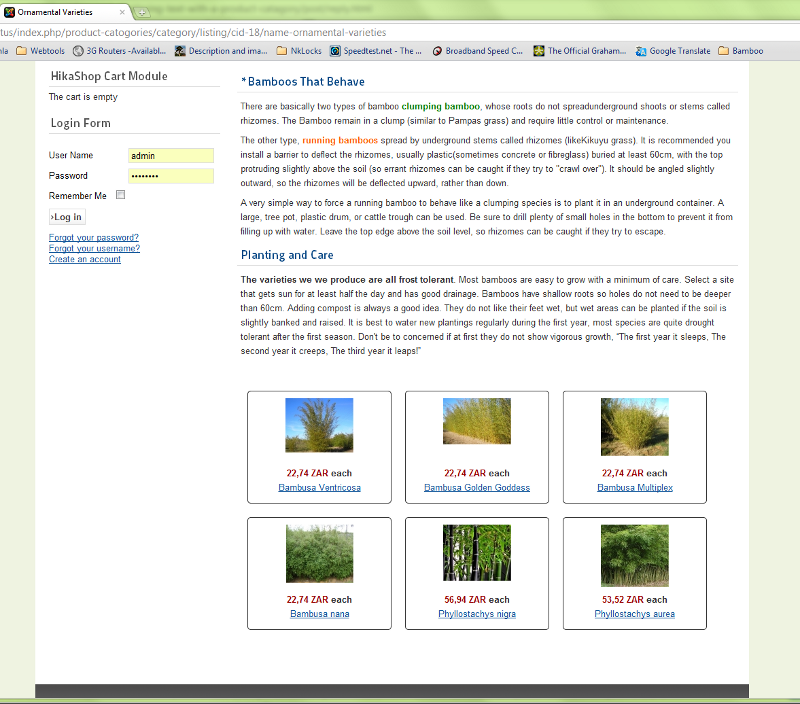
Let me start by apologising, I am not any good at scripting and I know you have better things to do then teach this.
I found the file \components\com_hikashop\views\product\listing.php
and in it the code you refer to: -
if($this->params->get('show_image') && !empty($this->element->file_path)){
jimport('joomla.filesystem.file');
if(JFile::exists($this->image->getPath($this->element->file_path,false))){
?>
<img src="<?php echo $this->image->getPath($this->element->file_path); ?>" class="hikashop_category_image"/>
<?php
}
}
I'm not sure if the position of the script will make any difference or is it the script itself that must be changed? I have tried to move it above the other code in the file to see if I can get the product images to display above the text, but it doesn't seem to make any difference?
I Enclose a screen shot of the Category page. To me it is more convenient to have the sub category items above the text so shoppers can go directly to them, and only those who wish to know more about the care of the plants in that category will read before selecting an item. I hope it makes sense and you can help?
Much appreciated
Please Log in or Create an account to join the conversation.
14 years 9 months ago #31523
by nicolas
Replied by nicolas on topic Re: Adding and displaying text with a product Catagory
That code is to display the image of the current category when the "show image" option of your menu is turned on which is not the case base don your screenshot.
The code you're looking for it this one:
if(!$this->module){
if(!empty($this->modules)){
$html = '';
jimport('joomla.application.module.helper');
foreach($this->modules as $module){
$html .= JModuleHelper::renderModule($module);
}
if(!empty($html)){
echo '<div class="hikashop_submodules" style="clear:both">'.$html.'</div>';
}
}
}
That's the code displaying the products listing associated module in your menu.
Also, you should edit that file 'listing' of the view "category" via the menu Display->Views in HikaShop. That way, you won't loose your changes when you update HikaShop.
The code you're looking for it this one:
if(!$this->module){
if(!empty($this->modules)){
$html = '';
jimport('joomla.application.module.helper');
foreach($this->modules as $module){
$html .= JModuleHelper::renderModule($module);
}
if(!empty($html)){
echo '<div class="hikashop_submodules" style="clear:both">'.$html.'</div>';
}
}
}
That's the code displaying the products listing associated module in your menu.
Also, you should edit that file 'listing' of the view "category" via the menu Display->Views in HikaShop. That way, you won't loose your changes when you update HikaShop.
Please Log in or Create an account to join the conversation.
14 years 9 months ago #31556
by Tusk
Replied by Tusk on topic Re: Adding and displaying text with a product Catagory
Hi Nicolas,
Thanks for the tip on how to edit files, I will do so. I am not sure you understood what I meant by pictures, I don't want to add additional pictures I just want the text description I include in a category to appear below the sub category images or the product images. See the attached image I have edited in gimp to illustrate what I want the page to look like.
Many thanks
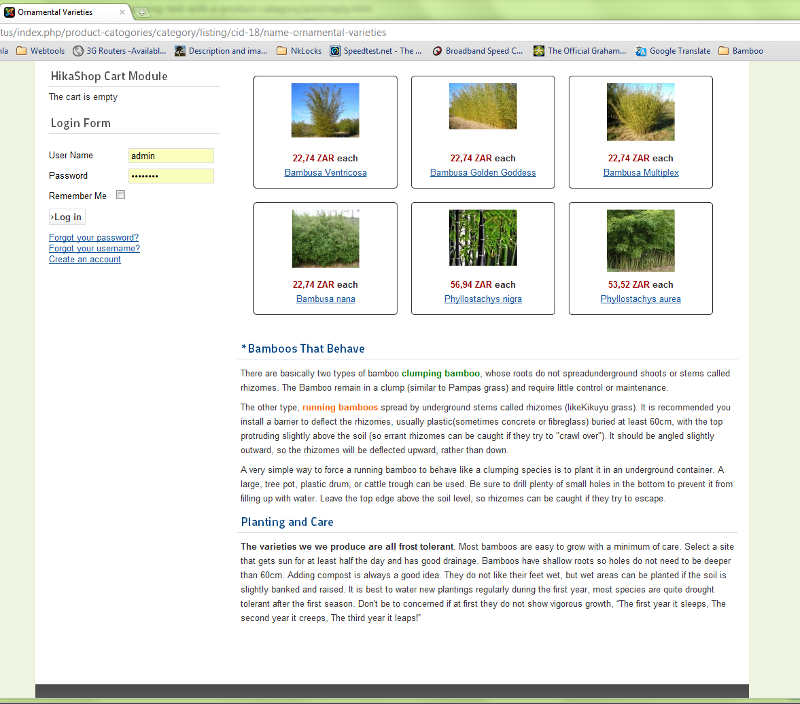
Thanks for the tip on how to edit files, I will do so. I am not sure you understood what I meant by pictures, I don't want to add additional pictures I just want the text description I include in a category to appear below the sub category images or the product images. See the attached image I have edited in gimp to illustrate what I want the page to look like.
Many thanks
Please Log in or Create an account to join the conversation.
14 years 9 months ago #31575
by nicolas
Replied by nicolas on topic Re: Adding and displaying text with a product Catagory
Yes, I totally understood what you want to do.
Please Log in or Create an account to join the conversation.
14 years 9 months ago #31629
by Tusk
Replied by Tusk on topic Re: Adding and displaying text with a product Catagory
Hi Nicolas Thanks,
I have tried playing with the code you referred to in the above posts, editing it as you suggested via the ADMINISTRATOR; Components/HikaShop/Display/Views menu, and then selecting the item 108, Front end, beez_20, category, listing but am not having any success in getting the products to appear above the description :blush:
Here is a link to the live site: www.hortuscapensis.com/product-catogorie...-ornamentalvarieties
I want the description to display at the bottom, below the products.
I have tried playing with the code you referred to in the above posts, editing it as you suggested via the ADMINISTRATOR; Components/HikaShop/Display/Views menu, and then selecting the item 108, Front end, beez_20, category, listing but am not having any success in getting the products to appear above the description :blush:
Here is a link to the live site: www.hortuscapensis.com/product-catogorie...-ornamentalvarieties
I want the description to display at the bottom, below the products.
Please Log in or Create an account to join the conversation.
14 years 9 months ago #31653
by nicolas
Replied by nicolas on topic Re: Adding and displaying text with a product Catagory
What modification did you make ? Are you sure that you are editing the correct file ?
If you add the code <?php exit; ?> at the beginning of the file, do you get a blank page ? (that means that it's the correct file).
If you add the code <?php exit; ?> at the beginning of the file, do you get a blank page ? (that means that it's the correct file).
Please Log in or Create an account to join the conversation.
14 years 9 months ago #31666
by Tusk
Replied by Tusk on topic Re: Adding and displaying text with a product Catagory
Thanks for all the help Nicolas,
It is the right file the code I was looking for is this: -
if($this->params->get('show_description')&&!empty($this->element->category_description)){
?>
<p>
<?php echo JHTML::_('content.prepare',$this->element->category_description); ?>
</p>
<?php
}
I moved it to the bottom and now the description displays below the products
Many thanks for your patience and help
It is the right file the code I was looking for is this: -
if($this->params->get('show_description')&&!empty($this->element->category_description)){
?>
<p>
<?php echo JHTML::_('content.prepare',$this->element->category_description); ?>
</p>
<?php
}
I moved it to the bottom and now the description displays below the products
Many thanks for your patience and help
Please Log in or Create an account to join the conversation.
Time to create page: 0.232 seconds