

- Posts: 84
- Thank you received: 2
Workflow
14 years 8 months ago #36772
by sdhakad
Error saving configuration. No matter whatever we do.
Browser: Chrome
Joomla: 1.5.24
Hikashop 1.5.6
=== Error ============
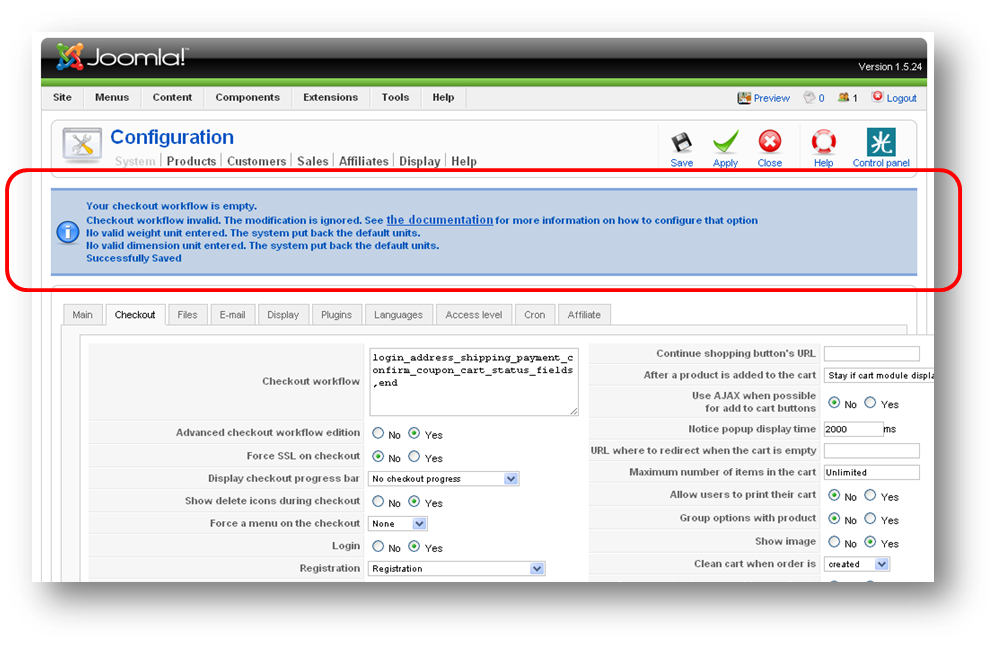
Your checkout workflow is empty.
Checkout workflow invalid. The modification is ignored. See the documentation for more information on how to configure that option
No valid weight unit entered. The system put back the default units.
No valid dimension unit entered. The system put back the default units.
=====================
Screenshot attached
Browser: Chrome
Joomla: 1.5.24
Hikashop 1.5.6
=== Error ============
Your checkout workflow is empty.
Checkout workflow invalid. The modification is ignored. See the documentation for more information on how to configure that option
No valid weight unit entered. The system put back the default units.
No valid dimension unit entered. The system put back the default units.
=====================
Screenshot attached
Please Log in or Create an account to join the conversation.

14 years 8 months ago #36872
by nicolas
Replied by nicolas on topic Re: Workflow
Hi,
Your checkout workflow sounds correct. Are you sure that you didn't add a return line or spaces in that field ? Because that could prevent the system from validating the workflow.
If you're sure that the workflow is correct, please provide a back end access to your website via our contact form and we'll check on the problem.
Your checkout workflow sounds correct. Are you sure that you didn't add a return line or spaces in that field ? Because that could prevent the system from validating the workflow.
If you're sure that the workflow is correct, please provide a back end access to your website via our contact form and we'll check on the problem.
Please Log in or Create an account to join the conversation.
14 years 8 months ago #36946
by sdhakad
Replied by sdhakad on topic Re: Workflow
Strangely it worked fine when i worked on IE. So i completed the configuration work on IE and after saving moved back to Chrome. But surely this is a workaround solution and not the recommended one.
Please Log in or Create an account to join the conversation.
14 years 8 months ago #37069
by nicolas
Replied by nicolas on topic Re: Workflow
Some other people also posted about such problem with chrome but we weren't able to reproduce it some far so we couldn't correct the problem.
Please Log in or Create an account to join the conversation.
14 years 7 months ago - 14 years 7 months ago #37411
by sdhakad
Replied by sdhakad on topic Re: Workflow
Strangely, this happens when you proceed with a fresh installation of Hikashop and then opening the configuration and saving it.
- Browser: Chrome
- Joomla: 1.5.24
- Hikashop 1.5.6
Last edit: 14 years 7 months ago by sdhakad.
Please Log in or Create an account to join the conversation.
14 years 7 months ago #37527
by nicolas
Replied by nicolas on topic Re: Workflow
We tried that on our end but it works on a fresh install too for us.
If you can replicate it on a test server, thanks for giving us a back end access to it so that we can see the problem.
If you can replicate it on a test server, thanks for giving us a back end access to it so that we can see the problem.
Please Log in or Create an account to join the conversation.
14 years 7 months ago #37666
by woodman
Replied by woodman on topic Re: Workflow
Same thing here:
Chrome 16.0.912.77 m
Joomla 1.5.21
PHP 5.2.17
When saving config, checkout error
Same page, same content from IE, no error
Chrome 16.0.912.77 m
Joomla 1.5.21
PHP 5.2.17
When saving config, checkout error
Same page, same content from IE, no error
Please Log in or Create an account to join the conversation.
14 years 7 months ago #37771
by frankie
Replied by frankie on topic Re: Workflow
Thanx for this guys, I've been looking for a solution for this everywhere but it turns out all I had to do was save my workflow on IE8. In fact the same error message kept on appearing even no matter what I changed in Firefox. It seems that this component only listens to IE, it totally ignores Firefox 9.0.1. At least it respects it elders lol.
Please Log in or Create an account to join the conversation.
14 years 6 months ago #41799
by Rick
I can verify this, yesterday i bought Hikashop and ran in the same problem.
Thanks to this thread i found out it only saves the workflow correctly with IE, normally i work with Firefox.
Replied by Rick on topic Re: Workflow
frankie wrote: Thanx for this guys, I've been looking for a solution for this everywhere but it turns out all I had to do was save my workflow on IE8. In fact the same error message kept on appearing even no matter what I changed in Firefox. It seems that this component only listens to IE, it totally ignores Firefox 9.0.1. At least it respects it elders lol.
I can verify this, yesterday i bought Hikashop and ran in the same problem.
Thanks to this thread i found out it only saves the workflow correctly with IE, normally i work with Firefox.
Please Log in or Create an account to join the conversation.
14 years 6 months ago #44919
by zali
Replied by zali on topic Re: Workflow
I have the same problem but DO NOT have IE nor am I able to install it so I need to fix this properly!
Please Log in or Create an account to join the conversation.
Time to create page: 0.233 seconds