

- Posts: 5
- Thank you received: 0
Change billing address background popup manually
14 years 5 months ago #46604
by ccaramel
Change billing address background popup manually was created by ccaramel
Hi all,
I wonder how to change the background of the billing address in the popup since with my template it is quite unusable :dry:
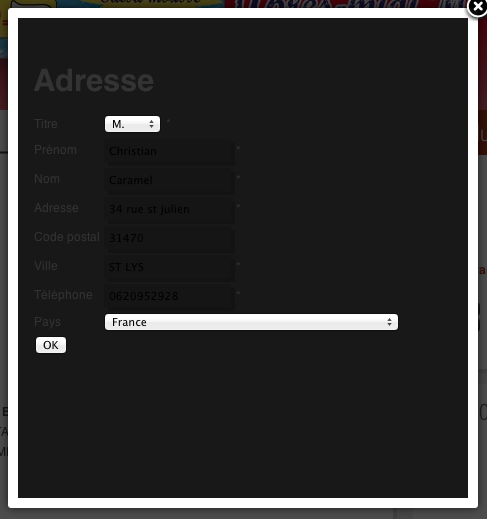
Thank you in advance for your advices.
Regards
I wonder how to change the background of the billing address in the popup since with my template it is quite unusable :dry:
Thank you in advance for your advices.
Regards
Please Log in or Create an account to join the conversation.

14 years 5 months ago #46710
by Xavier
Replied by Xavier on topic Re: Change billing address background popup manually
Hi ccaramel,
To change this background, ou have to edit your css file, or frontend_default.css
And for example, apply this:
To change this background, ou have to edit your css file, or frontend_default.css
And for example, apply this:
Code:
body.contentpane #all{
background-color: #FFFFFF;
color: grey;
}
body.contentpane #all h1{
color: grey;
}
Please Log in or Create an account to join the conversation.
14 years 5 months ago #46823
by ccaramel
Replied by ccaramel on topic Re: Change billing address background popup manually
Hi Xavier,
Thank you for the answer. But it doesn't work.
I edited frontend_default.css et saved it as custom adding the lines you give, but the display remains identical (I also cleaned my browser cache)
Is there a way to edit this css directly in my website tree (ftps access).
Regards
Thank you for the answer. But it doesn't work.
I edited frontend_default.css et saved it as custom adding the lines you give, but the display remains identical (I also cleaned my browser cache)
Is there a way to edit this css directly in my website tree (ftps access).
Regards
Please Log in or Create an account to join the conversation.

14 years 5 months ago #46827
by nicolas
Replied by nicolas on topic Re: Change billing address background popup manually
Make sure that you selected the "custom" file in the configuration and that you saved the configuration.
You can also edit the CSS via FTP under the folder media/com_hikashop/css but if you update HikaShop later on, the default css files will be overwritten.
You can also edit the CSS via FTP under the folder media/com_hikashop/css but if you update HikaShop later on, the default css files will be overwritten.
Please Log in or Create an account to join the conversation.
14 years 5 months ago #46834
by ccaramel
Replied by ccaramel on topic Re: Change billing address background popup manually
I verified it many times. I also tried t directly edit default css and use it. The problem remains.
You can check the problem at the following address: www.aquihaysalsa.com
user: test
pwd: test
Regards
You can check the problem at the following address: www.aquihaysalsa.com
user: test
pwd: test
Regards
Please Log in or Create an account to join the conversation.
14 years 5 months ago #46926
by nicolas
Replied by nicolas on topic Re: Change billing address background popup manually
I still see the "default" front end CSS file being used on your front end. Please double check that setting.
Please Log in or Create an account to join the conversation.
14 years 5 months ago #46977
by ccaramel
Replied by ccaramel on topic Re: Change billing address background popup manually
As I noticed in last post, I edited directly by FTPS the default css. Now I use the modified custom css. Could you check it?
Regards
Regards
Please Log in or Create an account to join the conversation.
14 years 5 months ago #46979
by Xavier
Replied by Xavier on topic Re: Change billing address background popup manually
In your css file, try this code:
Code:
body.component-body{
background-color: white;
}
The following user(s) said Thank You: ccaramel
Please Log in or Create an account to join the conversation.
14 years 5 months ago #46989
by ccaramel
Replied by ccaramel on topic Re: Change billing address background popup manually
Thank you.
Now it works.
Best regards.
Now it works.
Best regards.
Please Log in or Create an account to join the conversation.
Time to create page: 0.214 seconds