
- Posts: 81
- Thank you received: 2
Hikashop payment
- rockoladeluxe
-
 Topic Author
- Offline
Less
More
14 years 1 week ago #66351
by rockoladeluxe
Hikashop payment was created by rockoladeluxe
Hi, my cient is asking me how to look at the Payment method field in Orders > Order (any order)
the manual says:
"Payment method : You will see here the name of the payment method selected by the customer during the checkout process. Once you changed it, a popup will open asking you more information about why you are changing it (great for later reference). If you want to notify the customer of the change, a notification email interface will also be displayed in that popup. Note that if you removed the payment view from the workflow of the checkout process, the customer will not be prompted to select a payment method and the dropdown won't be visible."
But I think this info maybe outdated, as there is an amount field also (see attachment)
What is the best way to handle this field?
Thanks!
Roy
the manual says:
"Payment method : You will see here the name of the payment method selected by the customer during the checkout process. Once you changed it, a popup will open asking you more information about why you are changing it (great for later reference). If you want to notify the customer of the change, a notification email interface will also be displayed in that popup. Note that if you removed the payment view from the workflow of the checkout process, the customer will not be prompted to select a payment method and the dropdown won't be visible."
But I think this info maybe outdated, as there is an amount field also (see attachment)
What is the best way to handle this field?
Thanks!
Roy
Please Log in or Create an account to join the conversation.
- rockoladeluxe
-
Topic Author
- Offline
Less
More
- Posts: 81
- Thank you received: 2
14 years 1 week ago #66365
by rockoladeluxe
Replied by rockoladeluxe on topic Re: Hikashop payment
Oh, I forgot the attachement...
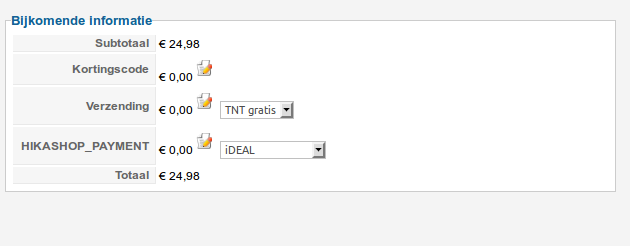
Please Log in or Create an account to join the conversation.

14 years 1 week ago #66520
by nicolas
Replied by nicolas on topic Re: Hikashop payment
What is the problem ?
You can see the payment method in your screenshot...
If you want to change it, just change it by clicking on the dropdown as explained.
If you want to change the payment fee, just click on the edit button.
You can see the payment method in your screenshot...
If you want to change it, just change it by clicking on the dropdown as explained.
If you want to change the payment fee, just click on the edit button.
The following user(s) said Thank You: rockoladeluxe
Please Log in or Create an account to join the conversation.
- rockoladeluxe
-
Topic Author
- Offline
Less
More
- Posts: 81
- Thank you received: 2
14 years 1 week ago #66555
by rockoladeluxe
Replied by rockoladeluxe on topic Re: Hikashop payment
Hi Nicolas,
I'm sorry for the confusion about this.
My client had a wild idea about the amount field for payment method on that page should be automatically updated by the bank (!!), so she would know when a payment is done...
I allready told her that would not be the case, but she insisted I asked you since she does not speak any English.
Her not being able to read the manual, or this forum can be hard for me sometimes..
Thank you for the anwser, I will translate it and try to explain what that field does.
Roy
I'm sorry for the confusion about this.
My client had a wild idea about the amount field for payment method on that page should be automatically updated by the bank (!!), so she would know when a payment is done...
I allready told her that would not be the case, but she insisted I asked you since she does not speak any English.
Her not being able to read the manual, or this forum can be hard for me sometimes..
Thank you for the anwser, I will translate it and try to explain what that field does.
Roy
Please Log in or Create an account to join the conversation.
14 years 1 week ago #66670
by nicolas
Replied by nicolas on topic Re: Hikashop payment
The payment fees can be configured manually in each payment method when you configure them based on the fees of your bank if you want to let the users decide which payment method he want to use based on the fees you have and that you charge him.
But if you include the fees in your costs already when you decide of the price of your products, then there is nothing to do with this field.
But if you include the fees in your costs already when you decide of the price of your products, then there is nothing to do with this field.
Please Log in or Create an account to join the conversation.
Time to create page: 0.237 seconds