

- Posts: 115
- Thank you received: 0
category tree
13 years 10 months ago #78323
by itye2012
category tree was created by itye2012
is there any way i can implement a category tree on my menus? eg you click on a category and it expands and shows the category below.Clicking on the category then takes you to that page
Many Thanks
Many Thanks
Please Log in or Create an account to join the conversation.

13 years 10 months ago #78325
by Xavier
Replied by Xavier on topic category tree
Hi,
You can find this kind of modules in the pre-installed HikaShop modules. This module is "Category on 2 levels"
Or you can see on our demo website, the module is displayed in the left bar, then go in the backend of the demo website and see how it's configured.
demo.hikashop.com
You can find this kind of modules in the pre-installed HikaShop modules. This module is "Category on 2 levels"
Or you can see on our demo website, the module is displayed in the left bar, then go in the backend of the demo website and see how it's configured.
demo.hikashop.com
Please Log in or Create an account to join the conversation.
13 years 10 months ago #78329
by itye2012
Replied by itye2012 on topic category tree
how do i configure this module? i cant seem to find it?
Please Log in or Create an account to join the conversation.
13 years 10 months ago #78333
by Xavier
Replied by Xavier on topic category tree
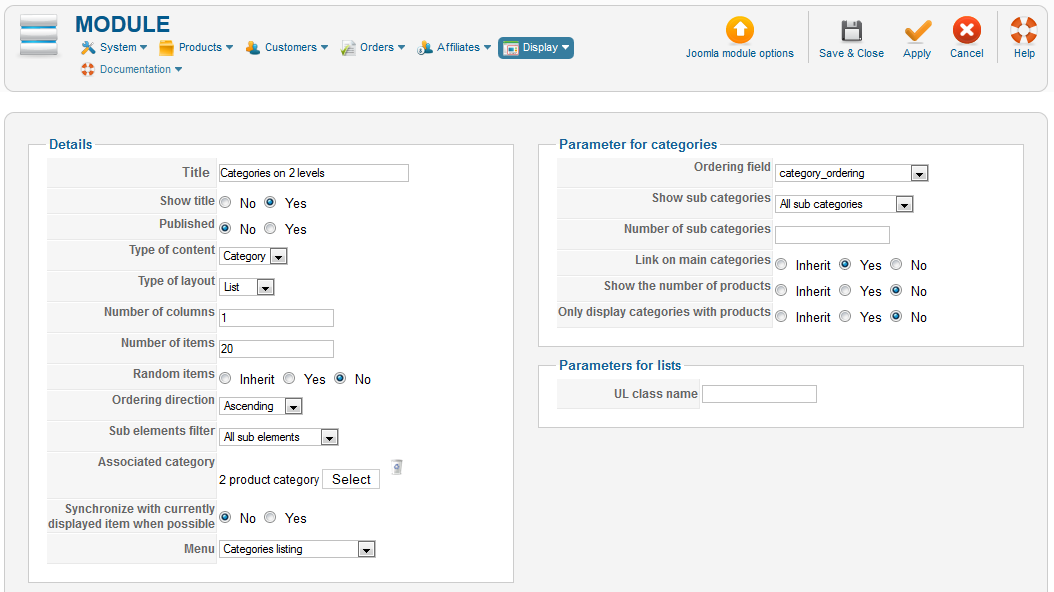
In HikaShop > Display > Content modules, create a module like that:
Please Log in or Create an account to join the conversation.
13 years 10 months ago #78339
by itye2012
Replied by itye2012 on topic category tree
Thats great thanks, also whats the difference between categories on 1 level and categories on 2 levels?
Please Log in or Create an account to join the conversation.
13 years 10 months ago #78341
by Xavier
Replied by Xavier on topic category tree
The difference is that in 1 level you only have the main elements displayed, and 2 levels you have the sub elements too.
ex:
main1
sub1
sub2
main2
sub3
The parameter changed in the settings is "sub elements filter"
ex:
main1
sub1
sub2
main2
sub3
The parameter changed in the settings is "sub elements filter"
Please Log in or Create an account to join the conversation.
13 years 10 months ago #78386
by itye2012
Replied by itye2012 on topic category tree
how can you set it up so it expands when you click the category as currently its showing all the categories ?
Please Log in or Create an account to join the conversation.
13 years 10 months ago #78387
by itye2012
Replied by itye2012 on topic category tree
how can i set it up similar to your demo where it expands when you click?
Please Log in or Create an account to join the conversation.
13 years 10 months ago #78407
by itye2012
Replied by itye2012 on topic category tree
in fact i am looking for a category tree for the website similar to the one on the demo website or even the one which is used in the back end of hika shop (components -> hika shop-> Categories).
Please Log in or Create an account to join the conversation.
13 years 10 months ago #78409
by Xavier
Replied by Xavier on topic category tree
If you made you module as on the screenshot, it should work as on the demo site.
You can see in the backend of the demo website, module with the ID 120
You can see in the backend of the demo website, module with the ID 120
Please Log in or Create an account to join the conversation.
13 years 10 months ago #78411
by itye2012
Replied by itye2012 on topic category tree
hi where is the screenshot?
thanks
thanks
Please Log in or Create an account to join the conversation.
13 years 10 months ago #78412
by itye2012
Replied by itye2012 on topic category tree
is it the one above in this thread?
thanks
thanks
Please Log in or Create an account to join the conversation.
13 years 10 months ago #78414
by itye2012
Replied by itye2012 on topic category tree
ive done this but it looks messy and the menus dont expand, they are already expanded, i want the user to click on a category which then expands depending on how many subcategories there are, similar to the hika shop categories in the back end
Please Log in or Create an account to join the conversation.

13 years 10 months ago #78441
by Jerome
Jerome - Obsidev.com
HikaMarket & HikaSerial developer / HikaShop core dev team.
Replied by Jerome on topic category tree
Hi,
The screenshot is in a previous post of Xavier.
www.hikashop.com/en/forum/2-general-talk...gory-tree.html#78333
Would it be possible to have a link to your webstore in order to see your module in action ?
Regards,
The screenshot is in a previous post of Xavier.
www.hikashop.com/en/forum/2-general-talk...gory-tree.html#78333
Would it be possible to have a link to your webstore in order to see your module in action ?
Regards,
Jerome - Obsidev.com
HikaMarket & HikaSerial developer / HikaShop core dev team.
Please Log in or Create an account to join the conversation.
13 years 10 months ago #78628
by itye2012
Replied by itye2012 on topic category tree
thanks jerome, if possible can you help on letting it look like the demo website?
how can i send you the log in details , have you got an email?
how can i send you the log in details , have you got an email?
Please Log in or Create an account to join the conversation.
13 years 10 months ago #78633
by Jerome
Jerome - Obsidev.com
HikaMarket & HikaSerial developer / HikaShop core dev team.
Replied by Jerome on topic category tree
Hi,
Thanks,
We do not require a backend access for the moment. Just a simple link to your webstore.Jerome wrote: Would it be possible to have a link to your webstore in order to see your module in action ?
Thanks,
Jerome - Obsidev.com
HikaMarket & HikaSerial developer / HikaShop core dev team.
Please Log in or Create an account to join the conversation.
13 years 10 months ago #78637
by itye2012
Replied by itye2012 on topic category tree
Please Log in or Create an account to join the conversation.
13 years 10 months ago - 13 years 10 months ago #78650
by Jerome
Jerome - Obsidev.com
HikaMarket & HikaSerial developer / HikaShop core dev team.
Replied by Jerome on topic category tree
Hi,
If you want the same display that in the demo website, you should look at his module configuration here :
demo.hikashop.com/administrator/index.ph...=1&task=edit&cid=120
So, use these options for you HikaShop category listing module :
Number of columns: 1
Type of layout: list
Sub elements filter: Direct Sub Elements
Show sub categories: All direct sub categories
Number of sub categories: 5
Link on main categories: No
Show the number of products: No
Only display categories with products: No
Regards,
If you want the same display that in the demo website, you should look at his module configuration here :
demo.hikashop.com/administrator/index.ph...=1&task=edit&cid=120
So, use these options for you HikaShop category listing module :
Number of columns: 1
Type of layout: list
Sub elements filter: Direct Sub Elements
Show sub categories: All direct sub categories
Number of sub categories: 5
Link on main categories: No
Show the number of products: No
Only display categories with products: No
Regards,
Jerome - Obsidev.com
HikaMarket & HikaSerial developer / HikaShop core dev team.
Last edit: 13 years 10 months ago by Jerome.
Please Log in or Create an account to join the conversation.
13 years 10 months ago #78715
by itye2012
Replied by itye2012 on topic category tree
tried the above but not working like the demo site and still not looking right, I renamed the categories on 2 levels module to AA Categories on 2 levels current so it was easier to find
Ive attached screenshots
1) the website is www.britishfoodabroad.co.uk
2) the test menu option I am using for this test is called Category Tree Test
3) the module I am using is called AA Categories on 2 levels current (been renamed as there were multiple modules called Categories on 2 levels)
Can you help?
Ive attached screenshots
1) the website is www.britishfoodabroad.co.uk
2) the test menu option I am using for this test is called Category Tree Test
3) the module I am using is called AA Categories on 2 levels current (been renamed as there were multiple modules called Categories on 2 levels)
Can you help?
Please Log in or Create an account to join the conversation.
13 years 10 months ago #78735
by Jerome
Jerome - Obsidev.com
HikaMarket & HikaSerial developer / HikaShop core dev team.
Replied by Jerome on topic category tree
Hi,
The options of your module does not match with that what I gave you in my previous post.
Please, follow our recommendations.
Regards,
The options of your module does not match with that what I gave you in my previous post.
Please, follow our recommendations.
Regards,
Jerome - Obsidev.com
HikaMarket & HikaSerial developer / HikaShop core dev team.
Please Log in or Create an account to join the conversation.
Time to create page: 0.372 seconds