

- Posts: 115
- Thank you received: 0
category tree
13 years 10 months ago #78748
by itye2012
Replied by itye2012 on topic category tree
hello jerome
are you talking about the categories on 2 levels option? if so all the options in your example are not available for me for some reason.
Can you advise?
are you talking about the categories on 2 levels option? if so all the options in your example are not available for me for some reason.
Can you advise?
Please Log in or Create an account to join the conversation.

13 years 10 months ago #78763
by Jerome
Jerome - Obsidev.com
HikaMarket & HikaSerial developer / HikaShop core dev team.
Replied by Jerome on topic category tree
Hello,
I don't understand why all the options in my examples are not available because, I see them in your screenshot but with wrong values.
So please, just copy theses values :
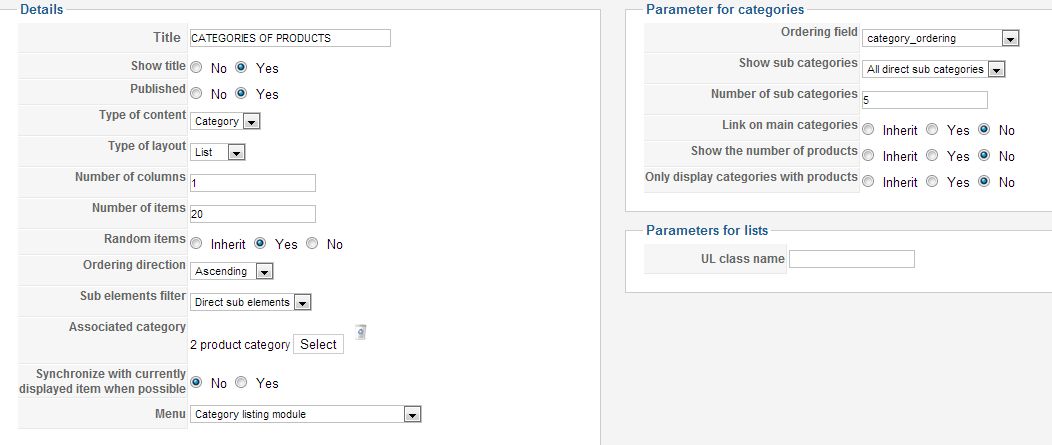
Regards,
I don't understand why all the options in my examples are not available because, I see them in your screenshot but with wrong values.
So please, just copy theses values :
Regards,
Jerome - Obsidev.com
HikaMarket & HikaSerial developer / HikaShop core dev team.
Please Log in or Create an account to join the conversation.
13 years 10 months ago #78774
by itye2012
Replied by itye2012 on topic category tree
seems to work better now but the formatting is untidy also if for example you click on Rice, Pasta and Noodles -> Pasta the formatting seems all wrong and not like the demo website
Please Log in or Create an account to join the conversation.
13 years 10 months ago #78787
by Jerome
Jerome - Obsidev.com
HikaMarket & HikaSerial developer / HikaShop core dev team.
Replied by Jerome on topic category tree
Hi,
Great! Now it's just some CSS customization.
In order to align the items, just add this CSS rule:
Regards,
Great! Now it's just some CSS customization.
In order to align the items, just add this CSS rule:
Code:
.pane-sliders .hikashop_product_list_item {
float: left;
width: 100%;
}
Regards,
Jerome - Obsidev.com
HikaMarket & HikaSerial developer / HikaShop core dev team.
Please Log in or Create an account to join the conversation.
13 years 10 months ago #78790
by itye2012
Replied by itye2012 on topic category tree
thanks, where do i need to add this code?
Please Log in or Create an account to join the conversation.
13 years 10 months ago #78817
by Jerome
Jerome - Obsidev.com
HikaMarket & HikaSerial developer / HikaShop core dev team.
Replied by Jerome on topic category tree
Hi,
You have to edit the HikaShop CSS file or to include this in your template CSS.
You can read more about CSS styling in HikaShop there : www.hikashop.com/en/support/documentation/faq.html#css
Regards,
You have to edit the HikaShop CSS file or to include this in your template CSS.
You can read more about CSS styling in HikaShop there : www.hikashop.com/en/support/documentation/faq.html#css
Regards,
Jerome - Obsidev.com
HikaMarket & HikaSerial developer / HikaShop core dev team.
Please Log in or Create an account to join the conversation.
Time to create page: 0.175 seconds