
- Posts: 223
- Thank you received: 1
no e-mail pop-up after upgrade to 2.2
- plumbingdeals
-
 Topic Author
- Offline
Less
More
13 years 1 month ago #118078
by plumbingdeals
no e-mail pop-up after upgrade to 2.2 was created by plumbingdeals
-- HikaShop version -- :2.2
-- Joomla version -- :2.5.11
Just upgraded to Business 2.2, not getting the e-mail pop-up when changing order status to shipped
Order status notification is published, and I did check notify customer.
Note, that I did do some customization to order status notification when using 2.1.3, but everything was working
-- Joomla version -- :2.5.11
Just upgraded to Business 2.2, not getting the e-mail pop-up when changing order status to shipped
Order status notification is published, and I did check notify customer.
Note, that I did do some customization to order status notification when using 2.1.3, but everything was working
Please Log in or Create an account to join the conversation.

13 years 1 month ago #118084
by Jerome
Jerome - Obsidev.com
HikaMarket & HikaSerial developer / HikaShop core dev team.
Replied by Jerome on topic no e-mail pop-up after upgrade to 2.2
Hi,
In the order listing, the popup is still present but in the order edition (in the backend), there is no more popup but you still have a "notify customer" checkbox.
We regroup the email features in the "email" button when you edit an order. In the latest HikaShop build, when you click on this button the "order status notification" email will be loaded, the same mail that you had when you changed the order status.
The difference is that the content of the email will be better. Before we load the email content before the status changed so, some data could be missing (if you have some downloadable files for example).
By moving it into the "email" button, we removed this kind of problem.
But in the order listing, you still can change the order status and get the modification popup (and the checkbox to send an email).
Regards,
In the order listing, the popup is still present but in the order edition (in the backend), there is no more popup but you still have a "notify customer" checkbox.
We regroup the email features in the "email" button when you edit an order. In the latest HikaShop build, when you click on this button the "order status notification" email will be loaded, the same mail that you had when you changed the order status.
The difference is that the content of the email will be better. Before we load the email content before the status changed so, some data could be missing (if you have some downloadable files for example).
By moving it into the "email" button, we removed this kind of problem.
But in the order listing, you still can change the order status and get the modification popup (and the checkbox to send an email).
Regards,
Jerome - Obsidev.com
HikaMarket & HikaSerial developer / HikaShop core dev team.
Please Log in or Create an account to join the conversation.
- plumbingdeals
-
Topic Author
- Offline
Less
More
- Posts: 223
- Thank you received: 1
13 years 1 month ago #118089
by plumbingdeals
Replied by plumbingdeals on topic no e-mail pop-up after upgrade to 2.2
the problem is, i am getting NO pop-ups, and the e-mail IS NOT being sent
Please Log in or Create an account to join the conversation.
13 years 1 month ago #118103
by Jerome
Jerome - Obsidev.com
HikaMarket & HikaSerial developer / HikaShop core dev team.
Replied by Jerome on topic no e-mail pop-up after upgrade to 2.2
Hi,
Where ?
Regards,
Where ?
Regards,
Jerome - Obsidev.com
HikaMarket & HikaSerial developer / HikaShop core dev team.
Please Log in or Create an account to join the conversation.
- plumbingdeals
-
Topic Author
- Offline
Less
More
- Posts: 223
- Thank you received: 1
13 years 1 month ago #118106
by plumbingdeals
Replied by plumbingdeals on topic no e-mail pop-up after upgrade to 2.2
I go to view the order here:
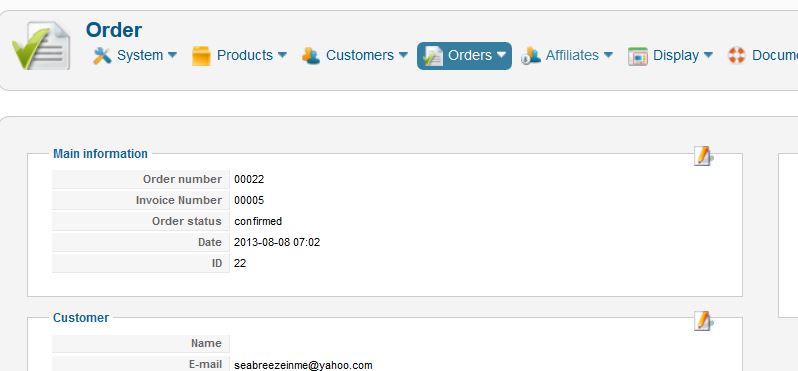
change the dropdown to shipped and check notify
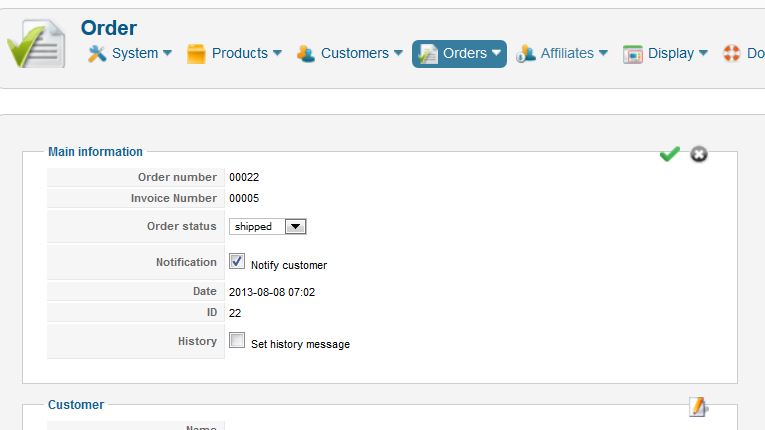
then i click the green check mark
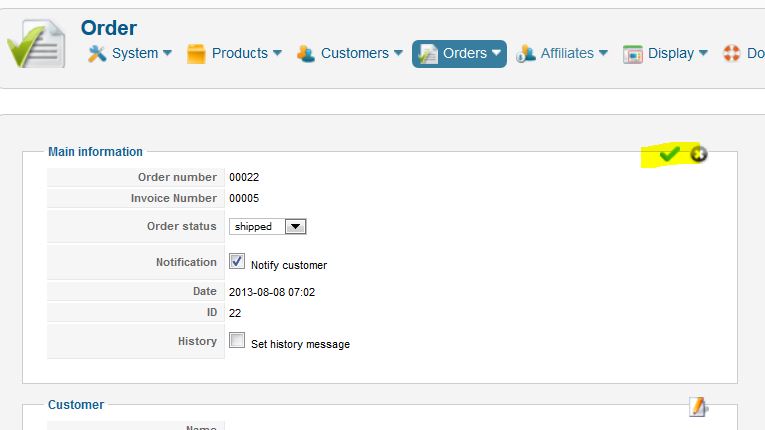
should i not get the pop-up showing my notification e-mail so that i can review and send it?
change the dropdown to shipped and check notify
then i click the green check mark
should i not get the pop-up showing my notification e-mail so that i can review and send it?
Please Log in or Create an account to join the conversation.
13 years 1 month ago #118111
by Jerome
Jerome - Obsidev.com
HikaMarket & HikaSerial developer / HikaShop core dev team.
Replied by Jerome on topic no e-mail pop-up after upgrade to 2.2
In the order listing, the popup is still present but in the order edition (in the backend), there is no more popup but you still have a "notify customer" checkbox.
We regroup the email features in the "email" button when you edit an order. In the latest HikaShop build, when you click on this button the "order status notification" email will be loaded, the same mail that you had when you changed the order status.
Jerome - Obsidev.com
HikaMarket & HikaSerial developer / HikaShop core dev team.
Please Log in or Create an account to join the conversation.
- plumbingdeals
-
Topic Author
- Offline
Less
More
- Posts: 223
- Thank you received: 1
13 years 1 month ago #118113
by plumbingdeals
Replied by plumbingdeals on topic no e-mail pop-up after upgrade to 2.2
Obviously I don't understand
My customized shipping e-mail appears nowhere and is not being sent
you say "being loaded", where is it being loaded I don't see it
as i said i get no pop-ups
if i click the e-mail button at top right, the only e-mail that pops up is a generic e-mail without my customizations, no matter when i click it
something is wrong...please provide step by step instructions for this, or i can give you backend access and you can see for yourself.
thank you...
My customized shipping e-mail appears nowhere and is not being sent
you say "being loaded", where is it being loaded I don't see it
as i said i get no pop-ups
if i click the e-mail button at top right, the only e-mail that pops up is a generic e-mail without my customizations, no matter when i click it
something is wrong...please provide step by step instructions for this, or i can give you backend access and you can see for yourself.
thank you...
Please Log in or Create an account to join the conversation.

13 years 1 month ago #118130
by nicolas
Replied by nicolas on topic no e-mail pop-up after upgrade to 2.2
Hi,
As Jerome said, there is no preview popup of the email anymore. If you check the notify customer checkbox and apply the change, the email will be sent automatically.
So it's normal that you don't have the popup anymore. Backend access won't change that fact.
As Jerome said, there is no preview popup of the email anymore. If you check the notify customer checkbox and apply the change, the email will be sent automatically.
So it's normal that you don't have the popup anymore. Backend access won't change that fact.
Please Log in or Create an account to join the conversation.
- plumbingdeals
-
Topic Author
- Offline
Less
More
- Posts: 223
- Thank you received: 1
13 years 1 month ago #118553
by plumbingdeals
Replied by plumbingdeals on topic no e-mail pop-up after upgrade to 2.2
Thank you....
I wish Jerome had simply said..."there is no preview popup of the email anymore. If you check the notify customer checkbox and apply the change, the email will be sent automatically."
I tested this, and yes, I now see it does work.
A suggestion...perhaps some sort of confirmation that the e-mail was sent (in the back-end) would be helpful.
I wish Jerome had simply said..."there is no preview popup of the email anymore. If you check the notify customer checkbox and apply the change, the email will be sent automatically."
I tested this, and yes, I now see it does work.
A suggestion...perhaps some sort of confirmation that the e-mail was sent (in the back-end) would be helpful.
Please Log in or Create an account to join the conversation.
Time to create page: 0.213 seconds