
- Posts: 608
- Thank you received: 13
Shipping Method Information Missing
- mohairbears
-
 Topic Author
- Offline
Less
More
13 years 1 month ago #119285
by mohairbears
Shipping Method Information Missing was created by mohairbears
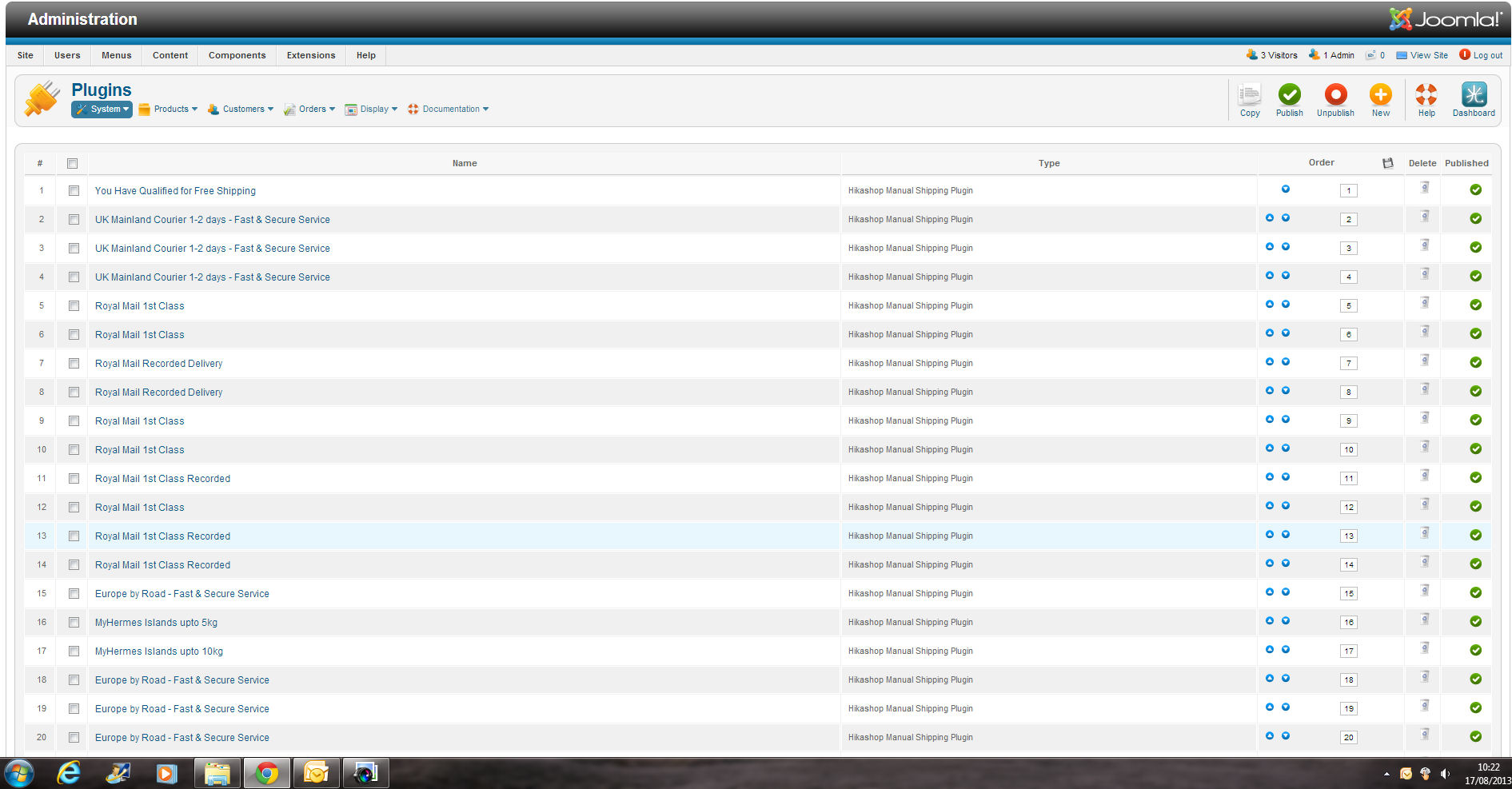
Hi again, I have just found that the shipping information that was previously show is no longer there? you used to be able to see vital information on your previous release i.e. cost, weight etc. without going in to each item.
Please Log in or Create an account to join the conversation.

13 years 1 month ago #119299
by Jerome
Jerome - Obsidev.com
HikaMarket & HikaSerial developer / HikaShop core dev team.
Replied by Jerome on topic Shipping Method Information Missing
Hi,
Please provide more information.
I do not understand your problem.
Regards,
Please provide more information.
I do not understand your problem.
Regards,
Jerome - Obsidev.com
HikaMarket & HikaSerial developer / HikaShop core dev team.
Please Log in or Create an account to join the conversation.
- mohairbears
-
Topic Author
- Offline
Less
More
- Posts: 608
- Thank you received: 13
13 years 1 month ago - 13 years 1 month ago #119322
by mohairbears
Replied by mohairbears on topic Shipping Method Information Missing
Can you see the missing parts from this
Last edit: 13 years 1 month ago by mohairbears. Reason: add file
Please Log in or Create an account to join the conversation.
13 years 1 month ago #119343
by Jerome
Jerome - Obsidev.com
HikaMarket & HikaSerial developer / HikaShop core dev team.
Replied by Jerome on topic Shipping Method Information Missing
Hi,
Right. The shipping listing will be improve in the next release.
We made a complete re-factoring of the shipping and payment system. This new listing is quite same than the previous one.
But you made a reference to the "manual" shipping plugin so we have to re-import his features into HikaShop (there was in the directly in the plugin, not in the HikaShop core).
Regards,
Right. The shipping listing will be improve in the next release.
We made a complete re-factoring of the shipping and payment system. This new listing is quite same than the previous one.
But you made a reference to the "manual" shipping plugin so we have to re-import his features into HikaShop (there was in the directly in the plugin, not in the HikaShop core).
Regards,
Jerome - Obsidev.com
HikaMarket & HikaSerial developer / HikaShop core dev team.
Please Log in or Create an account to join the conversation.
- mohairbears
-
Topic Author
- Offline
Less
More
- Posts: 608
- Thank you received: 13
13 years 1 month ago - 13 years 1 month ago #119344
by mohairbears
Replied by mohairbears on topic Shipping Method Information Missing
Hi, As I have over 50 variations n the manual shipping it's now a nightmare trying to find the right shipping line without going in to the lines individually. Your previous release showed the postage cost and the weight range without entering the lines.
thanks
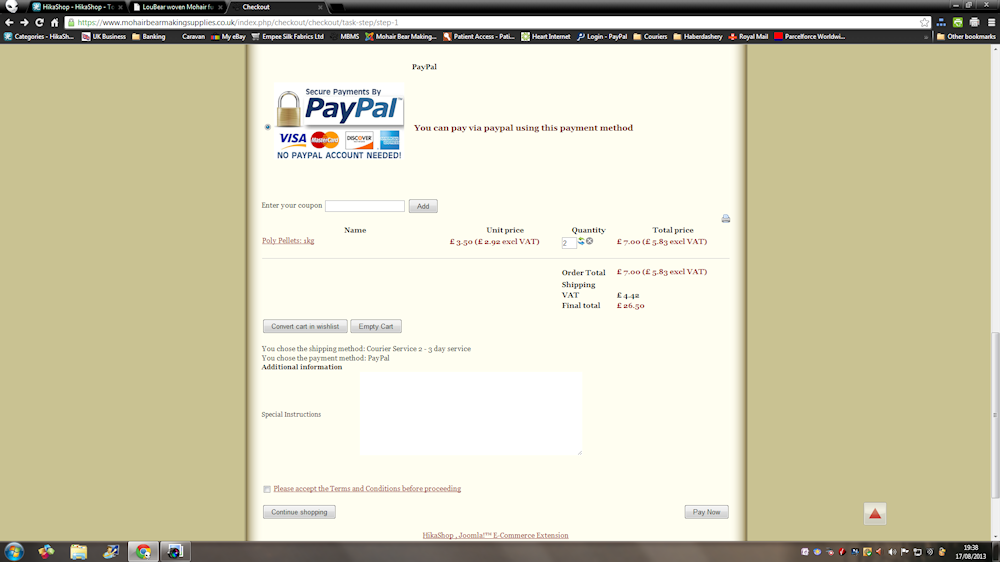
I have now also found a further issue, the shipping cost is NOT show in checkout although it is included it the total cost?
thanks
I have now also found a further issue, the shipping cost is NOT show in checkout although it is included it the total cost?
Last edit: 13 years 1 month ago by mohairbears. Reason: further error found
Please Log in or Create an account to join the conversation.
13 years 1 month ago #119354
by Jerome
Jerome - Obsidev.com
HikaMarket & HikaSerial developer / HikaShop core dev team.
Replied by Jerome on topic Shipping Method Information Missing
Hi,
I think you have an override of the checkout cart which come from a previous HikaShop version.
The shipping line in the table is now displaying differently in order to support the multi-shipping feature.
Regards,
I think you have an override of the checkout cart which come from a previous HikaShop version.
The shipping line in the table is now displaying differently in order to support the multi-shipping feature.
Regards,
Jerome - Obsidev.com
HikaMarket & HikaSerial developer / HikaShop core dev team.
Please Log in or Create an account to join the conversation.
- mohairbears
-
Topic Author
- Offline
Less
More
- Posts: 608
- Thank you received: 13
13 years 1 month ago #119364
by mohairbears
Replied by mohairbears on topic Shipping Method Information Missing
Hi, I have changed around a few settings and nothing alters, one thing I have noticed is the radio button on the shipping option does not stop selected?
Please Log in or Create an account to join the conversation.
- mohairbears
-
Topic Author
- Offline
Less
More
- Posts: 608
- Thank you received: 13
13 years 1 month ago #119373
by mohairbears
Replied by mohairbears on topic Shipping Method Information Missing **URGENT**
Hi Can you send me a link to the previous version of Hikashop as this version is seriously affecting my business now!
Please Log in or Create an account to join the conversation.
13 years 1 month ago #119380
by Jerome
Jerome - Obsidev.com
HikaMarket & HikaSerial developer / HikaShop core dev team.
Replied by Jerome on topic Shipping Method Information Missing **URGENT**
Hi,
You can override the view "plugin | listing" in order to display the price and restriction.
Part 1 :
Part 2 :
Part 3 :
A similar code will be present in the next version of HikaShop.
It is not recommend to download from HikaShop 2.2.0 because the plugin system was highly modified.
Regards,
You can override the view "plugin | listing" in order to display the price and restriction.
Part 1 :
Code:
<th class="title"><?php echo JText::_('HIKA_NAME');?></th>
<?php if($this->plugin_type == 'shipping') { /* begin of code to add */ ?>
<th class="title"><?php echo JText::_('PRODUCT_PRICE');?></th>
<th class="title"><?php echo JText::_('HIKA_RESTRICTIONS');?></th>
<?php } /* end of code to add */ ?>
<th class="title"><?php echo JText::_('HIKA_TYPE');?></th>
Code:
$currentPlugin = null;
if(isset($this->plugins[ $plugin->$p_type ])) {
$currentPlugin = $this->plugins[ $plugin->$p_type ];
$plugin->$p_published = $plugin->$p_published && $currentPlugin->published;
}
// Begin of code to add
if(empty($this->currencyClass))
$this->currencyClass = hikashop_get('class.currency');
if(empty($this->zoneClass))
$this->zoneClass = hikashop_get('class.zone');
if(!empty($plugin->plugin_params))
$plugin->plugin_params = unserialize($plugin->plugin_params);
if(!empty($plugin->shipping_params))
$plugin->plugin_params = unserialize($plugin->shipping_params);
if(!empty($plugin->payment_params))
$plugin->plugin_params = unserialize($plugin->payment_params);
// End of code to add
?>
<tr class="row<?php echo $k;?>" id="<?php echo $id;?>">
Code:
<td>
<a href="<?php echo hikashop_completeLink('plugins&plugin_type='.$this->plugin_type.'&task=edit&name='. $plugin->$p_type .'&subtask='.$this->plugin_type.'_edit&'.$p_id.'='.$plugin->$p_id);?>"><?php
echo $plugin->$p_name;
if(empty($plugin->$p_name))
echo '<em>' . JText::_('NO_NAME') . '</em>';
?></a>
</td>
<?php
// Begin of code to add
if($this->plugin_type == 'shipping') {
?>
<td><?php
if(bccomp($plugin->shipping_price, 0, 3))
echo $this->currencyClass->displayPrices(array($plugin), 'shipping_price', 'shipping_currency_id');
if(isset($plugin->plugin_params->shipping_percentage) && bccomp($plugin->plugin_params->shipping_percentage,0,3)) {
echo '<br/>';
echo $plugin->plugin_params->shipping_percentage.'%';
}
?></td>
<td><?php
$restrictions=array();
if(!empty($plugin->plugin_params->shipping_min_volume))
$restrictions[] = JText::_('SHIPPING_MIN_VOLUME') . ':' . $plugin->plugin_params->shipping_min_volume . $plugin->plugin_params->shipping_size_unit;
if(!empty($plugin->plugin_params->shipping_max_volume))
$restrictions[] = JText::_('SHIPPING_MAX_VOLUME') . ':' . $plugin->plugin_params->shipping_max_volume . $plugin->plugin_params->shipping_size_unit;
if(!empty($plugin->plugin_params->shipping_min_weight))
$restrictions[] = JText::_('SHIPPING_MIN_WEIGHT') . ':' . $plugin->plugin_params->shipping_min_weight . $plugin->plugin_params->shipping_weight_unit;
if(!empty($plugin->plugin_params->shipping_max_weight))
$restrictions[] = JText::_('SHIPPING_MAX_WEIGHT') . ':' . $plugin->plugin_params->shipping_max_weight . $plugin->plugin_params->shipping_weight_unit;
if(isset($plugin->plugin_params->shipping_min_price) && bccomp($plugin->plugin_params->shipping_min_price, 0, 5)) {
$plugin->shipping_min_price = $plugin->plugin_params->shipping_min_price;
$restrictions[] = JText::_('SHIPPING_MIN_PRICE') . ':' . $this->currencyClass->displayPrices(array($plugin), 'shipping_min_price', 'shipping_currency_id');
}
if(isset($plugin->plugin_params->shipping_max_price) && bccomp($plugin->plugin_params->shipping_max_price, 0, 5)) {
$plugin->shipping_max_price = $plugin->plugin_params->shipping_max_price;
$restrictions[] = JText::_('SHIPPING_MAX_PRICE') . ':' . $this->currencyClass->displayPrices(array($plugin), 'shipping_max_price', 'shipping_currency_id');
}
if(!empty($plugin->plugin_params->shipping_zip_prefix))
$restrictions[] = JText::_('SHIPPING_PREFIX') . ':' . $plugin->plugin_params->shipping_zip_prefix;
if(!empty($plugin->plugin_params->shipping_min_zip))
$restrictions[] = JText::_('SHIPPING_MIN_ZIP') . ':' . $plugin->plugin_params->shipping_min_zip;
if(!empty($plugin->plugin_params->shipping_max_zip))
$restrictions[] = JText::_('SHIPPING_MAX_ZIP') . ':' . $plugin->plugin_params->shipping_max_zip;
if(!empty($plugin->plugin_params->shipping_zip_suffix))
$restrictions[] = JText::_('SHIPPING_SUFFIX') . ':' . $plugin->plugin_params->shipping_zip_suffix;
if(!empty($plugin->shipping_zone_namekey)) {
$zone = $this->zoneClass->get($plugin->shipping_zone_namekey);
$restrictions[] = JText::_('ZONE') . ':' . $zone->zone_name_english;
}
echo implode('<br/>',$restrictions);
?></td>
<?php } /* end of code to add */ ?>
It is not recommend to download from HikaShop 2.2.0 because the plugin system was highly modified.
Regards,
Jerome - Obsidev.com
HikaMarket & HikaSerial developer / HikaShop core dev team.
Please Log in or Create an account to join the conversation.
- mohairbears
-
Topic Author
- Offline
Less
More
- Posts: 608
- Thank you received: 13
13 years 1 month ago #119381
by mohairbears
Replied by mohairbears on topic Shipping Method Information Missing **URGENT**
that's not the big problem right now, orders cannot be placed as you cannot select the shipping method? the radio button does not stop active or change when selecting other options, I am losing big money over this, please send me the previous version which worked ok.
thanks
thanks
Please Log in or Create an account to join the conversation.
- mohairbears
-
Topic Author
- Offline
Less
More
- Posts: 608
- Thank you received: 13
13 years 1 month ago - 13 years 1 month ago #119383
by mohairbears
Replied by mohairbears on topic Shipping Method Information Missing **URGENT**
RIGHT I have manage to get back release 2.1.3 which works perfectly! this has cost me £1,000's in lost orders you need to get this sorted out!
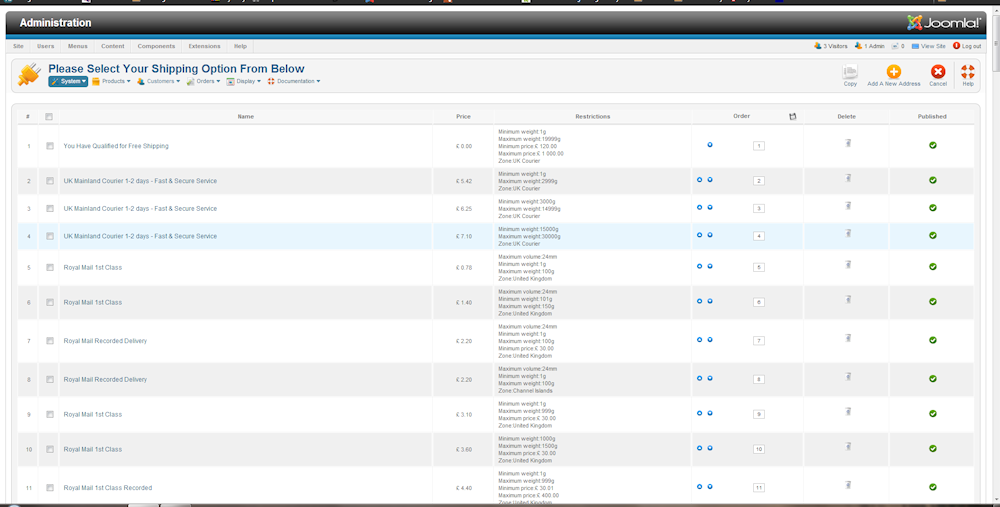
This is what it should look like in manual shipping not like the effort you released, but that was NOT the big issue order's could not be placed and the shipping option could not be selected in checkout. I suspect the shipping error show here was to blame but you could not offer me a solution and when I requested one it was declined instead passing code which means nothing to me??
Following on from this, there is still an issue with he payment method in checkout, when changing the payment method the change is not reflected down below the ordered items? the only way this changes is when you press pay now but this then does not go through until you press pay now again, you can then see that is changed the payment method on the first pay now??
This is what it should look like in manual shipping not like the effort you released, but that was NOT the big issue order's could not be placed and the shipping option could not be selected in checkout. I suspect the shipping error show here was to blame but you could not offer me a solution and when I requested one it was declined instead passing code which means nothing to me??
Following on from this, there is still an issue with he payment method in checkout, when changing the payment method the change is not reflected down below the ordered items? the only way this changes is when you press pay now but this then does not go through until you press pay now again, you can then see that is changed the payment method on the first pay now??
Last edit: 13 years 1 month ago by mohairbears. Reason: more issues
Please Log in or Create an account to join the conversation.

13 years 1 month ago #119385
by nicolas
Replied by nicolas on topic Shipping Method Information Missing **URGENT**
Hi,
The selection of shipping methods is working fine on our end and we can't see the problem on your website now that you reverted to the previous version. So we'll need that you provide a copy of the website with the latest version and the issue so that we can look at the problem as it seems to be something very specific to your website or the way your shipping methods are configured.
As Jerome said, the shipping methods listing has been totally redone and the restrictions aren't displayed anymore for manual shipping methods. He offered you to change the code to add that back in by editing the file "listing" of the view "plugins" via the menu Display>Views. If you had done as he explained, you would have gotten back the restrictions display on the listing. In any case, as Jerome said, that will be added back in next version.
Regarding the payment method selection, what you're describing sounds like the normal behavior when the "auto submit" option of the Checkout tab of the configuration of HikaShop is turned off. I would thus recommend you to check that setting.
The selection of shipping methods is working fine on our end and we can't see the problem on your website now that you reverted to the previous version. So we'll need that you provide a copy of the website with the latest version and the issue so that we can look at the problem as it seems to be something very specific to your website or the way your shipping methods are configured.
As Jerome said, the shipping methods listing has been totally redone and the restrictions aren't displayed anymore for manual shipping methods. He offered you to change the code to add that back in by editing the file "listing" of the view "plugins" via the menu Display>Views. If you had done as he explained, you would have gotten back the restrictions display on the listing. In any case, as Jerome said, that will be added back in next version.
Regarding the payment method selection, what you're describing sounds like the normal behavior when the "auto submit" option of the Checkout tab of the configuration of HikaShop is turned off. I would thus recommend you to check that setting.
Please Log in or Create an account to join the conversation.
- mohairbears
-
Topic Author
- Offline
Less
More
- Posts: 608
- Thank you received: 13
13 years 1 month ago #119391
by mohairbears
Replied by mohairbears on topic Shipping Method Information Missing **URGENT**
Hi Nicolas, Forget the shipping stuff I'll stick with what I have as this now works ok.
The "auto submit" has always been on so that was not the problem, I have changed the payment.php for the 2.2.2 version and of my 3 payment methods only the credit card does not auto refresh when selected, I have sort of worked a solution by switching the payment method above the shipping method so that if they select the card payment hopefully they will then select the shipping and it will auto correct itself. I have mentioned this problem with the card payment before because you have to press pay now twice (once refeshes the page and updates your selected option, then the second press pay now sends the payment through, hope this is clear as to what's happening
thanks
The "auto submit" has always been on so that was not the problem, I have changed the payment.php for the 2.2.2 version and of my 3 payment methods only the credit card does not auto refresh when selected, I have sort of worked a solution by switching the payment method above the shipping method so that if they select the card payment hopefully they will then select the shipping and it will auto correct itself. I have mentioned this problem with the card payment before because you have to press pay now twice (once refeshes the page and updates your selected option, then the second press pay now sends the payment through, hope this is clear as to what's happening
thanks
Please Log in or Create an account to join the conversation.
13 years 1 month ago #119568
by nicolas
Replied by nicolas on topic Shipping Method Information Missing **URGENT**
Yes, it's clear now.
That's the normal behavior because the cart is on the same step and that the payment selection might change the payment fee and so the system let you on the same step after you validate the payment selection. The payment selection is validated automatically for paypal and bank transfer since there is no info but it is only validated once you click the next button for the credit card plugin or if there is another submission (like when you select the shipping method).
So what you did is a solution, but you can also have a multi step checkout, or remove the cart from the checkout page and instead display it as a cart module on the checkout page.
We can't change that behavior because it would mean that users with payment fees or who want a confirmation of the reception of the credit card data wouldn't get it anymore.
That's the normal behavior because the cart is on the same step and that the payment selection might change the payment fee and so the system let you on the same step after you validate the payment selection. The payment selection is validated automatically for paypal and bank transfer since there is no info but it is only validated once you click the next button for the credit card plugin or if there is another submission (like when you select the shipping method).
So what you did is a solution, but you can also have a multi step checkout, or remove the cart from the checkout page and instead display it as a cart module on the checkout page.
We can't change that behavior because it would mean that users with payment fees or who want a confirmation of the reception of the credit card data wouldn't get it anymore.
Please Log in or Create an account to join the conversation.
Time to create page: 0.229 seconds