
Customer Orders Screen
- fireballxl5
-
 Topic Author
- Offline
Less
More
13 years 1 week ago - 13 years 1 week ago #124483
by fireballxl5
Customer Orders Screen was created by fireballxl5
- index.php?option=com_hikashop&view=order&layout=listing
I wish to remove the area enclosed in the blue box as the display looks bad and I don't want the back button. I wish to have my own menu system based on the menu options available in the Hika section of the Menu Item Type.
I will want to remove this section from all possible choices listed.
Is this possible and if so what do I need to do?
Many thanks
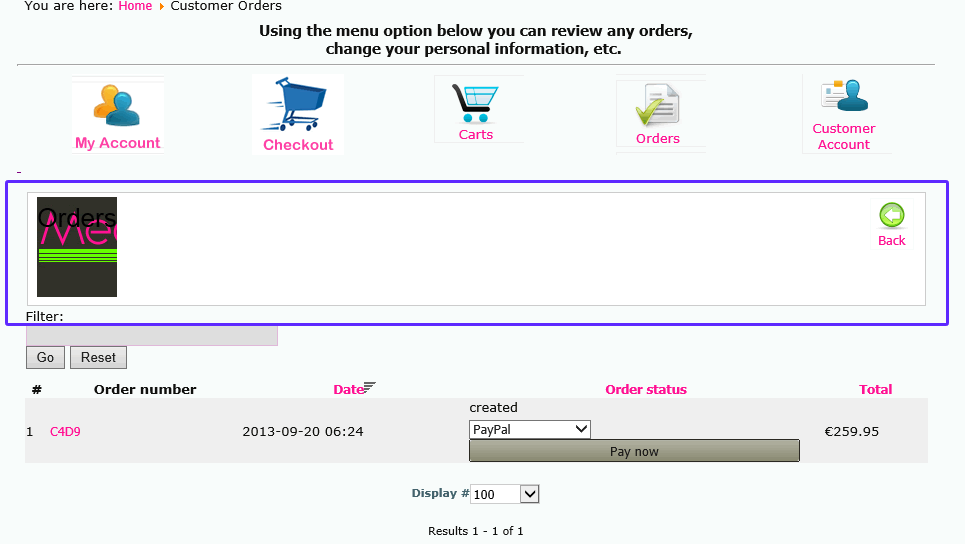
I wish to remove the area enclosed in the blue box as the display looks bad and I don't want the back button. I wish to have my own menu system based on the menu options available in the Hika section of the Menu Item Type.
I will want to remove this section from all possible choices listed.
Is this possible and if so what do I need to do?
Many thanks
Last edit: 13 years 1 week ago by fireballxl5. Reason: wrong image
Please Log in or Create an account to join the conversation.

13 years 1 week ago #124510
by Jerome
Jerome - Obsidev.com
HikaMarket & HikaSerial developer / HikaShop core dev team.
Replied by Jerome on topic Customer Orders Screen
Hi,
You have to override the view "order | show".
Regards,
You have to override the view "order | show".
Regards,
Jerome - Obsidev.com
HikaMarket & HikaSerial developer / HikaShop core dev team.
Please Log in or Create an account to join the conversation.
- fireballxl5
-
Topic Author
- Offline
13 years 1 week ago #124512
by fireballxl5
Replied by fireballxl5 on topic Customer Orders Screen
I'm sorry but I have no idea what you mean when you say;
- You have to override the view "order | show".
- You have to override the view "order | show".
Please Log in or Create an account to join the conversation.

13 years 1 week ago #124657
by Xavier
Replied by Xavier on topic Customer Orders Screen
Hi,
To override a view, you have to go through the menu Display > Views, then in the listing select the view to edit, and edit the HTML code.
In your case, and as Jerome said, you have to edit the view "order / show".
Here is more documentation about how to customize the layout:
www.hikashop.com/support/documentation/1...ize-the-display.html
To override a view, you have to go through the menu Display > Views, then in the listing select the view to edit, and edit the HTML code.
In your case, and as Jerome said, you have to edit the view "order / show".
Here is more documentation about how to customize the layout:
www.hikashop.com/support/documentation/1...ize-the-display.html
Please Log in or Create an account to join the conversation.
- fireballxl5
-
Topic Author
- Offline
13 years 1 week ago #124658
by fireballxl5
Replied by fireballxl5 on topic Customer Orders Screen
Hi Xavier
The link you have given does not return a page
The link you have given does not return a page
Please Log in or Create an account to join the conversation.
13 years 1 week ago #124720
by Xavier
Replied by Xavier on topic Customer Orders Screen
Hi,
I just checked, and the link is a valid one.
Thanks to try again.
I just checked, and the link is a valid one.
Thanks to try again.
The following user(s) said Thank You: fireballxl5
Please Log in or Create an account to join the conversation.
Time to create page: 0.179 seconds