
strage stars field in comment section

13 years 1 week ago #124854
by Teto
strage stars field in comment section was created by Teto
-- HikaShop version -- : 2.2.1
-- Joomla version -- : 2.5.14
-- PHP version -- : 5.3.27
Hello
I am installing the new release in my test Environment. In production www.madeinvino.com I have the versione 2.1.2.
In the commenct section, there is now a strange field near the stars, is it correct?
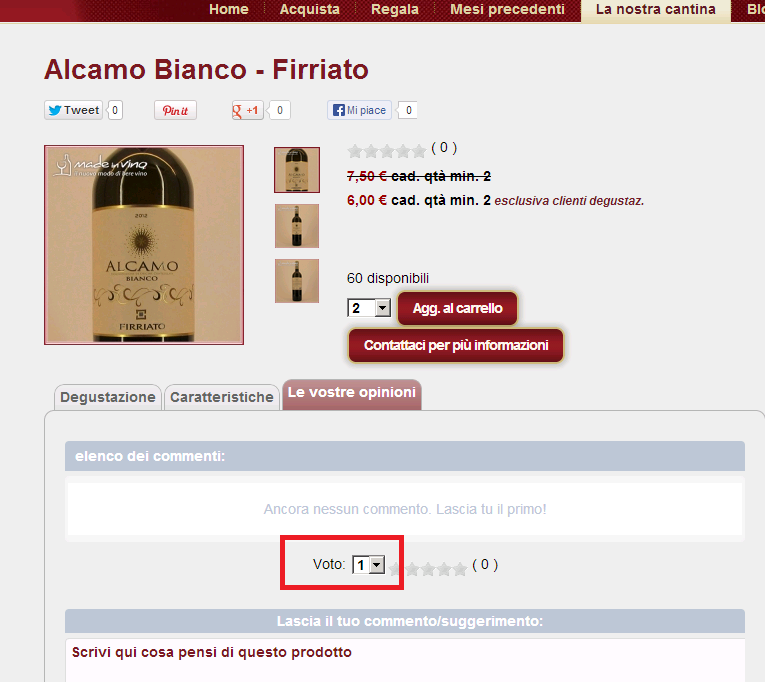
I don't have this field in the production environment:
If you need more details please let me know
Best.
-- Joomla version -- : 2.5.14
-- PHP version -- : 5.3.27
Hello
I am installing the new release in my test Environment. In production www.madeinvino.com I have the versione 2.1.2.
In the commenct section, there is now a strange field near the stars, is it correct?
I don't have this field in the production environment:
If you need more details please let me know
Best.
Please Log in or Create an account to join the conversation.

13 years 1 week ago #124873
by Jerome
Jerome - Obsidev.com
HikaMarket & HikaSerial developer / HikaShop core dev team.
Replied by Jerome on topic strage stars field in comment section
Hi,
This element should be hidden. Do you have view overrides for the votes ?
Regards,
This element should be hidden. Do you have view overrides for the votes ?
Regards,
Jerome - Obsidev.com
HikaMarket & HikaSerial developer / HikaShop core dev team.
Please Log in or Create an account to join the conversation.
13 years 1 week ago - 13 years 1 week ago #124891
by Teto
Replied by Teto on topic strage stars field in comment section
Hi
Yes, I have different custom views ( .
.
I deleted the two views:
product - show.php
product - show_default.php
But I still have the problem.
Could you indicate what is the view I have to check?
Thanks and regards.
Yes, I have different custom views (
.I deleted the two views:
product - show.php
product - show_default.php
But I still have the problem.
Could you indicate what is the view I have to check?
Thanks and regards.
Last edit: 13 years 1 week ago by Teto.
Please Log in or Create an account to join the conversation.

13 years 1 week ago #124904
by Xavier
Replied by Xavier on topic strage stars field in comment section
Hi,
The view to edit is "vote / mini", the select need to have the "display:none;" css property.
The view to edit is "vote / mini", the select need to have the "display:none;" css property.
Please Log in or Create an account to join the conversation.
13 years 1 week ago #124906
by Teto
Replied by Teto on topic strage stars field in comment section
Hello
I am using the standard view for Vote-Mini
Do I have to modify or check something in the Front-end CSS File?
Thanks and regards
I am using the standard view for Vote-Mini
Do I have to modify or check something in the Front-end CSS File?
Thanks and regards
Please Log in or Create an account to join the conversation.
13 years 1 week ago #124915
by Xavier
Replied by Xavier on topic strage stars field in comment section
You can add the display:none; css property on this select in the frontend css file
Please Log in or Create an account to join the conversation.
13 years 1 week ago #124917
by Teto
Replied by Teto on topic strage stars field in comment section
Sorry Xavier, I did not understand, is it a bug or I did something wrong?
Do I have to modify the custom Front-end CSS File?
Could you please send me the code?
Many thanks.
Do I have to modify the custom Front-end CSS File?
Could you please send me the code?
Many thanks.
Please Log in or Create an account to join the conversation.
13 years 6 days ago #124987
by Jerome
Jerome - Obsidev.com
HikaMarket & HikaSerial developer / HikaShop core dev team.
Replied by Jerome on topic strage stars field in comment section
Hi,
In the "vote | mini" view, we currently have this line of code
The "display none" rule is like hard coded in the view so the dropdown is not displayed.
If you don't have it, you can put it in the view. I though it was in the 2.2.1 release but it might be done using CSS.
Well, it will be include in the 2.2.2, that's sure.
Regards,
In the "vote | mini" view, we currently have this line of code
Code:
<select name="hikashop_vote_rating" style="display: none;" class="chzn-done" id="<?php echo $select_id;?>">
If you don't have it, you can put it in the view. I though it was in the 2.2.1 release but it might be done using CSS.
Well, it will be include in the 2.2.2, that's sure.
Regards,
Jerome - Obsidev.com
HikaMarket & HikaSerial developer / HikaShop core dev team.
Please Log in or Create an account to join the conversation.
13 years 6 days ago #125017
by Teto
Replied by Teto on topic strage stars field in comment section
Hello
the strange is in the vote-mini view the code seems fine:
Is there something missing?
the strange is in the vote-mini view the code seems fine:
Code:
<?php
/**
* @package HikaShop for Joomla!
* @version 2.2.1
* @author hikashop.com
* @copyright (C) 2010-2013 HIKARI SOFTWARE. All rights reserved.
* @license GNU/GPLv3 http://www.gnu.org/licenses/gpl-3.0.html
*/
defined('_JEXEC') or die('Restricted access');
?><?php
JHTML::_('behavior.tooltip');
$row =& $this->rows;
$vote_enabled = $row->vote_enabled;
if ($vote_enabled == 1) {
$hikashop_vote_average_score = $row->hikashop_vote_average_score;
$hikashop_vote_average_score_rounded = $row->hikashop_vote_average_score_rounded;
JRequest::setVar("rate_rounded",$hikashop_vote_average_score_rounded);
$hikashop_vote_total_vote = $row->hikashop_vote_total_vote;
$hikashop_vote_nb_star = $row->hikashop_vote_nb_star;
JRequest::setVar("nb_max_star",$hikashop_vote_nb_star);
$type_item = $row->type_item;
$hikashop_vote_ref_id = $row->vote_ref_id;
$main_div_name = $row->main_div_name;
$hikashop_vote_user_id = hikashop_loadUser();
$listing_true = $row->listing_true;
$select_id = "select_id_".$hikashop_vote_ref_id;
if($main_div_name != '' ){
$select_id .= "_".$main_div_name;
}else{
$select_id .= "_hikashop_main_div_name";
}
if(empty($main_div_name)){?>
<input type="hidden" id="hikashop_vote_ref_id" value="<?php echo $hikashop_vote_ref_id;?>"/>
<?php } ?>
<input type="hidden" id="hikashop_vote_ok_<?php echo $hikashop_vote_ref_id;?>" value="0"/>
<input type="hidden" id="vote_type_<?php echo $hikashop_vote_ref_id;?>" value="<?php echo $type_item; ?>"/>
<input type="hidden" id="hikashop_vote_user_id_<?php echo $hikashop_vote_ref_id;?>" value="<?php echo $hikashop_vote_user_id;?>"/>
<div class="hikashop_vote_stars">
<select name="hikashop_vote_rating" style="display: none;" class="chzn-done" id="<?php echo $select_id;?>">
<?php
for ($i = 1; $i <= $hikashop_vote_nb_star; $i++) {
echo '<option value="' . $i . '">' . $i . '</option>';
}
?>
</select>
<script type='text/javascript'>
window.addEvent('domready', function() {
var rating = new hikashop_ratings(document.getElementById('<?php echo $select_id;?>'), {
id : 'hikashop_vote_rating_<?php echo $type_item; ?>_<?php echo $hikashop_vote_ref_id;?>_',
showSelectBox : false,
container : null,
defaultRating : <?php echo $hikashop_vote_average_score_rounded; ?>
});
});
</script>
<span class="hikashop_total_vote" >(<?php echo JHTML::tooltip($hikashop_vote_average_score.'/'.$hikashop_vote_nb_star, JText::_('VOTE_AVERAGE'), '', ' '.$hikashop_vote_total_vote.' '); ?>) </span>
<span id="hikashop_vote_status_<?php echo $hikashop_vote_ref_id;?>" class="hikashop_vote_notification_mini"></span>
</div>
<?php
}
?>
Is there something missing?
Please Log in or Create an account to join the conversation.
13 years 6 days ago #125026
by Xavier
Replied by Xavier on topic strage stars field in comment section
Thanks to try the following css property:
It will override the other css properties, maybe your template is overriding it already, thanks to check the css code with your browser console.
Code:
.hikashop_vote_stars select{
display: none !important;
}
It will override the other css properties, maybe your template is overriding it already, thanks to check the css code with your browser console.
Please Log in or Create an account to join the conversation.
13 years 6 days ago #125033
by Teto
Replied by Teto on topic strage stars field in comment section
Perfect, it works. 
I added the css property and now is fine.
I added the css property and now is fine.
Please Log in or Create an account to join the conversation.
Time to create page: 0.233 seconds