

- Posts: 19
- Thank you received: 0
Item layout error
13 years 12 hours ago #125833
by redconect
Item layout error was created by redconect
-- url of the page with the problem -- :
mywebsite.com/mypage
-- HikaShop version -- : starter 2 2 1
-- Joomla version -- 3.0
-- PHP version -- : x¿?
-- Browser(s) name and version -- : crome
-- Error-message(debug-mod must be tuned on) -- : Error_message
Hi good morning,
Sorry if my inglish is not so good.
i have a proble on my site proteinasbarcelona.es/
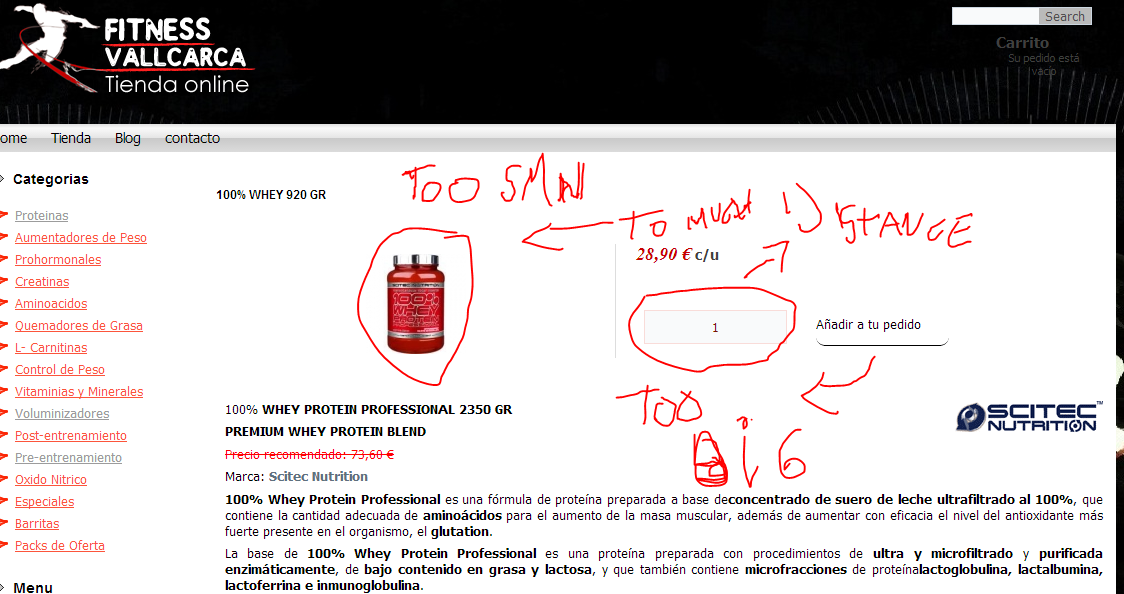
the problem is tha on the product layout as you can see the cuantity frame ist too big and the image of the item ist to small, and all details have to much distance between them.
can you help me ?
how can y fix this.
thanks
-- HikaShop version -- : starter 2 2 1
-- Joomla version -- 3.0
-- PHP version -- : x¿?
-- Browser(s) name and version -- : crome
-- Error-message(debug-mod must be tuned on) -- : Error_message
Hi good morning,
Sorry if my inglish is not so good.
i have a proble on my site proteinasbarcelona.es/
the problem is tha on the product layout as you can see the cuantity frame ist too big and the image of the item ist to small, and all details have to much distance between them.
can you help me ?
how can y fix this.
thanks
Please Log in or Create an account to join the conversation.

Less
More
- Posts: 12953
- Thank you received: 1778
13 years 9 hours ago #125840
by Mohamed Thelji
Replied by Mohamed Thelji on topic Item layout error
Hi,
It seems like you've already changed the displaying of your product page, did you solved your issues ? if not, you'll probably be able to do it by using some CSS code.
It seems like you've already changed the displaying of your product page, did you solved your issues ? if not, you'll probably be able to do it by using some CSS code.
Please Log in or Create an account to join the conversation.
13 years 6 hours ago #125881
by redconect
Replied by redconect on topic Item layout error
HI no i just change the hikashop template, but the problem still there.
need to put more closer the item picture the separator and details.
how can i do it.
edit css code Wich css file?
thanks
need to put more closer the item picture the separator and details.
how can i do it.
edit css code Wich css file?
thanks
Please Log in or Create an account to join the conversation.

13 years 26 minutes ago #125941
by Jerome
Jerome - Obsidev.com
HikaMarket & HikaSerial developer / HikaShop core dev team.
Replied by Jerome on topic Item layout error
Hi,
You can override the HikaShop CSS file as the HikaShop style CSS file.
In the backend, there is a CSS section where you can access and modify the CSS content (by creating copies).
Regards,
You can override the HikaShop CSS file as the HikaShop style CSS file.
In the backend, there is a CSS section where you can access and modify the CSS content (by creating copies).
Regards,
Jerome - Obsidev.com
HikaMarket & HikaSerial developer / HikaShop core dev team.
The following user(s) said Thank You: redconect
Please Log in or Create an account to join the conversation.
Time to create page: 0.187 seconds