

- Posts: 73
- Thank you received: 1
Checkout Workflow problem
12 years 11 months ago #126273
by julian56
Checkout Workflow problem was created by julian56
Joomla 2.5
I am trying to delete the Login/Register and just proceed to checkout as a guest. I read the posts and your answer but it doesn't work.
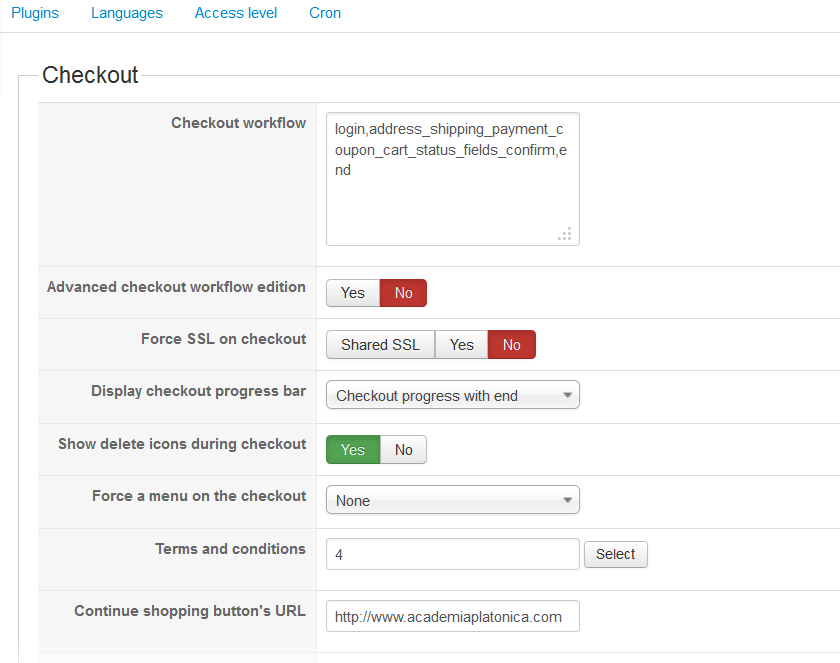
1- First I keep in Checkout Workflow:
login,address_shipping_payment_coupon_cart_status_fields_confirm,end
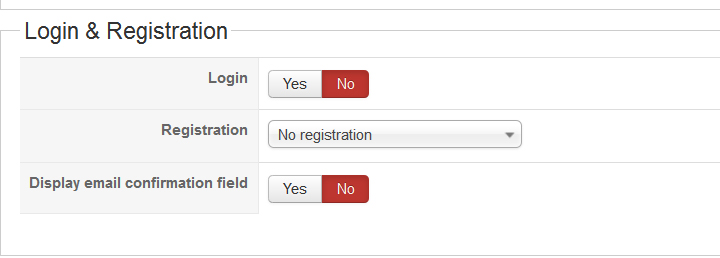
and in the part "Login & Registration" I choose: No, no registration, No
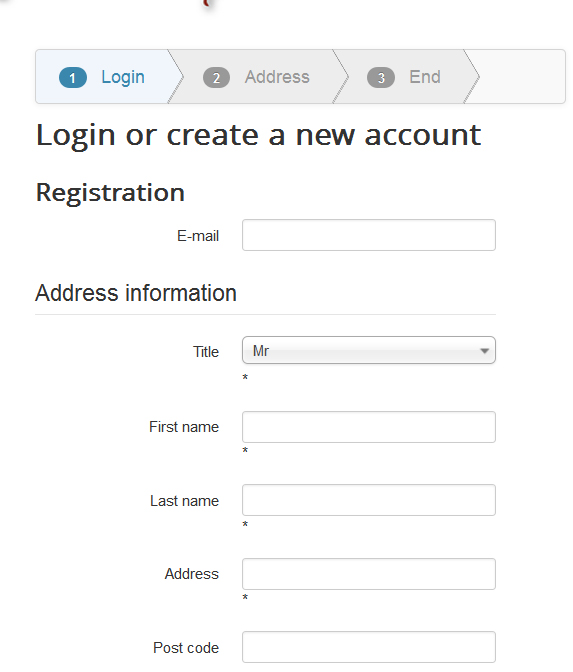
When I run a test and try to check out as a guest I still have:
Login or create a new account
Registration
2- I deleted fron ther checkout workflow the Login keeping this command:
address_shipping_payment_coupon_cart_status_fields_confirm,end
In this case I have the message of error:
No shipping method found
What can I do to have just the address without the need to register and login and checkout as guest?
Thank you!
I am trying to delete the Login/Register and just proceed to checkout as a guest. I read the posts and your answer but it doesn't work.
1- First I keep in Checkout Workflow:
login,address_shipping_payment_coupon_cart_status_fields_confirm,end
and in the part "Login & Registration" I choose: No, no registration, No
When I run a test and try to check out as a guest I still have:
Login or create a new account
Registration
2- I deleted fron ther checkout workflow the Login keeping this command:
address_shipping_payment_coupon_cart_status_fields_confirm,end
In this case I have the message of error:
No shipping method found
What can I do to have just the address without the need to register and login and checkout as guest?
Thank you!
Please Log in or Create an account to join the conversation.

Less
More
- Posts: 12953
- Thank you received: 1778
12 years 11 months ago #126289
by Mohamed Thelji
Replied by Mohamed Thelji on topic Checkout Workflow problem
Hi,
I think that you'll probably find your answer through this thread :
I think that you'll probably find your answer through this thread :
If you want to have a checkout without registration but with address, you will have to have both "login" and "address" views in the checkout workflow. Then, in the Checkout tab of the configuration, you can change the option "registration" to "no registration" in order to remove the creation of a user account. Also, you can turn off the "login" option there to remove the login area of the checkout.
That way, you will still have the address form but no user account would be created.
That "Registration" option is only available in our commercial editions.
Please Log in or Create an account to join the conversation.
12 years 11 months ago #126388
by julian56
Replied by julian56 on topic Checkout Workflow problem
I did exactly that as you can see below.
However as you can see on the last screenshot this is not working...
Registration still there:
What can I do?
Thank you for your help.
However as you can see on the last screenshot this is not working...
Registration still there:
What can I do?
Thank you for your help.
Please Log in or Create an account to join the conversation.

12 years 11 months ago #126393
by Jerome
Jerome - Obsidev.com
HikaMarket & HikaSerial developer / HikaShop core dev team.
Replied by Jerome on topic Checkout Workflow problem
Hi,
It is working, it's just the translation which made a confusion.
Regards,
It is working, it's just the translation which made a confusion.
Regards,
Jerome - Obsidev.com
HikaMarket & HikaSerial developer / HikaShop core dev team.
Please Log in or Create an account to join the conversation.
12 years 11 months ago #126398
by julian56
Replied by julian56 on topic Checkout Workflow problem
What you mean by
If I am confused so are my customers...
What would be the good translation and how to implement it?
Thank you
?the translation which made a confusion
If I am confused so are my customers...
What would be the good translation and how to implement it?
Thank you
Please Log in or Create an account to join the conversation.

12 years 11 months ago #126404
by nicolas
Replied by nicolas on topic Checkout Workflow problem
What jerome says is that the text there says "registration" and " login or register.." but it's just because the text doesn't change when you change that "registration" option.
But the function of that form changes properly.
You can modify the text to whatever you want ( for example "guest checkout" or "address form" or what not ) with a translation override, like any other text in Hikashop:
www.hikashop.com/download/languages.html#modify
But the function of that form changes properly.
You can modify the text to whatever you want ( for example "guest checkout" or "address form" or what not ) with a translation override, like any other text in Hikashop:
www.hikashop.com/download/languages.html#modify
Please Log in or Create an account to join the conversation.
12 years 11 months ago #126462
by julian56
Replied by julian56 on topic Checkout Workflow problem
Perfect! It works!
Thank you very much
Thank you very much
Please Log in or Create an account to join the conversation.
Time to create page: 0.259 seconds