
- Posts: 159
- Thank you received: 0
how to get minicart in header
- Shafan Hameed
-
 Topic Author
- Offline
Less
More
12 years 11 months ago #128436
by Shafan Hameed
how to get minicart in header was created by Shafan Hameed
-- url of the page with the problem -- :
mywebsite.com/mypage
-- HikaShop version -- : 2.2.1
-- Joomla version -- : 3.0
-- PHP version -- : 5.3.27
-- Browser(s) name and version -- : FireFox 23.0.1
-- Error-message(debug-mod must be tuned on) -- : Error_message
hi i am trying to get Hikashop minicart on the header of my website but no matter what i do it didnt shows the cart picture.. it only shows the message of the cart is empty or items added to the cart.
this is my Shopping Cart settings
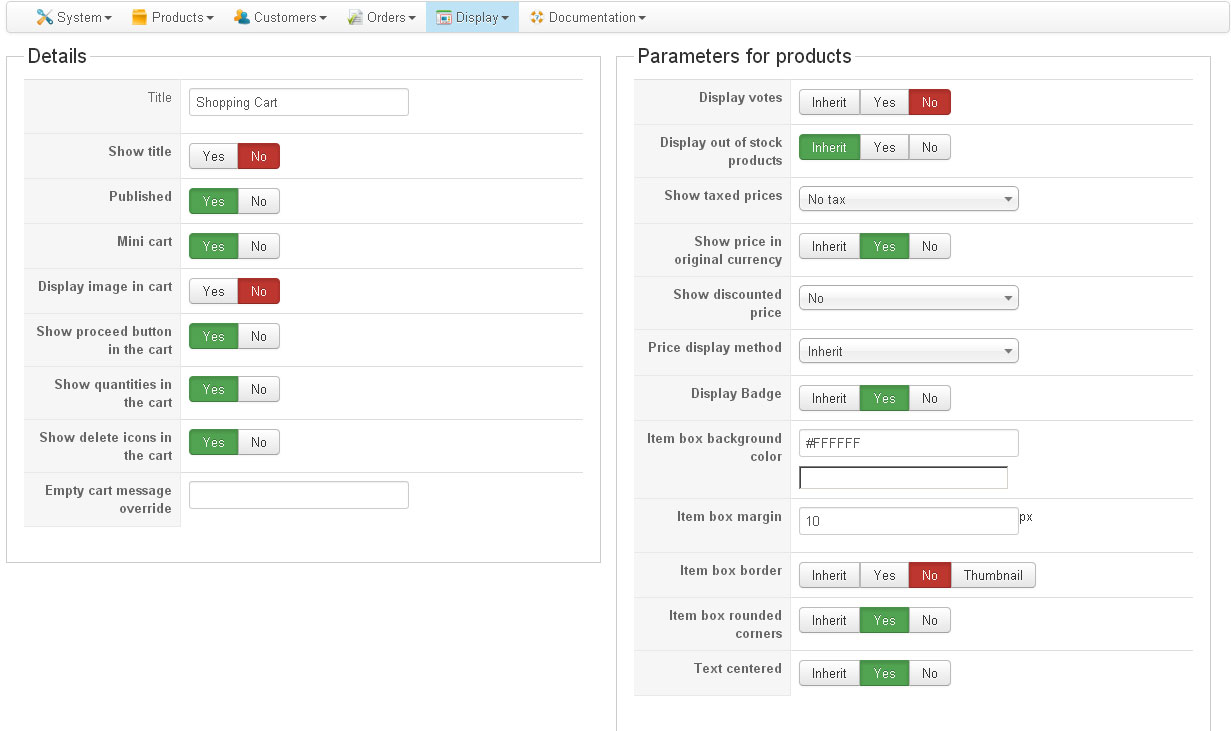
and this is what i am getting in the result

i have tried clearing the cache and purging the old cache but i am getting the same response.
Kindly help
-- HikaShop version -- : 2.2.1
-- Joomla version -- : 3.0
-- PHP version -- : 5.3.27
-- Browser(s) name and version -- : FireFox 23.0.1
-- Error-message(debug-mod must be tuned on) -- : Error_message
hi i am trying to get Hikashop minicart on the header of my website but no matter what i do it didnt shows the cart picture.. it only shows the message of the cart is empty or items added to the cart.
this is my Shopping Cart settings
and this is what i am getting in the result
i have tried clearing the cache and purging the old cache but i am getting the same response.
Kindly help
Please Log in or Create an account to join the conversation.

12 years 11 months ago #128454
by Jerome
Jerome - Obsidev.com
HikaMarket & HikaSerial developer / HikaShop core dev team.
Replied by Jerome on topic how to get minicart in header
Hi,
Which cart picture ?
The module does not display a cart picture but you can add one using some CSS.
Regards,
Which cart picture ?
The module does not display a cart picture but you can add one using some CSS.
Regards,
Jerome - Obsidev.com
HikaMarket & HikaSerial developer / HikaShop core dev team.
Please Log in or Create an account to join the conversation.
- Shafan Hameed
-
Topic Author
- Offline
Less
More
- Posts: 159
- Thank you received: 0
12 years 11 months ago #128515
by Shafan Hameed
Replied by Shafan Hameed on topic how to get minicart in header
This one i am talking about

i saw this one on some of you showcase websites.
why i cant have it ?
if there is some css then kindly tell me the codes and where to put it. thanks
i saw this one on some of you showcase websites.
why i cant have it ?
if there is some css then kindly tell me the codes and where to put it. thanks
Please Log in or Create an account to join the conversation.

Less
More
- Posts: 12953
- Thank you received: 1778
12 years 11 months ago #128528
by Mohamed Thelji
Replied by Mohamed Thelji on topic how to get minicart in header
Hi,
I think that you'll probably find a solution through this thread :
I think that you'll probably find a solution through this thread :
You'll just have to :
- Go to "Hikashop->Display->Views"
- Edit the "Cart" file of the "Product" view of your front-end template
- Change this line :
$emptyText =JText::_('CART_EMPTY');
By :
$emptyText = '<img src="YourImgLink" alt="cart empty" height="42" width="42">'.JText::_('CART_EMPTY');
Note that you'll have to replace the YourImgLink text by the link to your image.
Please Log in or Create an account to join the conversation.
- Shafan Hameed
-
Topic Author
- Offline
Less
More
- Posts: 159
- Thank you received: 0
12 years 10 months ago #132616
by Shafan Hameed
Replied by Shafan Hameed on topic how to get minicart in header
hi. i want to know one more thing. how to change" The cart is empty" message ? i want it to show "0 Item(s)" instead of it. how to do that ?
Please Log in or Create an account to join the conversation.

12 years 10 months ago #132649
by nicolas
Replied by nicolas on topic how to get minicart in header
Please Log in or Create an account to join the conversation.
- Shafan Hameed
-
Topic Author
- Offline
Less
More
- Posts: 159
- Thank you received: 0
12 years 10 months ago #132663
by Shafan Hameed
Replied by Shafan Hameed on topic how to get minicart in header
Thanks its Done.. One more thing...
how to change the styling of hikashop buttons ? i want to change the background and text color
or
how to make hikashop buttons looks like my theme button styling ?
how to change the styling of hikashop buttons ? i want to change the background and text color
or
how to make hikashop buttons looks like my theme button styling ?
Please Log in or Create an account to join the conversation.
12 years 10 months ago #132688
by nicolas
Replied by nicolas on topic how to get minicart in header
The buttons should normally use your template's styling automatically unless you changes the "button style" option of the configuration from "normal" to "css". So I would recommend to check on that.
If your template doesn't provide any styling for the buttons, you can add your own CSS to the "button" class in order to style your buttons.
If your template doesn't provide any styling for the buttons, you can add your own CSS to the "button" class in order to style your buttons.
Please Log in or Create an account to join the conversation.
Time to create page: 0.213 seconds