
- Posts: 159
- Thank you received: 0
Facing Problem in HikaShop
- Shafan Hameed
-
 Topic Author
- Offline
Less
More
12 years 11 months ago #129138
by Shafan Hameed
Facing Problem in HikaShop was created by Shafan Hameed
-- url of the page with the problem -- :
mywebsite.com/mypage
-- HikaShop version -- : 2.2.1
-- Joomla version -- : 3.0
-- PHP version -- : 5.3.27
-- Browser(s) name and version -- : FireFox 23.0.1
-- Error-message(debug-mod must be tuned on) -- : Error_message
Hi i am facing problem in HikaShop i think .
1) i am unable to see the menu Navigation in Product Page with which we can switch to Products, Categories, Brands etc.. see the screenshot
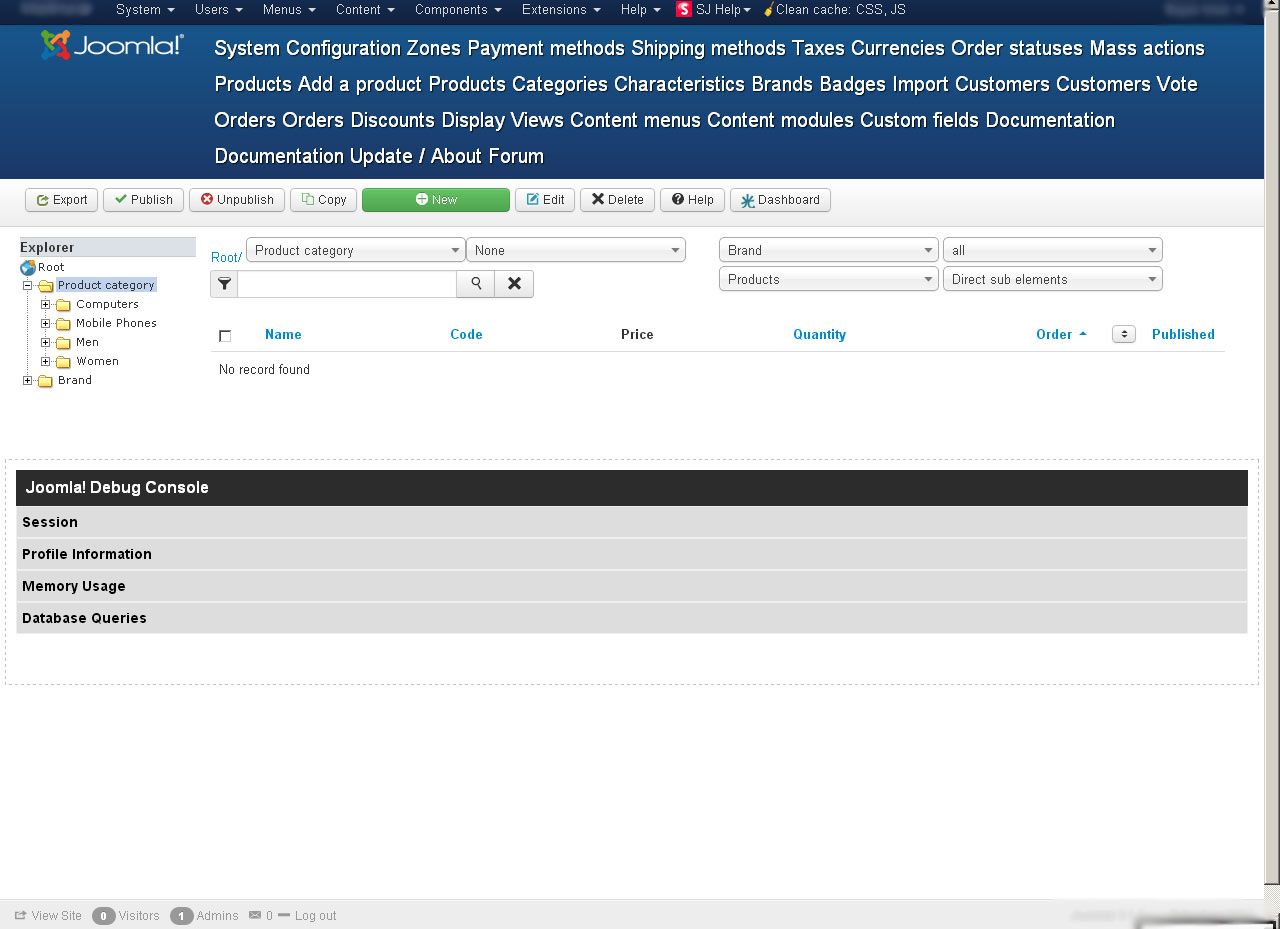
2) Unable to add Magic Slideshow module for HikaShop. when i add it i got this error on front-end. see the screenshot

Same response when i add any Component from Magic Tools.
Kindly help.. Thanks in advance
-- HikaShop version -- : 2.2.1
-- Joomla version -- : 3.0
-- PHP version -- : 5.3.27
-- Browser(s) name and version -- : FireFox 23.0.1
-- Error-message(debug-mod must be tuned on) -- : Error_message
Hi i am facing problem in HikaShop i think .
1) i am unable to see the menu Navigation in Product Page with which we can switch to Products, Categories, Brands etc.. see the screenshot
2) Unable to add Magic Slideshow module for HikaShop. when i add it i got this error on front-end. see the screenshot
Same response when i add any Component from Magic Tools.
Kindly help.. Thanks in advance
Please Log in or Create an account to join the conversation.

12 years 11 months ago #129155
by nicolas
Replied by nicolas on topic Facing Problem in HikaShop
Hi,
1. That's because you need to change the option "menu position" of the Display tab of the configuration to "above the content" as it is by default on Joomla 3.
2. These are notice messages from the Magic slideshow module. You need to contact their support for help on that as we don't know how they work, and thus cannot help you set them up. What I can say is that if you want to hide notice and warning messages on your website, you can deactivate the "error reporting" option of the joomla configuration.
1. That's because you need to change the option "menu position" of the Display tab of the configuration to "above the content" as it is by default on Joomla 3.
2. These are notice messages from the Magic slideshow module. You need to contact their support for help on that as we don't know how they work, and thus cannot help you set them up. What I can say is that if you want to hide notice and warning messages on your website, you can deactivate the "error reporting" option of the joomla configuration.
The following user(s) said Thank You: Shafan Hameed
Please Log in or Create an account to join the conversation.
- Shafan Hameed
-
Topic Author
- Offline
Less
More
- Posts: 159
- Thank you received: 0
12 years 11 months ago #129218
by Shafan Hameed
Replied by Shafan Hameed on topic Facing Problem in HikaShop
got the menu back... Thanks alot Nicolas.
Please Log in or Create an account to join the conversation.
Time to create page: 0.175 seconds