

- Posts: 139
- Thank you received: 1
Customising Checkout View ... strange problem
12 years 11 months ago - 12 years 11 months ago #129803
by abasel
Customising Checkout View ... strange problem was created by abasel
Via the display menu I have edited checkout / cart.php so that it displays four of my custom fields.
The following code has been inserted into the "<div class="hikashop_cart_product_custom_item_fields">" section as PHP
equisites.'</p>';
[/code]
This works for all but the 1st item in the cart (see image below).
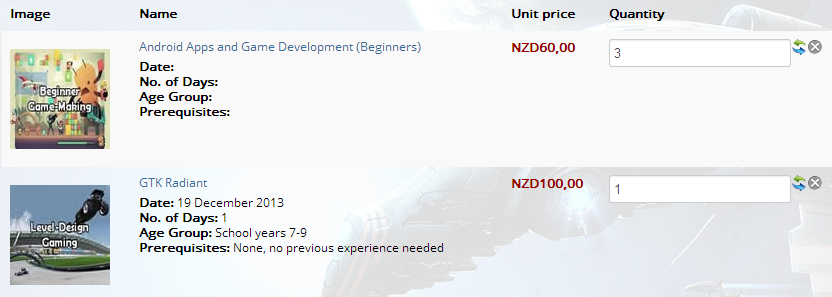
As you can see the entries for the custom fields are blank, even though they do have data. This happens to whatever product is listed first.
Any ideas on how I can fix this?
Since posting this I have just upgraded to "Business" so there may be a better way to do this.
The following code has been inserted into the "<div class="hikashop_cart_product_custom_item_fields">" section as PHP
Code:
echo '<p><strong>Date:</strong> '.$this->row->date.'<br/>';
echo '<strong>No. of Days:</strong> '.$this->row->noofdays.'<br/>';
echo '<strong>Age Group:</strong> '.$this->row->agegroup.'<br/>';
echo '<strong>Prerequisites:</strong> '.$this->row->prer
[/code]
This works for all but the 1st item in the cart (see image below).
As you can see the entries for the custom fields are blank, even though they do have data. This happens to whatever product is listed first.
Any ideas on how I can fix this?
Since posting this I have just upgraded to "Business" so there may be a better way to do this.
Last edit: 12 years 11 months ago by abasel.
Please Log in or Create an account to join the conversation.

Less
More
- Posts: 12953
- Thank you received: 1778
12 years 11 months ago #129818
by Mohamed Thelji
Replied by Mohamed Thelji on topic Customising Checkout View ... strange problem
Hi,
Can you try it with this code :
You'll have to put it just after these lines :
Can you try it with this code :
Code:
foreach($this->rows as $row){
echo '<p><strong>Date:</strong> '.$row->date.'<br/>';
echo '<strong>No. of Days:</strong> '.$row->noofdays.'<br/>';
echo '<strong>Age Group:</strong> '.$row->agegroup.'<br/>';
echo '<strong>Prerequisites:</strong> '.$row->prer;
}
Code:
<div class="hikashop_cart_product_custom_item_fields">
<?php
Please Log in or Create an account to join the conversation.
12 years 11 months ago #129918
by abasel
Replied by abasel on topic Customising Checkout View ... strange problem
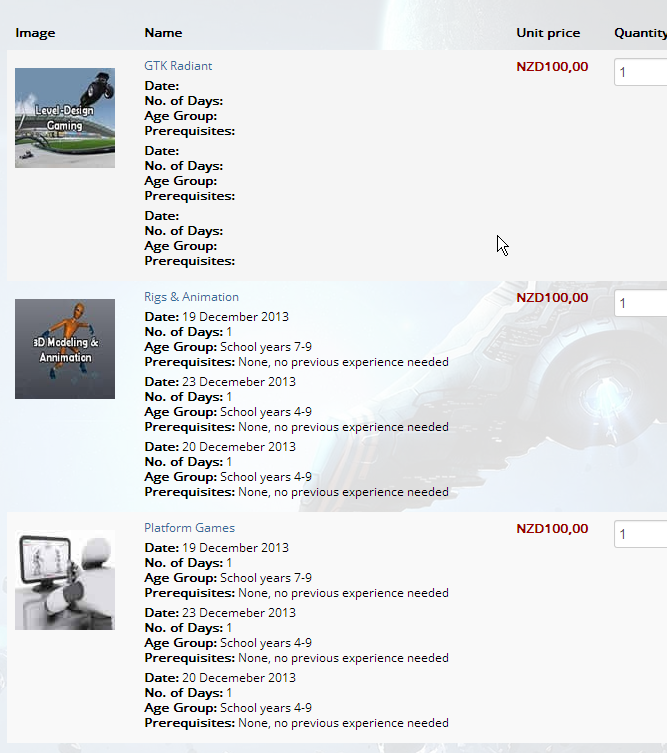
Hi, this simply repeats the fields by the number of rows, with the first entries still being blank.
Please Log in or Create an account to join the conversation.

12 years 11 months ago #129982
by nicolas
Replied by nicolas on topic Customising Checkout View ... strange problem
No what mohamed provided is not correct.
What you just need to do is to use
instead of the code that you posted first:
That's because $this->row doesn't existing at the beginning of the foreach, only at the end, so each time you're actually displaying the data of the previous product with your code instead of displaying the data of the current product, and that's why the first one has empty values with your code.
What you just need to do is to use
Code:
echo '<p><strong>Date:</strong> '.$row->date.'<br/>';
echo '<strong>No. of Days:</strong> '.$row->noofdays.'<br/>';
echo '<strong>Age Group:</strong> '.$row->agegroup.'<br/>';
echo '<strong>Prerequisites:</strong> '.$row->prerequisites.'</p>';
Code:
echo '<p><strong>Date:</strong> '.$this->row->date.'<br/>';
echo '<strong>No. of Days:</strong> '.$this->row->noofdays.'<br/>';
echo '<strong>Age Group:</strong> '.$this->row->agegroup.'<br/>';
echo '<strong>Prerequisites:</strong> '.$this->row->prerequisites.'</p>';
The following user(s) said Thank You: abasel, Mohamed Thelji
Please Log in or Create an account to join the conversation.
12 years 11 months ago #129988
by abasel
Replied by abasel on topic Customising Checkout View ... strange problem
Awesome, that worked.. thanks 
Please Log in or Create an account to join the conversation.
Time to create page: 0.196 seconds