

- Posts: 139
- Thank you received: 1
Formatting final checkou
12 years 11 months ago #129931
by abasel
Formatting final checkou was created by abasel
I can't find the CSS that controls the space i.e. I am trying to fix the "Birthday" and "Mailing list" lines so that their details don't wrap onto the next line.
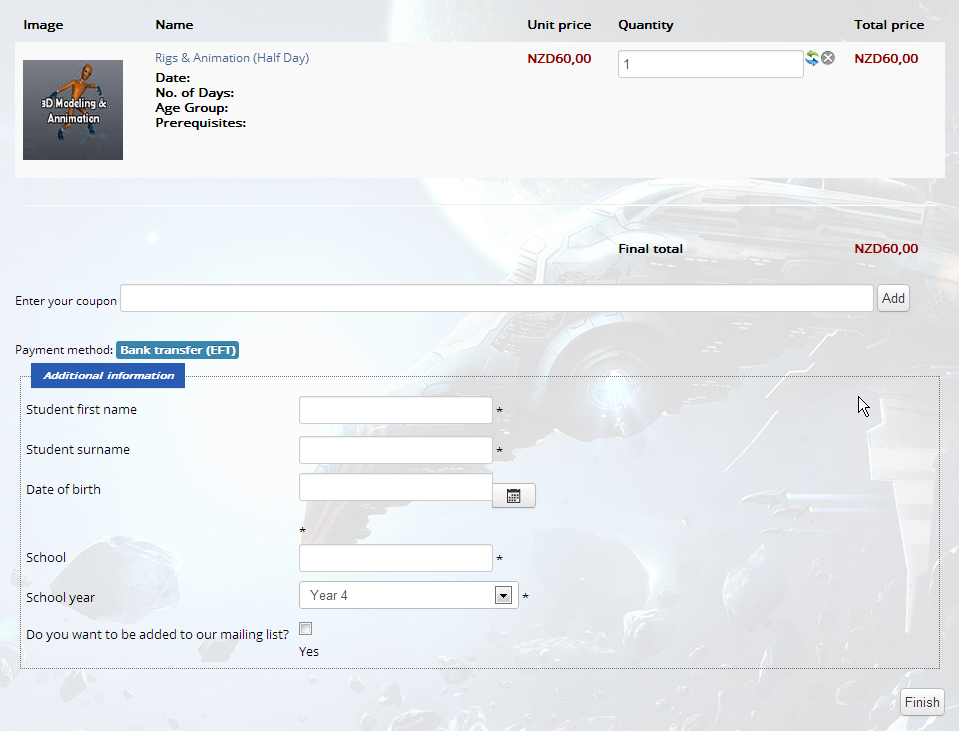
When I disable all my CSS it still does it so I am not sure what is happening,
Code:
<form action="/index.php/cart/checkout/task-step/step-1" method="post" name="hikashop_checkout_form" enctype="multipart/form-data" onsubmit="if('function' == typeof(hikashopSubmitForm)) { hikashopSubmitForm('hikashop_checkout_form'); return false; } else { return true; }">
<div id="hikashop_checkout_cart" class="hikashop_checkout_cart"> <br>
<table class="table table-striped table-hover" width="100%">
<thead>
<tr>
<th id="hikashop_cart_product_image_title" class="hikashop_cart_product_image_title hikashop_cart_title"> Image </th>
<th id="hikashop_cart_product_name_title" class="hikashop_cart_product_name_title hikashop_cart_title"> Name </th>
<th id="hikashop_cart_product_price_title" class="hikashop_cart_product_price_title hikashop_cart_title"> Unit price </th>
<th id="hikashop_cart_product_quantity_title" class="hikashop_cart_product_quantity_title hikashop_cart_title"> Quantity </th>
<th id="hikashop_cart_product_total_title" class="hikashop_cart_product_total_title hikashop_cart_title"> Total price </th>
</tr>
</thead>
<tfoot>
<tr>
<td colspan="5"><hr></td>
</tr>
<tr>
<td></td>
<td></td>
<td></td>
<td id="hikashop_checkout_cart_final_total_title" class="hikashop_cart_total_title hikashop_cart_title"> Final total </td>
<td class="hikashop_cart_total_value"><span class="hikashop_checkout_cart_final_total"> NZD60,00 </span></td>
</tr>
</tfoot>
<tbody>
<tr class="row0">
<td class="hikashop_cart_product_image_value"><div class="hikashop_cart_product_image_thumb"> <a title="ItemModelling" alt="ItemModelling" rel="{handler: 'image'}" target="_blank" href="/media/com_hikashop/upload/itemmodelling.jpg" onclick="SqueezeBox.fromElement(this,{parse: 'rel'});return false;"><img src="/media/com_hikashop/upload/thumbnail_100x100/itemmodelling.jpg" alt="ItemModelling" title="ItemModelling" style="margin-top:10px;margin-bottom:10px;display:inline-block;vertical-align:middle"></a> </div></td>
<td class="hikashop_cart_product_name_value"><p class="hikashop_cart_product_name"> <a href="/index.php/cart/product/21-rigs-animation-half-day"> Rigs & Animation (Half Day) </a><br>
</p>
<div class="hikashop_cart_product_custom_item_fields">
<p><strong>Date:</strong> <br>
<strong>No. of Days:</strong> <br>
<strong>Age Group:</strong> <br>
<strong>Prerequisites:</strong> </p>
</div></td>
<td class="hikashop_cart_product_price_value"><span class="hikashop_product_price_full"> <span class="hikashop_product_price">NZD60,00</span> </span></td>
<td class="hikashop_cart_product_quantity_value"><input id="hikashop_checkout_quantity_29" name="item[29]" class="hikashop_product_quantity_field" value="1" onchange="var qty_field = document.getElementById('hikashop_checkout_quantity_29'); if (qty_field){}; return true;" type="text">
<div class="hikashop_cart_product_quantity_refresh"> <a href="#" onclick="var qty_field = document.getElementById('hikashop_checkout_quantity_29'); if (qty_field && qty_field.value != '1'){ qty_field.form.submit(); } return false;" title="Refresh"> <img src="/media/com_hikashop/images/refresh.png" alt="Refresh" border="0"> </a> </div>
<div class="hikashop_cart_product_quantity_delete"> <a href="/index.php/cart/product/updatecart/quantity-0/return_url-aHR0cDovL3d3dy5kaXNjb3ZlcnlsYWJzLmNvLm56L2luZGV4LnBocC9jYXJ0/cid-21" onclick="var qty_field = document.getElementById('hikashop_checkout_quantity_29'); if(qty_field){qty_field.value=0; qty_field.form.submit();} return false;" title="Delete"> <img src="/media/com_hikashop/images/delete2.png" alt="Delete" border="0"> </a> </div></td>
<td class="hikashop_cart_product_total_value"><span class="hikashop_product_price_full"> <span class="hikashop_product_price">NZD60,00</span> </span></td>
</tr>
</tbody>
</table>
</div>
<span class="hikashop_checkout_coupon" id="hikashop_checkout_coupon"> Enter your coupon
<input id="hikashop_checkout_coupon_input" name="coupon" value="" type="text">
<input class="btn button hikashop_cart_input_button" name="refresh" value="Add" onclick="return hikashopCheckCoupon('hikashop_checkout_coupon_input');" type="button">
</span> <br>
<br>
<span id="hikashop_checkout_status"> Payment method: <span class="label label-info">Bank transfer (EFT)</span></span>
<div class="clear_both"></div>
<div id="hikashop_checkout_additional_info" class="hikashop_checkout_additional_info">
<fieldset class="input">
<legend>Additional information</legend>
<table class="hikashop_contentpane" border="0" cellpadding="0" cellspacing="0">
<tbody>
<tr class="hikashop_checkout_studentfirstname_line" id="hikashop_order_studentfirstname">
<td class="key"><label for="studentfirstname">Student first name</label></td>
<td><input class="inputbox" id="studentfirstname" onchange="hikashopToggleFields(this.value,'studentfirstname','order',0);" name="data[order][studentfirstname]" value="" type="text">
<span class="hikashop_field_required">*</span></td>
</tr>
<tr class="hikashop_checkout_studentsurname_line" id="hikashop_order_studentsurname">
<td class="key"><label for="studentsurname">Student surname</label></td>
<td><input class="inputbox" id="studentsurname" onchange="hikashopToggleFields(this.value,'studentsurname','order',0);" name="data[order][studentsurname]" value="" type="text">
<span class="hikashop_field_required">*</span></td>
</tr>
<tr class="hikashop_checkout_studentdob_line" id="hikashop_order_studentdob">
<td class="key"><label for="studentdob">Date of birth</label></td>
<td><div class="input-append">
<input data-original-title="" class="hasTooltip" title="" name="data[order][studentdob]" id="studentdob" value="" onchange="studentdob_checkDate(1);" type="text">
<button class="btn" id="studentdob_img"><i class="icon-calendar"></i></button>
</div>
<span class="hikashop_field_required">*</span></td>
</tr>
<tr class="hikashop_checkout_schoolname_line" id="hikashop_order_schoolname">
<td class="key"><label for="schoolname">School</label></td>
<td><input class="inputbox" id="schoolname" onchange="hikashopToggleFields(this.value,'schoolname','order',0);" name="data[order][schoolname]" value="" type="text">
<span class="hikashop_field_required">*</span></td>
</tr>
<tr class="hikashop_checkout_schoolyear_line" id="hikashop_order_schoolyear">
<td class="key"><label for="schoolyear">School year</label></td>
<td><select id="schoolyear" name="data[order][schoolyear]" size="1" onchange="hikashopToggleFields(this.value,'schoolyear','order',0);">
<option value="4" id="schoolyear_4">Year 4</option>
<option value="5" id="schoolyear_5">Year 5</option>
<option value="6" id="schoolyear_6">Year 6</option>
<option value="7" id="schoolyear_7">Year 7</option>
<option value="8" id="schoolyear_8">Year 8</option>
<option value="9" id="schoolyear_9">Year 9</option>
</select>
<span class="hikashop_field_required">*</span></td>
</tr>
<tr class="hikashop_checkout_mailinglist_line" id="hikashop_order_mailinglist">
<td class="key"><label for="mailinglist">Do you want to be added to our mailing list?</label></td>
<td><input name="data[order][mailinglist]" value=" " type="hidden">
<input name="data[order][mailinglist][]" value="yes" id="mailinglist_yes" onchange="hikashopToggleFields(this.value,'mailinglist','order',0);" type="checkbox">
<label for="mailinglist_yes">Yes</label></td>
</tr>
</tbody>
</table>
</fieldset>
</div>
<div style="clear:both"></div>
<input name="Itemid" value="158" type="hidden">
<input name="option" value="com_hikashop" type="hidden">
<input name="ctrl" value="checkout" type="hidden">
<input name="task" value="step" type="hidden">
<input name="previous" value="0" type="hidden">
<input name="step" value="1" type="hidden">
<input id="hikashop_validate" name="validate" value="0" type="hidden">
<input name="dff26b9ff746ab1af2a79dada77bd5e1" value="1" type="hidden">
<input name="unique_id" value="[535ec5377981e03fa5181ab1d322ae25]" type="hidden">
<br style="clear:both">
<input class="btn button hikashop_cart_input_button" name="next" value="Finish" onclick="var field=document.getElementById('hikashop_product_quantity_field_2');if(hikashopCheckChangeForm('order','hikashop_checkout_form')){ if(hikashopCheckMethods()){ document.getElementById('hikashop_validate').value=1; document.forms['hikashop_checkout_form'].submit();}} return false;" id="hikashop_checkout_next_button" type="submit">
</form>
When I disable all my CSS it still does it so I am not sure what is happening,
Please Log in or Create an account to join the conversation.

12 years 11 months ago #129955
by nicolas
Replied by nicolas on topic Formatting final checkou
Please provide a link to that page.
Please Log in or Create an account to join the conversation.
12 years 11 months ago #129958
by abasel
Replied by abasel on topic Formatting final checkou
As the site is active I can't give you a public link. You can however reach it via the following login:
www.discoverylabs.co.nz/index.php/contact-us/login
Username: testuser
Password: testuser
From there you can add items to the cart, go to checkout and have a look.
Thanks
www.discoverylabs.co.nz/index.php/contact-us/login
Username: testuser
Password: testuser
From there you can add items to the cart, go to checkout and have a look.
Thanks
Please Log in or Create an account to join the conversation.

12 years 11 months ago #130008
by Jerome
Jerome - Obsidev.com
HikaMarket & HikaSerial developer / HikaShop core dev team.
Replied by Jerome on topic Formatting final checkou
Hi,
Your design problems are not related to HikaShop itself.
The calendar button is not aligned due to a CSS rule from the file: "nexus.css"
The checkbox and label are related to the bootstrap CSS file (some "display:inline-block" required)
The "star" for the date of birth is related to the way that Joomla 3 display his calendar, using an "input-append" class (set a "display:inline-block" using a specific css rule can be good too).
For most I see, you should add some specific CSS rules in order to fix.
I will recommend you this documentation page which explain how (and some tricks) customize the display ; useful for customizing HikaShop but not only !
www.hikashop.com/support/documentation/1...ize-the-display.html
Regards,
Your design problems are not related to HikaShop itself.
The calendar button is not aligned due to a CSS rule from the file: "nexus.css"
Code:
.readmore a, input.button, li.pagenav-prev, li.pagenav-next, button, .btn {
padding: 4px 14px;
}
The "star" for the date of birth is related to the way that Joomla 3 display his calendar, using an "input-append" class (set a "display:inline-block" using a specific css rule can be good too).
For most I see, you should add some specific CSS rules in order to fix.
I will recommend you this documentation page which explain how (and some tricks) customize the display ; useful for customizing HikaShop but not only !
www.hikashop.com/support/documentation/1...ize-the-display.html
Regards,
Jerome - Obsidev.com
HikaMarket & HikaSerial developer / HikaShop core dev team.
Please Log in or Create an account to join the conversation.
12 years 11 months ago #130367
by abasel
Replied by abasel on topic Formatting final checkou
Don't think its the best option as its very specific rules (i.e. if I change the field names I will have to change the css)
Fixes the mailing list options
Fixes the Calendar icon
Puts more space between the labels and input fields
Try as I may I just can't fix the * at the end of the calendar icon, i.e. I can't stop it from wrapping around onto the next line.
Fixes the mailing list options
Code:
#hikashop_order_studentdob > td:nth-child(2) > span:nth-child(2){
display:inline-block;
}
#hikashop_order_mailinglist > td:nth-child(2) > label:nth-child(3){
width:10px;
display:inline-block;
margin-left:5px;
}
div#hikashop_checkout_additional_info input {
margin: 0;
}
Code:
div#hikashop_checkout_additional_info button {
margin:1px 0px;
}
Puts more space between the labels and input fields
Code:
div#hikashop_checkout_additional_info label {
margin-right:5px;
}
Try as I may I just can't fix the * at the end of the calendar icon, i.e. I can't stop it from wrapping around onto the next line.
Please Log in or Create an account to join the conversation.

12 years 11 months ago #130477
by Xavier
Replied by Xavier on topic Formatting final checkou
Thanks to try this code:
This will align the star and be applied only on that field.
Code:
.hikashop_checkout_studentdob_line .input-append{width: 174px !important; float: left;}
.hikashop_checkout_studentdob_line .hikashop_field_required{margin-left: 23px !important;}
This will align the star and be applied only on that field.
The following user(s) said Thank You: abasel
Please Log in or Create an account to join the conversation.
12 years 11 months ago #130510
by abasel
Replied by abasel on topic Formatting final checkou
Awesome.. thanks that worked perfectly
Please Log in or Create an account to join the conversation.
Time to create page: 0.251 seconds