

- Posts: 214
- Thank you received: 1
Aligning Images and Text in Product Listing
12 years 9 months ago - 12 years 9 months ago #136272
by matps
Aligning Images and Text in Product Listing was created by matps
Hi Guys,
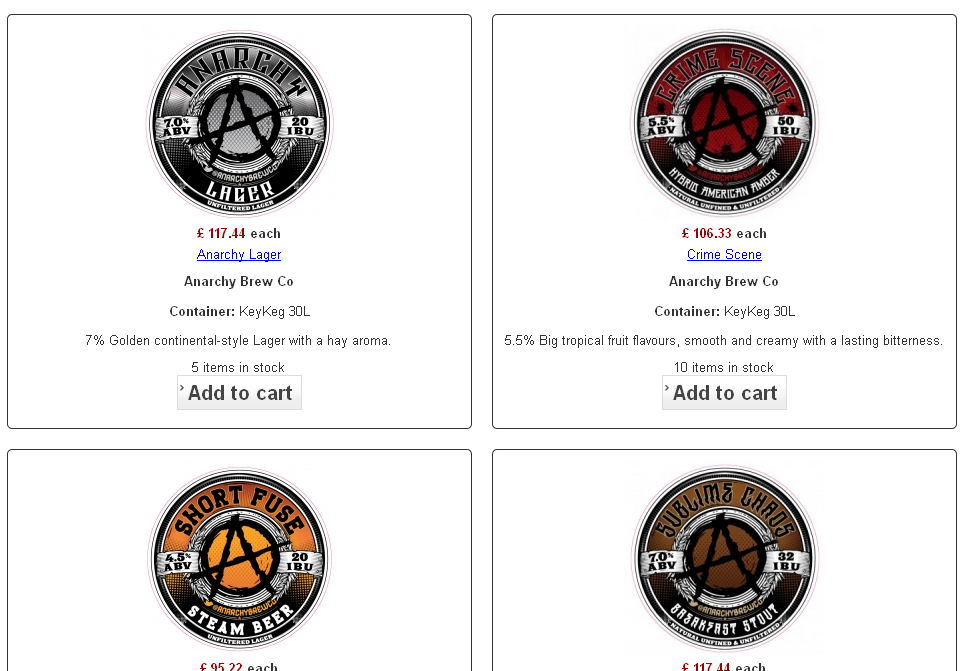
What I've been asked to try and do is to get rid of as much white space possible on the products listing page, www.craftkeg.com/index.php/mobile-version , which currently looks like this...
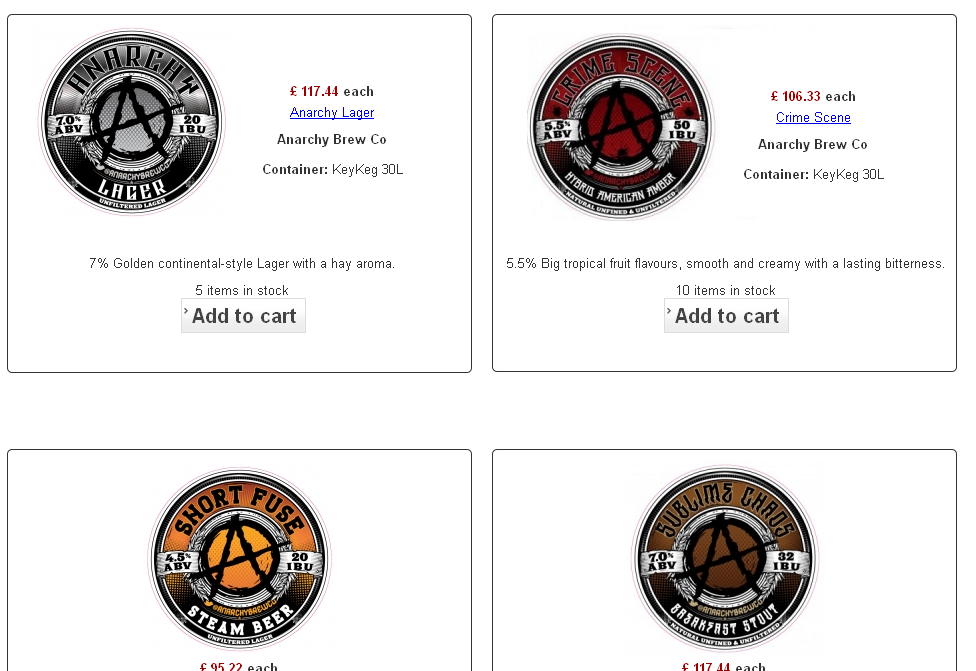
So what I think would look good is to align the image to the left and have the text on the right, as shown in this photoshopped image...
I'm just wondering if this is a possibility at all, I'm guessing by editing either the css or product / listing_img_title.pgp file?
Kind Regards,
Matthew
PS, the reason for this is to create a more mobile friendly page. Does Hikashop offer any kind of browser detection out of interest?
What I've been asked to try and do is to get rid of as much white space possible on the products listing page, www.craftkeg.com/index.php/mobile-version , which currently looks like this...
So what I think would look good is to align the image to the left and have the text on the right, as shown in this photoshopped image...
I'm just wondering if this is a possibility at all, I'm guessing by editing either the css or product / listing_img_title.pgp file?
Kind Regards,
Matthew
PS, the reason for this is to create a more mobile friendly page. Does Hikashop offer any kind of browser detection out of interest?
Last edit: 12 years 9 months ago by matps.
Please Log in or Create an account to join the conversation.

12 years 9 months ago #136311
by nicolas
Replied by nicolas on topic Aligning Images and Text in Product Listing
Hi
1. Yes, you would need to edit the file "listing_img_title" of the view "product" via the menu Display>Views.
2. If your template would be compatible with bootstrap (which is not the case as far as I can see), you would be able to turn on the "use bootstrap design" option of the configuration so that HikaShop layouts would adapt dynamically to the size of the screen.
1. Yes, you would need to edit the file "listing_img_title" of the view "product" via the menu Display>Views.
2. If your template would be compatible with bootstrap (which is not the case as far as I can see), you would be able to turn on the "use bootstrap design" option of the configuration so that HikaShop layouts would adapt dynamically to the size of the screen.
Please Log in or Create an account to join the conversation.
12 years 9 months ago #136388
by matps
Replied by matps on topic Aligning Images and Text in Product Listing
Hi Nicolas, thanks for getting back to me and clearing up the question about the bootstrap.
So I'm in the "listing_img_title" view and I'm looking at the following code
<!-- PRODUCT IMG -->
<div style="height:<?php echo $this->image->main_thumbnail_y;?>px;text-align:center;clear:both;" class="hikashop_product_image">
<div style="position:relative;text-align:center;clear:both;width:<?php echo $this->image->main_thumbnail_x;?>px;margin: auto;" class="hikashop_product_image_subdiv">
I was expecting to get the result I was after by changing text-align:center to text-align:left but that doesn't seem to have done anything.
So I'm in the "listing_img_title" view and I'm looking at the following code
<!-- PRODUCT IMG -->
<div style="height:<?php echo $this->image->main_thumbnail_y;?>px;text-align:center;clear:both;" class="hikashop_product_image">
<div style="position:relative;text-align:center;clear:both;width:<?php echo $this->image->main_thumbnail_x;?>px;margin: auto;" class="hikashop_product_image_subdiv">
I was expecting to get the result I was after by changing text-align:center to text-align:left but that doesn't seem to have done anything.
Please Log in or Create an account to join the conversation.
12 years 9 months ago #136491
by nicolas
Replied by nicolas on topic Aligning Images and Text in Product Listing
It's much more complex than that...
You would have to add such CSS to put the image on the left:
.hikashop_product_image_subdiv{ float: left; }
But then, to move the text properly on the right it will be quite complex CSS.
You would have to modify the HTML, basically to get the same display as the listing_img_desc view file.
Why not directly use that view file by selecting the item box layout "image and description" in the hikashop options of your menu ?
You would have to add such CSS to put the image on the left:
.hikashop_product_image_subdiv{ float: left; }
But then, to move the text properly on the right it will be quite complex CSS.
You would have to modify the HTML, basically to get the same display as the listing_img_desc view file.
Why not directly use that view file by selecting the item box layout "image and description" in the hikashop options of your menu ?
Please Log in or Create an account to join the conversation.
12 years 9 months ago #136816
by matps
Replied by matps on topic Aligning Images and Text in Product Listing
Hi Nicolas,
I originally did try this, but I've used html in the description to get tabbed formats for the products. For example on this page www.craftkeg.com/index.php/component/hik...s-crafty-craft-lager I'll have the html...
{tab Tasting Notes}
<h1>Craft Keg Horns Crafty Craft Lager from By The Horns in London.</h1>
<p><b>ABV:</b> 5.3% Limited edition craft lager.</p>
<h3><a href=" www.craftkeg.com/index.php/all-products/...ory/121-by-the-horns ">See More products from By The Horns.
<h4>Horns Crafty Craft Lager is available in 30 Litre <a href=" www.keykeg.com/en/ " target="_blank">KeyKegs from craft keg.
{tab Container Details}
<p>Horns Crafty Craft Lager is available in 30L KeyKegs. The KeyKeg fitting is a GR type specially adapted for the KeyKeg’s two-compartment system. Please ensure you have the right keg connector to fit this as a £20 charge will be made to return collect incorrectly ordered products.</p><br>
<img src="images/keykeg_coupler_small.jpg" alt="keykeg coupler" /><img src="images/keykegs_small.png" alt="KeyKeg Containers" />
<br>
<h4>Click for <a href=" www.craftkeg.com/index.php/home/how-to/keykeg ">more details on how to use and dispose of KeyKegs.
<p>{/tabs}</p>
so when displaying several products this takes forever to load! This is why I had created a new custom field in the products table and added that to "listing_img_title" so each product could only have a few lines of text.
I originally did try this, but I've used html in the description to get tabbed formats for the products. For example on this page www.craftkeg.com/index.php/component/hik...s-crafty-craft-lager I'll have the html...
{tab Tasting Notes}
<h1>Craft Keg Horns Crafty Craft Lager from By The Horns in London.</h1>
<p><b>ABV:</b> 5.3% Limited edition craft lager.</p>
<h3><a href=" www.craftkeg.com/index.php/all-products/...ory/121-by-the-horns ">See More products from By The Horns.
<h4>Horns Crafty Craft Lager is available in 30 Litre <a href=" www.keykeg.com/en/ " target="_blank">KeyKegs from craft keg.
{tab Container Details}
<p>Horns Crafty Craft Lager is available in 30L KeyKegs. The KeyKeg fitting is a GR type specially adapted for the KeyKeg’s two-compartment system. Please ensure you have the right keg connector to fit this as a £20 charge will be made to return collect incorrectly ordered products.</p><br>
<img src="images/keykeg_coupler_small.jpg" alt="keykeg coupler" /><img src="images/keykegs_small.png" alt="KeyKeg Containers" />
<br>
<h4>Click for <a href=" www.craftkeg.com/index.php/home/how-to/keykeg ">more details on how to use and dispose of KeyKegs.
<p>{/tabs}</p>
so when displaying several products this takes forever to load! This is why I had created a new custom field in the products table and added that to "listing_img_title" so each product could only have a few lines of text.
Please Log in or Create an account to join the conversation.
12 years 9 months ago #136866
by nicolas
Replied by nicolas on topic Aligning Images and Text in Product Listing
Hi,
It would be simpler to simply edit the listing_img_desc view file and replace product_description by the column name of your custom field than trying to rewrite the whole listing_img_title view file to look like the desc one.
It would be simpler to simply edit the listing_img_desc view file and replace product_description by the column name of your custom field than trying to rewrite the whole listing_img_title view file to look like the desc one.
Please Log in or Create an account to join the conversation.
Time to create page: 0.200 seconds