

- Posts: 214
- Thank you received: 1
Editing Size of Checkout Popup
12 years 9 months ago #137042
by matps
Editing Size of Checkout Popup was created by matps
Hi There,
So I've started using the 'Stay and display a popup notice' option for my cart, and I was wondering where abouts the size of the popup is controlled. I've noticed that it seems to be quite large which doesn't make a difference on the desktop, but when viewing on a mobile I've noticed a large amount of whitespace.
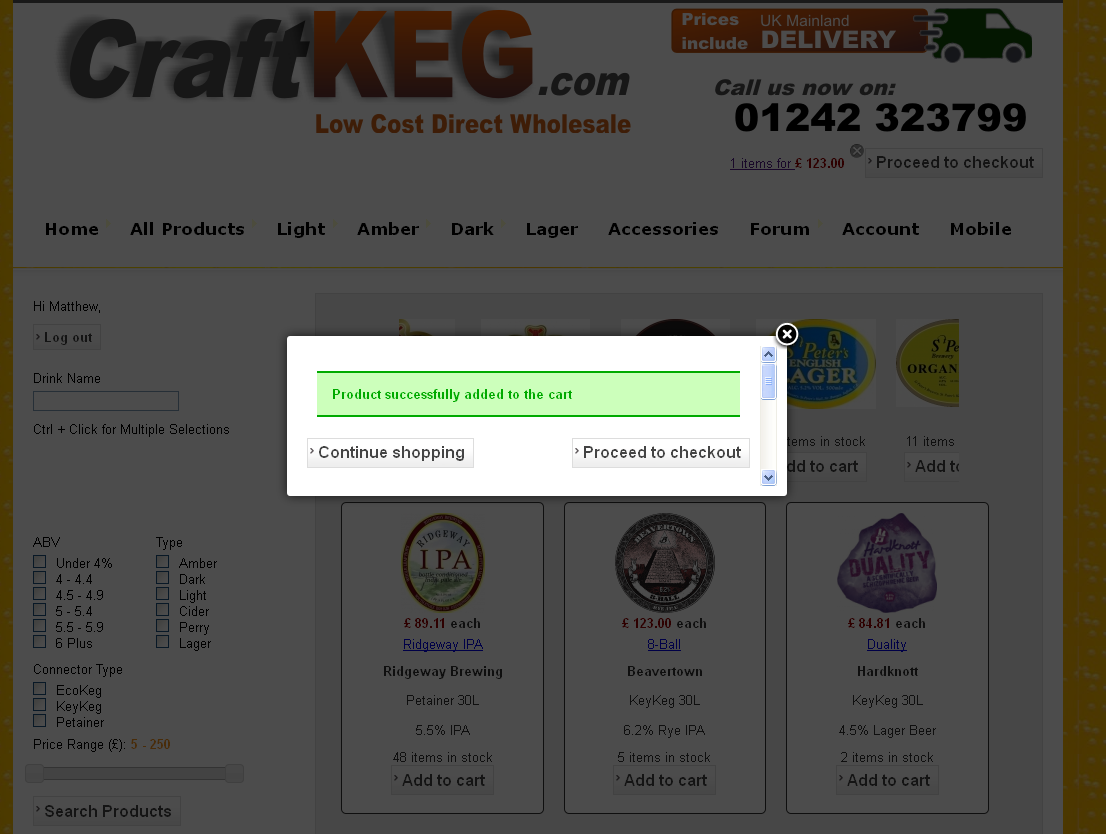
If you look at the image, you can see by the scrollbar there is space that doesn't need to be there.
Kind Regards,
Matthew
So I've started using the 'Stay and display a popup notice' option for my cart, and I was wondering where abouts the size of the popup is controlled. I've noticed that it seems to be quite large which doesn't make a difference on the desktop, but when viewing on a mobile I've noticed a large amount of whitespace.
If you look at the image, you can see by the scrollbar there is space that doesn't need to be there.
Kind Regards,
Matthew
Please Log in or Create an account to join the conversation.

12 years 9 months ago #137080
by nicolas
Replied by nicolas on topic Editing Size of Checkout Popup
Hi,
The size of the popup can be changed in the configuration with the option "Add to cart popup size" if you have the latest version of HikaShop.
The size of the popup can be changed in the configuration with the option "Add to cart popup size" if you have the latest version of HikaShop.
Please Log in or Create an account to join the conversation.
Time to create page: 0.130 seconds