

- Posts: 105
- Thank you received: 1
Migrating from Virtuemart 1.9.1 - URL Redirect
12 years 9 months ago #137725
by moneymr
Migrating from Virtuemart 1.9.1 - URL Redirect was created by moneymr
-- HikaShop version -- : 2.2.3
-- Joomla version -- : 3.2.1
I installed HikaShop 2.2.3 on Joomla 1.5 with virtuemart 1.9.1 and made import.
Everything fine.
Next, I installed Joomla 3.2.1 and HikaShop 2.2.3 on another site.
After, I made export all tables names *_hika from database with joomla 1.5. In backup file I changed suffix and import it to Joomla 3.2.1
Turn on Virutemart redirection plugin - but redirection an old URL does not worked on Joomla 3.2.1
But in Joomla 1.5 it worked well.
What should I do to make work redirection?
-- Joomla version -- : 3.2.1
I installed HikaShop 2.2.3 on Joomla 1.5 with virtuemart 1.9.1 and made import.
Everything fine.
Next, I installed Joomla 3.2.1 and HikaShop 2.2.3 on another site.
After, I made export all tables names *_hika from database with joomla 1.5. In backup file I changed suffix and import it to Joomla 3.2.1
Turn on Virutemart redirection plugin - but redirection an old URL does not worked on Joomla 3.2.1
But in Joomla 1.5 it worked well.
What should I do to make work redirection?
Please Log in or Create an account to join the conversation.

12 years 9 months ago #137732
by Jerome
Jerome - Obsidev.com
HikaMarket & HikaSerial developer / HikaShop core dev team.
Replied by Jerome on topic Migrating from Virtuemart 1.9.1 - URL Redirect
Hi,
Did you import the table "hikashop_vm_prod" ?
Does the system plugin "vm redirect" enabled ?
Regards,
Did you import the table "hikashop_vm_prod" ?
Does the system plugin "vm redirect" enabled ?
Regards,
Jerome - Obsidev.com
HikaMarket & HikaSerial developer / HikaShop core dev team.
Please Log in or Create an account to join the conversation.
12 years 9 months ago - 12 years 9 months ago #137800
by moneymr
Replied by moneymr on topic Migrating from Virtuemart 1.9.1 - URL Redirect
Hi.
Table hikashop_vm_prod is imported from Joomla 1.5.
Everything was imported. I delete all *_hika tables and import it from Joomla 1.5
Plugin is turned on.
Also, after importing I have too big menu on Hikashop. Please look at picture
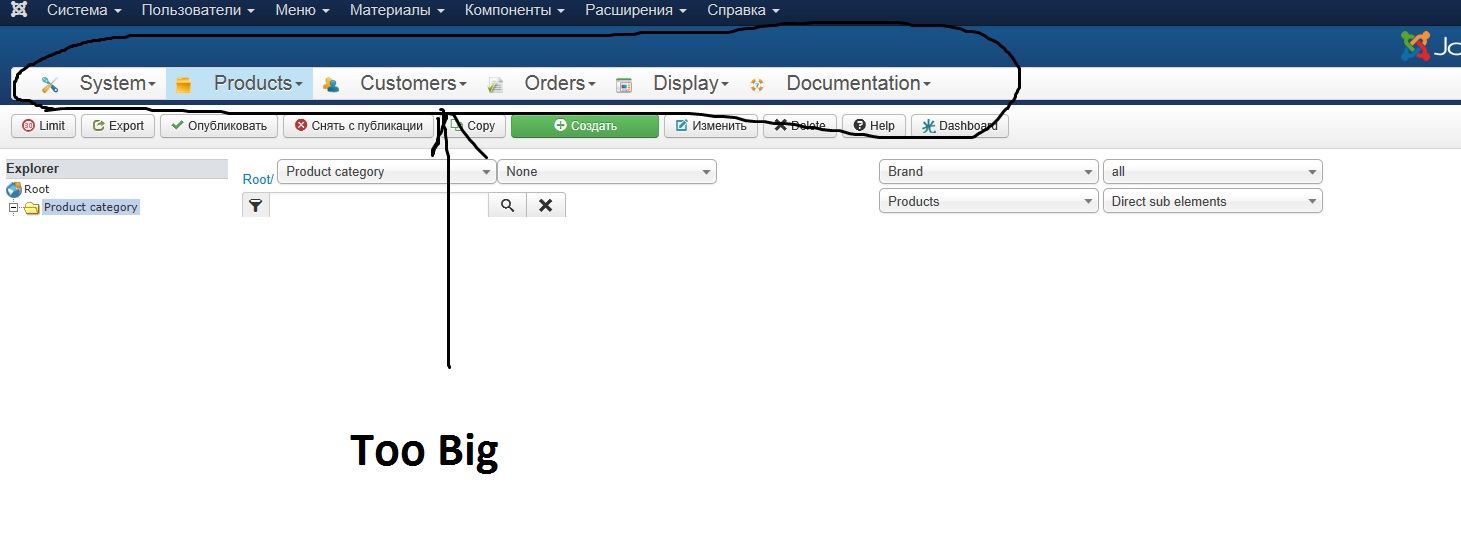
Table hikashop_vm_prod is imported from Joomla 1.5.
Everything was imported. I delete all *_hika tables and import it from Joomla 1.5
Plugin is turned on.
Also, after importing I have too big menu on Hikashop. Please look at picture
Last edit: 12 years 9 months ago by moneymr.
Please Log in or Create an account to join the conversation.
12 years 9 months ago #137846
by moneymr
Replied by moneymr on topic Migrating from Virtuemart 1.9.1 - URL Redirect
In what table located old Virtuemart URLs?
Like this: site.ru/catalog/clock.html?page=shop.pro...ge.tpl&product_id=29
Like this: site.ru/catalog/clock.html?page=shop.pro...ge.tpl&product_id=29
Please Log in or Create an account to join the conversation.

12 years 9 months ago #137883
by nicolas
Replied by nicolas on topic Migrating from Virtuemart 1.9.1 - URL Redirect
Hi,
The VM redirect plugin can only work after the VirtueMart router has converted the SEF URLs of VirtueMart to non-SEF URLs.
Without it, the plugin cannot understand the SEF URLs as it doesn't even know if they belong to VirtueMart or not.
I don't know what you were previously using for the SEFing of VM URLs but you would need to have the same system back on your Joomla 3.x website if you want the plugin to work.
Alternatively, you could also modify the URLs dynamically with htaccess rules.
For example, you could change clock.html? to index.php?option=com_virtuemart&
That way, the URLs would be manually non-SEFed without the VirtueMart router and the VM redirect plugin would do the rest and redirect to the corresponding page in HikaShop.
That will require a bit if fiddling with the htaccess on your website:
www.google.com/search?q=htaccess+replace...10&es_sm=93&ie=UTF-8
Regarding the HikaShop backend toolbar, that is the normal size of the menu toolbar on Joomla 3.x as it uses the new styling of toolbars on Joomla 3.x
It should actually be below the button bar and that can be changed with the "menu position" option of the configuration.
The VM redirect plugin can only work after the VirtueMart router has converted the SEF URLs of VirtueMart to non-SEF URLs.
Without it, the plugin cannot understand the SEF URLs as it doesn't even know if they belong to VirtueMart or not.
I don't know what you were previously using for the SEFing of VM URLs but you would need to have the same system back on your Joomla 3.x website if you want the plugin to work.
Alternatively, you could also modify the URLs dynamically with htaccess rules.
For example, you could change clock.html? to index.php?option=com_virtuemart&
That way, the URLs would be manually non-SEFed without the VirtueMart router and the VM redirect plugin would do the rest and redirect to the corresponding page in HikaShop.
That will require a bit if fiddling with the htaccess on your website:
www.google.com/search?q=htaccess+replace...10&es_sm=93&ie=UTF-8
Regarding the HikaShop backend toolbar, that is the normal size of the menu toolbar on Joomla 3.x as it uses the new styling of toolbars on Joomla 3.x
It should actually be below the button bar and that can be changed with the "menu position" option of the configuration.
Please Log in or Create an account to join the conversation.
12 years 9 months ago - 12 years 9 months ago #137888
by moneymr
Replied by moneymr on topic Migrating from Virtuemart 1.9.1 - URL Redirect
Hi. Thanks.
It working when I use this construction: index.php?option=com_virtuemart&
But I still do not like how to looks backend Hika Toolbar.
When I installed Hikashop on Joomla 3.2.1 is looks more comfort for me. But after I imported * _hika tables it changes the view.
How can I turn back it to normal size? Maybe I should migrate not all tables of * _hika in phpmyadmin?
It working when I use this construction: index.php?option=com_virtuemart&
But I still do not like how to looks backend Hika Toolbar.
When I installed Hikashop on Joomla 3.2.1 is looks more comfort for me. But after I imported * _hika tables it changes the view.
How can I turn back it to normal size? Maybe I should migrate not all tables of * _hika in phpmyadmin?
Last edit: 12 years 9 months ago by moneymr.
Please Log in or Create an account to join the conversation.
12 years 9 months ago #137892
by Jerome
Jerome - Obsidev.com
HikaMarket & HikaSerial developer / HikaShop core dev team.
Replied by Jerome on topic Migrating from Virtuemart 1.9.1 - URL Redirect
Hi,
The toolbar position is the HikaShop option : menu position
www.hikashop.com/support/documentation/5...html#display_general
Regards,
The toolbar position is the HikaShop option : menu position
www.hikashop.com/support/documentation/5...html#display_general
Regards,
Jerome - Obsidev.com
HikaMarket & HikaSerial developer / HikaShop core dev team.
Please Log in or Create an account to join the conversation.
12 years 9 months ago #137913
by moneymr
Replied by moneymr on topic Migrating from Virtuemart 1.9.1 - URL Redirect
Thanks a lot.
Please Log in or Create an account to join the conversation.
Time to create page: 0.197 seconds