

- Posts: 214
- Thank you received: 1
Creating a Product List with Table View
12 years 8 months ago #139985
by matps
Creating a Product List with Table View was created by matps
Hi Guys,
So what I'm trying to do is I'm editing the product / listing_table.php to try and create a products list which you can see here - www.craftkeg.com/index.php/price-list , and I'm linking to a similar page which I've called "Print Friendly version" which strips out the menu and add to cart which aren't any use for someone to print.
Now I have two issues, first is I'd like to be able to create some space between the columns, and my second question is if they are both using the table view, which does my Printer friendly version look different with hardly any spacing?
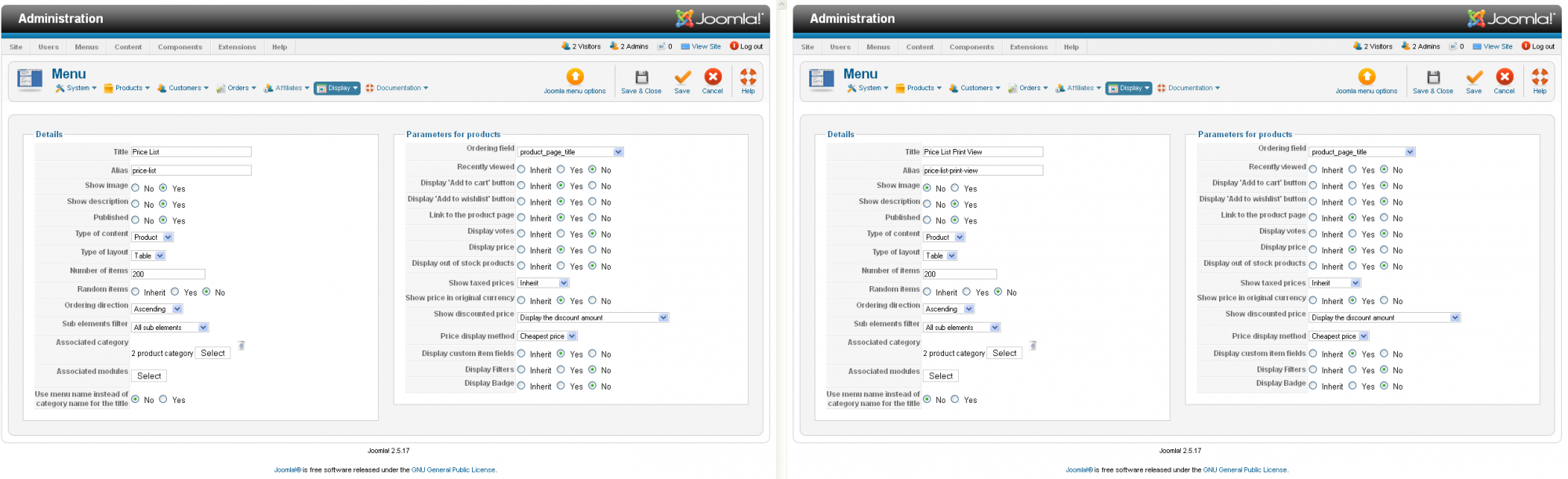
My other question is why do I have images for both, when I've selected Show Image for only the Price List, I've selected no for the Price List Print View. Any help would be greatly appreciated.
Kind Regards
So what I'm trying to do is I'm editing the product / listing_table.php to try and create a products list which you can see here - www.craftkeg.com/index.php/price-list , and I'm linking to a similar page which I've called "Print Friendly version" which strips out the menu and add to cart which aren't any use for someone to print.
Now I have two issues, first is I'd like to be able to create some space between the columns, and my second question is if they are both using the table view, which does my Printer friendly version look different with hardly any spacing?
My other question is why do I have images for both, when I've selected Show Image for only the Price List, I've selected no for the Price List Print View. Any help would be greatly appreciated.
Kind Regards
Please Log in or Create an account to join the conversation.

12 years 8 months ago #140030
by nicolas
Replied by nicolas on topic Creating a Product List with Table View
Hi,
1. You can add such CSS in the frontend CSS file of HikaShop:
#hikashop_category_information_menu_625 table{ width: 100%; }
www.hikashop.com/support/support/documen...ize-the-display.html
2. They both look the same to me, with the exact same spacing.
3. The show image option is to display the image of the category or not. Not to display the images of the products or not.
There is actually no option for that. You would have to edit the file "listing_table" and add such code at the beginning:
<?php $this->config->set('thumbnail',false);?>
1. You can add such CSS in the frontend CSS file of HikaShop:
#hikashop_category_information_menu_625 table{ width: 100%; }
www.hikashop.com/support/support/documen...ize-the-display.html
2. They both look the same to me, with the exact same spacing.
3. The show image option is to display the image of the category or not. Not to display the images of the products or not.
There is actually no option for that. You would have to edit the file "listing_table" and add such code at the beginning:
<?php $this->config->set('thumbnail',false);?>
The following user(s) said Thank You: matps
Please Log in or Create an account to join the conversation.
12 years 8 months ago #140075
by matps
Replied by matps on topic Creating a Product List with Table View
Thanks very much for your help with the css Nicolas.
I don't know if you would have done it a different way, but I ended up duplicating my beez5 template, appying the copy to the Print View menu item, then adding different code to both "listing_table" views to get the result I desired.
www.craftkeg.com/index.php/price-list
Thanks again for helping!
I don't know if you would have done it a different way, but I ended up duplicating my beez5 template, appying the copy to the Print View menu item, then adding different code to both "listing_table" views to get the result I desired.
www.craftkeg.com/index.php/price-list
Thanks again for helping!
The following user(s) said Thank You: nicolas
Please Log in or Create an account to join the conversation.
Time to create page: 0.169 seconds