
- Posts: 45
- Thank you received: 1
Display the Cart module
- keithstanley
-
 Topic Author
- Offline
Less
More
12 years 8 months ago #141559
by keithstanley
Display the Cart module was created by keithstanley
I am sorry but I have looked and looked but I can't find what I am after. I am sure there is a "option" I have not enabled but I can not find it to enable it. I simply want to display the Cart in the same manner that it is displayed on the Hikashop "demo" shop; see picture.
I have put a red box around what I am talking about
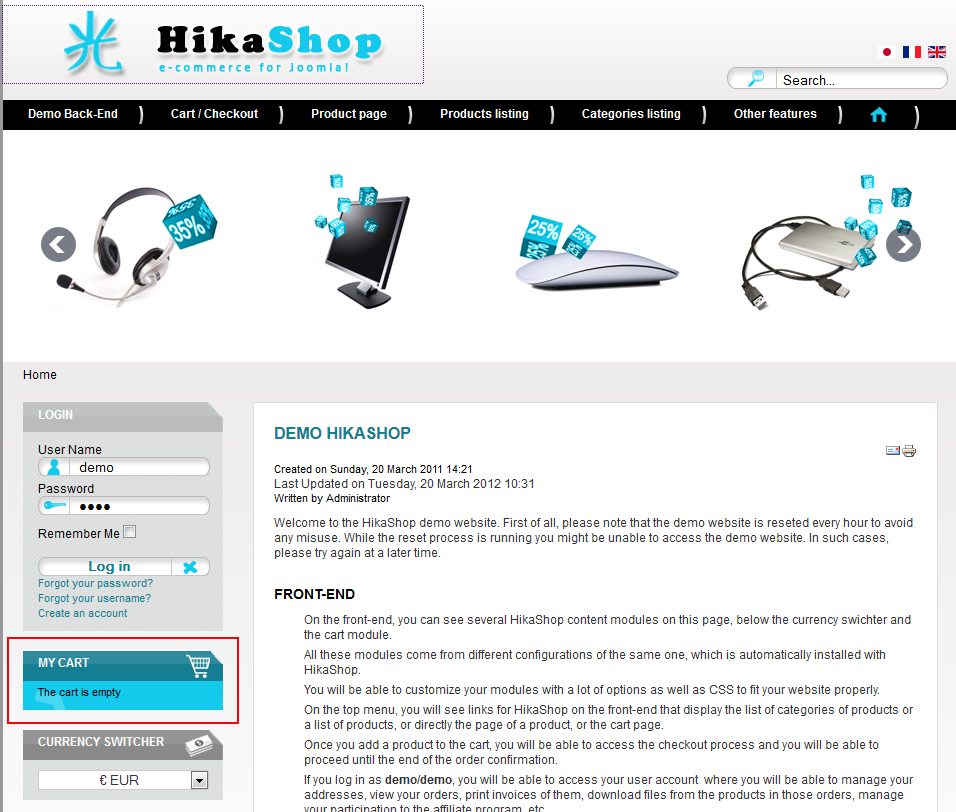
This is the site I am working on www.mindsafety.eu/index.php/shop/hikasho...r-categories-listing
thanks and again I am sorry but I can't find the answer in the many many postings of the forum.
Thanks
I have put a red box around what I am talking about
This is the site I am working on www.mindsafety.eu/index.php/shop/hikasho...r-categories-listing
thanks and again I am sorry
but I can't find the answer in the many many postings of the forum.Thanks
Please Log in or Create an account to join the conversation.
- keithstanley
-
Topic Author
- Offline
Less
More
- Posts: 45
- Thank you received: 1
12 years 8 months ago - 12 years 8 months ago #141565
by keithstanley
Replied by keithstanley on topic Display the Cart module
OK I have been "poking around" some more and I have made some changes and I have now got the beginning of what I am after.

When the shop area is first accessed there is the text "My Cart" at the top and beneath that is states " The cart is empty."
www.mindsafety.eu/index.php/shop/hikasho...r-categories-listing
That is closer to what I am after but I am not there yet
Does anyone have any ideas?
I really like the way the cart shows on the Hikashop demo shop and that I what I am trying to acheive.
Thanks
When the shop area is first accessed there is the text "My Cart" at the top and beneath that is states " The cart is empty."
www.mindsafety.eu/index.php/shop/hikasho...r-categories-listing
That is closer to what I am after
but I am not there yet Does anyone have any ideas?
I really like the way the cart shows on the Hikashop demo shop and that I what I am trying to acheive.
Thanks
Last edit: 12 years 8 months ago by keithstanley.
Please Log in or Create an account to join the conversation.

12 years 8 months ago #141654
by Eliot
Replied by Eliot on topic Display the Cart module
Hi there,
The cart on page looks quite good. Could you be more specific about what else you are looking for?
Styling?
The cart on page looks quite good. Could you be more specific about what else you are looking for?
Styling?
The following user(s) said Thank You: keithstanley
Please Log in or Create an account to join the conversation.
- keithstanley
-
Topic Author
- Offline
Less
More
- Posts: 45
- Thank you received: 1
12 years 8 months ago #141684
by keithstanley
Replied by keithstanley on topic Display the Cart module
Hello Eliot,
Thanks for saying the cart looks good but I am unsure what you are seeing that "looks good".
I would like to make mine look like the one on the Hikashop Demo page; see picture.
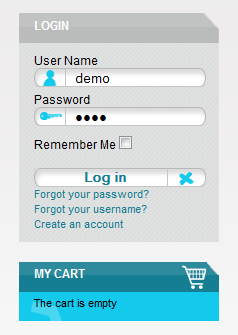
I would probably want to use different colours but what is in the picture is almost exactly what I am after.
Now I understand it is probably a css task but I have used Firebug to try to learn how it was done on the Demo site but I can't find it.
Could you please point me to the correct file?
Thanks and I am still loving working with Hikashop!!!
Thanks for saying the cart looks good but I am unsure what you are seeing that "looks good".
I would like to make mine look like the one on the Hikashop Demo page; see picture.
I would probably want to use different colours but what is in the picture is almost exactly what I am after.
Now I understand it is probably a css task but I have used Firebug to try to learn how it was done on the Demo site but I can't find it.
Could you please point me to the correct file?
Thanks and I am still loving working with Hikashop!!!
Please Log in or Create an account to join the conversation.

12 years 8 months ago #141709
by nicolas
Replied by nicolas on topic Display the Cart module
It's indeed done with CSS in the template :
That CSS assumes that you put the images at the correct place on your website and that you added the text " moduletable-cart" (with the space at the beginning) in the "module class suffix" option of the module.
Code:
/********************************** cart module*/
.moduletable-cart{
margin-left:20px;}
.moduletable-cart h3{
padding-left:15px;
padding-top:5px;
color:#FFF;
font-size:12px;
background: url(../images/cart_top.png) no-repeat;
height:25px;
}
.moduletable-cart #hikashop_cart_module{
background-image: url(../images/cart_center.png);
background-repeat: no-repeat;
background-color:#14CBEC;
margin-bottom:20px;
margin-right:5px;
padding-bottom:10px;
padding-left:15px;
padding-right:10px;
font-size:11px;
text-align:left;
}
.moduletable-cart .hikashop_product_price{
color:#FFF;
margin-left:5px;
}
.hikashop_cart .hikashop_cart_module_product_name_title{
padding-bottom:10px;
padding-top:3px;}
.hikashop_cart .hikashop_cart_module_product_quantity_title{
padding-bottom:10px;
padding-top:3px;}
.hikashop_cart .hikashop_cart_module_product_price_title{
padding-bottom:10px;
padding-top:3px;}
.hikashop_cart .hikashop_cart_module_product_total_title{
font-weight:bold;}
.hikashop_cart .hikashop_cart_module_product_quantity_value input{
border:1px solid #167e93}
.hikashop_cart hr{
background-color:#167e93;
margin-top:10px;
margin-right:10px;}
.moduletable-cart .hikashop_cart_module_product_name_value a{
color:#000;}
.moduletable-cart .hikashop_product_price_full{
padding-top:7px;}
.moduletable-cart .hikashop_cart_input_button{
background: url(../images/cart_ok.png) no-repeat;
background-color:transparent;
width:172px;
height:23px;
color:#FFF;
font-weight:bold;
cursor:pointer;
font-size:12px;}
.moduletable-cart span.hikashop_product_price {
white-space: normal;
}
.hikashop_cart_module_product_delete_value img{
display:none;}
.hikashop_cart_module_product_delete_value a{
background-image:url(../images/delete2.png);
background-repeat:no-repeat;
display:block;
height:16px;
width:16px;}
.moduletable-cart #hikashop_cart {padding-top:5px;}
/******image delete on checkout page*/
.hikashop_cart_product_quantity_delete img{
display:none;}
.hikashop_cart_product_quantity_delete a{
background-image:url(../images/delete2.png);
background-repeat:no-repeat;
display:block;
height:16px;
width:16px;
float:right;
}
The following user(s) said Thank You: keithstanley
Please Log in or Create an account to join the conversation.
- keithstanley
-
Topic Author
- Offline
Less
More
- Posts: 45
- Thank you received: 1
12 years 8 months ago - 12 years 8 months ago #141857
by keithstanley
Replied by keithstanley on topic Display the Cart module
That makes perfect sense except for one part, sorry
I understand what you have said and I have been looking at the Demo site again using Firebug and I have seen the code there.
I just can't find where I add the text " moduletable-cart" (with the space at the beginning) in the "module class suffix" option of the module.
Where is the "module class suffix" option of the module. Is it in the Hikashop module or the Hikashop cart module or ??????
Sorry but I just can't find the place where I need to add the text " moduletable-cart" (with the space at the beginning) in the "module class suffix" option of the module.
The other question I have is I have some coding work for my site that needs doing; isn't there a way to get someone from the forum to do the work and pay them for it?
Thanks
AHHH!!!!! I have just been looking at the DEMO site again this time through the back-end and I am wondering is this where I must add the text " moduletable-cart" (with the space at the beginning) in the "module class suffix" option of the module? See picture below:
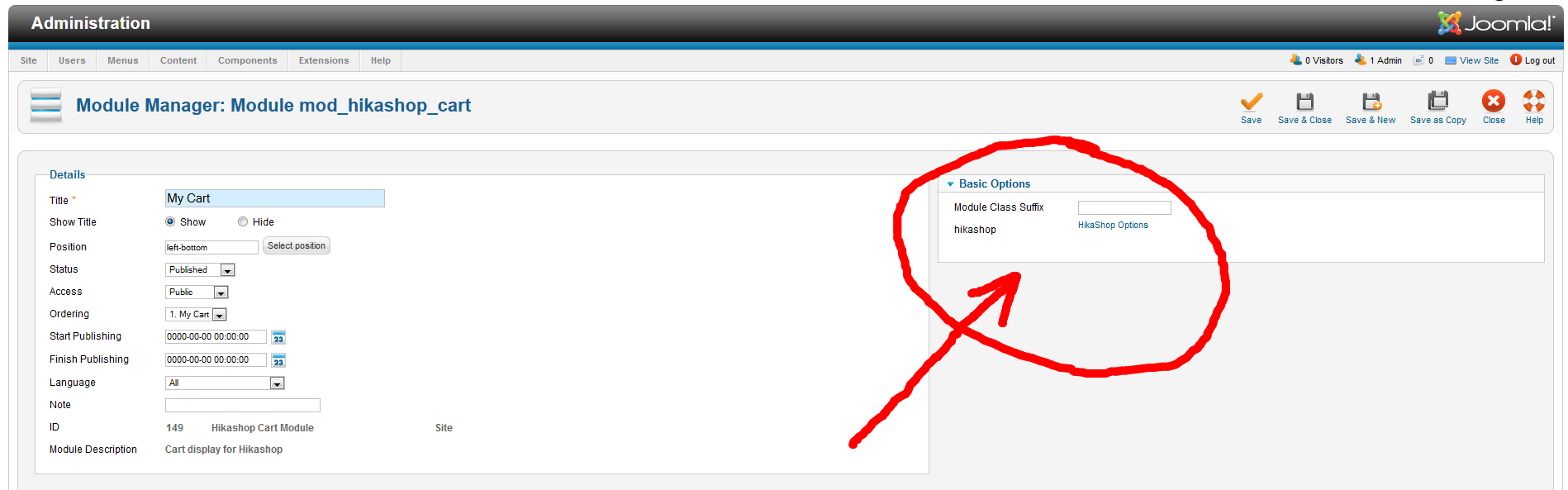
Sorry to have so many question but as you know 1 wrong adjustment to a website can take the site down!!!!
Thanks for your help and a great tool!!!!
I understand what you have said and I have been looking at the Demo site again using Firebug and I have seen the code there.
I just can't find where I add the text " moduletable-cart" (with the space at the beginning) in the "module class suffix" option of the module.
Where is the "module class suffix" option of the module. Is it in the Hikashop module or the Hikashop cart module or ??????
Sorry but I just can't find the place where I need to add the text " moduletable-cart" (with the space at the beginning) in the "module class suffix" option of the module.
The other question I have is I have some coding work for my site that needs doing; isn't there a way to get someone from the forum to do the work and pay them for it?
Thanks
AHHH!!!!! I have just been looking at the DEMO site again this time through the back-end and I am wondering is this where I must add the text " moduletable-cart" (with the space at the beginning) in the "module class suffix" option of the module? See picture below:
Sorry to have so many question but as you know 1 wrong adjustment to a website can take the site down!!!!
Thanks for your help and a great tool!!!!
Last edit: 12 years 8 months ago by keithstanley.
Please Log in or Create an account to join the conversation.
12 years 8 months ago #141865
by Eliot
Replied by Eliot on topic Display the Cart module
Glad to see you found the answer!
And thanks for sharing it, it might help other users
And thanks for sharing it, it might help other users
The following user(s) said Thank You: keithstanley
Please Log in or Create an account to join the conversation.
11 years 2 months ago #208786
by Siberio87
Replied by Siberio87 on topic Display the Cart module
i am sorry to open a very old topic
but i been trying to do this aswell but i cant get this done for some reason
www.ecp-products.nl/webshop
but i been trying to do this aswell but i cant get this done for some reason
www.ecp-products.nl/webshop
Please Log in or Create an account to join the conversation.
11 years 2 months ago #208795
by nicolas
Replied by nicolas on topic Display the Cart module
Hi,
There are several issues on your website which lead to that CSS code not working properly:
1. Your template is using h2 tags instead of h3 tags for the module titles.
So you would need to change that in the CSS that you added.
2. You uploaded the same image for the cart_top.png and cart_center.png
Please make sure that you're using the correct images or it won't work.
3. Your template is applying CSS to the module title and the module surroundings which makes the images not fit properly. So it will require some additional custom CSS.
There are several issues on your website which lead to that CSS code not working properly:
1. Your template is using h2 tags instead of h3 tags for the module titles.
So you would need to change that in the CSS that you added.
2. You uploaded the same image for the cart_top.png and cart_center.png
Please make sure that you're using the correct images or it won't work.
3. Your template is applying CSS to the module title and the module surroundings which makes the images not fit properly. So it will require some additional custom CSS.
Please Log in or Create an account to join the conversation.
11 years 2 months ago #208822
by Siberio87
Replied by Siberio87 on topic Display the Cart module
Hey Nicolas,
thanks for your reply.
i changed the header to H2 that now displayed the image for me, i did change the width of the image with photoshop and i did renamed the cart_center to cart_center2 so it wont show an image there for now
the only thing i have problems with now is removing the gap between the cart_top and the actual cart (attached an image)
is it just a css issue?
regards,
Davy
thanks for your reply.
i changed the header to H2 that now displayed the image for me, i did change the width of the image with photoshop and i did renamed the cart_center to cart_center2 so it wont show an image there for now
the only thing i have problems with now is removing the gap between the cart_top and the actual cart (attached an image)
is it just a css issue?
regards,
Davy
Please Log in or Create an account to join the conversation.
11 years 2 months ago #208828
by nicolas
Replied by nicolas on topic Display the Cart module
Hi,
Yes, it's just a CSS issue dues to the CSS of your template.
Add that CSS and that should do it:
.moduletable-cart h2{
margin: 0 !important;
padding-bottom: 0 !important;
}
Yes, it's just a CSS issue dues to the CSS of your template.
Add that CSS and that should do it:
.moduletable-cart h2{
margin: 0 !important;
padding-bottom: 0 !important;
}
Please Log in or Create an account to join the conversation.
Time to create page: 0.193 seconds