

- Posts: 461
- Thank you received: 36
Extension Manager Discover
12 years 5 months ago - 12 years 5 months ago #151054
by joomleb
Extension Manager Discover was created by joomleb
-- HikaShop version -- : 2.3.o
-- Joomla version -- : 3.2.3
-- PHP version -- : 5.4.8
-- Browser(s) name and version -- : Chrome 33.x
Hi guys,
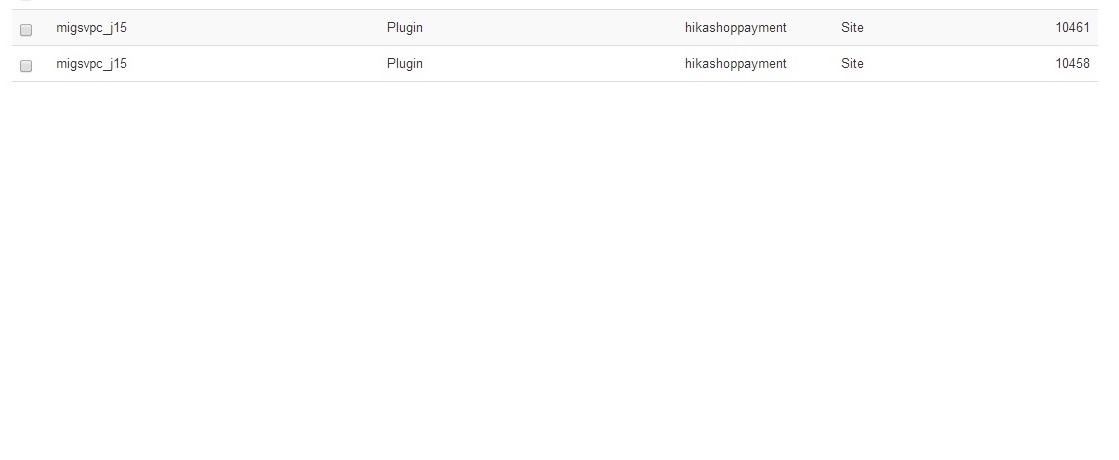
looking on my Joomla 3.2.3 (last 2.3.0 HikaShop) Extension Manager Discover and clicking on "discover" I found:
- migsvpc_j15
- migsvpc_j15
So,
1 - Why I have back this result while I never seen anything during installations/updates ?
2 - Why a double result of that plugin (with two differents ID) ?
3 - Now, joomla documentation say to select the items and click on install, is it right ?
4 - I tested it on a site and I had back:
Warning
JFolder: :files: Path is not a folder. Path: /home/.../test.com/plugins/hikashoppayment/migsvpc_j15
JFolder: :files: Path is not a folder. Path: /home/.../test.com/plugins/hikashoppayment/migsvpc_j15
JInstaller: :Install: Cannot find XML setup file
JFolder: :files: Path is not a folder. Path: /home/.../test.com/plugins/hikashoppayment/migsvpc_j15
JFolder: :files: Path is not a folder. Path: /home/.../test.com/plugins/hikashoppayment/migsvpc_j15
JInstaller: :Install: Cannot find XML setup file
Is it right ?
Please, Can you help me on understand and solve this issue ?
-- Joomla version -- : 3.2.3
-- PHP version -- : 5.4.8
-- Browser(s) name and version -- : Chrome 33.x
Hi guys,
looking on my Joomla 3.2.3 (last 2.3.0 HikaShop) Extension Manager Discover and clicking on "discover" I found:
- migsvpc_j15
- migsvpc_j15
So,
1 - Why I have back this result while I never seen anything during installations/updates ?
2 - Why a double result of that plugin (with two differents ID) ?
3 - Now, joomla documentation say to select the items and click on install, is it right ?
4 - I tested it on a site and I had back:
Warning
JFolder: :files: Path is not a folder. Path: /home/.../test.com/plugins/hikashoppayment/migsvpc_j15
JFolder: :files: Path is not a folder. Path: /home/.../test.com/plugins/hikashoppayment/migsvpc_j15
JInstaller: :Install: Cannot find XML setup file
JFolder: :files: Path is not a folder. Path: /home/.../test.com/plugins/hikashoppayment/migsvpc_j15
JFolder: :files: Path is not a folder. Path: /home/.../test.com/plugins/hikashoppayment/migsvpc_j15
JInstaller: :Install: Cannot find XML setup file
Is it right ?
Please, Can you help me on understand and solve this issue ?
Last edit: 12 years 5 months ago by joomleb.
Please Log in or Create an account to join the conversation.

12 years 5 months ago #151058
by nicolas
Replied by nicolas on topic Extension Manager Discover
Hi,
The migs vpc plugin should already be installed. No need to do that to use it. On top of that the migsvpc_j15 xml is only for Joomla 1.5, not Joomla 3.x so there is no point in trying to install it anyway. Now I don't know why the joomla discovery system would display that on your website. You should just ignore these entries.
The migs vpc plugin should already be installed. No need to do that to use it. On top of that the migsvpc_j15 xml is only for Joomla 1.5, not Joomla 3.x so there is no point in trying to install it anyway. Now I don't know why the joomla discovery system would display that on your website. You should just ignore these entries.
Please Log in or Create an account to join the conversation.
12 years 5 months ago - 12 years 5 months ago #151083
by joomleb
Replied by joomleb on topic Extension Manager Discover
Hi Nicolas,
So, I tested and:
1 - Yes, the "HikaShop MIGS VPC payment plugin" with ID 10336 is already installed, while the migsvpc_j15 in Discover has ID 10485
2 - "migsvpc_j15 xml is only for Joomla 1.5" - But my site started from Joomla 3.x !
3 - So, I created a new subdomain (PHP 5.4.8 - mySQLi 5.5.32-cll - Apache 2.2.26) and installed a new clean Joomla 3.2.3, configured "Error Reporting: Development" and installed last HikaShop Business 2.3.0 Uploading the package file = installation OK = BUT, in Extension Manager Discover clicking on "discover":
- migsvpc_j15
the plugin is there! So, I think this is something need to be fixed in HikaShop. Please, let me know if you want test site credentials and let me know if you can replicate the error.
4 - "You should just ignore these entries": Not a good "answer". Please, How to erase it (also manually) from the discover list ? There I can only find an "install" button
Many Thanks for support!
So, I tested and:
1 - Yes, the "HikaShop MIGS VPC payment plugin" with ID 10336 is already installed, while the migsvpc_j15 in Discover has ID 10485
2 - "migsvpc_j15 xml is only for Joomla 1.5" - But my site started from Joomla 3.x !
3 - So, I created a new subdomain (PHP 5.4.8 - mySQLi 5.5.32-cll - Apache 2.2.26) and installed a new clean Joomla 3.2.3, configured "Error Reporting: Development" and installed last HikaShop Business 2.3.0 Uploading the package file = installation OK = BUT, in Extension Manager Discover clicking on "discover":
- migsvpc_j15
the plugin is there! So, I think this is something need to be fixed in HikaShop. Please, let me know if you want test site credentials and let me know if you can replicate the error.
4 - "You should just ignore these entries": Not a good "answer". Please, How to erase it (also manually) from the discover list ? There I can only find an "install" button
Many Thanks for support!
Last edit: 12 years 5 months ago by joomleb.
Please Log in or Create an account to join the conversation.
12 years 5 months ago #151121
by nicolas
Replied by nicolas on topic Extension Manager Discover
Delete the file plugins/hikashoppayment/migsvpc/migsvpc_j15.xml if you don't want it.
Please Log in or Create an account to join the conversation.
12 years 5 months ago #151214
by joomleb
Replied by joomleb on topic Extension Manager Discover
Hi Nicolas,
thanks for the instruction, tested and issue seem to be solved.
As far as I understand on next update release HikaShop will install again that .xml file for joomla 1.5, or HikaShop will be fixed for this issue ?
Many Thanks for Support!
thanks for the instruction, tested and issue seem to be solved.
As far as I understand on next update release HikaShop will install again that .xml file for joomla 1.5, or HikaShop will be fixed for this issue ?
Many Thanks for Support!
Please Log in or Create an account to join the conversation.
12 years 5 months ago #151231
by nicolas
Replied by nicolas on topic Extension Manager Discover
It depends. If you do it tomorrow, you'll have to do it again. If you do it with a future version of HikaShop you won't have to.
Please Log in or Create an account to join the conversation.
12 years 5 months ago #151305
by joomleb
Replied by joomleb on topic Extension Manager Discover
I mean sure from next release 
Many Thanks for Support !
Many Thanks for Support !
Please Log in or Create an account to join the conversation.
Time to create page: 0.194 seconds