

- Posts: 377
- Thank you received: 7
Variants generating random prices when added
12 years 5 months ago #153856
by Dibben
Variants generating random prices when added was created by Dibben
When I add variants to a product it generates a random price I haven't been able to figure out why this is or where the prices may be coming from as my product variants also don't need separate prices.
kind regards
Alex
-- url of the page with the problem -- :http://www.wigsbysimone.co.uk/new456/Amore-Wigs/boiler-part/product_id-375/name-alyssa.html
-- HikaShop version -- : 2.3.0
-- Joomla version -- : 3.2.0
kind regards
Alex
-- url of the page with the problem -- :http://www.wigsbysimone.co.uk/new456/Amore-Wigs/boiler-part/product_id-375/name-alyssa.html
-- HikaShop version -- : 2.3.0
-- Joomla version -- : 3.2.0
Please Log in or Create an account to join the conversation.

Less
More
- Posts: 12953
- Thank you received: 1778
12 years 5 months ago #153863
by Mohamed Thelji
Replied by Mohamed Thelji on topic Variants generating random prices when added
Hello Alex,
Are you sure that you didn't set any prices through your product variants configuration page ?
Are you sure that you didn't set any prices through your product variants configuration page ?
Please Log in or Create an account to join the conversation.
12 years 5 months ago #153962
by Dibben
Replied by Dibben on topic Variants generating random prices when added
Hi,
No these products were added in from scratch and it still seems to be adding random variant prices. Where would the price setting be for variants in the back end that wouldn't be immediately noticeable or that I might of missed at all?
Regards
Alex
No these products were added in from scratch and it still seems to be adding random variant prices. Where would the price setting be for variants in the back end that wouldn't be immediately noticeable or that I might of missed at all?
Regards
Alex
Please Log in or Create an account to join the conversation.
Less
More
- Posts: 12953
- Thank you received: 1778
12 years 5 months ago #153970
by Mohamed Thelji
Replied by Mohamed Thelji on topic Variants generating random prices when added
The solution will be to :
1. Check one of your product variant price through your product page (front-end)
2. Check that product variant price through your back-end, to do that you'll just have to :
- Go to "Hikashop->Products->'YourProduct'"
- Use the "Manage variants" button of the "Characteristics" tab
- Go to your variant configuration page.
And see if you have set a different price for your product variant than your product price.
1. Check one of your product variant price through your product page (front-end)
2. Check that product variant price through your back-end, to do that you'll just have to :
- Go to "Hikashop->Products->'YourProduct'"
- Use the "Manage variants" button of the "Characteristics" tab
- Go to your variant configuration page.
And see if you have set a different price for your product variant than your product price.
Please Log in or Create an account to join the conversation.
12 years 5 months ago #154084
by Dibben
Replied by Dibben on topic Variants generating random prices when added
I understand how it works, but we didnt set a different price of each one, when we add the variant group then click on manage variants, it automatically generates them but when it does this it creates randomised prices for the variants, they should be the same as the original product?
Thanks
Alex
Thanks
Alex
Please Log in or Create an account to join the conversation.

12 years 5 months ago #154152
by nicolas
Replied by nicolas on topic Variants generating random prices when added
HikaShop doesn't generate random prices for variants.
If you get prices for generated variants, it indicates that these prices were already in the hikashop_price table of the database with the price_product_id value referencing a product/variant which didn't exist and the generated variants were assigned the same ids coincidentally.
So it's not a bug, it's an issue with the database which wasn't clean in the first place for some reason (a bad data transfer from one website database to another, mutliple tests without proper deleting of the data, etc).
If you get prices for generated variants, it indicates that these prices were already in the hikashop_price table of the database with the price_product_id value referencing a product/variant which didn't exist and the generated variants were assigned the same ids coincidentally.
So it's not a bug, it's an issue with the database which wasn't clean in the first place for some reason (a bad data transfer from one website database to another, mutliple tests without proper deleting of the data, etc).
Please Log in or Create an account to join the conversation.
12 years 5 months ago #154179
by Dibben
Replied by Dibben on topic Variants generating random prices when added
I see, is there a specific database table i should check is clean in mysql is empty before i go any further to ensure that it doesn't happen?
Thanks
Thanks
Please Log in or Create an account to join the conversation.
12 years 5 months ago #154201
by nicolas
Replied by nicolas on topic Variants generating random prices when added
Well you can run such query in your phpmyadmin:
That will remove all the prices which are referenced for a product/variant which doesn't exist.
Code:
DELETE price.* FROM #__hikashop_price AS price LEFT JOIN #__hikashop_product AS product ON price.price_product_id=product.product_id WHERE product.product_id IS NULL
Please Log in or Create an account to join the conversation.
12 years 5 months ago #154282
by Dibben
Replied by Dibben on topic Variants generating random prices when added
Hi Nicolas,
Thanks I run this query on the database then went back into a product and added a variant then clicked on manage variants, the prices were then generated as follows (attached)
I don't know where these figures come from they appear completely random. The main products price is 207 with tax.... I can manually update it however i am confused as to why it does this.
Kind regards
Thanks I run this query on the database then went back into a product and added a variant then clicked on manage variants, the prices were then generated as follows (attached)
I don't know where these figures come from they appear completely random. The main products price is 207 with tax.... I can manually update it however i am confused as to why it does this.
Kind regards
Please Log in or Create an account to join the conversation.
12 years 4 months ago #154305
by nicolas
Replied by nicolas on topic Variants generating random prices when added
Hi,
Then the only way the prices could be in variants by default would be if you already had variants in your product.
Run that query first to make sure that you don't have variants for your product:
DELETE product.* FROM #__hikashop_product AS product WHERE product.product_parent_id IS XXX
where XXX is the id of the product.
Then the only way the prices could be in variants by default would be if you already had variants in your product.
Run that query first to make sure that you don't have variants for your product:
DELETE product.* FROM #__hikashop_product AS product WHERE product.product_parent_id IS XXX
where XXX is the id of the product.
Please Log in or Create an account to join the conversation.
12 years 4 months ago #154847
by Dibben
Replied by Dibben on topic Variants generating random prices when added
Hi Nicolas,
That didnt work either, we run that query on the database and then added and managed variants on the front end this resulted in random prices being created again for those variants. Even if we create a new product then manage variants it always creates random prices of each of the variants.
Kind regards
That didnt work either, we run that query on the database and then added and managed variants on the front end this resulted in random prices being created again for those variants. Even if we create a new product then manage variants it always creates random prices of each of the variants.
Kind regards
Please Log in or Create an account to join the conversation.
12 years 4 months ago #154974
by Dibben
Replied by Dibben on topic Variants generating random prices when added
Hi Nicolas,
I am still unsure of where these variant prices are generating from I have inputted all of my products and given them their variants but I would now like the generated prices to be removed completely.
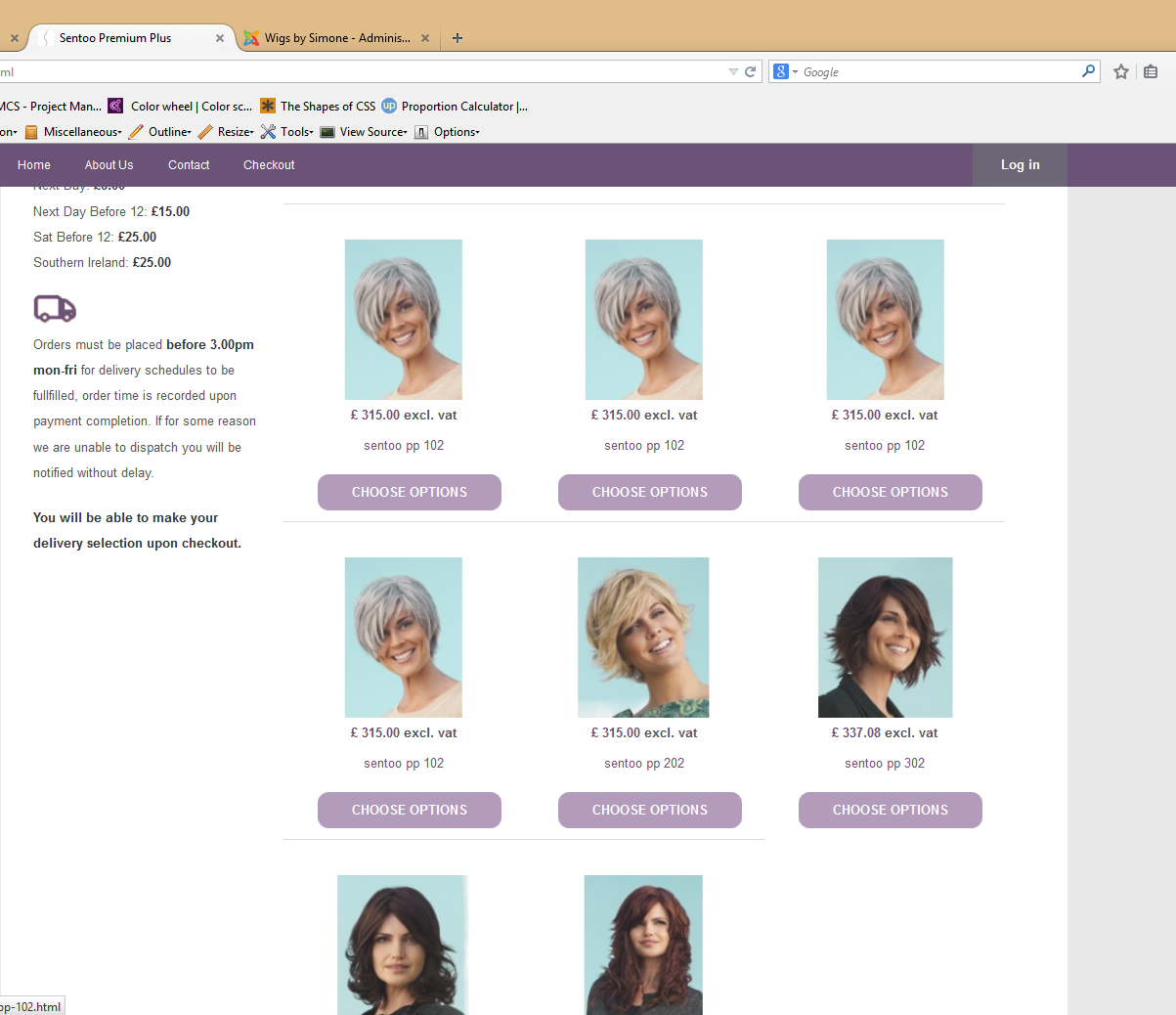
As you can see in untitled 1.png I have duplicated my product sentoo pp 102 3 times and the display at this level is fine.
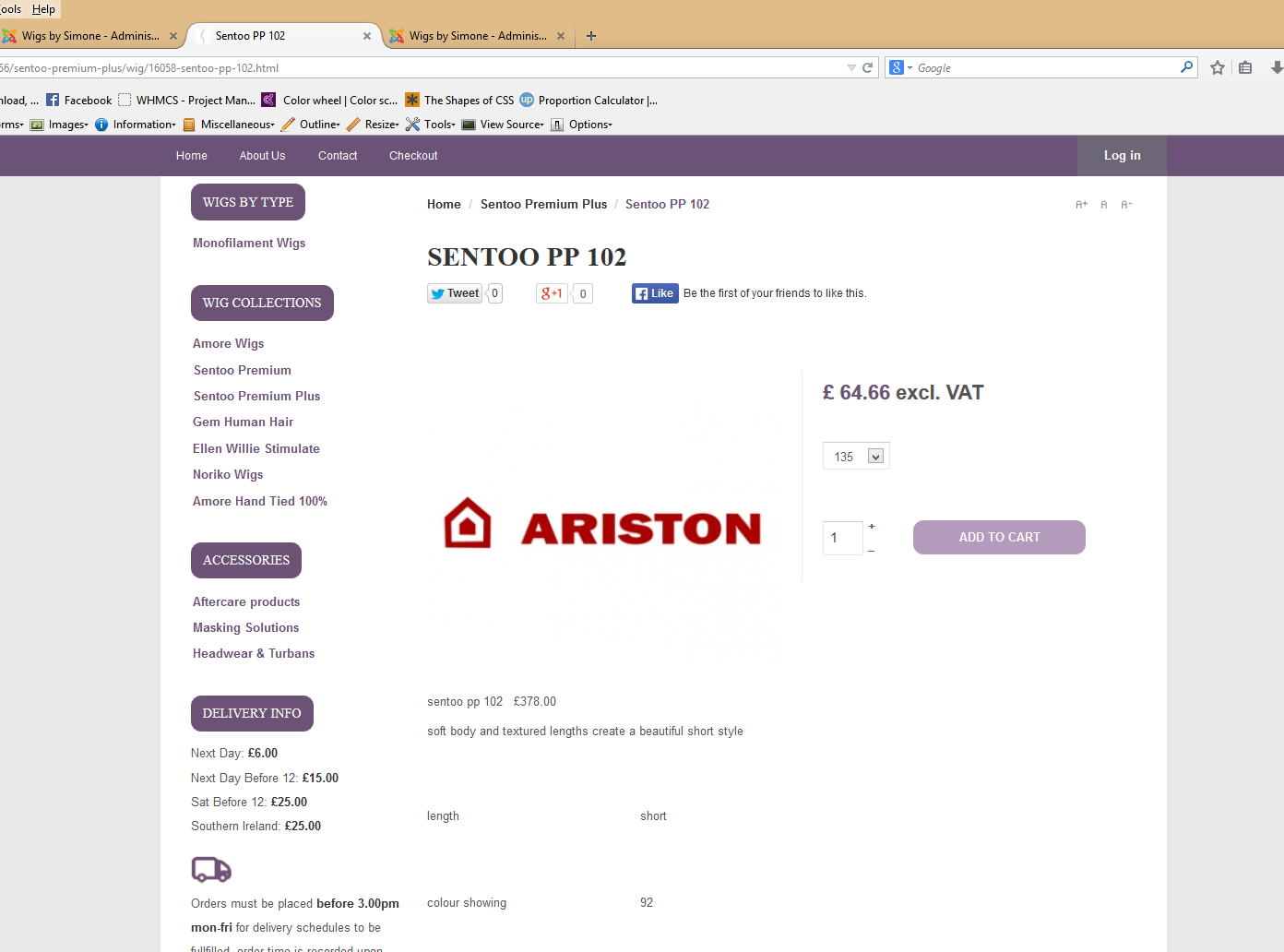
When I click through to the product I am given an image that is not the product image and a random variant price (see untitled2.png)
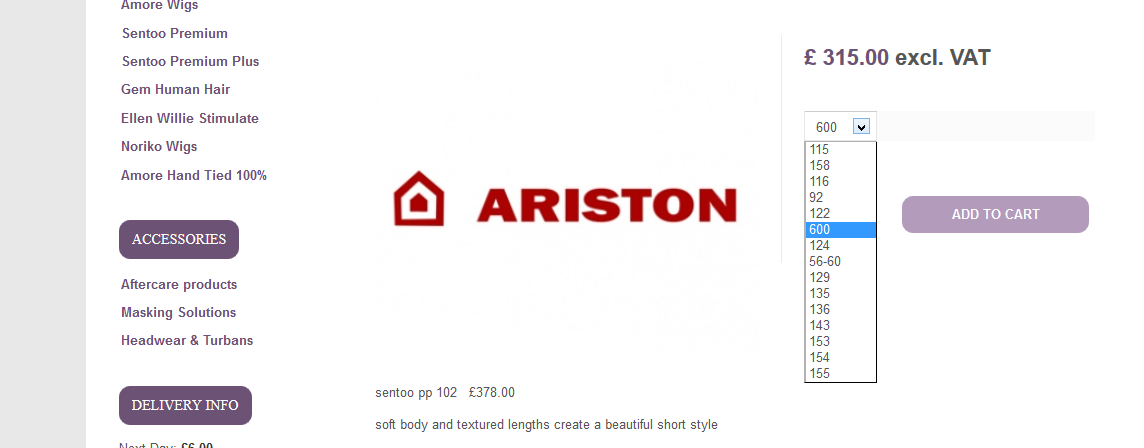
When I click through all the variants after this I am given different prices (see untitled 3.png)
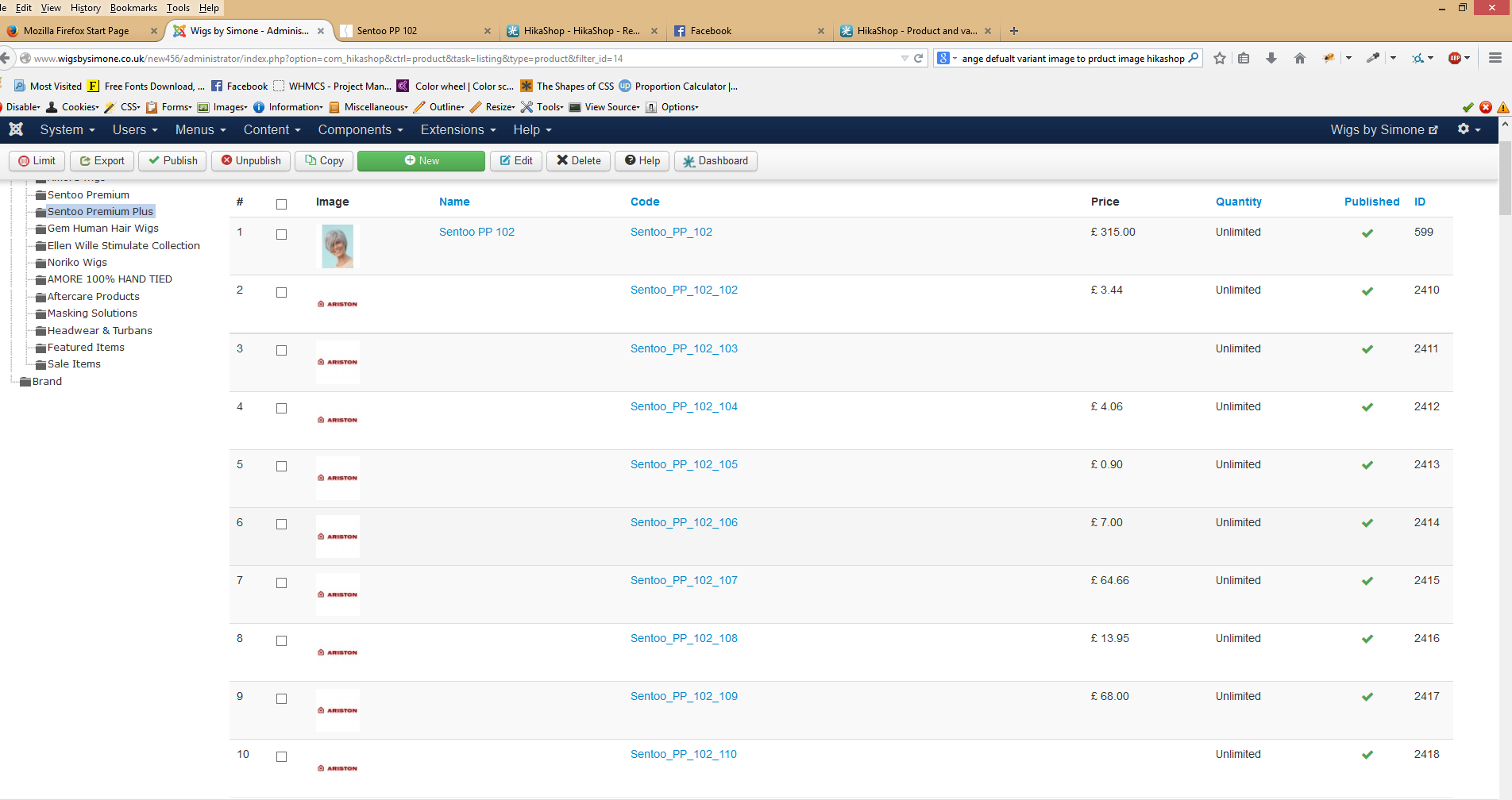
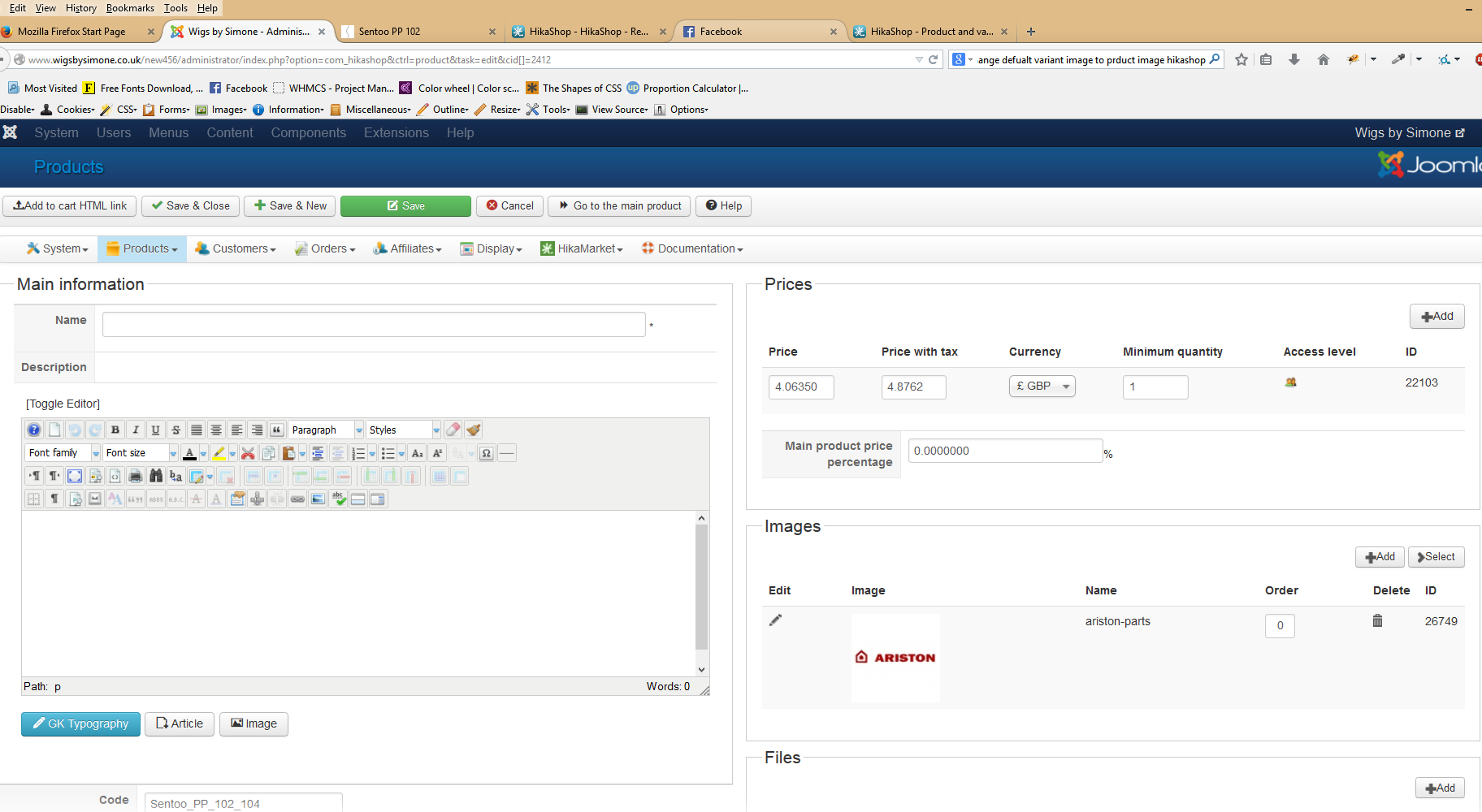
In the back end in untitled 4.png you can see the generated variants and prices along with the image (this is the same for all products that I have published variants for that have been generated automatically)
When I then click through to my product I can see the generated variant price and image which I did not include when adding the variants to the original product. (see untitled 5.png)
The variant prices change on product and variant when automatically generated but when inputted manually it does not..... Where exactly are these prices coming from as I do not need any different variant prices.
Kind regards,
Alex
I am still unsure of where these variant prices are generating from I have inputted all of my products and given them their variants but I would now like the generated prices to be removed completely.
As you can see in untitled 1.png I have duplicated my product sentoo pp 102 3 times and the display at this level is fine.
When I click through to the product I am given an image that is not the product image and a random variant price (see untitled2.png)
When I click through all the variants after this I am given different prices (see untitled 3.png)
In the back end in untitled 4.png you can see the generated variants and prices along with the image (this is the same for all products that I have published variants for that have been generated automatically)
When I then click through to my product I can see the generated variant price and image which I did not include when adding the variants to the original product. (see untitled 5.png)
The variant prices change on product and variant when automatically generated but when inputted manually it does not..... Where exactly are these prices coming from as I do not need any different variant prices.
Kind regards,
Alex
Please Log in or Create an account to join the conversation.
12 years 4 months ago #155370
by Dibben
Replied by Dibben on topic Variants generating random prices when added
Hi Nicolas,
Could really do with some help on this one, if i export the products i can see that the information in the export file is incorrect too, but that was obviously generated by hikashop when i clicked on generate variants, so it is generating the content incorrectly based on old deleted products which sounds very much like a bug? I can export and correct all of the current products information using excel however the problem will still persist with newly added products.
Kind regards
Could really do with some help on this one, if i export the products i can see that the information in the export file is incorrect too, but that was obviously generated by hikashop when i clicked on generate variants, so it is generating the content incorrectly based on old deleted products which sounds very much like a bug? I can export and correct all of the current products information using excel however the problem will still persist with newly added products.
Kind regards
Please Log in or Create an account to join the conversation.
12 years 4 months ago #155613
by Dibben
Replied by Dibben on topic Variants generating random prices when added
Hi Nicolas,
I would not worry about this now, due to time constraints we did this manually hopefully it doesn't happen again in the future. I have also set variants generation to manual rather than automatic for this site in future.
Kind regards
I would not worry about this now, due to time constraints we did this manually hopefully it doesn't happen again in the future. I have also set variants generation to manual rather than automatic for this site in future.
Kind regards
Please Log in or Create an account to join the conversation.

12 years 4 months ago #156778
by Xavier
Replied by Xavier on topic Variants generating random prices when added
Hi,
That's indeed a weird situation. We were not able to reproduce that bug on our end.
You had maybe old values in the table "#__hikashop_prices". The old products were probably not removed correctly and some data were still present. For the images, the data was maybe still in the table "#__hikashop_file".
To quickly edit the products, one thing to do could be to export via csv, edit the csv and import again.
Or use the mass actions, but there can not handle the images currently.
That's indeed a weird situation. We were not able to reproduce that bug on our end.
You had maybe old values in the table "#__hikashop_prices". The old products were probably not removed correctly and some data were still present. For the images, the data was maybe still in the table "#__hikashop_file".
To quickly edit the products, one thing to do could be to export via csv, edit the csv and import again.
Or use the mass actions, but there can not handle the images currently.
Please Log in or Create an account to join the conversation.
Time to create page: 0.272 seconds