

- Posts: 44
- Thank you received: 0
Adjust image size
12 years 4 months ago #155719
by benrud
Adjust image size was created by benrud
-- url of the page with the problem -- : test.crossfitshorts.com
-- HikaShop version -- : HikaShop Essential: 2.3.0
-- Joomla version -- : Joomla! 3.3.0 Stable
-- PHP version -- : 5.4.27
-- Browser(s) name and version -- : ALL
-- Error-message(debug-mod must be tuned on) -- : see belowe
Hello,
I'd like to know how to increase the size (width & height) of all the images displayed in a product category page. The screenshot below shows the object I want to modify.
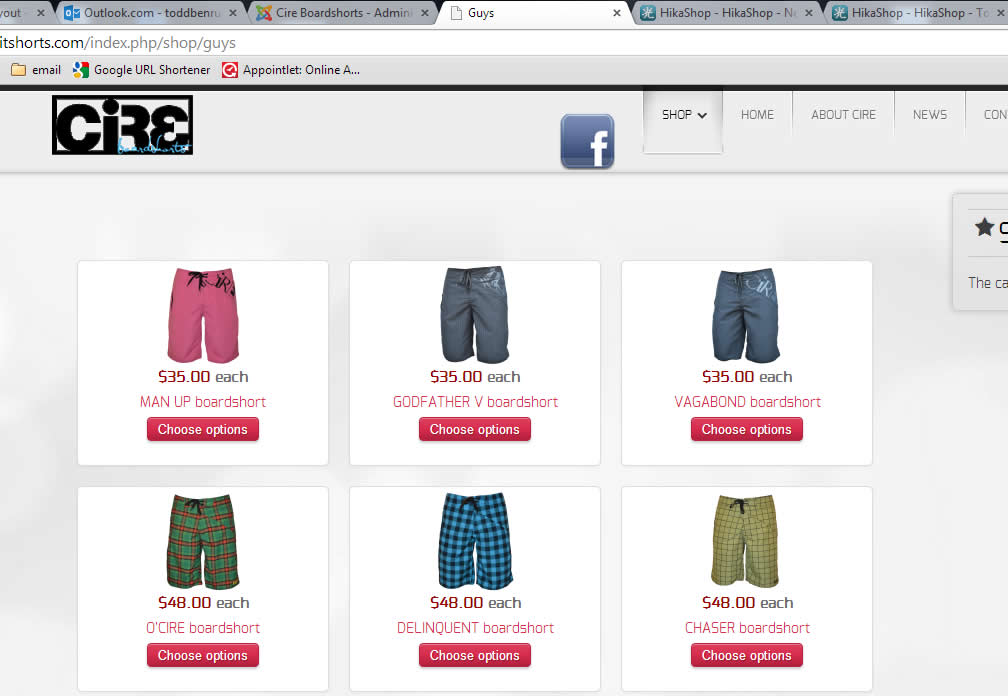
Thank you,
TOdd
-- HikaShop version -- : HikaShop Essential: 2.3.0
-- Joomla version -- : Joomla! 3.3.0 Stable
-- PHP version -- : 5.4.27
-- Browser(s) name and version -- : ALL
-- Error-message(debug-mod must be tuned on) -- : see belowe
Hello,
I'd like to know how to increase the size (width & height) of all the images displayed in a product category page. The screenshot below shows the object I want to modify.
Thank you,
TOdd
Please Log in or Create an account to join the conversation.

Less
More
- Posts: 12953
- Thank you received: 1778
12 years 4 months ago #155724
by Mohamed Thelji
Replied by Mohamed Thelji on topic Adjust image size
Hello Todd,
You'll be able to do that by using the "Image width/height" options of your product listing content menu/module configuration screen through "Hikashop->Display->Content menus/modules".
You'll be able to do that by using the "Image width/height" options of your product listing content menu/module configuration screen through "Hikashop->Display->Content menus/modules".
The following user(s) said Thank You: benrud
Please Log in or Create an account to join the conversation.
12 years 4 months ago #155922
by benrud
Replied by benrud on topic Adjust image size
thank you!
Please Log in or Create an account to join the conversation.
Time to create page: 0.236 seconds