

- Posts: 60
- Thank you received: 0
Waitinglist more fields
12 years 4 months ago #157514
by Swib
Waitinglist more fields was created by Swib
-- url of the page with the problem -- :
www.anitahoetmer.nl/swib/index.php/compo...n-breukelen?Itemid=1
-- HikaShop version Essnetial: 2.3.1
-- Joomla version -- : 3.3
-- PHP version -- : 5.5.5
I have three questions:
1. For the waitinglist are only two fields possible.
I want to add more fields: phone, total persons, the categorie end the article to be placed on the waitinglist, adress
Is this possible and how do I have to do this? http://www.anitahoetmer.nl/swib/index.php/plaats-mij-op-de-wachtlijst
2. Is it possible to export this waitinglist to an excel document?
3. If this all is not possible, I disable the function of the waitinglist, and I create a "waitinglist" with RSForms.
Is it possible to link the message which appears if there are no products available to this document?
Thanks!
-- HikaShop version Essnetial: 2.3.1
-- Joomla version -- : 3.3
-- PHP version -- : 5.5.5
I have three questions:
1. For the waitinglist are only two fields possible.
I want to add more fields: phone, total persons, the categorie end the article to be placed on the waitinglist, adress
Is this possible and how do I have to do this? http://www.anitahoetmer.nl/swib/index.php/plaats-mij-op-de-wachtlijst
2. Is it possible to export this waitinglist to an excel document?
3. If this all is not possible, I disable the function of the waitinglist, and I create a "waitinglist" with RSForms.
Is it possible to link the message which appears if there are no products available to this document?
Thanks!
Please Log in or Create an account to join the conversation.
12 years 4 months ago #157515
by Swib
Replied by Swib on topic Waitinglist more fields
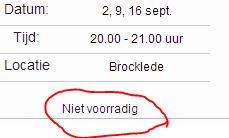
Niet voorradig means not available
Please Log in or Create an account to join the conversation.

12 years 4 months ago #157579
by Xavier
Replied by Xavier on topic Waitinglist more fields
Hi,
1. To add fields, you will have to edit the view "product / waitlist", and the file "components/com_hikashop/controllers/product.php", function "add_waitlist" to get the field values and save it in database.
2. No export at this time for the waitlists.
3. I think that it could be possible by editing the view "product / quantity" and replacing the add to waitlist button to a custom button which will redirect to the desired form. Giving the product if via POST and in RSForm I think that you can get this POST value to have the correct product id.
1. To add fields, you will have to edit the view "product / waitlist", and the file "components/com_hikashop/controllers/product.php", function "add_waitlist" to get the field values and save it in database.
2. No export at this time for the waitlists.
3. I think that it could be possible by editing the view "product / quantity" and replacing the add to waitlist button to a custom button which will redirect to the desired form. Giving the product if via POST and in RSForm I think that you can get this POST value to have the correct product id.
The following user(s) said Thank You: Swib
Please Log in or Create an account to join the conversation.
12 years 3 months ago #159983
by Swib
Replied by Swib on topic Waitinglist more fields
Thank you. The first two problems are sold.
The third answer I do not understand.
Maybe I can make an override and add a link at this override. Is that possible?
The third answer I do not understand.
Maybe I can make an override and add a link at this override. Is that possible?
Please Log in or Create an account to join the conversation.

12 years 3 months ago #160007
by nicolas
Replied by nicolas on topic Waitinglist more fields
Yes. You can override the file "quantity" of the view "product" via the menu Display>Views in the backend of HikaShop.
Please Log in or Create an account to join the conversation.
12 years 3 months ago #160142
by Swib
Replied by Swib on topic Waitinglist more fields
Thank you for your answer, but I have no idea how to do that.
Where do I have to add what:
<div class="hikashop_product_no_stock">
<?php
echo JText::_('NO_STOCK').'<br/>';
$waitlist = $this->config->get('product_waitlist',0);
if(hikashop_level(1) && ($waitlist==2 || ($waitlist==1 && (!empty($this->element->main->product_waitlist) || !empty($this->element->product_waitlist))))){ ?>
</div><div id="hikashop_product_waitlist_main" class="hikashop_product_waitlist_main">
<?php
$empty='';
jimport('joomla.html.parameter');
$params = new HikaParameter($empty);
echo $this->cart->displayButton(JText::_('ADD_ME_WAITLIST'),'add_waitlist',$params,hikashop_completeLink('product&task=waitlist&cid='.$this->row->product_id.$url_itemid),'window.location=\''.str_replace("'","\'",hikashop_completeLink('product&task=waitlist&cid='.$this->row->product_id.$url_itemid)).'\';return false;');
Where do I have to add what:
<div class="hikashop_product_no_stock">
<?php
echo JText::_('NO_STOCK').'<br/>';
$waitlist = $this->config->get('product_waitlist',0);
if(hikashop_level(1) && ($waitlist==2 || ($waitlist==1 && (!empty($this->element->main->product_waitlist) || !empty($this->element->product_waitlist))))){ ?>
</div><div id="hikashop_product_waitlist_main" class="hikashop_product_waitlist_main">
<?php
$empty='';
jimport('joomla.html.parameter');
$params = new HikaParameter($empty);
echo $this->cart->displayButton(JText::_('ADD_ME_WAITLIST'),'add_waitlist',$params,hikashop_completeLink('product&task=waitlist&cid='.$this->row->product_id.$url_itemid),'window.location=\''.str_replace("'","\'",hikashop_completeLink('product&task=waitlist&cid='.$this->row->product_id.$url_itemid)).'\';return false;');
Please Log in or Create an account to join the conversation.
12 years 3 months ago #160377
by Xavier
Replied by Xavier on topic Waitinglist more fields
Hi,
You have to replace the code:
By a custom button redirecting to the RSForm, something like:
You have to replace the code:
Code:
$empty='';
jimport('joomla.html.parameter');
$params = new HikaParameter($empty);
echo $this->cart->displayButton(JText::_('ADD_ME_WAITLIST'),'add_waitlist',$params,hikashop_completeLink('product&task=waitlist&cid='.$this->row->product_id.$url_itemid),'window.location=\''.str_replace("'","\'",hikashop_completeLink('product&task=waitlist&cid='.$this->row->product_id.$url_itemid)).'\';return false;');
Code:
echo '<input type="button" onclick="window.location.href=\'YOUR_RSFORM_URL?id='.$this->row->product_id.'\'"';
Please Log in or Create an account to join the conversation.
Time to create page: 0.172 seconds