

- Posts: 222
- Thank you received: 1
after update backend no order change possibility
12 years 3 months ago #159441
by Vero
after update backend no order change possibility was created by Vero
-- url of the page with the problem -- :
mywebsite.com/mypage
-- HikaShop version -- : x.x.x
-- Joomla version -- : x.x
-- PHP version -- : x.x.x
-- Browser(s) name and version -- : XXXXX x.x.x
-- Error-message(debug-mod must be tuned on) -- : Error_message
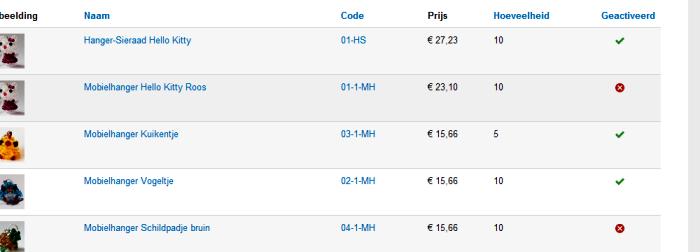
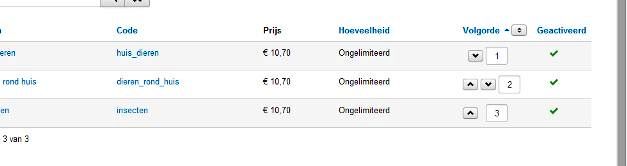
After hikashop update to the last version I see no more to change the order of products possibility (backend). Have it so to be?
Thanks, Vero
-- HikaShop version -- : x.x.x
-- Joomla version -- : x.x
-- PHP version -- : x.x.x
-- Browser(s) name and version -- : XXXXX x.x.x
-- Error-message(debug-mod must be tuned on) -- : Error_message
After hikashop update to the last version I see no more to change the order of products possibility (backend). Have it so to be?
Thanks, Vero
Please Log in or Create an account to join the conversation.

12 years 3 months ago #159444
by Jerome
Jerome - Obsidev.com
HikaMarket & HikaSerial developer / HikaShop core dev team.
Replied by Jerome on topic after update backend no order change possibility
Hi,
Please be clear.
Regards,
Please be clear.
Regards,
Jerome - Obsidev.com
HikaMarket & HikaSerial developer / HikaShop core dev team.
Please Log in or Create an account to join the conversation.
12 years 3 months ago #159552
by Vero
Replied by Vero on topic after update backend no order change possibility
This is from my updated website:
And this is from other not updated website:
Thanks, Vero
And this is from other not updated website:
Thanks, Vero
Please Log in or Create an account to join the conversation.

Less
More
- Posts: 12953
- Thank you received: 1778
12 years 3 months ago #159564
by Mohamed Thelji
Replied by Mohamed Thelji on topic after update backend no order change possibility
Hello,
Then the solution will just be to replace the code of the "listing" file of your "product" view of your back-end template of your first website, by the code of the file of your second website, via "Hikashop->Display->Views".
Then the solution will just be to replace the code of the "listing" file of your "product" view of your back-end template of your first website, by the code of the file of your second website, via "Hikashop->Display->Views".
Please Log in or Create an account to join the conversation.
12 years 3 months ago - 12 years 3 months ago #159744
by Vero
Replied by Vero on topic after update backend no order change possibility
Thanks for answer,
But:
1. It is not logical to replace the all code, because I have no images in not updated version.
2. All code is identical in both of sites, except code of images.
Please, check the codes, because I don't see any difference.
Code of updated version:
Code of not updated version:
Do you see a different? May be some mistake in the code of updated version?
Thanks for help,
Vero
But:
1. It is not logical to replace the all code, because I have no images in not updated version.
2. All code is identical in both of sites, except code of images.
Please, check the codes, because I don't see any difference.
Code of updated version:
Code:
if($this->doOrdering){?>
<td class="order">
<?php if($this->manage){ ?>
<span><?php echo $this->pagination->orderUpIcon( $i, $this->order->reverse XOR ( $row->ordering >= @$this->rows[$i-1]->ordering ), $this->order->orderUp, 'Move Up',$this->order->ordering ); ?></span>
<span><?php echo $this->pagination->orderDownIcon( $i, $a, $this->order->reverse XOR ( $row->ordering <= @$this->rows[$i+1]->ordering ), $this->order->orderDown, 'Move Down' ,$this->order->ordering); ?></span>
<input type="text" name="order[]" size="5" <?php if(!$this->order->ordering) echo 'disabled="disabled"'?> value="<?php echo $row->ordering; ?>" class="text_area" style="text-align: center" />
<?php }else{ echo $row->ordering; } ?>
</td>
<?php }?>
Code of not updated version:
Code:
if($this->doOrdering){?>
<td class="order">
<?php if($this->manage){ ?>
<span><?php echo $this->pagination->orderUpIcon( $i, $this->order->reverse XOR ( $row->ordering >= @$this->rows[$i-1]->ordering ), $this->order->orderUp, 'Move Up',$this->order->ordering ); ?></span>
<span><?php echo $this->pagination->orderDownIcon( $i, $a, $this->order->reverse XOR ( $row->ordering <= @$this->rows[$i+1]->ordering ), $this->order->orderDown, 'Move Down' ,$this->order->ordering); ?></span>
<input type="text" name="order[]" size="5" <?php if(!$this->order->ordering) echo 'disabled="disabled"'?> value="<?php echo $row->ordering; ?>" class="text_area" style="text-align: center" />
<?php }else{ echo $row->ordering; } ?>
</td>
<?php }?>
Do you see a different? May be some mistake in the code of updated version?
Thanks for help,
Vero
Last edit: 12 years 3 months ago by Vero.
Please Log in or Create an account to join the conversation.

12 years 3 months ago #159794
by nicolas
Replied by nicolas on topic after update backend no order change possibility
Hi,
The code didn't change.
The column is still there.
Change the "all sub elements" dropdown on the top right of the listing to "direct sub elements" and you'll see the column.
The code didn't change.
The column is still there.
Change the "all sub elements" dropdown on the top right of the listing to "direct sub elements" and you'll see the column.
The following user(s) said Thank You: Vero
Please Log in or Create an account to join the conversation.
12 years 3 months ago #159831
by Vero
Replied by Vero on topic after update backend no order change possibility
Thanks Nicolas!
I see now the column.
Vero
I see now the column.
Vero
Please Log in or Create an account to join the conversation.
Time to create page: 0.203 seconds