

- Posts: 1184
- Thank you received: 13
Use tax depending on the customers address
12 years 3 months ago #159802
by verzevoul
Use tax depending on the customers address was created by verzevoul
Hi! I m trying to make hikashop change automatically the tax rate depending of the provided postac code.
So I created 2 TAX RATES IN A CATEGORY
a. 23%
b. 13%
When I change my address i saw that tax was correctly applied to the price.
The problem is that to manage this I had to apply the b.tax rate to a zone. But this rate has to be applied to multiple zones.
I can t apply to multiple zones.
So or I have to make many tax rates for each zone, or to use the postal code which I tried but doesn t work for me.
Any ideas?
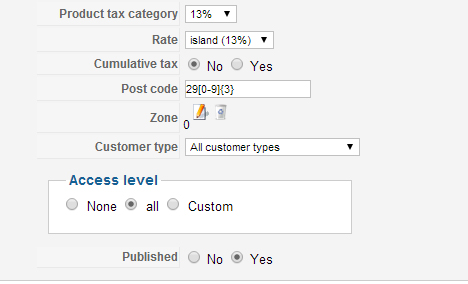
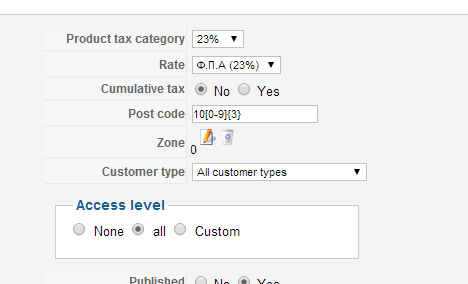
So I created 2 TAX RATES IN A CATEGORY
a. 23%
b. 13%
When I change my address i saw that tax was correctly applied to the price.
The problem is that to manage this I had to apply the b.tax rate to a zone. But this rate has to be applied to multiple zones.
I can t apply to multiple zones.
So or I have to make many tax rates for each zone, or to use the postal code which I tried but doesn t work for me.
Any ideas?
Please Log in or Create an account to join the conversation.

12 years 3 months ago #159806
by nicolas
Replied by nicolas on topic Use tax depending on the customers address
Hi,
Yes, you need to create one tax rule per zone.
Now, if you have several zones with the same tax rate, you can create a new tax zone via the menu System>Zones and add all these zones as sub zones of that tax zone. Then, simply add that tax zone in your tax rule and the tax rate of the tax rule will apply to all the sub zones of the tax zone of your tax rule.
Yes, you need to create one tax rule per zone.
Now, if you have several zones with the same tax rate, you can create a new tax zone via the menu System>Zones and add all these zones as sub zones of that tax zone. Then, simply add that tax zone in your tax rule and the tax rate of the tax rule will apply to all the sub zones of the tax zone of your tax rule.
The following user(s) said Thank You: verzevoul
Please Log in or Create an account to join the conversation.
12 years 2 months ago #162765
by verzevoul
Replied by verzevoul on topic Use tax depending on the customers address
Goodmorning, I have created the tax rules and each one has Sub-zones. I have 3 rates & tax categories (13%, 16%, 23 %), but works only the 23%.
Also in field "Product tax category" in the products edit, i changed it either to 13 or 16% but still doesn't work.
What am i doing wrong?
Thank you
Also in field "Product tax category" in the products edit, i changed it either to 13 or 16% but still doesn't work.
What am i doing wrong?
Thank you
Please Log in or Create an account to join the conversation.
12 years 2 months ago #162809
by verzevoul
Replied by verzevoul on topic Use tax depending on the customers address
i ve figured it out, and made it work. So the products with 13% are ok.
I have 1 new tax rule (1st pic) and i put a zone here with 9 sub-zones in it.
These sub-zones also excist in the rest tax rules with different rate.
What i want to do, is when clients order a particular product which has 13% tax & his/her state is one of these 9 that i mentioned,
the tax becomes even lower (9%).
Is there anyway i can make this work?
I have 1 new tax rule (1st pic) and i put a zone here with 9 sub-zones in it.
These sub-zones also excist in the rest tax rules with different rate.
What i want to do, is when clients order a particular product which has 13% tax & his/her state is one of these 9 that i mentioned,
the tax becomes even lower (9%).
Is there anyway i can make this work?
Please Log in or Create an account to join the conversation.

12 years 2 months ago #162814
by Xavier
Replied by Xavier on topic Use tax depending on the customers address
Hi,
You will have to edit/create the zones in order to have unique zones for a product to have the desired tax rules.
Create a zone with the 9 sub-zones and apply a tax rule on it.
Then create another zone without these 9 sub-zones and apply a tax rule on it.
You will have to edit/create the zones in order to have unique zones for a product to have the desired tax rules.
Create a zone with the 9 sub-zones and apply a tax rule on it.
Then create another zone without these 9 sub-zones and apply a tax rule on it.
The following user(s) said Thank You: verzevoul
Please Log in or Create an account to join the conversation.
12 years 2 months ago #163000
by verzevoul
Replied by verzevoul on topic Use tax depending on the customers address
Shall i sent you the user+pass to login?
Could you take a look?
Could you take a look?
Please Log in or Create an account to join the conversation.
12 years 2 months ago #163004
by nicolas
Replied by nicolas on topic Use tax depending on the customers address
Sure but we would also need that you explain which zone shoudl have which tax for which tax category (a few examples). So that we can see what you have done and find out what you didn't do so that it fit with your needs.
You can send that via our contact form:
www.hikashop.com/contact-us.html
Please also give a link to this thread.
You can send that via our contact form:
www.hikashop.com/contact-us.html
Please also give a link to this thread.
Please Log in or Create an account to join the conversation.
12 years 2 months ago #163273
by verzevoul
Replied by verzevoul on topic Use tax depending on the customers address
hello have you seen my contact form?
Please Log in or Create an account to join the conversation.
12 years 2 months ago #163284
by nicolas
Replied by nicolas on topic Use tax depending on the customers address
Yes, we replied to you already with the solution.
The following user(s) said Thank You: verzevoul
Please Log in or Create an account to join the conversation.
Time to create page: 0.320 seconds