
- Posts: 640
- Thank you received: 16
Skip first level category to show directly 2nd
- PeterChain
-
 Topic Author
- Offline
Less
More
11 years 10 months ago #179699
by PeterChain
Skip first level category to show directly 2nd was created by PeterChain
-- HikaShop version -- : 2.3.4
-- Joomla version -- : 3.3.6
I have a category listing menu setup to show one category in Second Level right after the general category "Product Category".
I want my category listing to show 2nd level categories after my selected category.
My chosen category to show in menu is CategoryA
CategoryA ----> Category Aa
> CategoryAaa
\---> CategoryAb
> Category Abb
----> CategoryAc
> Category Acc
I want to see only CategoryAxx, the third level but not the direct level under CategoryA as I already see them in a Content module.
In 'All subelements filter' I can include more or less levels but not jump a level
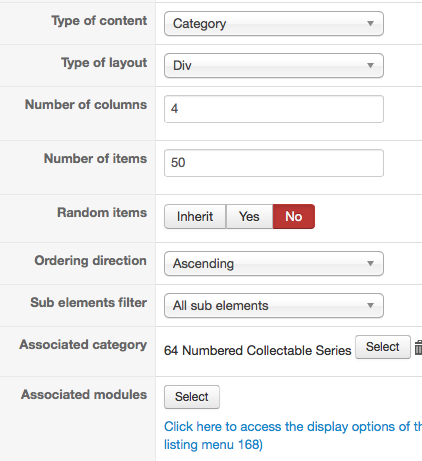
-- Joomla version -- : 3.3.6
I have a category listing menu setup to show one category in Second Level right after the general category "Product Category".
I want my category listing to show 2nd level categories after my selected category.
My chosen category to show in menu is CategoryA
CategoryA ----> Category Aa
> CategoryAaa
\---> CategoryAb
> Category Abb
----> CategoryAc
> Category Acc
I want to see only CategoryAxx, the third level but not the direct level under CategoryA as I already see them in a Content module.
In 'All subelements filter' I can include more or less levels but not jump a level
Please Log in or Create an account to join the conversation.

11 years 10 months ago #179744
by Jerome
Jerome - Obsidev.com
HikaMarket & HikaSerial developer / HikaShop core dev team.
Replied by Jerome on topic Skip first level category to show directly 2nd
Hi,
If you want to change the way that the category menu is acting, you will have to do some customization in the view.
The category menu can't know if you displaying the first or the second level : it does not have any information to determine the "level".
So it means that you have to code in the view that information and the code to use that information to show or not the category listing.
The category listing menu is not design to such purpose ; but you can use a category listing module and thanks to the "menu" option, generate links to another menu (generally a product listing menu). So you have categories and if you click on it, you will just see product listing.
Regards,
If you want to change the way that the category menu is acting, you will have to do some customization in the view.
The category menu can't know if you displaying the first or the second level : it does not have any information to determine the "level".
So it means that you have to code in the view that information and the code to use that information to show or not the category listing.
The category listing menu is not design to such purpose ; but you can use a category listing module and thanks to the "menu" option, generate links to another menu (generally a product listing menu). So you have categories and if you click on it, you will just see product listing.
Regards,
Jerome - Obsidev.com
HikaMarket & HikaSerial developer / HikaShop core dev team.
Please Log in or Create an account to join the conversation.
Time to create page: 0.195 seconds