

- Posts: 139
- Thank you received: 1
Don't get correct screen on changing order status
11 years 7 months ago - 11 years 7 months ago #190133
by abasel
Don't get correct screen on changing order status was created by abasel
-- HikaShop version -- : HikaShop Business: 2.3.5
-- Joomla version -- : 3.3.6
-- PHP version -- : 5.3.28
-- Browser(s) name and version -- : Version 40.0.2214.111 m (64-bit)
-- Error-message(debug-mod must be tuned on) -- : When changing order status don't get all options
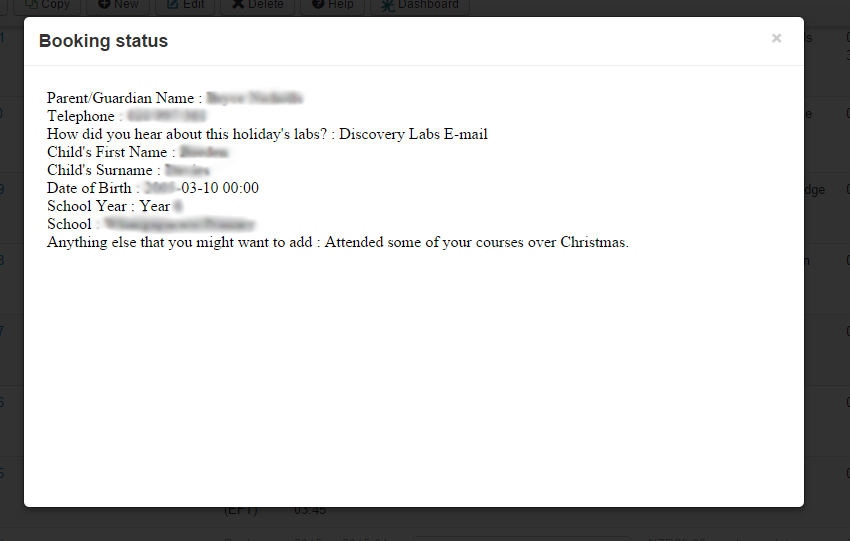
Before updating, when I changed the order status a screen would open up that allowed me to add notes to the order as well as send a copy to my client. Now all I get is a screen that looks like the one below. There is also no save button.
Some more info: It looks like any screen with e-mail associated with it does this. Invoice and Shipping Invoice tabs are working just fine
-- Joomla version -- : 3.3.6
-- PHP version -- : 5.3.28
-- Browser(s) name and version -- : Version 40.0.2214.111 m (64-bit)
-- Error-message(debug-mod must be tuned on) -- : When changing order status don't get all options
Before updating, when I changed the order status a screen would open up that allowed me to add notes to the order as well as send a copy to my client. Now all I get is a screen that looks like the one below. There is also no save button.
Some more info: It looks like any screen with e-mail associated with it does this. Invoice and Shipping Invoice tabs are working just fine
Last edit: 11 years 7 months ago by abasel. Reason: More info
Please Log in or Create an account to join the conversation.

11 years 7 months ago - 11 years 7 months ago #190201
by Jerome
Jerome - Obsidev.com
HikaMarket & HikaSerial developer / HikaShop core dev team.
Replied by Jerome on topic Don't get correct screen on changing order status
Hi,
I first think that it looks like a hidden PHP Fatal error in your email.
Then I see that you send us an email with accesses to your website ; so I take a little look.
I forced temporally the "error reporting" to "maximum" in your Joomla global configuration and I was able to see the PHP error message
I don't know if you have customized your preload email, but if you did not modify it, I will suggest you to remove the override for that part of the email.
Regards,
I first think that it looks like a hidden PHP Fatal error in your email.
Then I see that you send us an email with accesses to your website ; so I take a little look.
I forced temporally the "error reporting" to "maximum" in your Joomla global configuration and I was able to see the PHP error message
Code:
Parent/Guardian Name : ---------
Telephone : -------------
How did you hear about this holiday's labs? : -------------
Child's First Name : -------------
Child's Surname : -------------
Date of Birth : -------------
School Year : -------------
School : -------------
Anything else that you might want to add : -------------
Warning: strtoupper() expects parameter 1 to be string, object given in /YYYYYY/public_html/XXXXXXXX/administrator/components/com_hikashop/classes/field.php on line 1382
Catchable fatal error: Object of class stdClass could not be converted to string in /YYYYYY/public_html/XXXXXXXX/media/com_hikashop/mail/order_status_notification.preload.modified.php on line 378
Regards,
Jerome - Obsidev.com
HikaMarket & HikaSerial developer / HikaShop core dev team.
Last edit: 11 years 7 months ago by Jerome.
Please Log in or Create an account to join the conversation.
11 years 7 months ago #190219
by abasel
Replied by abasel on topic Don't get correct screen on changing order status
Its strange as I haven't made any changes to this in the last 6 months or so. I will however try remove the preload modification. As its been a while I am not sure which one it might be.
If I go to system -> e-mails, I see
Order Creation notification
Order Status notification
Order notification
Which one should I remove or all you talking about another place?
If I go to system -> e-mails, I see
Order Creation notification
Order Status notification
Order notification
Which one should I remove or all you talking about another place?
Please Log in or Create an account to join the conversation.
11 years 7 months ago #190222
by abasel
Replied by abasel on topic Don't get correct screen on changing order status
Hi, I have removed all the above customisations and it appears to have made no difference. Still not working.
Please Log in or Create an account to join the conversation.

11 years 7 months ago #190271
by Xavier
Replied by Xavier on topic Don't get correct screen on changing order status
Hi,
After looking at your website and doing some tests, if found that the issue is coming from your custom order field with the namekey "coupon".
Please create another custom field with another name, populate its value with the ones of the "coupon" one and delete the "coupon" custom order field.
This namekey can't be used because in the order data we have a "coupon" entry for the real coupon system, so when trying to get value in the custom field it get the coupon object of the order..
After looking at your website and doing some tests, if found that the issue is coming from your custom order field with the namekey "coupon".
Please create another custom field with another name, populate its value with the ones of the "coupon" one and delete the "coupon" custom order field.
This namekey can't be used because in the order data we have a "coupon" entry for the real coupon system, so when trying to get value in the custom field it get the coupon object of the order..
The following user(s) said Thank You: abasel
Please Log in or Create an account to join the conversation.
11 years 7 months ago #190379
by abasel
Replied by abasel on topic Don't get correct screen on changing order status
Awesome, that did it  Thanks
Thanks Please Log in or Create an account to join the conversation.
Time to create page: 0.170 seconds