
How to add special instruction to every product?

11 years 7 months ago #190741
by habusam
How to add special instruction to every product? was created by habusam
-- HikaShop version -- : 2.3.5
-- Joomla version -- : 3.3.6
-- PHP version -- : 5.4.35
Hello every one,
How i can add special instruction to each Product ?
Thanks
-- Joomla version -- : 3.3.6
-- PHP version -- : 5.4.35
Hello every one,
How i can add special instruction to each Product ?
Thanks
Please Log in or Create an account to join the conversation.

11 years 7 months ago #190762
by Jerome
Jerome - Obsidev.com
HikaMarket & HikaSerial developer / HikaShop core dev team.
Replied by Jerome on topic How to add special instruction to every product?
Hi,
You will have to explain us what are these special instructions.
Regards,
You will have to explain us what are these special instructions.
Regards,
Jerome - Obsidev.com
HikaMarket & HikaSerial developer / HikaShop core dev team.
Please Log in or Create an account to join the conversation.
11 years 7 months ago #190800
by habusam
Replied by habusam on topic How to add special instruction to every product?
its a restaurant, so when customer order lets for example a sandwich and he does not like tomato, so he can says in these instruction no tomatoes , so when the order comes to the restaurant and they will follow instruction that no tomatoes in the sandwich so we need to add this feature to every product, thanks
see screen shoot

see screen shoot
Please Log in or Create an account to join the conversation.
11 years 7 months ago #190808
by Jerome
Jerome - Obsidev.com
HikaMarket & HikaSerial developer / HikaShop core dev team.
Replied by Jerome on topic How to add special instruction to every product?
Hi,
You can use "item custom field" if you want the information be in the product page (when the customer add the product in his cart).
You can use "order custom field" if you want the information be during the checkout.
These two kind of custom fields are provided by HikaShop Business.
Regards,
You can use "item custom field" if you want the information be in the product page (when the customer add the product in his cart).
You can use "order custom field" if you want the information be during the checkout.
These two kind of custom fields are provided by HikaShop Business.
Regards,
Jerome - Obsidev.com
HikaMarket & HikaSerial developer / HikaShop core dev team.
Please Log in or Create an account to join the conversation.
11 years 7 months ago #190924
by habusam
Replied by habusam on topic How to add special instruction to every product?
Thank you so much it works, but how i can put to the left under the picture instead under the item
take a look at this screen shot
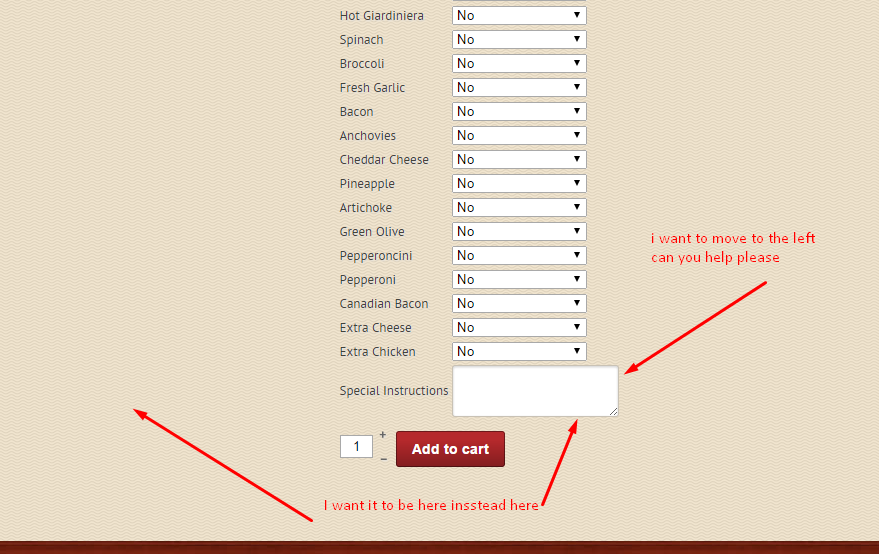
Thanks
take a look at this screen shot
Thanks
Please Log in or Create an account to join the conversation.

11 years 7 months ago #190940
by nicolas
Replied by nicolas on topic How to add special instruction to every product?
You need to edit the file "show_default" via the menu Display>Views and move the code:
where you want it.
Code:
if (!$this->params->get('catalogue') && ($this->config->get('display_add_to_cart_for_free_products') || !empty ($this->element->prices))) {
if (!empty ($this->itemFields)) {
$form = ',\'hikashop_product_form\'';
if ($this->config->get('redirect_url_after_add_cart', 'stay_if_cart') == 'ask_user') {
?>
<input type="hidden" name="popup" value="1"/>
<?php
}
//LAYOUT show_block_custom_item
$this->setLayout('show_block_custom_item');
echo $this->loadTemplate();
}
}
Please Log in or Create an account to join the conversation.
Time to create page: 0.257 seconds