
Cosmetic Tip comes always after TAX

11 years 7 months ago - 11 years 7 months ago #192431
by habusam
Cosmetic Tip comes always after TAX was created by habusam
-- HikaShop version -- : 2.3.5
-- Joomla version -- : 3.4
-- PHP version -- : 5.4.35
-- Browser(s) name and version -- : firefox , safari, chrome
Hello every one
Please see attachment
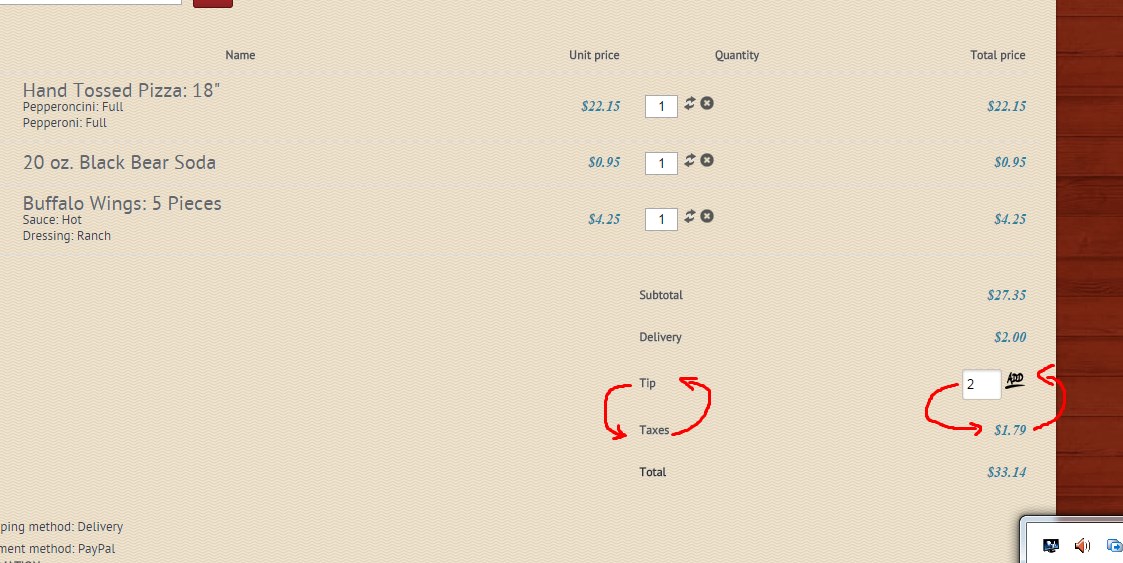
I'm trying to re arrange the looks of the check out here
usually Tip comes after Tax not before, because why customer has to pay tax on his Tip,
Please help me in this matter, thanks
-- Joomla version -- : 3.4
-- PHP version -- : 5.4.35
-- Browser(s) name and version -- : firefox , safari, chrome
Hello every one
Please see attachment
I'm trying to re arrange the looks of the check out here
usually Tip comes after Tax not before, because why customer has to pay tax on his Tip,
Please help me in this matter, thanks
Last edit: 11 years 7 months ago by habusam.
Please Log in or Create an account to join the conversation.

11 years 7 months ago #192476
by nicolas
Replied by nicolas on topic Cosmetic Tip comes always after TAX
Hi,
You have to edit the file "cart" of the view "checkout" via the menu Display>Views and swap the two blocks of code corresponding to these areas.
You have to edit the file "cart" of the view "checkout" via the menu Display>Views and swap the two blocks of code corresponding to these areas.
Please Log in or Create an account to join the conversation.
11 years 7 months ago #192502
by habusam
Replied by habusam on topic Cosmetic Tip comes always after TAX
Thank you for quick replay, I could not figure out how to do it, can i send you the code as attachment, can you help me with it, i have already a backup , please take a look to the attachment
thanks
thanks
Please Log in or Create an account to join the conversation.
11 years 7 months ago #192514
by nicolas
Replied by nicolas on topic Cosmetic Tip comes always after TAX
Hi,
That's the code for the tip on your view:
That's the code for the taxes on your view:
Swap both and that's it.
That's the code for the tip on your view:
Code:
?>
<!-- ADDED BY XAVIER -->
<tr id="hikashop_checkout_cart_tip_<?php echo str_replace(' ','_',$k); ?>_line">
<?php echo $td; ?>
<td class="hikashop_cart_title">
<?php echo JText::_('Tip'); ?>
</td>
<td style="float: right;">
<?php
if(!empty($this->additional)) {
foreach($this->additional as $k => $additional) {
if($additional->name == 'Tip')
$value = $additional->price_value;
}
}
?>
<input style="width:30px" class="inputbox" id="tip" onchange="hikashopToggleFields(this.value,'tip','order',0);" name="data[order][tip]" value="<?php echo @$value; ?>" type="text">
<img onclick="document.getElementsByName('step')[0].value = '0'; var form = document.getElementsByName('hikashop_checkout_form')[0]; form.submit(); return false;" width="20px" src="/templates/rt_fresco_responsive/images/icons/icon-circle-ok.png" alt="ok"/>
</td>
</tr>
<!-- EO ADDED BY XAVIER -->
<?php
Code:
if(!empty($this->additional)) {
$exclude_additionnal = explode(',', $this->config->get('order_additional_hide', ''));
foreach($this->additional as $k => $additional) {
if($additional->name == 'Tip') continue;
if(in_array($additional->name, $exclude_additionnal))
continue;
?>
<tr id="hikashop_checkout_cart_additional_<?php echo str_replace(' ','_',$k); ?>_line" >
<?php echo $td; ?>
<td id="hikashop_checkout_cart_additional_<?php echo str_replace(' ','_',$k); ?>_title" class="hikashop_cart_additional_title hikashop_cart_title"><?php
echo JText::_($additional->name);
?></td>
<td class="hikashop_cart_additional_value" data-title="<?php echo JText::_($additional->name); ?>">
<span class="hikashop_checkout_cart_additional">
<?php
if(!empty($additional->price_value) || empty($additional->value)) {
if(bccomp($taxes,0,5)==0 || !$this->params->get('price_with_tax')){
echo $this->currencyHelper->format(@$additional->price_value,$additional->price_currency_id);
}else{
echo $this->currencyHelper->format(@$additional->price_value_with_tax,$additional->price_currency_id);
}
} else {
echo $additional->value;
}
?>
</span>
</td>
</tr>
<?php
}
}
Please Log in or Create an account to join the conversation.
11 years 7 months ago #192581
by habusam
Replied by habusam on topic Cosmetic Tip comes always after TAX
I did the changes it did not work still the same
take a new look to the file i sent you
thanks
take a new look to the file i sent you
thanks
Please Log in or Create an account to join the conversation.
11 years 7 months ago #192587
by nicolas
Replied by nicolas on topic Cosmetic Tip comes always after TAX
Then either you have caching on your website/browser or you're editing the view file for another template that the template you're using on your frontend.
Please Log in or Create an account to join the conversation.
11 years 7 months ago - 11 years 7 months ago #192622
by habusam
Replied by habusam on topic Cosmetic Tip comes always after TAX
Hello Nick, I really Did,
look to the screenshot and last file i sent you as text after the editing

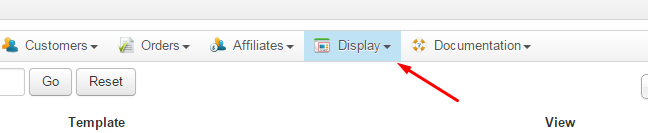
look to the screenshot and last file i sent you as text after the editing
Last edit: 11 years 7 months ago by habusam.
Please Log in or Create an account to join the conversation.
11 years 7 months ago #192634
by nicolas
Replied by nicolas on topic Cosmetic Tip comes always after TAX
Hi,
I don't see how th display wouldn't change on your frontend if you've modfied the correct file for the correct template.
Are you sure that you swapped both blocks of code ? Did you save the change ? I don't see any other possibility.
I don't see how th display wouldn't change on your frontend if you've modfied the correct file for the correct template.
Are you sure that you swapped both blocks of code ? Did you save the change ? I don't see any other possibility.
Please Log in or Create an account to join the conversation.
11 years 7 months ago #192698
by habusam
Replied by habusam on topic Cosmetic Tip comes always after TAX
I really Did nick,
did you see the last file after modified
please give me your opinion about it,
Thanks
did you see the last file after modified
please give me your opinion about it,
Thanks
Please Log in or Create an account to join the conversation.
11 years 7 months ago #192731
by nicolas
Replied by nicolas on topic Cosmetic Tip comes always after TAX
Hi,
I saw the file www.hikashop.com/media/kunena/attachment...ges_did_not_work.txt and didn't see that you swapped both piece of code in it.
I saw the file www.hikashop.com/media/kunena/attachment...ges_did_not_work.txt and didn't see that you swapped both piece of code in it.
Please Log in or Create an account to join the conversation.
11 years 7 months ago #192819
by habusam
Replied by habusam on topic Cosmetic Tip comes always after TAX
Problem solved thank you,
Please Log in or Create an account to join the conversation.
Time to create page: 0.213 seconds