
- Posts: 135
- Thank you received: 3
Distorted product-view after upgrading to 2.4.0
- simonkloostra
-
 Topic Author
- Offline
Less
More
11 years 6 months ago - 11 years 6 months ago #194060
by simonkloostra
Distorted product-view after upgrading to 2.4.0 was created by simonkloostra
-- url of the page with the problem -- :
hielspoorinfo.nl/webshop/product/profesi...-hielspoor-steunzool
-- HikaShop version -- : 2.4.0
-- Joomla version -- : 3.4.0
-- PHP version -- : 5.4
-- Browser(s) name and version -- : All
-- Error-message(debug-mod must be tuned on) -- : No errormessage
I earlier had an issue on 2 sites with shrunken images after upgrading to 2.4.0. This issue was solved, Now I have another issue on another site. This site is set-up differently from the other 2 sites, so the problem did not arise there.
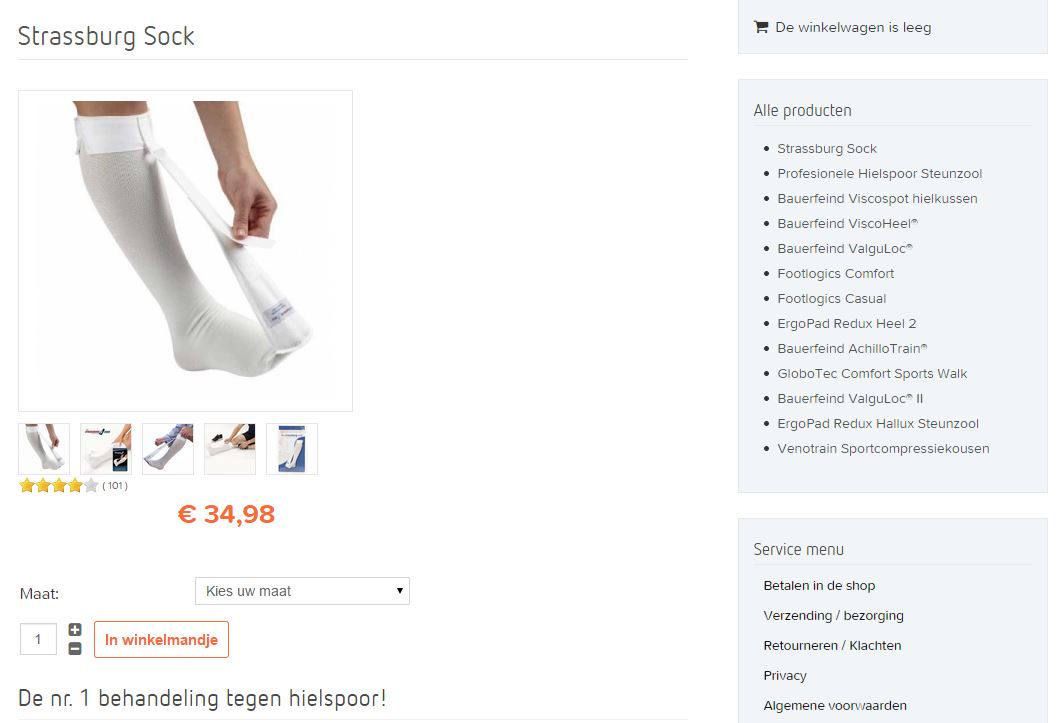
The formatting on this page is distorted after upgrading (Business): The product-images touches the elements to the right, with no margin in between, which looks really ugly. Also, for some products (third screenprint) this causes the right-div to fall below the image.
Before upgrading:
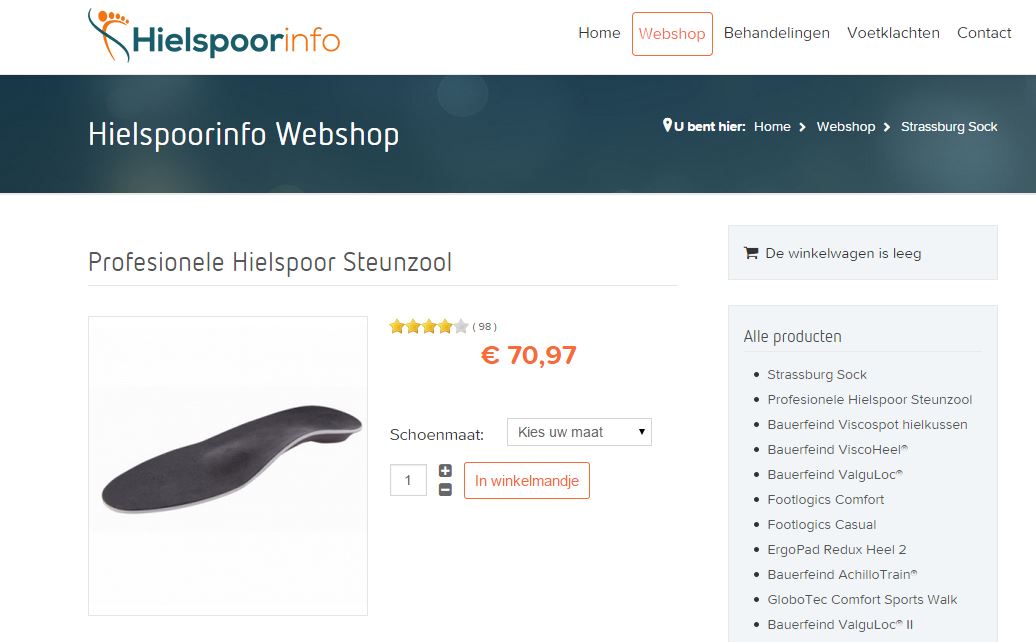
After upgrading:

Another one after upgrading:
-- HikaShop version -- : 2.4.0
-- Joomla version -- : 3.4.0
-- PHP version -- : 5.4
-- Browser(s) name and version -- : All
-- Error-message(debug-mod must be tuned on) -- : No errormessage
I earlier had an issue on 2 sites with shrunken images after upgrading to 2.4.0. This issue was solved, Now I have another issue on another site. This site is set-up differently from the other 2 sites, so the problem did not arise there.
The formatting on this page is distorted after upgrading (Business): The product-images touches the elements to the right, with no margin in between, which looks really ugly. Also, for some products (third screenprint) this causes the right-div to fall below the image.
Before upgrading:
After upgrading:
Another one after upgrading:
Last edit: 11 years 6 months ago by simonkloostra.
Please Log in or Create an account to join the conversation.

11 years 6 months ago #194132
by lousyfool
Need help with customisations of layouts, style or other site development? PM me!
(Don't forget to turn on "E-mail notification of new messages" )
Replied by lousyfool on topic Distorted product-view after upgrading to 2.4.0
You're using a template which comes with a proprietary grid system. But it also has the Bootstrap standard row-fluid and span classes on board. So, you should try setting HikaShop to using Bootstrap in its system display configuration.
It works just fine when I simulate it in Firebug on your site.
It works just fine when I simulate it in Firebug on your site.
Need help with customisations of layouts, style or other site development? PM me!
(Don't forget to turn on "E-mail notification of new messages" )
Please Log in or Create an account to join the conversation.
- simonkloostra
-
Topic Author
- Offline
Less
More
- Posts: 135
- Thank you received: 3
11 years 6 months ago #194174
by simonkloostra
Replied by simonkloostra on topic Distorted product-view after upgrading to 2.4.0
This does correct the product-display, but now my my products-overview is completely messed up, including the bottom-module with random products. I have created a temporary screenprint here to show what went wrong (it's a very large screenprint, so I'lk rather post it here instead of polluting this forum:
awesomescreenshot.com/09e4laeh73
I had to roll-back the change to use Bootstrap, so any advice as to how to correct the product display is appreciated.
I had to roll-back the change to use Bootstrap, so any advice as to how to correct the product display is appreciated.
Please Log in or Create an account to join the conversation.
11 years 6 months ago - 11 years 6 months ago #194186
by lousyfool
Need help with customisations of layouts, style or other site development? PM me!
(Don't forget to turn on "E-mail notification of new messages" )
Replied by lousyfool on topic Distorted product-view after upgrading to 2.4.0
Well, sorry for that. But it's due to the template and its CSS.
With HikaShop set to Bootstrap, the listings (for both products and categories) could easily be fixed with this line of custom CSS (which seems missing in the template):
But if you prefer using the template provider's grid, you'd ideally add the rt-grid classes to the "product / show_default" view. And possibly a few other views... I expect the checkout and who knows what other pages to cause you similar headaches. You should then eventually also contact the template provider on the "how to".
Everything else will end up being a more or less funky workaround.
Wrap-up:
Bootstrap = simple "one line" fix.
No Bootstrap = view editions/overrides, likely not just one to adjust the shop to match the template, and best with support from template provider.
For the latter see also here: www.hikashop.com/forum/product-category-...-right-of-photo.html
With HikaShop set to Bootstrap, the listings (for both products and categories) could easily be fixed with this line of custom CSS (which seems missing in the template):
Code:
.row-fluid .hikashop_product_column_1, .row-fluid .hikashop_category_column_1, .row-fluid-7 .hikashop_product_column_1, .row-fluid-7 .hikashop_category_column_1, .row-fluid-8 .hikashop_product_column_1, .row-fluid-8 .hikashop_category_column_1, .row-fluid-10 .hikashop_product_column_1, .row-fluid-10 .hikashop_category_column_1, .row .hikashop_product_column_1, .row .hikashop_category_column_1 {clear: left; margin-left: 0 !important;}
But if you prefer using the template provider's grid, you'd ideally add the rt-grid classes to the "product / show_default" view. And possibly a few other views... I expect the checkout and who knows what other pages to cause you similar headaches. You should then eventually also contact the template provider on the "how to".
Everything else will end up being a more or less funky workaround.
Wrap-up:
Bootstrap = simple "one line" fix.
No Bootstrap = view editions/overrides, likely not just one to adjust the shop to match the template, and best with support from template provider.
For the latter see also here: www.hikashop.com/forum/product-category-...-right-of-photo.html
Need help with customisations of layouts, style or other site development? PM me!
(Don't forget to turn on "E-mail notification of new messages" )
Last edit: 11 years 6 months ago by lousyfool.
Please Log in or Create an account to join the conversation.

11 years 6 months ago #194175
by Jerome
Jerome - Obsidev.com
HikaMarket & HikaSerial developer / HikaShop core dev team.
Replied by Jerome on topic Distorted product-view after upgrading to 2.4.0
Hi,
Are you sure that you did not modify your Hikashop configuration ?
Or editing directly the HikaShop default CSS file instead of overriding it ?
The HikaShop frontend_default CSS did not changed with the last update, there is no modification in the CSS for the product page, so I think that an option has changed or a CSS has changed because it was modified.
Regards,
Are you sure that you did not modify your Hikashop configuration ?
Or editing directly the HikaShop default CSS file instead of overriding it ?
The HikaShop frontend_default CSS did not changed with the last update, there is no modification in the CSS for the product page, so I think that an option has changed or a CSS has changed because it was modified.
Regards,
Jerome - Obsidev.com
HikaMarket & HikaSerial developer / HikaShop core dev team.
Please Log in or Create an account to join the conversation.
- simonkloostra
-
Topic Author
- Offline
Less
More
- Posts: 135
- Thank you received: 3
11 years 6 months ago #194240
by simonkloostra
Replied by simonkloostra on topic Distorted product-view after upgrading to 2.4.0
I definitely did not modify the Hikashop CSS files, I always stay away from these. I only made some sall changes in a separate custom css file, outside Hikashop. I also did not touch any options in Hikasho lately, the shop is running stable.
To verify, I restored the backup from before the upgrade, double-checking that all was fine, upgraded, and saw the distortians. So there definitely must have been a change in Hikashop somewhere that caused this.
To verify, I restored the backup from before the upgrade, double-checking that all was fine, upgraded, and saw the distortians. So there definitely must have been a change in Hikashop somewhere that caused this.
Please Log in or Create an account to join the conversation.
11 years 6 months ago - 11 years 6 months ago #194268
by lousyfool
Need help with customisations of layouts, style or other site development? PM me!
(Don't forget to turn on "E-mail notification of new messages" )
Replied by lousyfool on topic Distorted product-view after upgrading to 2.4.0
If you'd take a look with Firebug or a comparable browser console, you'd see that the HikaShop frontend_default.css of version 2.4.0 is loading fine. But then afterwards there is the Gantry file /templates/destinyfx/css-compiled/master-dc16294ec3826ed70bdc82164178a43b.css loading, including HikaShop classes that are overriding a lot of HikaShop's CSS.
There's then also the possibility of view overrides being part of the template, but that'd be easy to verify at your end, obviously.
In the present configuration and state - as already said - you can try to ask RT for help since it's their template and CSS, but I've been already suggesting what's likely to happen to get the shop including all its pages to work on various screen sizes.
However - and this is also only my humble opinion, of course - as indicated, with Bootstrap basically being on board, it would sure take much less work to configure the store accordingly (incl thumbnails), facing only relatively few CSS fixes to get all pages to work as intended. But even that RT should be able to confirm.
In any case, quite a bit will also depend on how experienced you are with frontend design. You said you've built two other sites with HikaShop before, so maybe you do web design professionally? If so, then you shouldn't have a big problem...
Edit:
BTW, I took the freedom to look at your custom CSS file. Yes, some 20-odd lines are HikaShop-related, but nothing critical regarding the issues at hand, indeed, though there are some width settings for custom item fields and options, but again, nowhere anything "destructive".

There's then also the possibility of view overrides being part of the template, but that'd be easy to verify at your end, obviously.
In the present configuration and state - as already said - you can try to ask RT for help since it's their template and CSS, but I've been already suggesting what's likely to happen to get the shop including all its pages to work on various screen sizes.
However - and this is also only my humble opinion, of course - as indicated, with Bootstrap basically being on board, it would sure take much less work to configure the store accordingly (incl thumbnails), facing only relatively few CSS fixes to get all pages to work as intended. But even that RT should be able to confirm.
In any case, quite a bit will also depend on how experienced you are with frontend design. You said you've built two other sites with HikaShop before, so maybe you do web design professionally? If so, then you shouldn't have a big problem...
Edit:
BTW, I took the freedom to look at your custom CSS file. Yes, some 20-odd lines are HikaShop-related, but nothing critical regarding the issues at hand, indeed, though there are some width settings for custom item fields and options, but again, nowhere anything "destructive".
Need help with customisations of layouts, style or other site development? PM me!
(Don't forget to turn on "E-mail notification of new messages" )
Last edit: 11 years 6 months ago by lousyfool. Reason: see edit
Please Log in or Create an account to join the conversation.

11 years 6 months ago #194253
by Xavier
Replied by Xavier on topic Distorted product-view after upgrading to 2.4.0
Hi,
I just checked again and as Jerome said, nothing has changed in the CSS file since the last version of HikaShop.
Besides, I checked for potential modifications in the view "product / show_tabular", and nothing has changed too.
So you have maybe a missing class in a view for an unknown reason.
Don't you have updated you template, or anything else ?
I just checked again and as Jerome said, nothing has changed in the CSS file since the last version of HikaShop.
Besides, I checked for potential modifications in the view "product / show_tabular", and nothing has changed too.
So you have maybe a missing class in a view for an unknown reason.
Don't you have updated you template, or anything else ?
Please Log in or Create an account to join the conversation.
- simonkloostra
-
Topic Author
- Offline
Less
More
- Posts: 135
- Thank you received: 3
11 years 6 months ago #194458
by simonkloostra
Replied by simonkloostra on topic Distorted product-view after upgrading to 2.4.0
Hi Jerome, the distortians were definitely introduced in Hikashop 2.4, but I also noticed that my template provider just released an update which solved some of the issues. I still have some issues, but I'll take it up with the template provider.
Thanks for checking.
Thanks for checking.
Please Log in or Create an account to join the conversation.
Time to create page: 0.279 seconds