
- Posts: 21
- Thank you received: 0
Cannot choose shipping method after update
- davidmayne
-
 Topic Author
- Offline
Less
More
11 years 6 months ago #194884
by davidmayne
Cannot choose shipping method after update was created by davidmayne
-- url of the page with the problem -- :
www.stepsandstillages.co.uk/
-- HikaShop version -- : 2.4.0
-- Joomla version -- : Latest
-- PHP version -- : 5.5.6
-- Browser(s) name and version -- : Any
Hi, After update from 2.3.1 to 2.4.0 I can no longer choose a shipping method in the checkout on local hosted site. The live site is running 2.3.1 and working fine.
The problem only arises when there is multiple shipping information as for example when products ship from different warehouses. So for example a mobile step and a ratchet strap from load restraint range use different shipping methods. See picture. A valid UK postcode is required for shipping method to be correct eg NN15 6BX.
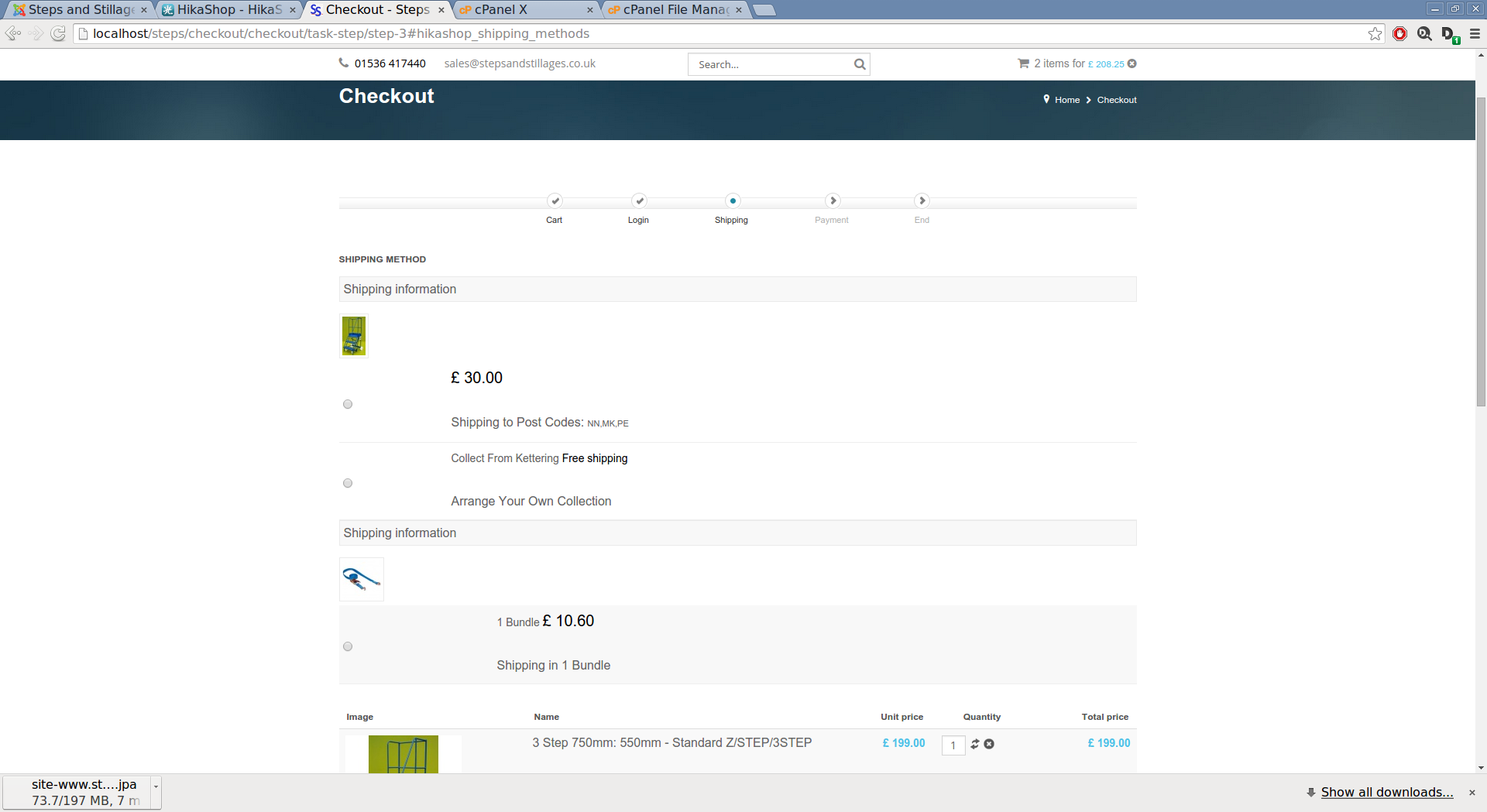
On selecting a radio button the form is submitted but button is not selected and there is no change in the shipping in the cart. If I delete a product from the cart so there is only 1 shipping method it works fine. Like I said it works correctly on live site running 2.3.1.
Do you have any ideas about the problem. I can probably set up a staging version using 2.4.0 if you feel it would be helpful but will take me a few days to get round to it.
Bye,
David.
-- HikaShop version -- : 2.4.0
-- Joomla version -- : Latest
-- PHP version -- : 5.5.6
-- Browser(s) name and version -- : Any
Hi, After update from 2.3.1 to 2.4.0 I can no longer choose a shipping method in the checkout on local hosted site. The live site is running 2.3.1 and working fine.
The problem only arises when there is multiple shipping information as for example when products ship from different warehouses. So for example a mobile step and a ratchet strap from load restraint range use different shipping methods. See picture. A valid UK postcode is required for shipping method to be correct eg NN15 6BX.
On selecting a radio button the form is submitted but button is not selected and there is no change in the shipping in the cart. If I delete a product from the cart so there is only 1 shipping method it works fine. Like I said it works correctly on live site running 2.3.1.
Do you have any ideas about the problem. I can probably set up a staging version using 2.4.0 if you feel it would be helpful but will take me a few days to get round to it.
Bye,
David.
Please Log in or Create an account to join the conversation.

11 years 6 months ago #194900
by Jerome
Jerome - Obsidev.com
HikaMarket & HikaSerial developer / HikaShop core dev team.
Replied by Jerome on topic Cannot choose shipping method after update
Hi,
Can you please check that you haven't an override for the view "checkout | shipping".
Regards,
Can you please check that you haven't an override for the view "checkout | shipping".
Regards,
Jerome - Obsidev.com
HikaMarket & HikaSerial developer / HikaShop core dev team.
Please Log in or Create an account to join the conversation.
- davidmayne
-
Topic Author
- Offline
Less
More
- Posts: 21
- Thank you received: 0
11 years 5 months ago #199226
by davidmayne
Replied by davidmayne on topic Cannot choose shipping method after update
H,
Sorry for the long delay but I got moved to an urgent project. Now back to Steps and Stillages.
I have removed all overrides in the checkout. I have tried different checkout settings and tried a 1 page checkout but the problem remains - but only when there are multiple shipping informations with products from different warehouses.
If I remove a product so that there are products from just one warehouse I can select a shipping method just fine. I have many shipping methods using several warehouses. Checking out from any single warehouse is fine.
Like I said live site using 2.3.1 works fine. Update local site to 2.4.0 with no other changes and with shipping from multiple warehouses I cannot choose a shipping method. Clicking a radio button contacts the server as before but returns with no buttons selected. Trying to checkout I get the message please select a shipping method as expected.
Thanks,
David.
Sorry for the long delay but I got moved to an urgent project. Now back to Steps and Stillages.
I have removed all overrides in the checkout. I have tried different checkout settings and tried a 1 page checkout but the problem remains - but only when there are multiple shipping informations with products from different warehouses.
If I remove a product so that there are products from just one warehouse I can select a shipping method just fine. I have many shipping methods using several warehouses. Checking out from any single warehouse is fine.
Like I said live site using 2.3.1 works fine. Update local site to 2.4.0 with no other changes and with shipping from multiple warehouses I cannot choose a shipping method. Clicking a radio button contacts the server as before but returns with no buttons selected. Trying to checkout I get the message please select a shipping method as expected.
Thanks,
David.
Please Log in or Create an account to join the conversation.

11 years 5 months ago #199235
by nicolas
Replied by nicolas on topic Cannot choose shipping method after update
Hi,
We've added a few patches regarding shipping and also one regarding warehouses since the release due to bugs.
Based on your description of the problem it could well be that one of them would solve the issue at hand.
Could you download again the latest version of the install package on our website and install it on your test website ?
That will add all the patches and should hopefully fix the problem.
If not, I'm afraid that we'll have to take a closer look to the problem and need to be able to reproduce the problem on your test website. In such cases, would it be possible to have you move your test website online where we could access it, ideally with a backend access in order to check your settings ?
We've added a few patches regarding shipping and also one regarding warehouses since the release due to bugs.
Based on your description of the problem it could well be that one of them would solve the issue at hand.
Could you download again the latest version of the install package on our website and install it on your test website ?
That will add all the patches and should hopefully fix the problem.
If not, I'm afraid that we'll have to take a closer look to the problem and need to be able to reproduce the problem on your test website. In such cases, would it be possible to have you move your test website online where we could access it, ideally with a backend access in order to check your settings ?
Please Log in or Create an account to join the conversation.
- davidmayne
-
Topic Author
- Offline
Less
More
- Posts: 21
- Thank you received: 0
11 years 5 months ago #199986
by davidmayne
Replied by davidmayne on topic Cannot choose shipping method after update
Hi,
Yes the issue was resolved by the latest update.
Thanks,
David.
Yes the issue was resolved by the latest update.
Thanks,
David.
Please Log in or Create an account to join the conversation.
Time to create page: 0.217 seconds