

- Posts: 75
- Thank you received: 0
The strikethrough on normal prices
11 years 6 months ago #195040
by Sunshine
/Christina
The strikethrough on normal prices was created by Sunshine
-- HikaShop version -- : 3
-- Joomla version -- : 3.3.6
-- PHP version -- : 5.6
-- Browser(s) name and version -- : google
Hi,
I see this question has been asked a few times, but the solutions are not working for me.
I have made some dicounts on several categories, and I want the old price to show with the strikethrough.
I have set the system - config - show - to show all prices before dicount. And so they are.
I also tried to change in the hikashop menu - show - content menu the the same "show all prices before discount", also I tried leave it as inherrit, still not showing the strike through.
Could you guide me to what I am missing here?
thanks
-- Joomla version -- : 3.3.6
-- PHP version -- : 5.6
-- Browser(s) name and version -- : google
Hi,
I see this question has been asked a few times, but the solutions are not working for me.
I have made some dicounts on several categories, and I want the old price to show with the strikethrough.
I have set the system - config - show - to show all prices before dicount. And so they are.
I also tried to change in the hikashop menu - show - content menu the the same "show all prices before discount", also I tried leave it as inherrit, still not showing the strike through.
Could you guide me to what I am missing here?
thanks
/Christina
Please Log in or Create an account to join the conversation.

11 years 6 months ago #195063
by nicolas
Replied by nicolas on topic The strikethrough on normal prices
Hi,
It should work. Maybe there is something else at play here.
Could you provide a link to the page where you want that display and a screenshot of the options of the menu item's hikashop options screen ?
It should work. Maybe there is something else at play here.
Could you provide a link to the page where you want that display and a screenshot of the options of the menu item's hikashop options screen ?
Please Log in or Create an account to join the conversation.
11 years 6 months ago - 11 years 6 months ago #195114
by Sunshine
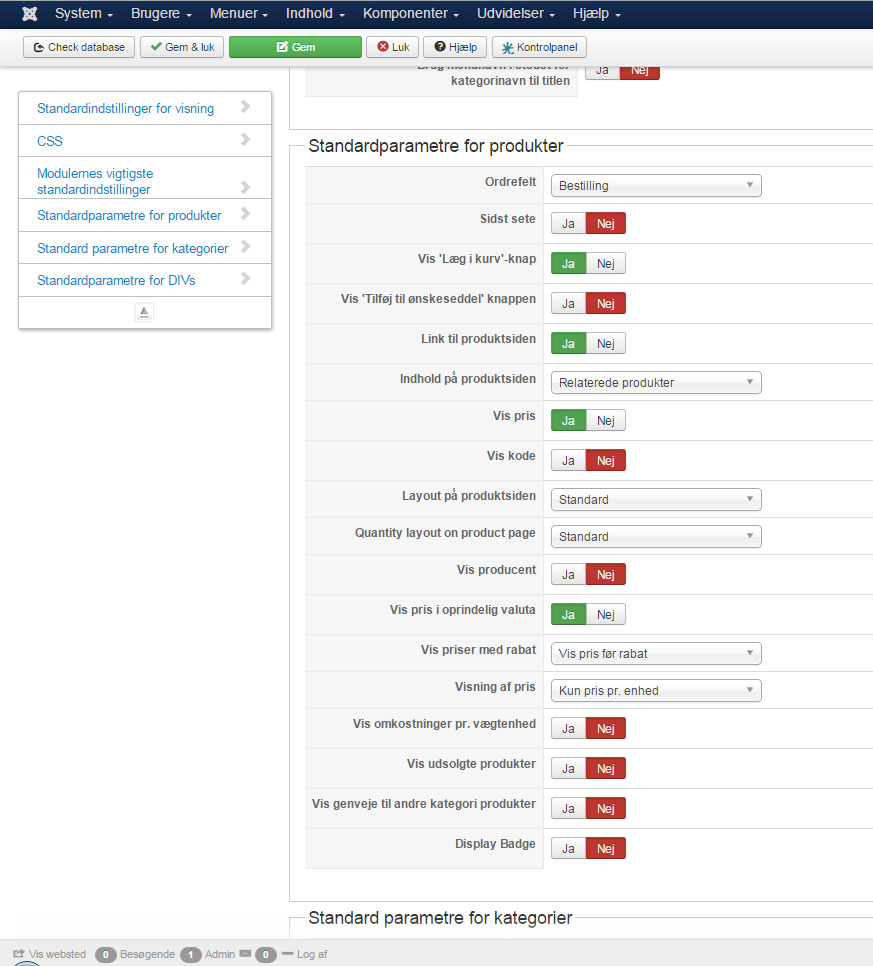
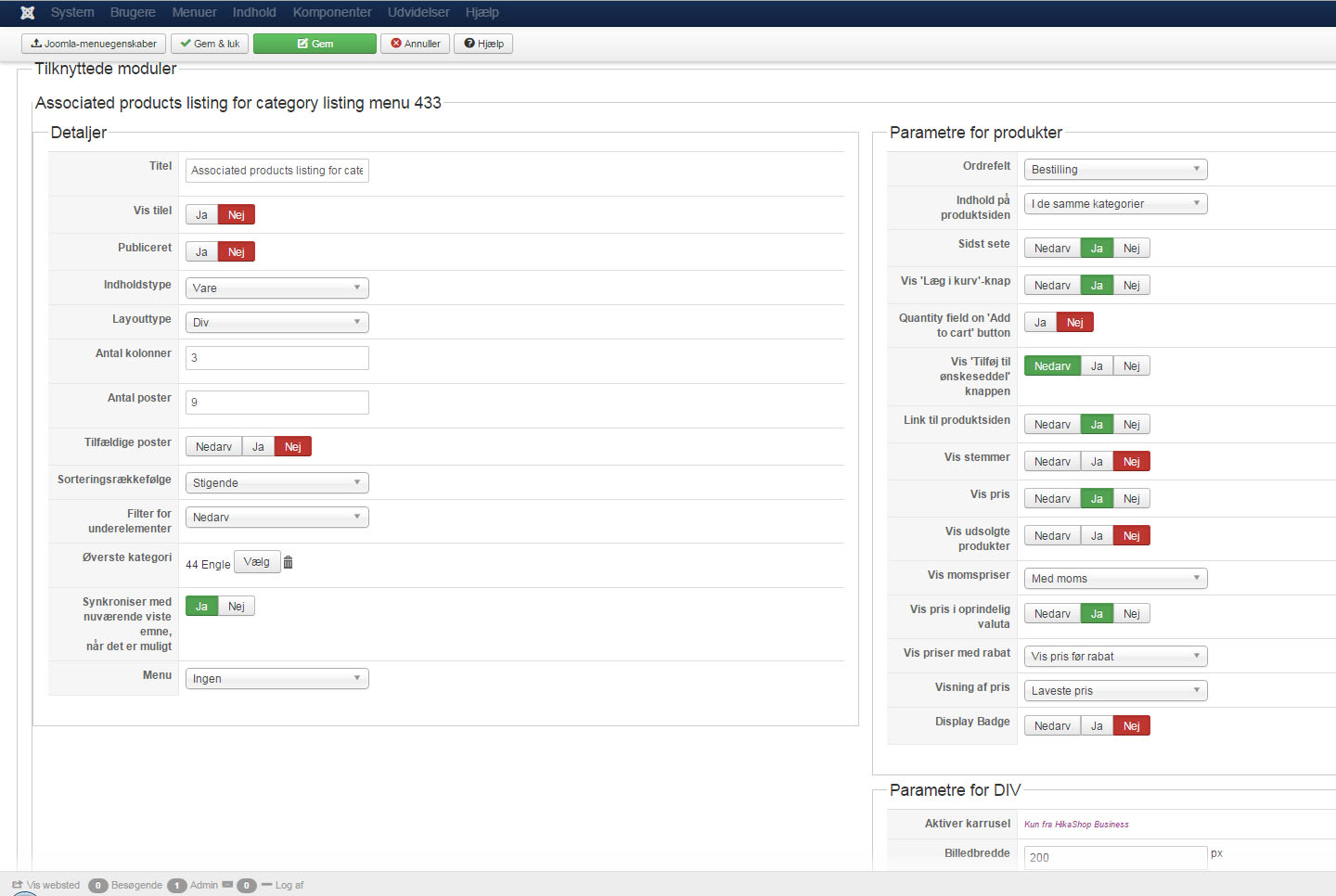
yes
here is one of the pages
meisolle.com/index.php/engle
file hika1 is from the system - config
the file hika 2 is from the show-content menu
/Christina
Replied by Sunshine on topic The strikethrough on normal prices
yes
here is one of the pages
meisolle.com/index.php/engle
file hika1 is from the system - config
the file hika 2 is from the show-content menu
/Christina
Last edit: 11 years 6 months ago by Sunshine.
Please Log in or Create an account to join the conversation.

11 years 6 months ago #195116
by lousyfool
All it takes is applying custom CSS to the class in question, e.g. like this:
Of course, you may as well want to add "padding-right: 5px;" and/or "color: #ff0000;" or so to it, depending on your likings.
Need help with customisations of layouts, style or other site development? PM me!
(Don't forget to turn on "E-mail notification of new messages" )
Replied by lousyfool on topic The strikethrough on normal prices
Sunshine wrote: ... I want the old price to show with the strikethrough.
All it takes is applying custom CSS to the class in question, e.g. like this:
Code:
.hikashop_product_price_before_discount {
text-decoration: line-through;
}
Of course, you may as well want to add "padding-right: 5px;" and/or "color: #ff0000;" or so to it, depending on your likings.
Need help with customisations of layouts, style or other site development? PM me!
(Don't forget to turn on "E-mail notification of new messages" )
The following user(s) said Thank You: Sunshine
Please Log in or Create an account to join the conversation.
11 years 6 months ago #195163
by Sunshine
/Christina
Replied by Sunshine on topic The strikethrough on normal prices
thanks, maybe I shouldn't mess with that if it is allready suppose to work without changing the CSS 
/Christina
Please Log in or Create an account to join the conversation.
11 years 6 months ago #195231
by lousyfool
Need help with customisations of layouts, style or other site development? PM me!
(Don't forget to turn on "E-mail notification of new messages" )
Replied by lousyfool on topic The strikethrough on normal prices
It would probably work if the HikaShop default CSS were loading, but your site is relying solely on the template CSS. Which isn't a bad thing, so generally no need to consider changing that. Like in this case, a thing or two may be "missing" but you can add it still - through your template's custom.css file.
So, go ahead, add the little snippet to it, and you'll find the "old" price the way you want it. No mess.
So, go ahead, add the little snippet to it, and you'll find the "old" price the way you want it. No mess.
Need help with customisations of layouts, style or other site development? PM me!
(Don't forget to turn on "E-mail notification of new messages" )
Please Log in or Create an account to join the conversation.
11 years 6 months ago #195236
by Sunshine

Please Log in or Create an account to join the conversation.
11 years 6 months ago #195237
by Sunshine
/Christina
Replied by Sunshine on topic The strikethrough on normal prices
okej that did help the page was to slow to uppload thank you
thank you /Christina
Please Log in or Create an account to join the conversation.
Time to create page: 0.233 seconds