

- Posts: 208
- Thank you received: 10
Space between currency and amount
11 years 5 months ago #199404
by simmiepam
Space between currency and amount was created by simmiepam
-- HikaShop version -- : 2.4.0
-- Joomla version -- : 3.4
Believe me when I tell you i've been TRYING to figure out the CSS to make this happen.
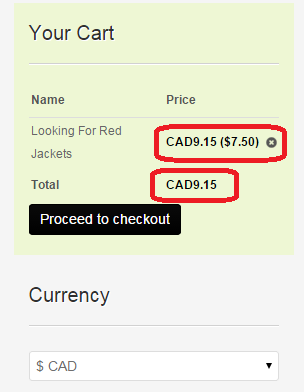
But when I use the currency switcher to change to Canada...there is NO SPACE between the word CAN and the amount. It's pretty hard to read at a glance.
Is there a way to put a space (2 or 3 would be better) after CAN and before the amount?
-- Joomla version -- : 3.4
Believe me when I tell you i've been TRYING to figure out the CSS to make this happen.
But when I use the currency switcher to change to Canada...there is NO SPACE between the word CAN and the amount. It's pretty hard to read at a glance.
Is there a way to put a space (2 or 3 would be better) after CAN and before the amount?
Please Log in or Create an account to join the conversation.

11 years 5 months ago #199424
by Xavier
Replied by Xavier on topic Space between currency and amount
Hi,
Via the menu System > Currencies, you can edit the settings of the currencies so you can edit the CAD one and add spaces.
Via the menu System > Currencies, you can edit the settings of the currencies so you can edit the CAD one and add spaces.
Please Log in or Create an account to join the conversation.
Time to create page: 0.175 seconds