

- Posts: 344
- Thank you received: 3
text on the top of each text-box stripe payment
11 years 1 month ago #213255
by river
text on the top of each text-box stripe payment was created by river
-- url of the page with the problem -- : http:/www.kvikkimedia.no
-- HikaShop version -- : 2.5.0
-- Joomla version -- : 3.4.3
In the Stripe credit card payment screen. Is it possible to put the text on the top of each text-box, instead of to the left ?
Please see encloused image to see what I mean.
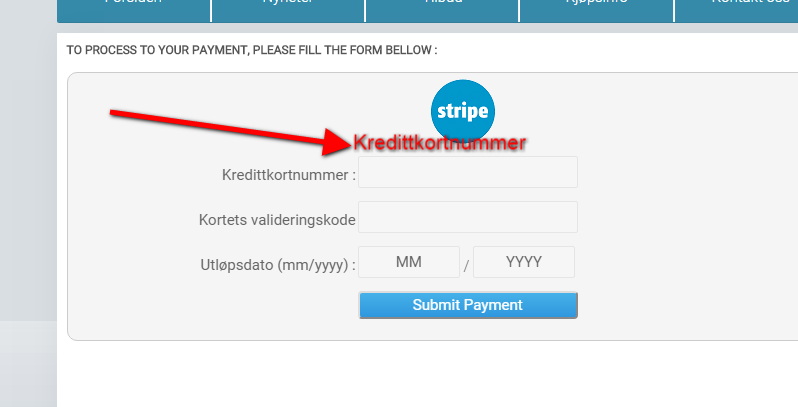
Then It would fit better when shopping using mobile phone.
-- HikaShop version -- : 2.5.0
-- Joomla version -- : 3.4.3
In the Stripe credit card payment screen. Is it possible to put the text on the top of each text-box, instead of to the left ?
Please see encloused image to see what I mean.
Then It would fit better when shopping using mobile phone.
Please Log in or Create an account to join the conversation.

11 years 1 month ago #213256
by nicolas
Replied by nicolas on topic text on the top of each text-box stripe payment
Hi,
Yes, it's possible.
You can first copy the file plugins/hikashoppayment/stripe/stripe_end.php to templates/YOUR_TEMPLATE/hikashoppayment/stripe_end.php and then modify the HTML in the copy to meet your needs.
Yes, it's possible.
You can first copy the file plugins/hikashoppayment/stripe/stripe_end.php to templates/YOUR_TEMPLATE/hikashoppayment/stripe_end.php and then modify the HTML in the copy to meet your needs.
Please Log in or Create an account to join the conversation.
11 years 1 month ago #213317
by river
Replied by river on topic text on the top of each text-box stripe payment
Tnx for reply.
Could you please give me some CSS advice on how to align the text on top of the input boxes ?
Now they are align to the left to the text box.
Could you please give me some CSS advice on how to align the text on top of the input boxes ?
Now they are align to the left to the text box.
Please Log in or Create an account to join the conversation.
11 years 1 month ago #213320
by nicolas
Replied by nicolas on topic text on the top of each text-box stripe payment
You can add a margin-left to the element encompassing your text.
Please Log in or Create an account to join the conversation.
10 years 3 weeks ago #249460
by river
Replied by river on topic text on the top of each text-box stripe payment
Even tought this is an old thread I still want to solve this:
I can't figgure this one out. This is the code snippet from stripe_end.php file which addresses the Credit card number text and its input box.
I want the credit card number text to be on top of the box. This way it doesnt float out on small mobile screens.
Where do I add the "margin-left" in order to get it do look like in my image above ?
I can't figgure this one out. This is the code snippet from stripe_end.php file which addresses the Credit card number text and its input box.
I want the credit card number text to be on top of the box. This way it doesnt float out on small mobile screens.
Code:
<tr style="margin-bottom:5px;">
<td style="text-align:right"><label><?php echo JText::_('CREDIT_CARD_NUMBER').' : '; ?></label></td>
<td><input style="text-align: center;" value="" autocomplete="off" type="text" size="20" data-stripe="number"></td>
</tr>
Where do I add the "margin-left" in order to get it do look like in my image above ?
Please Log in or Create an account to join the conversation.
10 years 3 weeks ago #249463
by nicolas
Replied by nicolas on topic text on the top of each text-box stripe payment
Hi,
You could add such CSS:
#stripeform tr, #stripeform td{ display:block; }
The CSS for that area can be added like any CSS you add on your website, ie. in the CSS file of your template.
But you can also add it to the CSS of HikaShop:
www.hikashop.com/support/documentation/1...ize-the-display.html
In any case, CSS customization like this is something you should do on your end.
You could add such CSS:
#stripeform tr, #stripeform td{ display:block; }
The CSS for that area can be added like any CSS you add on your website, ie. in the CSS file of your template.
But you can also add it to the CSS of HikaShop:
www.hikashop.com/support/documentation/1...ize-the-display.html
In any case, CSS customization like this is something you should do on your end.
Please Log in or Create an account to join the conversation.
Time to create page: 0.200 seconds