

- Posts: 49
- Thank you received: 1
I need to add
11 years 3 weeks ago #213488
by optiplus
I need to add was created by optiplus
Hi,
I need to add the custom field in the table below , to select the size before buying ...
I added a photo for better clarification
Regards
I need to add the custom field in the table below , to select the size before buying ...
I added a photo for better clarification
Regards
Please Log in or Create an account to join the conversation.

Less
More
- Posts: 12953
- Thank you received: 1778
11 years 3 weeks ago #213507
by Mohamed Thelji
Replied by Mohamed Thelji on topic I need to add
Hello,
You'll have to use a custom ITEM field, and then set the "Custom item fields" option to YES through your product listing content module configuration page via "Hikashop->Display->Content modules".
You'll have to use a custom ITEM field, and then set the "Custom item fields" option to YES through your product listing content module configuration page via "Hikashop->Display->Content modules".
Please Log in or Create an account to join the conversation.
11 years 1 week ago #214868
by optiplus
Replied by optiplus on topic I need to add
I tried what you indicate me but makes me nothing ...
Some models have some other sizes and other models , I need you to select the size and when I made my order selected size appears.
Sorry for my bad english...
Some models have some other sizes and other models , I need you to select the size and when I made my order selected size appears.
Sorry for my bad english...
Please Log in or Create an account to join the conversation.

11 years 1 week ago #214891
by nicolas
Replied by nicolas on topic I need to add
Hi,
I think that Mohamed thought that your listing there was a products listing module, and not the listing of variants of the product.
It's not possible to have the custom item fields displayed in the variants table for each variant of the product.
The system hasn't been made to support that.
In that case, I would recommend instead to have a second characteristic for the size and add it to the product as second characteristic.
I think that Mohamed thought that your listing there was a products listing module, and not the listing of variants of the product.
It's not possible to have the custom item fields displayed in the variants table for each variant of the product.
The system hasn't been made to support that.
In that case, I would recommend instead to have a second characteristic for the size and add it to the product as second characteristic.
Please Log in or Create an account to join the conversation.
11 years 1 week ago #214924
by optiplus
Replied by optiplus on topic I need to add
Hi Nicolas,
Not if I understand correctly.
You mean to introduce each of the sizes that can be a model??
In each model to introduce its variants?
Regards
Not if I understand correctly.
You mean to introduce each of the sizes that can be a model??
In each model to introduce its variants?
Regards
Please Log in or Create an account to join the conversation.
Less
More
- Posts: 12953
- Thank you received: 1778
11 years 1 week ago #214933
by Mohamed Thelji
Replied by Mohamed Thelji on topic I need to add
Hi,
He just wanted you to create a new "Calibre" characteristic and add it to every product which use the "Calibre" custom Item field.You mean to introduce each of the sizes that can be a model??
In each model to introduce its variants?
Please Log in or Create an account to join the conversation.
11 years 5 days ago #215617
by optiplus
Replied by optiplus on topic I need to add
Hi, I created a custom field " Calibre " and I get to select it. But then when you pay does not leave the selected gauge "Calibre".
Please Log in or Create an account to join the conversation.
Less
More
- Posts: 12953
- Thank you received: 1778
11 years 4 days ago #215623
by Mohamed Thelji
Replied by Mohamed Thelji on topic I need to add
Hello,
What do you exactly mean by :
Thanks.
What do you exactly mean by :
Can you give us more information about it through some screenshots for example ?But then when you pay does not leave the selected gauge "Calibre".
Thanks.
Please Log in or Create an account to join the conversation.
11 years 4 days ago #215728
by optiplus
Replied by optiplus on topic I need to add
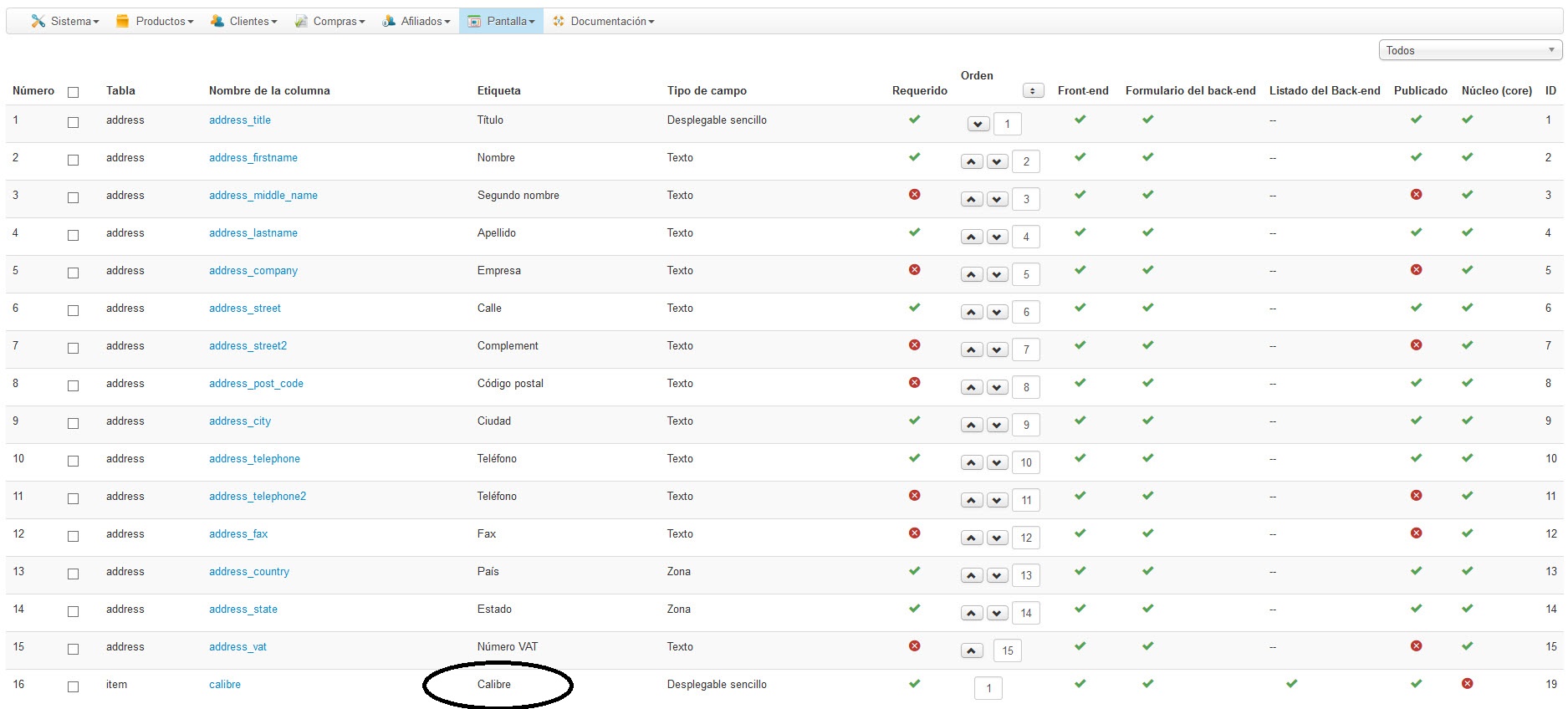
I make custom field "Calibre"
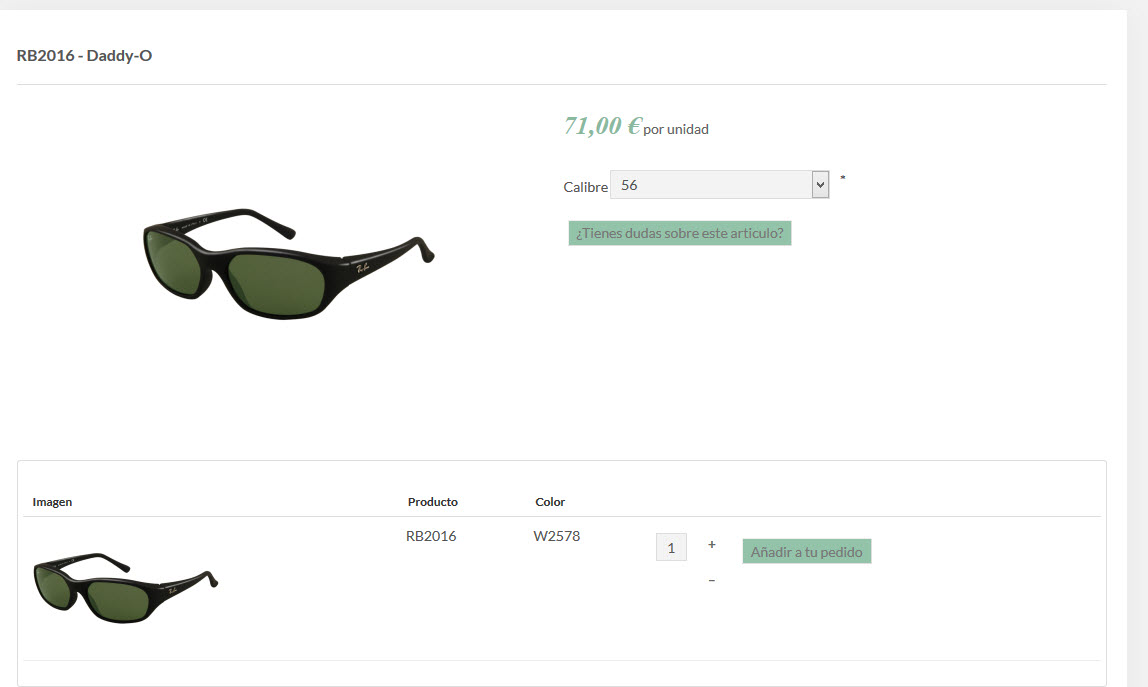
I see the " Calibre" in the model
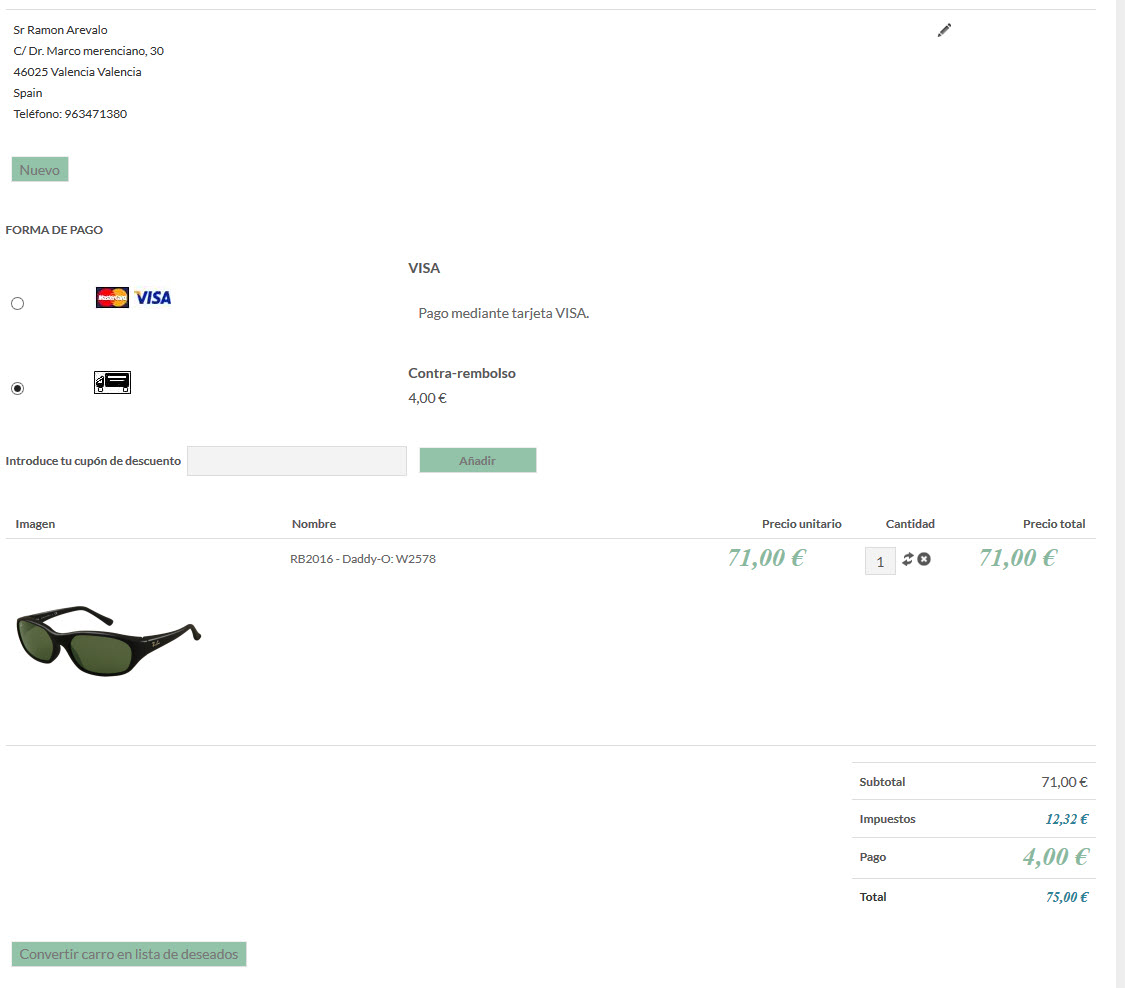
Now i buy and i dont see "calibre" in payment.
I see the " Calibre" in the model
Now i buy and i dont see "calibre" in payment.
Please Log in or Create an account to join the conversation.
Less
More
- Posts: 12953
- Thank you received: 1778
11 years 3 days ago #215732
by Mohamed Thelji
Replied by Mohamed Thelji on topic I need to add
Hello,
It's actually working fine on my end, can you give us a link to your product page so that we can directly test it ?
Thanks.
It's actually working fine on my end, can you give us a link to your product page so that we can directly test it ?
Thanks.
Please Log in or Create an account to join the conversation.
11 years 3 days ago #215923
by optiplus
Replied by optiplus on topic I need to add
Please Log in or Create an account to join the conversation.
11 years 2 days ago #215938
by nicolas
Replied by nicolas on topic I need to add
Hi,
I already told you that the system doesn't support custom item fields for products with characteristics if you use the "list" display of the characteristics selection interface.
So it's normal that it doesn't work.
As I told you, I would recommend instead to have a second characteristic for the Calibre and add it to the product as second characteristic.
I already told you that the system doesn't support custom item fields for products with characteristics if you use the "list" display of the characteristics selection interface.
So it's normal that it doesn't work.
As I told you, I would recommend instead to have a second characteristic for the Calibre and add it to the product as second characteristic.
Please Log in or Create an account to join the conversation.
11 years 2 days ago #216019
by optiplus
Replied by optiplus on topic I need to add
Ok , but that does not help me.
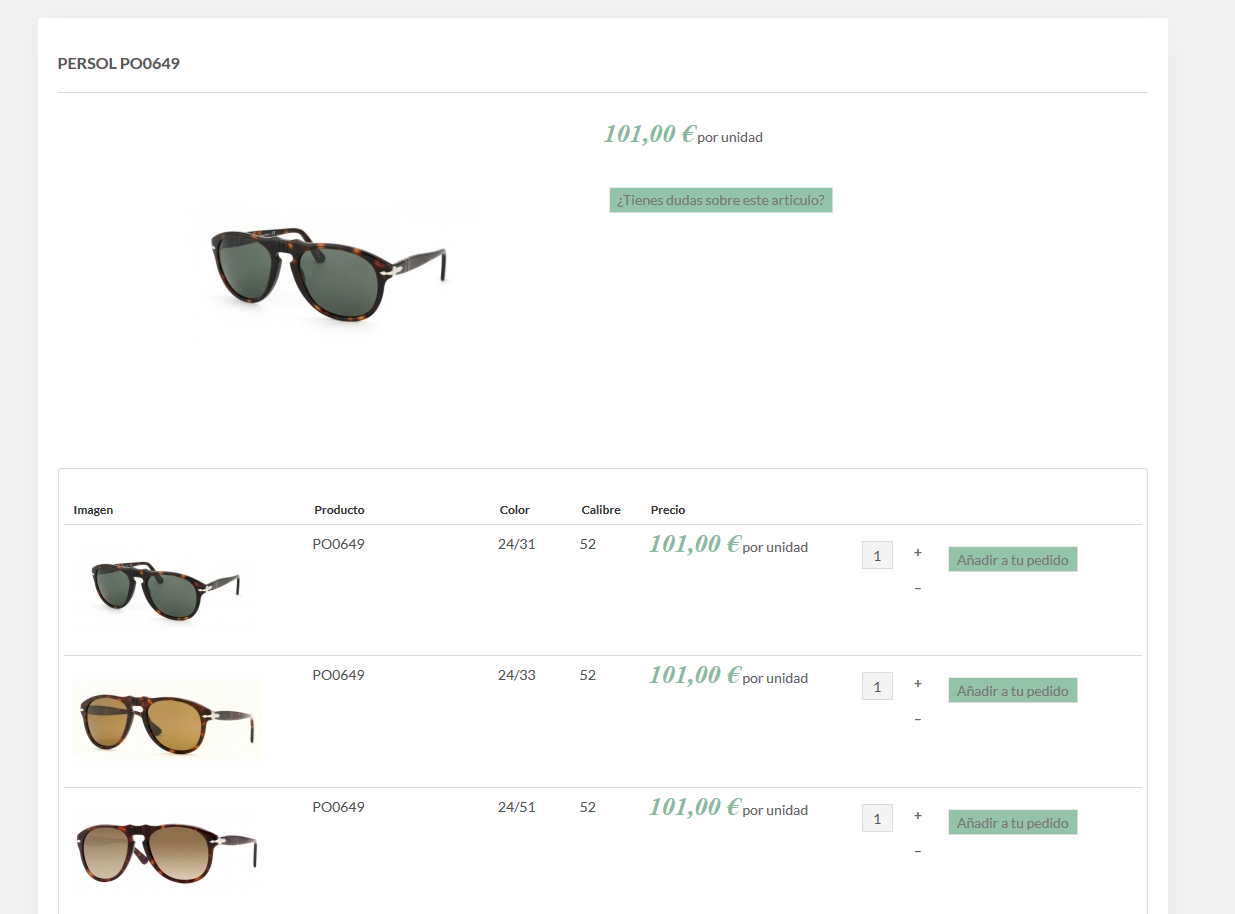
I explain how it should operate:
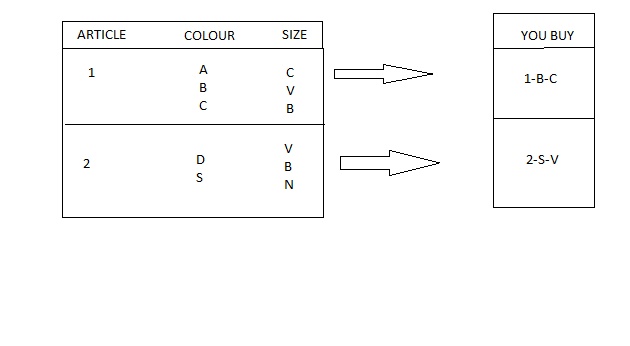
1 article have most colour and 1 colour have 1 or 2 or 3 sizes...but dont all colours have same sizes...
It is not easy to explain and my English does not help ...IM SORRY.....
I explain how it should operate:
1 article have most colour and 1 colour have 1 or 2 or 3 sizes...but dont all colours have same sizes...
It is not easy to explain and my English does not help ...IM SORRY.....
Please Log in or Create an account to join the conversation.
11 years 1 day ago #216029
by nicolas
Replied by nicolas on topic I need to add
Hi,
I don't see the problem of doing what you said you want to do with characteristics.
Once you add your two characteristics to your product, you can go in the "Variants" tab of the product and add/delete modify the variants of the product.
So different products can have different sizes/colors combinations available and each color doesn't need to have all the sizes available either.
It's up to you to define what you want in the Variants tab of the product.
I don't see the problem of doing what you said you want to do with characteristics.
Once you add your two characteristics to your product, you can go in the "Variants" tab of the product and add/delete modify the variants of the product.
So different products can have different sizes/colors combinations available and each color doesn't need to have all the sizes available either.
It's up to you to define what you want in the Variants tab of the product.
Please Log in or Create an account to join the conversation.
11 years 1 day ago #216150
by optiplus
Replied by optiplus on topic I need to add
I cant choose among the diferent sizes in a model...
Each model has different colours and sizes, so I need to show each color with their own "size/s" like a dropdown menu for the client be able to choose the right one. How can i do it?
Each model has different colours and sizes, so I need to show each color with their own "size/s" like a dropdown menu for the client be able to choose the right one. How can i do it?
Please Log in or Create an account to join the conversation.
11 years 18 hours ago #216154
by nicolas
Replied by nicolas on topic I need to add
If you add two characteristic, one for the color and one for the size, you'll get to see all the possibilities of combinations that you allowed in your product variants in the listing of variants of your product page. Thus there is no need for a dropdown.
Please Log in or Create an account to join the conversation.
10 years 11 months ago #216269
by optiplus
Replied by optiplus on topic I need to add
But as you say I have to create a product for each color and different size ...
If a color has 3 sizes I have to create one for each size and the list can be enormous.
If it were not so , I do not understand that ... otherwise would have any example to see ?
If a color has 3 sizes I have to create one for each size and the list can be enormous.
If it were not so , I do not understand that ... otherwise would have any example to see ?
Please Log in or Create an account to join the conversation.
10 years 11 months ago #216278
by nicolas
Replied by nicolas on topic I need to add
The list can indeed because big if you have a lot of combinations. In your example, you had 3 values for the color and 3 for the size. That's 9 variants, so I supposed that this is what you had in mind and in that case, a list of 9 variants on the product page shouldn't be a problem.
Instead of displaying the characteristics in a list, you could display them as dropdowns, as it is the case by default. That way, you won't have the issue with the long list and you'll get the size dropdown like you want.
Instead of displaying the characteristics in a list, you could display them as dropdowns, as it is the case by default. That way, you won't have the issue with the long list and you'll get the size dropdown like you want.
Please Log in or Create an account to join the conversation.
10 years 11 months ago #216570
by optiplus
Replied by optiplus on topic I need to add
I did in this way because i would like to see the colors under the model of the glass.
Then, Do you want to say that the only solution is register all the colors with their size?
This it's a problem because some times there are 40 colors and every color has 3 different sizes. It's very messy.
Thanks for your help,
Then, Do you want to say that the only solution is register all the colors with their size?
This it's a problem because some times there are 40 colors and every color has 3 different sizes. It's very messy.
Thanks for your help,
Please Log in or Create an account to join the conversation.

10 years 11 months ago #216678
by Jerome
Jerome - Obsidev.com
HikaMarket & HikaSerial developer / HikaShop core dev team.
Replied by Jerome on topic I need to add
Hi,
I don't see the link between your message (and question) and the Nicolas' answer.
If you have characteristics, yes, you create variants for each possible combination.
If there is too much variants ; you might think to use a different design or use something else than characteristics.. But it has a lot of impacts and it's a total different subject.
HikaShop have various ways to allow you to sell products but first ; you need to know what you are selling, how you are selling it and how you want to manage your products.
Depending that ; there will be different solution but few of them could require some custom development.
Regards,
I don't see the link between your message (and question) and the Nicolas' answer.
If you have characteristics, yes, you create variants for each possible combination.
If there is too much variants ; you might think to use a different design or use something else than characteristics.. But it has a lot of impacts and it's a total different subject.
HikaShop have various ways to allow you to sell products but first ; you need to know what you are selling, how you are selling it and how you want to manage your products.
Depending that ; there will be different solution but few of them could require some custom development.
Regards,
Jerome - Obsidev.com
HikaMarket & HikaSerial developer / HikaShop core dev team.
Please Log in or Create an account to join the conversation.
Time to create page: 0.304 seconds