

- Posts: 54
- Thank you received: 2
HiNo images in OSMap
11 years 3 weeks ago #214089
by jvstratum
No images in OSMap was created by jvstratum
-- HikaShop version -- : 2.5.0
-- Joomla version -- : 3.4.4
-- PHP version -- : 5.4
I installed OSMap (free version) and the Hikashop Xmap extension. The sitemap itself is functioning as it should. However, the image sitemap remains empty.
What can I do to get the images listed in the image sitemap?
-- Joomla version -- : 3.4.4
-- PHP version -- : 5.4
I installed OSMap (free version) and the Hikashop Xmap extension. The sitemap itself is functioning as it should. However, the image sitemap remains empty.
What can I do to get the images listed in the image sitemap?
Please Log in or Create an account to join the conversation.

11 years 3 weeks ago - 11 years 3 weeks ago #214103
by nicolas
Replied by nicolas on topic No images in OSMap
Hi,
Can you provide the link of your XML site map ?
Could you also try with this new version of the xmap integration plugin (make sure that you also configure the "image frequency" setting there.
Can you provide the link of your XML site map ?
Could you also try with this new version of the xmap integration plugin (make sure that you also configure the "image frequency" setting there.
This attachment is hidden for guests.
Please log in or register to see it.
Please log in or register to see it.
Last edit: 11 years 3 weeks ago by nicolas.
Please Log in or Create an account to join the conversation.
11 years 3 weeks ago - 11 years 3 weeks ago #214259
by jvstratum
Replied by jvstratum on topic No images in OSMap
Hi Nicolas,
I've tried to use the new plugin, but things only get worse. Instead of a image sitemap with no images in it I now end up with a blank browser screen for the image sitemap.
Befor I made any changes to OSMap and the HikaShop plugin frequency for the sitemap was set to weekly and the frequency for the HikaShop image sitemap plugin was left on de thefault setting "Use parent menu settings".
After installing your new version of the plugin I ended up with two fields for image frequency. See image.

I set the frequency for the sitemap to hourly and afterwards I also set the image frequency in both fields to hourly.
Sitemaps:
Sitemap
Image sitemap
I've tried to use the new plugin, but things only get worse. Instead of a image sitemap with no images in it I now end up with a blank browser screen for the image sitemap.
Befor I made any changes to OSMap and the HikaShop plugin frequency for the sitemap was set to weekly and the frequency for the HikaShop image sitemap plugin was left on de thefault setting "Use parent menu settings".
After installing your new version of the plugin I ended up with two fields for image frequency. See image.
I set the frequency for the sitemap to hourly and afterwards I also set the image frequency in both fields to hourly.
Sitemaps:
Sitemap
Image sitemap
Last edit: 11 years 3 weeks ago by jvstratum.
Please Log in or Create an account to join the conversation.

11 years 3 weeks ago #214292
by Jerome
Jerome - Obsidev.com
HikaMarket & HikaSerial developer / HikaShop core dev team.
Replied by Jerome on topic No images in OSMap
Hi,
Regarding the HikaShop Xmap plugins (version 1 or version 2), I don't see anything for the images.
There is the listing of the products for sure, but that's it.
So I don't know how the "image sitemap" is working or what kind of trigger/function it is using but I don't see anything in the current plugin.
Regards,
Regarding the HikaShop Xmap plugins (version 1 or version 2), I don't see anything for the images.
There is the listing of the products for sure, but that's it.
So I don't know how the "image sitemap" is working or what kind of trigger/function it is using but I don't see anything in the current plugin.
Regards,
Jerome - Obsidev.com
HikaMarket & HikaSerial developer / HikaShop core dev team.
Please Log in or Create an account to join the conversation.
11 years 3 weeks ago - 11 years 3 weeks ago #214354
by jvstratum
Replied by jvstratum on topic No images in OSMap
Hi Jerome,
That was exactly the problem. At first the image sitemap was working, but dit not contain images. After installing the latest plugin version I ended up with a blank browser screen.
This morning I completely removed everything about OSMap and Xmap for Hikashop. Installed OSMap again and installed the latest V2 Xmap for HikaShop plugin.
Instead of a blank screen, the Xmap HikaShop plugin is now giving an error:
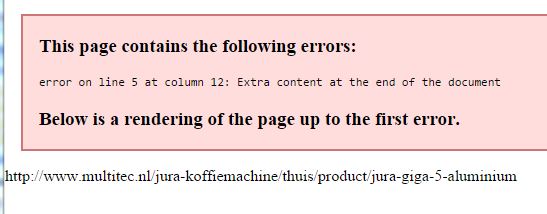
Note: I'm using Rokbooster. When Rokbooster is disabled the error is on line 7
Any suggestions?
That was exactly the problem. At first the image sitemap was working, but dit not contain images. After installing the latest plugin version I ended up with a blank browser screen.
This morning I completely removed everything about OSMap and Xmap for Hikashop. Installed OSMap again and installed the latest V2 Xmap for HikaShop plugin.
Instead of a blank screen, the Xmap HikaShop plugin is now giving an error:
Note: I'm using Rokbooster. When Rokbooster is disabled the error is on line 7
Any suggestions?
Last edit: 11 years 3 weeks ago by jvstratum. Reason: Additional info
Please Log in or Create an account to join the conversation.
11 years 2 weeks ago #214408
by Jerome
Jerome - Obsidev.com
HikaMarket & HikaSerial developer / HikaShop core dev team.
Replied by Jerome on topic No images in OSMap
Hi,
Your browser display your that message.
You must see the source of the page in order to get the XML content ; there you will be able to see what is the problem on line 5, column 12.
I perform a test using mapX (which is globally the same as OSMap, using the same base) and the hikashop xmap2 plugin ; it was working fine.
Looks like that the "images" sitemap is just a sitemap but which should list pages which contain images.
Regards,
Your browser display your that message.
You must see the source of the page in order to get the XML content ; there you will be able to see what is the problem on line 5, column 12.
I perform a test using mapX (which is globally the same as OSMap, using the same base) and the hikashop xmap2 plugin ; it was working fine.
Looks like that the "images" sitemap is just a sitemap but which should list pages which contain images.
Regards,
Jerome - Obsidev.com
HikaMarket & HikaSerial developer / HikaShop core dev team.
Please Log in or Create an account to join the conversation.
11 years 2 weeks ago #214470
by jvstratum
Replied by jvstratum on topic No images in OSMap
OK, I looked at it, but I still don't have any clue what is causing the problem or how to solve it.
Please Log in or Create an account to join the conversation.
11 years 2 weeks ago #214500
by Jerome
Jerome - Obsidev.com
HikaMarket & HikaSerial developer / HikaShop core dev team.
Replied by Jerome on topic No images in OSMap
Hi,
You can share that information with us ; otherwise I'm afraid that I won't be able to have any hint for you.
Regards,
You can share that information with us ; otherwise I'm afraid that I won't be able to have any hint for you.
Regards,
Jerome - Obsidev.com
HikaMarket & HikaSerial developer / HikaShop core dev team.
Please Log in or Create an account to join the conversation.
11 years 2 weeks ago #214676
by jvstratum
Replied by jvstratum on topic No images in OSMap
Hi Jerome,
I hope this is what you asked for.
Joep
I hope this is what you asked for.
Joep
Please Log in or Create an account to join the conversation.
11 years 2 weeks ago #214849
by nicolas
Replied by nicolas on topic No images in OSMap
Hi,
Unfortunately, that doesn't help.
Could you provide the link of your site map so that we can see it ?
Unfortunately, that doesn't help.
Could you provide the link of your site map so that we can see it ?
Please Log in or Create an account to join the conversation.
11 years 2 weeks ago #214854
by jvstratum
Replied by jvstratum on topic No images in OSMap
Sure, I can post it again:
image sitemap
Please Log in or Create an account to join the conversation.
11 years 2 weeks ago #214861
by Jerome
Jerome - Obsidev.com
HikaMarket & HikaSerial developer / HikaShop core dev team.
Replied by Jerome on topic No images in OSMap
Hi,
The sitemap is not fully generated ; which means that you might have a PHP fatal error which stop the page generation.
Please check your PHP error log in order to find that PHP fatal error.
Regards,
The sitemap is not fully generated ; which means that you might have a PHP fatal error which stop the page generation.
Please check your PHP error log in order to find that PHP fatal error.
Regards,
Jerome - Obsidev.com
HikaMarket & HikaSerial developer / HikaShop core dev team.
Please Log in or Create an account to join the conversation.

Less
More
- Posts: 158
- Thank you received: 5
7 years 10 months ago #300504
by serbofleconcepts
Replied by serbofleconcepts on topic No images in OSMap
Hello, does the Hikashop OSMap plugin actually support images as I can see all my products in the xml sitemap but I get 0 for the images.
www.leconcepts.com/component/osmap/?view=xml&id=1&images=1
www.leconcepts.com/component/osmap/?view=xml&id=1&images=1
Please Log in or Create an account to join the conversation.
7 years 10 months ago #300506
by nicolas
Replied by nicolas on topic No images in OSMap
Hi,
The site map plugin we provide on our website does generate the links for the images in the structure returned to OSMap:
Now I don't know how OSMap processes that structure or how to configure OSMap to process it.
Maybe there is something to activate in OSMap.
I would recommend contacting the support of OSMap about that.
The site map plugin we provide on our website does generate the links for the images in the structure returned to OSMap:
Code:
$img = new stdClass();
$img->src = $image;
$img->title = $name;
$node->isImages = 1;
$node->images = array($img);
Maybe there is something to activate in OSMap.
I would recommend contacting the support of OSMap about that.
The following user(s) said Thank You: serbofleconcepts
Please Log in or Create an account to join the conversation.
Less
More
- Posts: 158
- Thank you received: 5
7 years 8 months ago #302902
by serbofleconcepts
Replied by serbofleconcepts on topic No images in OSMap
I have contacted the owners of OSMap and they have suggested the following;
Hi
Could you ask the Hikashop team about this, please?
They support the plugin that connects OSMap to Hikashop.
It's possible that a Hikashop update means that they need to update the plugin.
Steve
I'm stuck in the middle - all I know is that this used to work on a previous version of HikaShop.
Hi
Could you ask the Hikashop team about this, please?
They support the plugin that connects OSMap to Hikashop.
It's possible that a Hikashop update means that they need to update the plugin.
Steve
I'm stuck in the middle - all I know is that this used to work on a previous version of HikaShop.
Please Log in or Create an account to join the conversation.
7 years 8 months ago #302917
by nicolas
Replied by nicolas on topic No images in OSMap
Hi,
No the plugin we offer doesn't need any update regarding HikaShop as far as I can see. We didn't change anything regarding the structure of the data for products since the first version of HikaShop.
I tried to get the free version of OSMap but I didn't get the email with the download link yet. So I couldn't try to reproduce the issue on my end.
I've send them a contact request to see if they can provide that so that we can move forward.
No the plugin we offer doesn't need any update regarding HikaShop as far as I can see. We didn't change anything regarding the structure of the data for products since the first version of HikaShop.
I tried to get the free version of OSMap but I didn't get the email with the download link yet. So I couldn't try to reproduce the issue on my end.
I've send them a contact request to see if they can provide that so that we can move forward.
Please Log in or Create an account to join the conversation.
Less
More
- Posts: 158
- Thank you received: 5
7 years 7 months ago #303767
by serbofleconcepts
Replied by serbofleconcepts on topic No images in OSMap
Is there any update on this?
Interestingly, I've just noticed some PHP errors relating to hikashop and OS map;
Where can I find the latest version of your OS map plugin?
Interestingly, I've just noticed some PHP errors relating to hikashop and OS map;
Code:
[12-Feb-2019 20:52:46 UTC] PHP Warning: Parameter 1 to xmap_com_hikashop::getTree() expected to be a reference, value given in /{removed}/public_html/administrator/components/com_osmap/library/alledia/osmap/Helper/General.php on line 383
Where can I find the latest version of your OS map plugin?
Please Log in or Create an account to join the conversation.

Less
More
- Posts: 12953
- Thank you received: 1778
7 years 7 months ago #303772
by Mohamed Thelji
Replied by Mohamed Thelji on topic No images in OSMap
Hello,
You'll find it through that link :
www.hikashop.com/support/documentation/8...ation-with-xmap.html
Kind regards,
Mohamed Thelji.
You'll find it through that link :
www.hikashop.com/support/documentation/8...ation-with-xmap.html
Kind regards,
Mohamed Thelji.
Please Log in or Create an account to join the conversation.
6 years 7 months ago - 6 years 7 months ago #316209
by doby75
Replied by doby75 on topic No images in OSMap
Hi, please help same problem here..
the products are seen but the pictures are just basic. We allowed access via a robot file to a folder images but the same
www.agrofd.com/component/osmap/?view=xml...&images=1&format=xml
The photos are in the standard folder agrofd.com/public_html/images/com_hikashop/upload/
Thanks a lot
Miroslav
the products are seen but the pictures are just basic. We allowed access via a robot file to a folder images but the same
www.agrofd.com/component/osmap/?view=xml...&images=1&format=xml
The photos are in the standard folder agrofd.com/public_html/images/com_hikashop/upload/
Thanks a lot
Miroslav
Last edit: 6 years 7 months ago by doby75.
Please Log in or Create an account to join the conversation.
6 years 7 months ago #316211
by nicolas
Replied by nicolas on topic No images in OSMap
Hi,
I had another look at this today and I've made some modifications to the plugin which I think could help.
Download again the install package of the plugin here: www.hikashop.com/support/documentation/8...ation-with-xmap.html
Install it on your website and edit the settings of the plugin. There, you'll have a new "change frequency for images" setting that you can configure. Make sure you save the settings once.
Then, it should hopefully better work to get the image data of products.
I had another look at this today and I've made some modifications to the plugin which I think could help.
Download again the install package of the plugin here: www.hikashop.com/support/documentation/8...ation-with-xmap.html
Install it on your website and edit the settings of the plugin. There, you'll have a new "change frequency for images" setting that you can configure. Make sure you save the settings once.
Then, it should hopefully better work to get the image data of products.
Please Log in or Create an account to join the conversation.
Time to create page: 0.318 seconds