

- Posts: 251
- Thank you received: 2
Checkout steps after update 2.6.0
11 years 3 days ago #215920
by Nello
Checkout steps after update 2.6.0 was created by Nello
-- HikaShop version -- : 2.6.0
-- Joomla version -- : 3.4.4
Hi,
today I updated to the last version 2.6.0 and it seems that the system no longer allows to buy without registration .
Before the update all works well and the various steps were correct.
Now from step-0 it goes directly to the step-2 but in the url I read step-1. It jumps the step of the payement.
How can I fix it?
Thank you
-- Joomla version -- : 3.4.4
Hi,
today I updated to the last version 2.6.0 and it seems that the system no longer allows to buy without registration .
Before the update all works well and the various steps were correct.
Now from step-0 it goes directly to the step-2 but in the url I read step-1. It jumps the step of the payement.
How can I fix it?
Thank you
Please Log in or Create an account to join the conversation.

11 years 2 days ago #215935
by nicolas
Replied by nicolas on topic Checkout steps after update 2.6.0
Hi,
We didn't change anything on that end.
So All I can think of is a setting issue.
Please provide a screenshot of the settings of the Checkout tab of the HikaShop configuration.
We didn't change anything on that end.
So All I can think of is a setting issue.
Please provide a screenshot of the settings of the Checkout tab of the HikaShop configuration.
Please Log in or Create an account to join the conversation.
11 years 2 days ago #216011
by Nello
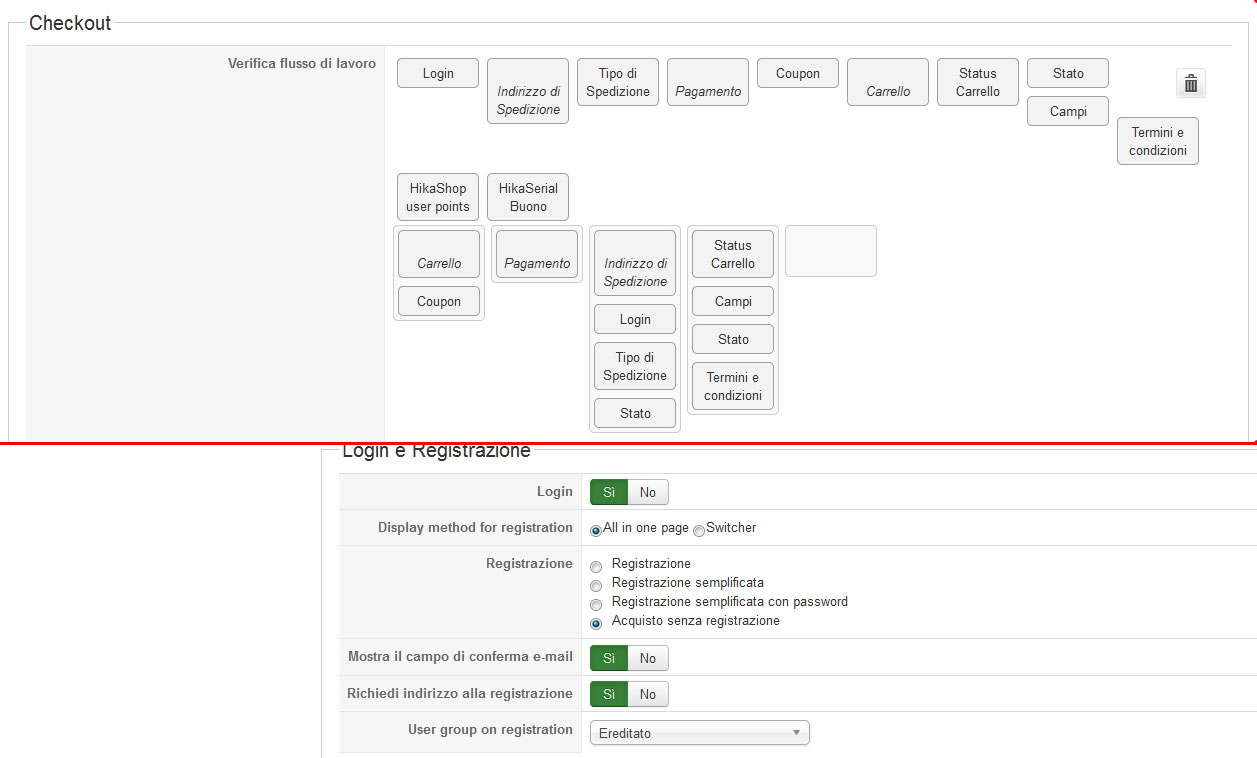
These are my checkout settings. I don't changed nothing and before the update all worked fine. I don't know if other settings are needed...
Replied by Nello on topic Checkout steps after update 2.6.0
These are my checkout settings. I don't changed nothing and before the update all worked fine. I don't know if other settings are needed...
Please Log in or Create an account to join the conversation.

Less
More
- Posts: 12953
- Thank you received: 1778
11 years 1 day ago #216014
by Mohamed Thelji
Replied by Mohamed Thelji on topic Checkout steps after update 2.6.0
Hello,
Can you try it with the "login" action on the first step of your checkout workflow ?
Thanks.
Can you try it with the "login" action on the first step of your checkout workflow ?
Thanks.
Please Log in or Create an account to join the conversation.
11 years 1 day ago #216151
by Nello
Replied by Nello on topic Checkout steps after update 2.6.0
Yes, but i don't want to have the login at the first step, I prefere to have it with the shipping address step.
So I resolved differently, putting together the cart and the payment in the first step-0 and then the login and shipping address.
It's not what I really want but works!
Thank you the same!
So I resolved differently, putting together the cart and the payment in the first step-0 and then the login and shipping address.
It's not what I really want but works!
Thank you the same!
Please Log in or Create an account to join the conversation.
10 years 10 months ago #221552
by kjeldbagh
Replied by kjeldbagh on topic Checkout steps after update 2.6.0
Hi,
I have some what the same issue.
My checkoutflow is: Login-cart-payment-status.
When I login, I stay in the login step - and have to press next.
If I have cart in the first step (step 0 in browser), then I preceed to payment (step2 in browser) if I change quantity in the cart.
If it is to work as wanted - I have to set the checkout process to: (cart+login)-(cart+coupon)-(payment)-(status)
The funny thing is that if I change quantity in the cart in the checkout process, I will stay in the cart, but browser adress will show step2
All cache disabled.
Hikashop version 2.6.0
Joomla 3.4.5
Template: cloudbase 3.0
I have some what the same issue.
My checkoutflow is: Login-cart-payment-status.
When I login, I stay in the login step - and have to press next.
If I have cart in the first step (step 0 in browser), then I preceed to payment (step2 in browser) if I change quantity in the cart.
If it is to work as wanted - I have to set the checkout process to: (cart+login)-(cart+coupon)-(payment)-(status)
The funny thing is that if I change quantity in the cart in the checkout process, I will stay in the cart, but browser adress will show step2
All cache disabled.
Hikashop version 2.6.0
Joomla 3.4.5
Template: cloudbase 3.0
Please Log in or Create an account to join the conversation.
10 years 10 months ago #221577
by nicolas
Replied by nicolas on topic Checkout steps after update 2.6.0
Hi,
That's strange.
Edit the file components/com_hikashop/controllers/checkout.php and in the function after_login, try removing either
or
One of the two modification should allow you to go to the next step automatically and that will tell us what is the problem.
That's strange.
Edit the file components/com_hikashop/controllers/checkout.php and in the function after_login, try removing either
Code:
if($this->_getStep('address',$this->previous)!==false || $this->_getStep('confirm',(int)$this->previous)===(int)$this->previous){
$status = false;
}
Code:
if(!$this->before_address()){
$status = false;
}
Please Log in or Create an account to join the conversation.
10 years 10 months ago #222508
by kjeldbagh
Replied by kjeldbagh on topic Checkout steps after update 2.6.0
Hi,
I removed:
_
if(!$this->before_address()){
$status = false;
}
Seems to work .
The funny thing is still funny The funny thing is that if I change quantity in the cart in the checkout process, I will stay in the cart (as I should), but browser address will show move to step2 and not stay step1. If I refresh browser then it shows step 2 (payment - which is step 3 in the backend checkout process.
________________--
How can I remove #hikashop_shipping_methods in the url when selecting shipping methods
I removed:
_
if(!$this->before_address()){
$status = false;
}
Seems to work .
The funny thing is still funny
The funny thing is that if I change quantity in the cart in the checkout process, I will stay in the cart (as I should), but browser address will show move to step2 and not stay step1. If I refresh browser then it shows step 2 (payment - which is step 3 in the backend checkout process.________________--
How can I remove #hikashop_shipping_methods in the url when selecting shipping methods
Please Log in or Create an account to join the conversation.
10 years 10 months ago #222510
by nicolas
Replied by nicolas on topic Checkout steps after update 2.6.0
Hi,
You would have to edit the file "shipping" of the view "checkout" via the menu Display>Views and remove from the line:
You would have to edit the file "shipping" of the view "checkout" via the menu Display>Views and remove from the line:
Code:
$checked.=' onclick="this.form.action=this.form.action+\'#hikashop_shipping_methods\';this.form.submit(); return false;"';
The following user(s) said Thank You: kjeldbagh
Please Log in or Create an account to join the conversation.
Time to create page: 0.198 seconds