

- Posts: 54
- Thank you received: 0
Cart Module Option ....
11 years 1 day ago #216139
by QureshiMo
Cart Module Option .... was created by QureshiMo
-- HikaShop version -- : 2.6.0
-- Joomla version -- : 3.4.4
-- PHP version -- : 5.5.12
Hello:
I upgraded Hikashop to 2.6.0 from 2.5.0 and noticed that the label for empty cart message has changed.
In 2.5.0, the label was
I believe this change is causing the cart module for my template not working properly. To begin, the cart module always shows default message for empty cart.
How can I change the label back to what was in 2.5.0? Where can I find the configuration fields (The fields used to customized a module)
Thanks,
<<< Ali >>>
-- Joomla version -- : 3.4.4
-- PHP version -- : 5.5.12
Hello:
I upgraded Hikashop to 2.6.0 from 2.5.0 and noticed that the label for empty cart message has changed.
In 2.5.0, the label was
. In 2.6.0, this message isEmpty cart message override
. The wordEmpty message
is missing in 2.6.0.Override
I believe this change is causing the cart module for my template not working properly. To begin, the cart module always shows default message for empty cart.
How can I change the label back to what was in 2.5.0? Where can I find the configuration fields (The fields used to customized a module)
Thanks,
<<< Ali >>>
Please Log in or Create an account to join the conversation.

11 years 1 day ago #216147
by nicolas
Replied by nicolas on topic Cart Module Option ....
Hi,
The label of the setting was changed in order to optimized the display of the new interface for the options of the cart module.
That change of the label has no link with the behavior of the cart module. Changing back the label won't "fix" anything.
The options are now available directly in the main Joomla settings of the module when you edit it via the Joomla modules manager.
The label of the setting was changed in order to optimized the display of the new interface for the options of the cart module.
That change of the label has no link with the behavior of the cart module. Changing back the label won't "fix" anything.
The options are now available directly in the main Joomla settings of the module when you edit it via the Joomla modules manager.
Please Log in or Create an account to join the conversation.
11 years 20 hours ago - 11 years 20 hours ago #216176
by QureshiMo
Replied by QureshiMo on topic Cart Module Option ....
Hello:
In this case, I am not sure why the empty error message I entered is not picked up by the template (See attachments)

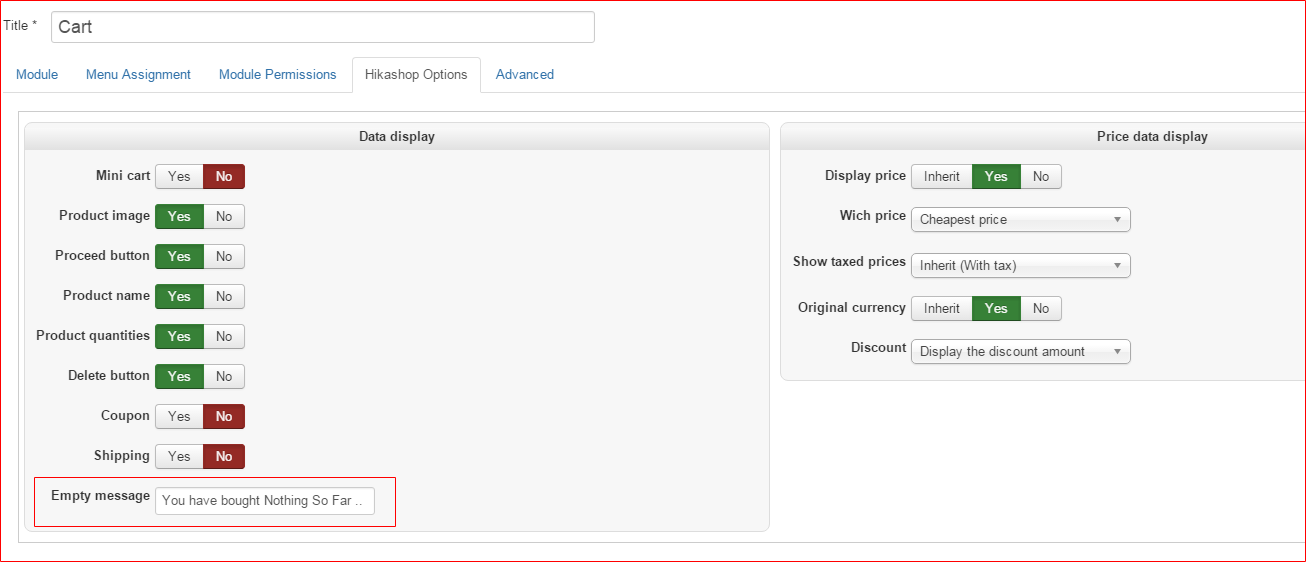
Mini cart suppose to show "0" (Zero).
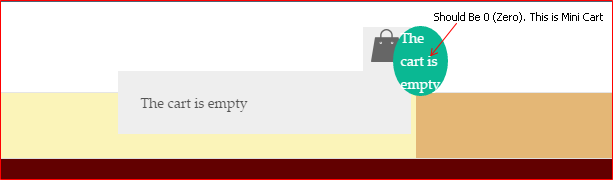
Thanks,
<<< Ali >>>
In this case, I am not sure why the empty error message I entered is not picked up by the template (See attachments)
Mini cart suppose to show "0" (Zero).
Thanks,
<<< Ali >>>
Last edit: 11 years 20 hours ago by QureshiMo. Reason: Replace last attachment with screen print that highlight Mini cart
Please Log in or Create an account to join the conversation.

10 years 11 months ago #216258
by Xavier
Replied by Xavier on topic Cart Module Option ....
Hi,
Please check if you have an override on the view "product / cart" via HikaShop > Display > Views.
If it is, do a backup of the view and reset it.
In the view, you should have a code like:
Please check if you have an override on the view "product / cart" via HikaShop > Display > Views.
If it is, do a backup of the view and reset it.
In the view, you should have a code like:
Code:
$desc = trim($this->params->get('msg'));
if(empty($desc) && $desc != '0') {
$this->params->set('msg', $emptyText);
$desc = $emptyText;
}
if(empty($this->rows)) {
if(!empty($desc) || $desc == '0') {
echo $this->notice_html;
?>
<div id="hikashop_cart" class="hikashop_cart"><?php
echo $desc;
?></div>
<div class="clear_both"></div>
<?php
}
if(JRequest::getWord('tmpl', '') == 'component') {
if(!headers_sent())
header('Content-Type: text/css; charset=utf-8');
exit;
}
return;
}
Please Log in or Create an account to join the conversation.
10 years 11 months ago #216370
by QureshiMo
Replied by QureshiMo on topic Cart Module Option ....
Hello:
Still not picking up the message. Here is the code (Except for debug statement which I added, all the code seems to be be expected code)
Here the output from the debug statement:

Thanks,
<<< Ali >>>
Still not picking up the message. Here is the code (Except for debug statement which I added, all the code seems to be be expected code)
Code:
$desc = trim($this->params->get('msg'));
echo "Debug: " . $this->params;
if(empty($desc) && $desc != '0') {
$this->params->set('msg', $emptyText);
$desc = $emptyText;
}
if(empty($this->rows)) {
if(!empty($desc) || $desc == '0') {
echo $this->notice_html;
?>
<div id="hikashop_cart" class="hikashop_cart"><?php
echo $desc;
?></div>
<div class="clear_both"></div>
<?php
}
Here the output from the debug statement:
Thanks,
<<< Ali >>>
Please Log in or Create an account to join the conversation.
10 years 11 months ago #216425
by Xavier
Replied by Xavier on topic Cart Module Option ....
Hi,
We are not able to reproduce the issue on our end.
Are you sure that you have the latest version of HikaShop ? (still 2.6.0 but with some bug fixes)
A solution could be to edit the view "product / cart" and add the following code at the top between php tags:
We are not able to reproduce the issue on our end.
Are you sure that you have the latest version of HikaShop ? (still 2.6.0 but with some bug fixes)
A solution could be to edit the view "product / cart" and add the following code at the top between php tags:
Code:
$modParams = $this->params->get('hikashopcartmodule', '');
foreach($modParams as $k => $v){
$this->params->set($k, $v);
}
Please Log in or Create an account to join the conversation.
Time to create page: 0.199 seconds