

- Posts: 57
- Thank you received: 0
Buying with AUP Adds Points on Order Change
10 years 11 months ago #217884
by firestax
Buying with AUP Adds Points on Order Change was created by firestax
-- HikaShop version -- : 2.5.0
-- Joomla version -- : 3.3.6
-- PHP version -- : 5.4.29
-- Browser(s) name and version -- : Chrome
We are using the virtual coupon and AlphaUSerPoints. When people check out using their points it will do a negative as it should. But when I update their order status it adds the total in points to their account. How do I get it to just take the points away?
-- Joomla version -- : 3.3.6
-- PHP version -- : 5.4.29
-- Browser(s) name and version -- : Chrome
We are using the virtual coupon and AlphaUSerPoints. When people check out using their points it will do a negative as it should. But when I update their order status it adds the total in points to their account. How do I get it to just take the points away?
Please Log in or Create an account to join the conversation.

10 years 11 months ago #217932
by nicolas
Replied by nicolas on topic Buying with AUP Adds Points on Order Change
Hi,
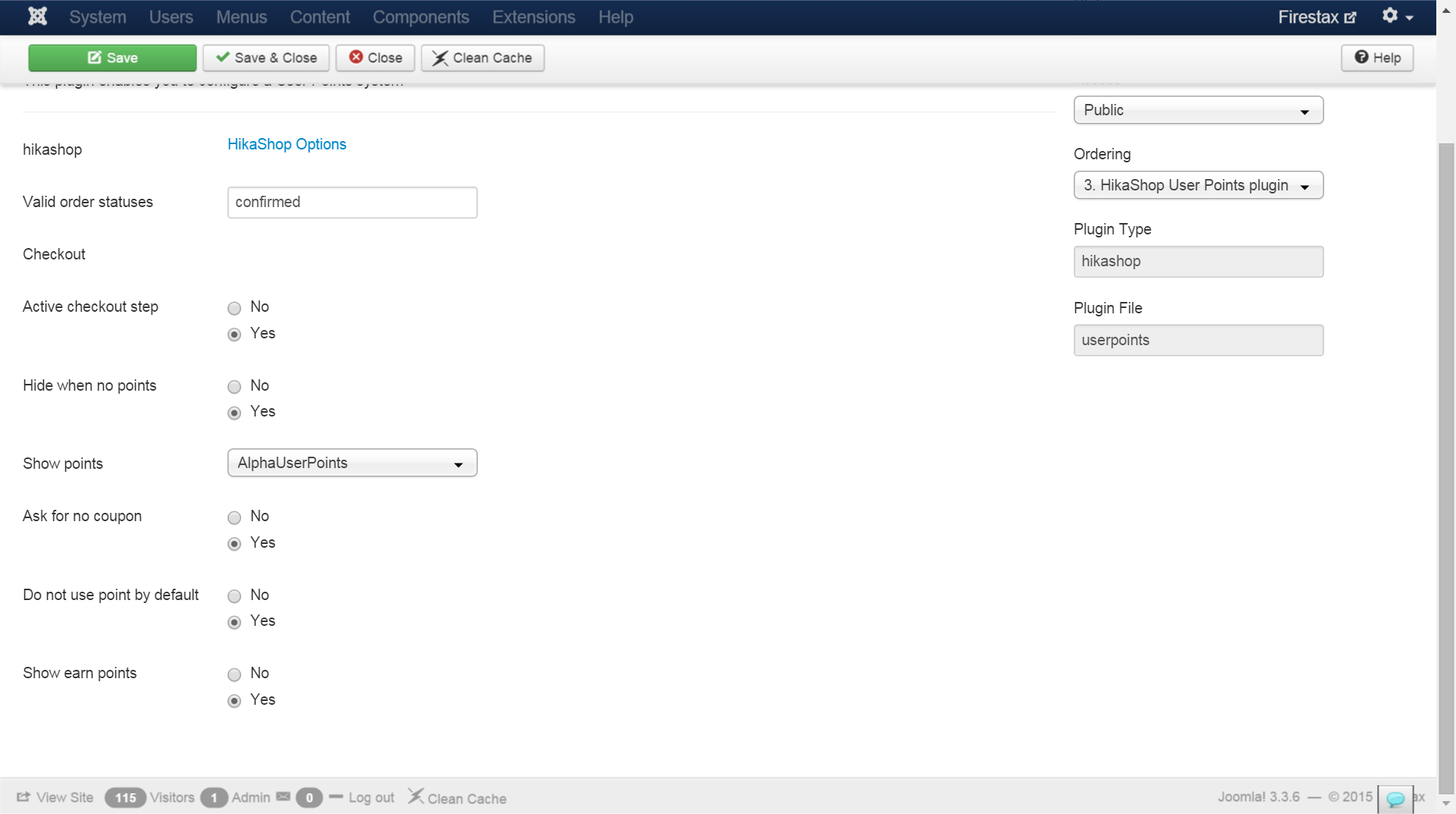
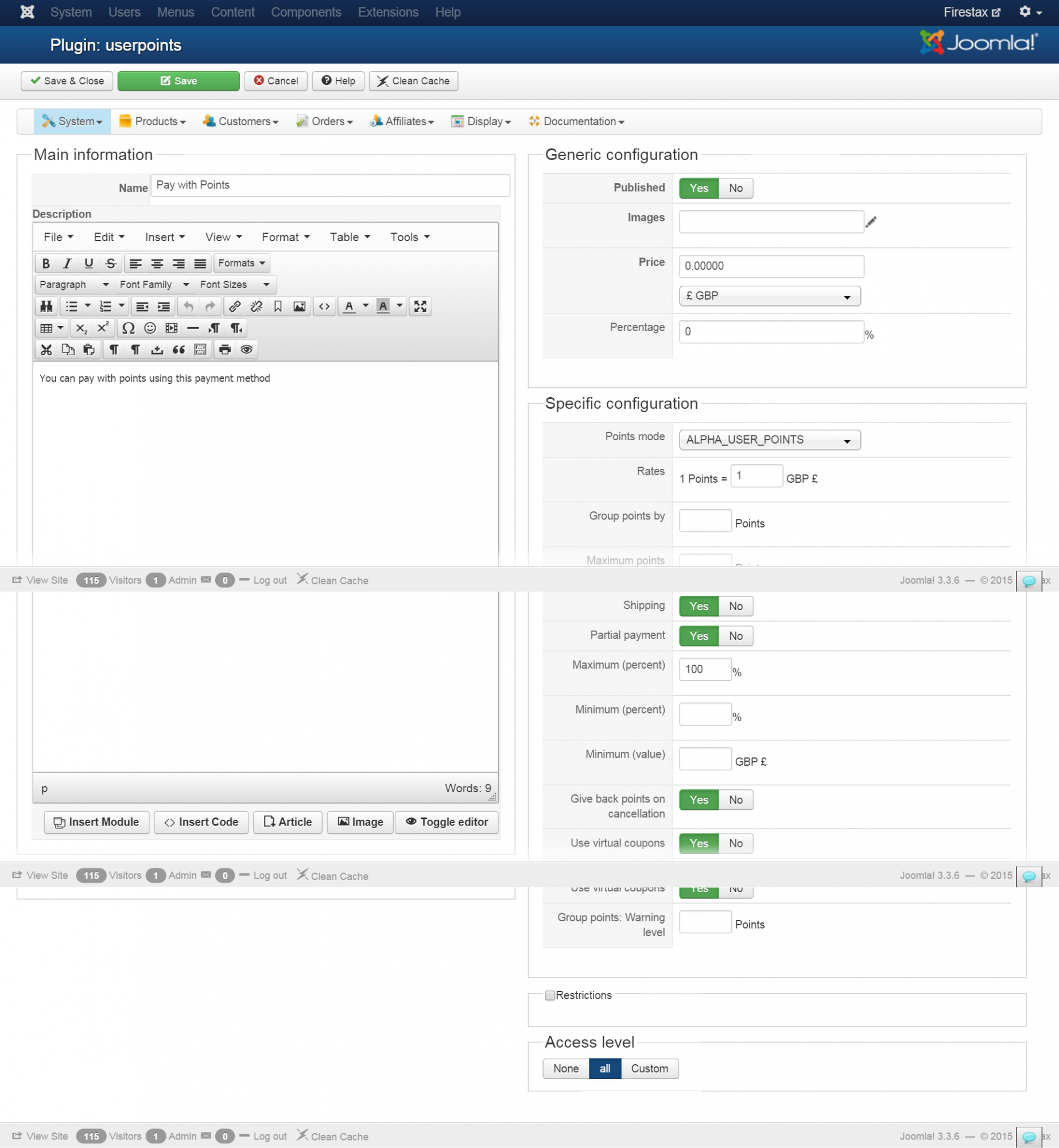
Could you provide some screenshots of how you configured your HikaShop User Points plugin and your HikaShop Payment User Points plugin ? Also, make sure that you're not using the AlphaUserPoints plugin which is deprecated (instead, you can use the two others above-mentioned).
Could you provide some screenshots of how you configured your HikaShop User Points plugin and your HikaShop Payment User Points plugin ? Also, make sure that you're not using the AlphaUserPoints plugin which is deprecated (instead, you can use the two others above-mentioned).
Please Log in or Create an account to join the conversation.
10 years 11 months ago #218116
by firestax
Replied by firestax on topic Buying with AUP Adds Points on Order Change
So i need to have Hikashop AlphaUserPoints Payment Plugin unpublished? I am attaching screenshots.
Please Log in or Create an account to join the conversation.
10 years 11 months ago #218129
by firestax
Replied by firestax on topic Buying with AUP Adds Points on Order Change
It also adds points when someone checks out using the bank transfer checkout.
Please Log in or Create an account to join the conversation.

10 years 11 months ago #218132
by Jerome
Jerome - Obsidev.com
HikaMarket & HikaSerial developer / HikaShop core dev team.
Replied by Jerome on topic Buying with AUP Adds Points on Order Change
Hi,
For the setting "valid order statuses" ; I recommend you to leave that field empty and the plugin will use the HikaShop setting (from the invoice statuses option).
Otherwise, with that current configuration, if a order is modified to "shipped", it will revert the points that the customer earn/used to confirm the order.
Regards,
For the setting "valid order statuses" ; I recommend you to leave that field empty and the plugin will use the HikaShop setting (from the invoice statuses option).
Otherwise, with that current configuration, if a order is modified to "shipped", it will revert the points that the customer earn/used to confirm the order.
Regards,
Jerome - Obsidev.com
HikaMarket & HikaSerial developer / HikaShop core dev team.
The following user(s) said Thank You: firestax
Please Log in or Create an account to join the conversation.
10 years 11 months ago #218657
by firestax
Replied by firestax on topic Buying with AUP Adds Points on Order Change
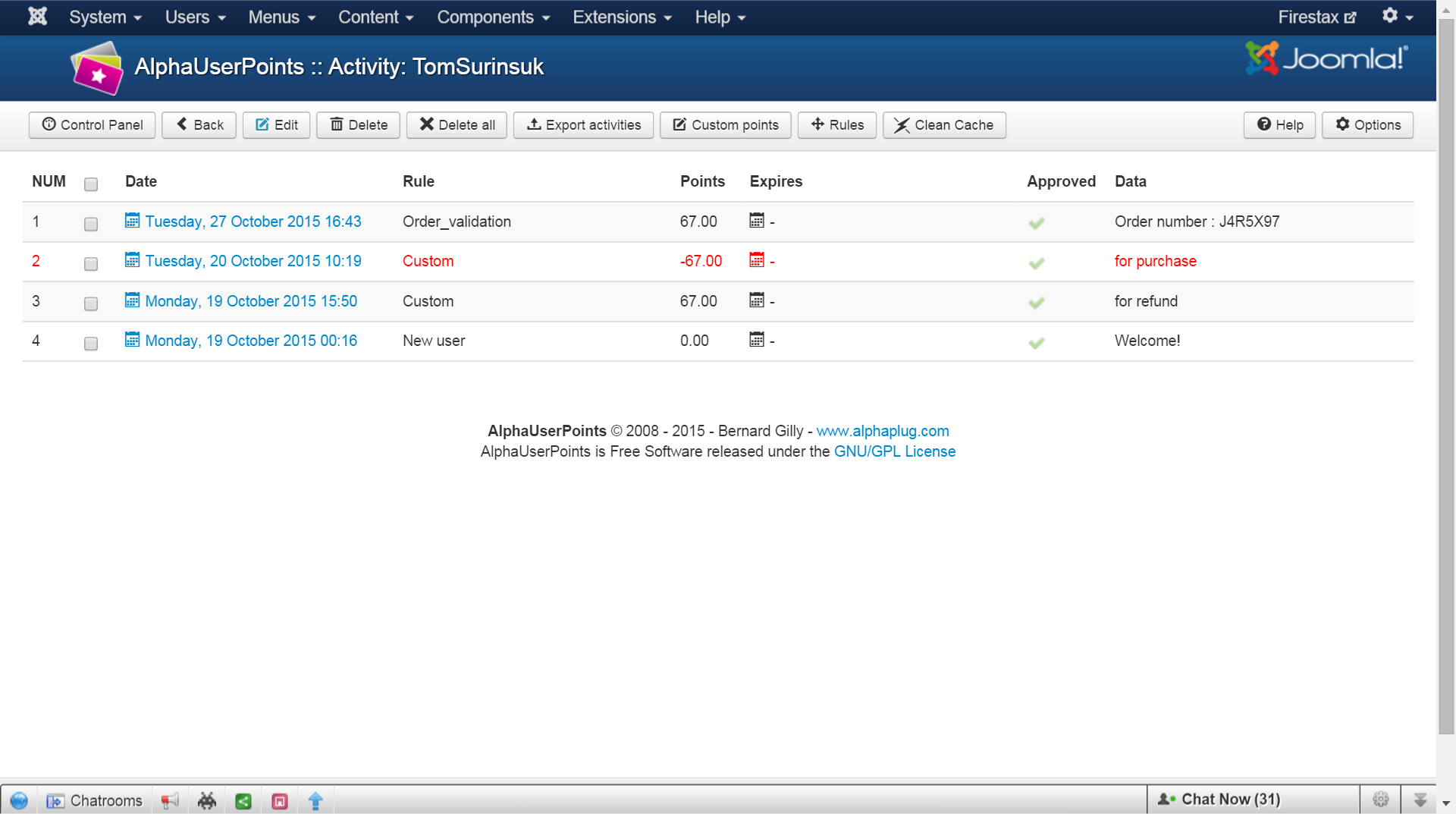
I have it blank now but it still adds points when I change the order status of those who used points to pay.
Please Log in or Create an account to join the conversation.
10 years 11 months ago #219123
by firestax
Replied by firestax on topic Buying with AUP Adds Points on Order Change
For my invoice status it has confirmed and shipped. Should I change it to just confirmed?
Please Log in or Create an account to join the conversation.
10 years 11 months ago #219207
by Jerome
Jerome - Obsidev.com
HikaMarket & HikaSerial developer / HikaShop core dev team.
Replied by Jerome on topic Buying with AUP Adds Points on Order Change
Hi,
The setting "invoice statuses" must include all valid statuses, when an order is considered as paid and should generate an invoice number.
About your previous screenshot I'm sorry but it does not explain what is happening. It does not illustrate any issue or problem.
Regards,
The setting "invoice statuses" must include all valid statuses, when an order is considered as paid and should generate an invoice number.
About your previous screenshot I'm sorry but it does not explain what is happening. It does not illustrate any issue or problem.
Regards,
Jerome - Obsidev.com
HikaMarket & HikaSerial developer / HikaShop core dev team.
Please Log in or Create an account to join the conversation.
10 years 11 months ago #219329
by firestax
Replied by firestax on topic Buying with AUP Adds Points on Order Change
The one with the order_validation rule added points to the customers account when I changed the order status. How do I get it to not do that?
Please Log in or Create an account to join the conversation.
10 years 10 months ago #219358
by Jerome
Jerome - Obsidev.com
HikaMarket & HikaSerial developer / HikaShop core dev team.
Replied by Jerome on topic Buying with AUP Adds Points on Order Change
Hi,
CF your screenshot in post "#218116"
For sure if you do not list all valid order statuses in the field and your setting "invoice order statuses" in HikaShop is also not good ; you will have bad side efect when you change the order status of an order.
So please configure these settings like I recommended you more than one week ago.
And please provide real details to help us to understand what is going one.
I'm sorry but
Regards,
CF your screenshot in post "#218116"
For the setting "valid order statuses" ; I recommend you to leave that field empty and the plugin will use the HikaShop setting (from the invoice statuses option).
For sure if you do not list all valid order statuses in the field and your setting "invoice order statuses" in HikaShop is also not good ; you will have bad side efect when you change the order status of an order.
So please configure these settings like I recommended you more than one week ago.
And please provide real details to help us to understand what is going one.
I'm sorry but
is really unclear and miss crucial information...when I changed the order status.
Regards,
Jerome - Obsidev.com
HikaMarket & HikaSerial developer / HikaShop core dev team.
Please Log in or Create an account to join the conversation.
10 years 10 months ago - 10 years 10 months ago #219620
by firestax
Replied by firestax on topic Buying with AUP Adds Points on Order Change
I thought you told me to leave it empty so I did but I still have the same problem. However, I have created additional order status that are valid that were not in invoice status. I have now added those to valid invoice status. Do I need to add them all or leave the field blank to the one you were just talking about?
Last edit: 10 years 10 months ago by firestax.
Please Log in or Create an account to join the conversation.
10 years 10 months ago #219625
by Jerome
Jerome - Obsidev.com
HikaMarket & HikaSerial developer / HikaShop core dev team.
Replied by Jerome on topic Buying with AUP Adds Points on Order Change
Hi,
In the plugin configuration ; the best is to leave the field blank.
In the HikaShop configuration ; you must have values to have a working configuration and a working store.
Regards,
In the plugin configuration ; the best is to leave the field blank.
In the HikaShop configuration ; you must have values to have a working configuration and a working store.
Regards,
Jerome - Obsidev.com
HikaMarket & HikaSerial developer / HikaShop core dev team.
The following user(s) said Thank You: firestax
Please Log in or Create an account to join the conversation.
10 years 10 months ago #220761
by firestax
Replied by firestax on topic Buying with AUP Adds Points on Order Change
Thank you that was my problem. I needed to add the other order status to the hikashop invoice statuses.
Please Log in or Create an account to join the conversation.
Time to create page: 0.239 seconds