

- Posts: 111
- Thank you received: 0
Can't upload file to server
10 years 10 months ago #219522
by nunonog
Can't upload file to server was created by nunonog
-- HikaShop version -- : 260
-- Joomla version -- : 345
-- Error-message(debug-mod must be tuned on) -- : Can't upload file
Hello,
My file is 27MB, I have updated post_max_size and the option upload_max_filesize in PHP.ini to 30MB as per indication of this post
I'm not getting any error when trying to upload the file, but when I select the file and click upload, nothing happens.
Is there a way to upload the files directly using FTP?
Thanks!
-- Joomla version -- : 345
-- Error-message(debug-mod must be tuned on) -- : Can't upload file
Hello,
My file is 27MB, I have updated post_max_size and the option upload_max_filesize in PHP.ini to 30MB as per indication of this post
I'm not getting any error when trying to upload the file, but when I select the file and click upload, nothing happens.
Is there a way to upload the files directly using FTP?
Thanks!
Please Log in or Create an account to join the conversation.

10 years 10 months ago #219527
by Jerome
Jerome - Obsidev.com
HikaMarket & HikaSerial developer / HikaShop core dev team.
Replied by Jerome on topic Can't upload file to server
Hi,
Can you please indicate where you're trying to perform an upload ?
That thread would help you if you have a javascript in the page
www.hikashop.com/forum/3-bug-report/8793...-t-upload-photo.html
Regards,
Can you please indicate where you're trying to perform an upload ?
That thread would help you if you have a javascript in the page
www.hikashop.com/forum/3-bug-report/8793...-t-upload-photo.html
Regards,
Jerome - Obsidev.com
HikaMarket & HikaSerial developer / HikaShop core dev team.
Please Log in or Create an account to join the conversation.
10 years 10 months ago #219673
by nunonog
Replied by nunonog on topic Can't upload file to server
Hi,
I'm trying to upload the file in the Administrator - > Products.
The smaller files are uploaded without any problems.
I'm trying to upload the file in the Administrator - > Products.
The smaller files are uploaded without any problems.
Please Log in or Create an account to join the conversation.

10 years 10 months ago #219675
by Xavier
Replied by Xavier on topic Can't upload file to server
Hi,
So this definitively looks like a filesize issue, if you try a grater limit than 30 is that working ?
You maybe have a server restrictions that is not allowing these sizes and is not reading the php.ini properties for these values.
So this definitively looks like a filesize issue, if you try a grater limit than 30 is that working ?
You maybe have a server restrictions that is not allowing these sizes and is not reading the php.ini properties for these values.
Please Log in or Create an account to join the conversation.
10 years 10 months ago #219805
by nunonog
Replied by nunonog on topic Can't upload file to server
Hi, I increased both limits to 50MB but it still doesn't upload.
It doesn't return any error, after clicking the upload button, nothing happens.
It doesn't return any error, after clicking the upload button, nothing happens.
Please Log in or Create an account to join the conversation.
10 years 10 months ago #219806
by Jerome
Jerome - Obsidev.com
HikaMarket & HikaSerial developer / HikaShop core dev team.
Replied by Jerome on topic Can't upload file to server
Hi,
Did you take a look at the other thread ?
Because your solution is already there.
Regards,
Did you take a look at the other thread ?
Because your solution is already there.
Regards,
Jerome - Obsidev.com
HikaMarket & HikaSerial developer / HikaShop core dev team.
Please Log in or Create an account to join the conversation.
10 years 10 months ago - 10 years 10 months ago #219896
by nunonog
Replied by nunonog on topic Can't upload file to server
Hello,
Yes, I did. My media Manager and php settings are both defined to upload files up to 50 MB.
But when I click the upload button in Hikashop for a file of 27MB, I get the error in Dev Tools:
POST error www.domain.com/administrator/index.php?o..._file&tmpl=component net::ERR_CONNECTION_ABORTED
Yes, I did. My media Manager and php settings are both defined to upload files up to 50 MB.
But when I click the upload button in Hikashop for a file of 27MB, I get the error in Dev Tools:
POST error www.domain.com/administrator/index.php?o..._file&tmpl=component net::ERR_CONNECTION_ABORTED
Last edit: 10 years 10 months ago by nunonog.
Please Log in or Create an account to join the conversation.
10 years 10 months ago #219897
by Jerome
Jerome - Obsidev.com
HikaMarket & HikaSerial developer / HikaShop core dev team.
Replied by Jerome on topic Can't upload file to server
Hi,
Can you please check in your PHP error log that you do not have a PHP fatal error ?
If the connection is aborted, it could be related to a server/php issue.
Regards,
Can you please check in your PHP error log that you do not have a PHP fatal error ?
If the connection is aborted, it could be related to a server/php issue.
Regards,
Jerome - Obsidev.com
HikaMarket & HikaSerial developer / HikaShop core dev team.
Please Log in or Create an account to join the conversation.
10 years 10 months ago #219927
by nunonog
Replied by nunonog on topic Can't upload file to server
Hi,
I've enabled "Error reporting" to "Maximum" in Joomla Global Config and reproduced the error again, but no PHP error message.
I've enabled "Error reporting" to "Maximum" in Joomla Global Config and reproduced the error again, but no PHP error message.
Please Log in or Create an account to join the conversation.
10 years 10 months ago #219929
by Jerome
Jerome - Obsidev.com
HikaMarket & HikaSerial developer / HikaShop core dev team.
Replied by Jerome on topic Can't upload file to server
Hi,
Because it's an XHR upload ; you're not able to see the content of that call except if you're using your browser console and catch all server requests...
You really need to take a look at the PHP error log file.
Regards,
Because it's an XHR upload ; you're not able to see the content of that call except if you're using your browser console and catch all server requests...
You really need to take a look at the PHP error log file.
Regards,
Jerome - Obsidev.com
HikaMarket & HikaSerial developer / HikaShop core dev team.
Please Log in or Create an account to join the conversation.
10 years 10 months ago - 10 years 10 months ago #220020
by nunonog
Replied by nunonog on topic Can't upload file to server
Hello Jerome,
Here it is in attachment. Thanks a lot for helping!
Here it is in attachment. Thanks a lot for helping!
Last edit: 10 years 10 months ago by nunonog.
Please Log in or Create an account to join the conversation.
10 years 10 months ago #220023
by Jerome
Jerome - Obsidev.com
HikaMarket & HikaSerial developer / HikaShop core dev team.
Replied by Jerome on topic Can't upload file to server
Hi,
I'm sorry but there is no attachment in your message.
Depending the size and the nature of the file ; it could be refused by the forum.
In that case you can use the support email (support at hikashop.com).
Regards,
I'm sorry but there is no attachment in your message.
Depending the size and the nature of the file ; it could be refused by the forum.
In that case you can use the support email (support at hikashop.com).
Regards,
Jerome - Obsidev.com
HikaMarket & HikaSerial developer / HikaShop core dev team.
Please Log in or Create an account to join the conversation.

10 years 10 months ago #220076
by nicolas
Replied by nicolas on topic Can't upload file to server
Hi,
We got the file.
The only error I see in it is this one:
but since it comes from your frontend template, I don't see why it would be linked to the problem.
So the problem is not a fatal error in PHP. Maybe there is some kind of security module in your apache server doing that.
Anyway, an easy way to circumvent the problem is to directly upload the file in media/com_hikashop/upload/safe/ via FTP and then use the other button next to the upload button to enter the filename of your file in the file popup so that the file gets linked to your product.
We got the file.
The only error I see in it is this one:
Code:
PHP Fatal error: Call to undefined method JDocumentRaw::getHeadData() in /home/portalge/public_html/templates/yoo_eat/warp/systems/joomla/layouts/head.php on line 132
So the problem is not a fatal error in PHP. Maybe there is some kind of security module in your apache server doing that.
Anyway, an easy way to circumvent the problem is to directly upload the file in media/com_hikashop/upload/safe/ via FTP and then use the other button next to the upload button to enter the filename of your file in the file popup so that the file gets linked to your product.
Please Log in or Create an account to join the conversation.
10 years 10 months ago #220095
by nunonog
Replied by nunonog on topic Can't upload file to server
Ok, I uploaded the files via FTP.
I guess this solves the problem.
Thank you.
I guess this solves the problem.
Thank you.
Please Log in or Create an account to join the conversation.
10 years 10 months ago #220471
by nunonog
Replied by nunonog on topic Can't upload file to server
Hello,
I have typed the file name instead of uploading the file as usual (I uploaded via FTP to /safe directory).
Now, users are downloading a file with 0Kb with the name "safe" instead of the actual file.
I have typed the file name instead of uploading the file as usual (I uploaded via FTP to /safe directory).
Now, users are downloading a file with 0Kb with the name "safe" instead of the actual file.
Please Log in or Create an account to join the conversation.
10 years 10 months ago #220485
by nicolas
Replied by nicolas on topic Can't upload file to server
Hi,
Can you do a screenshot of the settings of your file ?
Can you make sure that the "upload secure folder" setting of the HikaShop configuration is correct ?
Can you do a screenshot of the settings of your file ?
Can you make sure that the "upload secure folder" setting of the HikaShop configuration is correct ?
Please Log in or Create an account to join the conversation.
10 years 10 months ago #220688
by nunonog
Replied by nunonog on topic Can't upload file to server
Hello,
Here it is:
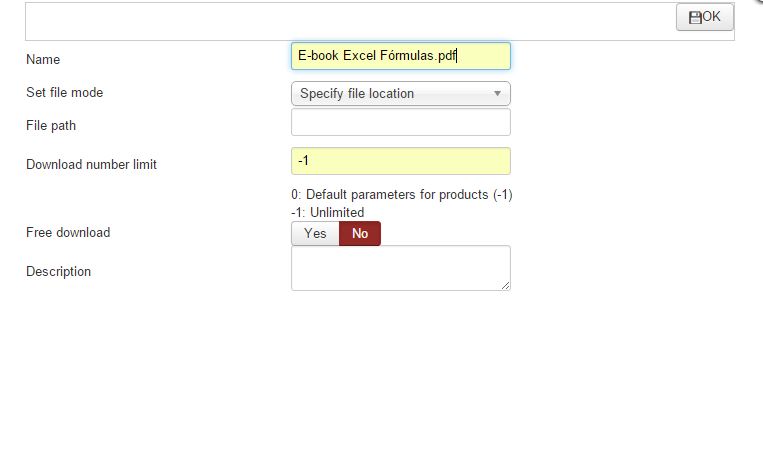
Here it is:
Please Log in or Create an account to join the conversation.
10 years 10 months ago #220698
by Jerome
Jerome - Obsidev.com
HikaMarket & HikaSerial developer / HikaShop core dev team.
Replied by Jerome on topic Can't upload file to server
Hi,
In the field "file path" ; you must provide the filename of the file.
Please understand that the "name" is the name of the file which will be display in the email, in the order summary, etc. It is not the file name.
Providing a blank file path will not work and result the side effect you're facing.
Regards,
In the field "file path" ; you must provide the filename of the file.
Please understand that the "name" is the name of the file which will be display in the email, in the order summary, etc. It is not the file name.
Providing a blank file path will not work and result the side effect you're facing.
Regards,
Jerome - Obsidev.com
HikaMarket & HikaSerial developer / HikaShop core dev team.
Please Log in or Create an account to join the conversation.
10 years 10 months ago #220747
by nunonog
Replied by nunonog on topic Can't upload file to server
Hi,
I'm sorry, but I still can't get it working:
What do I have to write in "File Path?"

I tried both names and also the file name, but none works.
I'm sorry, but I still can't get it working:
What do I have to write in "File Path?"
I tried both names and also the file name, but none works.
Please Log in or Create an account to join the conversation.
10 years 10 months ago #220760
by Jerome
Jerome - Obsidev.com
HikaMarket & HikaSerial developer / HikaShop core dev team.
Replied by Jerome on topic Can't upload file to server
Hi,
Your screenshot is for the product main options.
You upload a file using FTP in the "safe" folder ; so you should know the name of that file (aka : filename).
www.hikashop.com/support/documentation/i...uct-form.html#images
Regards,
Your screenshot is for the product main options.
You upload a file using FTP in the "safe" folder ; so you should know the name of that file (aka : filename).
www.hikashop.com/support/documentation/i...uct-form.html#images
Regards,
Jerome - Obsidev.com
HikaMarket & HikaSerial developer / HikaShop core dev team.
Please Log in or Create an account to join the conversation.
Time to create page: 0.250 seconds