
- Posts: 45
- Thank you received: 0
upgraded Hikashop Buiseness doesn't work correctly
- sasha_klimenchuk
-
 Topic Author
- Offline
Less
More
10 years 10 months ago #221184
by sasha_klimenchuk
-- HikaShop version -- : HikaShop Business: 2.6.0
-- Joomla version -- : 3.4.5 Stable
-- PHP version -- : 5.4.4
-- Browser(s) name and version -- : Chrome 46.0.2490.86 m
We upgraded Hikashop to Buiseness version, and now it doesn't work correctly. We can't upload an image for any item. We point green arrow, choose image and it doesn't work. Loading bar is red, but 100%.
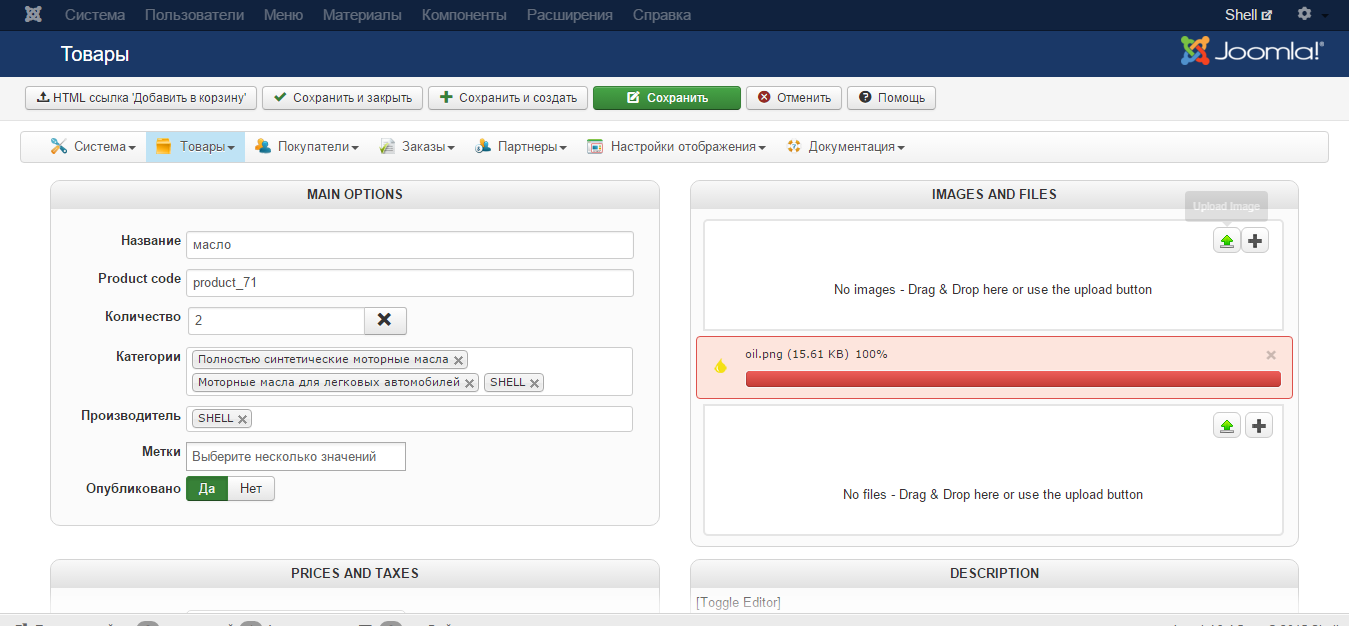
We try to fix it:
- Progreccor give us hosting for site
- when site installed on localhost, it works correctly
- when we upload site on hosting, it doesn't work
- upgrade hikashop to latest version again
after Hikashop update
Errors:
JFolder::create: Cant create folders
The folders /media/com_hikashop/upload/... is not writeable
- upgrade Joomla to latest version
So, we can't solve this trouble.
Help us, please!
P.S. Bad english, sorry
-- Joomla version -- : 3.4.5 Stable
-- PHP version -- : 5.4.4
-- Browser(s) name and version -- : Chrome 46.0.2490.86 m
We upgraded Hikashop to Buiseness version, and now it doesn't work correctly. We can't upload an image for any item. We point green arrow, choose image and it doesn't work. Loading bar is red, but 100%.
We try to fix it:
- Progreccor give us hosting for site
- when site installed on localhost, it works correctly
- when we upload site on hosting, it doesn't work
- upgrade hikashop to latest version again
after Hikashop update
Errors:
JFolder::create: Cant create folders
The folders /media/com_hikashop/upload/... is not writeable
- upgrade Joomla to latest version
So, we can't solve this trouble.
Help us, please!
P.S. Bad english, sorry
Please Log in or Create an account to join the conversation.

10 years 10 months ago #221208
by Jerome
Jerome - Obsidev.com
HikaMarket & HikaSerial developer / HikaShop core dev team.
Replied by Jerome on topic upgraded Hikashop Buiseness doesn't work correctly
Hi,
Using FTP you need to change the access for the folder "media/com_hikashop/upload" so HikaShop will be able to store new files into that folder.
Regards,
Using FTP you need to change the access for the folder "media/com_hikashop/upload" so HikaShop will be able to store new files into that folder.
Regards,
Jerome - Obsidev.com
HikaMarket & HikaSerial developer / HikaShop core dev team.
Please Log in or Create an account to join the conversation.
- sasha_klimenchuk
-
Topic Author
- Offline
Less
More
- Posts: 45
- Thank you received: 0
10 years 10 months ago - 10 years 10 months ago #221246
by sasha_klimenchuk
Replied by sasha_klimenchuk on topic upgraded Hikashop Buiseness doesn't work correctly
access 777 for the folder "media/com_hikashop/upload". I forgot to say about this.
Last edit: 10 years 10 months ago by sasha_klimenchuk.
Please Log in or Create an account to join the conversation.


10 years 10 months ago #221359
by nicolas
Replied by nicolas on topic upgraded Hikashop Buiseness doesn't work correctly
Are the permissions also set to 777 for all the subfolders of that folder ?
I don't see any other reason than permissions for your issue.
I don't see any other reason than permissions for your issue.
Please Log in or Create an account to join the conversation.
- sasha_klimenchuk
-
Topic Author
- Offline
Less
More
- Posts: 45
- Thank you received: 0
10 years 10 months ago #221379
by sasha_klimenchuk
Replied by sasha_klimenchuk on topic upgraded Hikashop Buiseness doesn't work correctly
Yes. All the subfolders have 777 permissions.
And it doesn't work.
And it doesn't work.
Please Log in or Create an account to join the conversation.
- sasha_klimenchuk
-
Topic Author
- Offline
Less
More
- Posts: 45
- Thank you received: 0
10 years 10 months ago #221392
by sasha_klimenchuk
Replied by sasha_klimenchuk on topic upgraded Hikashop Buiseness doesn't work correctly
Problem solved! I changed path 'Upload folder' in Cofiguration-Files from media/com_hikashop/upload to images/com_hikashop/upload/. Probably, it appeared after updating HikaShop from Starter 2.2 to Business 2.6.
Please Log in or Create an account to join the conversation.
Time to create page: 0.229 seconds