

- Posts: 37
- Thank you received: 3
Warning: Division by zero in
10 years 5 months ago #236853
by Ilya.bps
Warning: Division by zero in was created by Ilya.bps
-- HikaShop version -- : 2.6.2
-- Joomla version -- : 3.5.1
-- Error-message(debug-mod must be tuned on) -- : Warning: Division by zero in /administrator/components/com_hikashop/classes/currency.php
Hello,
I receive an error after updating to 2.6.2 version when you go to cart
Warning: Division by zero in /administrator/components/com_hikashop/classes/currency.php
-- Joomla version -- : 3.5.1
-- Error-message(debug-mod must be tuned on) -- : Warning: Division by zero in /administrator/components/com_hikashop/classes/currency.php
Hello,
I receive an error after updating to 2.6.2 version when you go to cart
Warning: Division by zero in /administrator/components/com_hikashop/classes/currency.php
Please Log in or Create an account to join the conversation.

10 years 5 months ago #236855
by Jerome
Jerome - Obsidev.com
HikaMarket & HikaSerial developer / HikaShop core dev team.
Replied by Jerome on topic Warning: Division by zero in
Hi,
You have a currency with a "rate" set to "0".
That should not happen ; you have an error in your currency configuration.
Regards,
You have a currency with a "rate" set to "0".
That should not happen ; you have an error in your currency configuration.
Regards,
Jerome - Obsidev.com
HikaMarket & HikaSerial developer / HikaShop core dev team.
Please Log in or Create an account to join the conversation.
10 years 5 months ago #236873
by Ilya.bps
Replied by Ilya.bps on topic Warning: Division by zero in
Sorry,
but I did not understand what I need to do to fix it?
but I did not understand what I need to do to fix it?
Please Log in or Create an account to join the conversation.

10 years 5 months ago - 10 years 5 months ago #236880
by Philip
Replied by Philip on topic Warning: Division by zero in
Hello,
In order to correct this, go to Components => HikaShop => Configuration, go to System dropdown and click on Currencies.
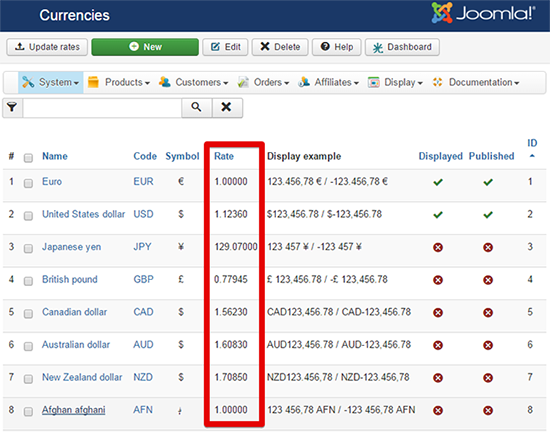
You will see your currency listing, find your currency and check the rate, if it is set to "0", click on his name to edit it OR use the Hikashop Currency Rates Plugin, his aim is to automatically updates your currencies rates.
For more details, have a see to this tutorial, here
Hope this will help you.
Regards,
In order to correct this, go to Components => HikaShop => Configuration, go to System dropdown and click on Currencies.
You will see your currency listing, find your currency and check the rate, if it is set to "0", click on his name to edit it OR use the Hikashop Currency Rates Plugin, his aim is to automatically updates your currencies rates.
For more details, have a see to this tutorial, here
Hope this will help you.
Regards,
Last edit: 10 years 5 months ago by Philip.
The following user(s) said Thank You: Ilya.bps
Please Log in or Create an account to join the conversation.
10 years 5 months ago #237032
by Ilya.bps
Replied by Ilya.bps on topic Warning: Division by zero in
Thank you,
needed to update the rate,
now it's work correctly
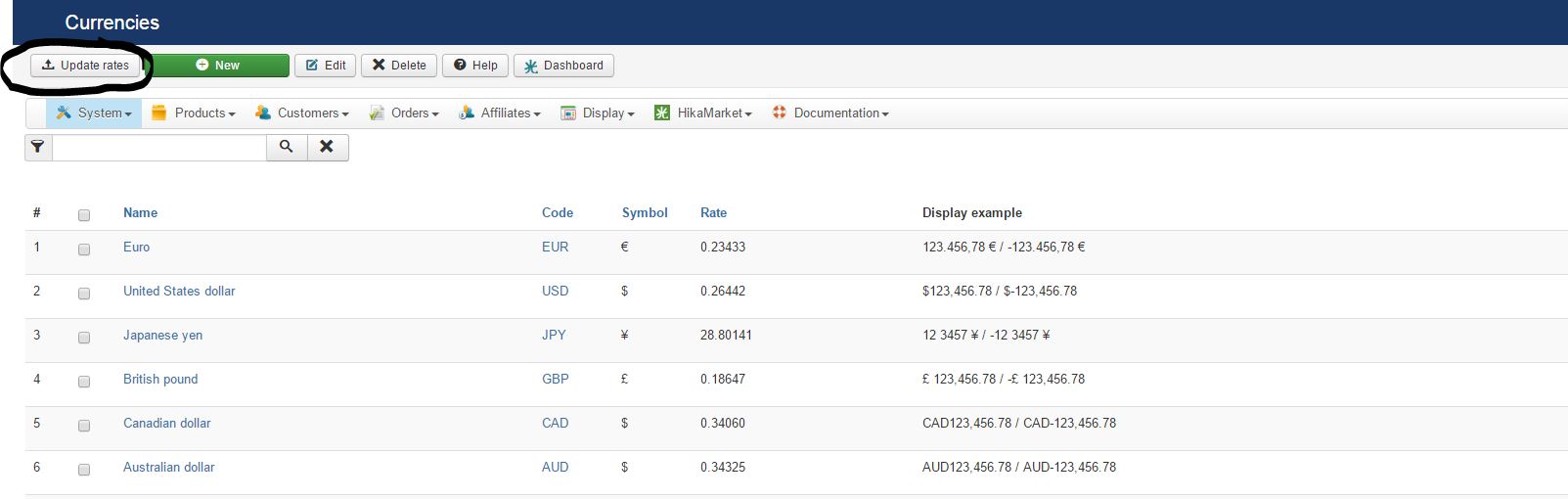
needed to update the rate,
now it's work correctly
Please Log in or Create an account to join the conversation.
Time to create page: 0.220 seconds