

- Posts: 75
- Thank you received: 1
Invoice layout has changed
10 years 5 months ago #237090
by mterry2
Invoice layout has changed was created by mterry2
-- HikaShop version -- : 2.6.2
-- Joomla version -- : 3.4.0
-- PHP version -- : 5.3.28
-- Browser(s) name and version -- : Chrome 36.0.1985
Hi. Since my last upgrade the layout of invoices I print from the back end for my customers has changed. All the sub-totals and totals have moved inwards (see attachment). They used to line up under the Quantity filed. Can you please let me know what code changes I need to make to restore the old view. Thanks
-- Joomla version -- : 3.4.0
-- PHP version -- : 5.3.28
-- Browser(s) name and version -- : Chrome 36.0.1985
Hi. Since my last upgrade the layout of invoices I print from the back end for my customers has changed. All the sub-totals and totals have moved inwards (see attachment). They used to line up under the Quantity filed. Can you please let me know what code changes I need to make to restore the old view. Thanks
Please Log in or Create an account to join the conversation.

10 years 5 months ago - 10 years 5 months ago #237103
by Philip
Replied by Philip on topic Invoice layout has changed
Hello,
This display issue is now corrected, you have to make two things :
- Update again, and so if an order haven't product WITH custom field like on your screenshot, won't be be displayed anymore.
- Manage your custom field option in Components => HikaShop => Configuration, and in Display dropdown and select Custom fields, and have a look on new options in Display part.
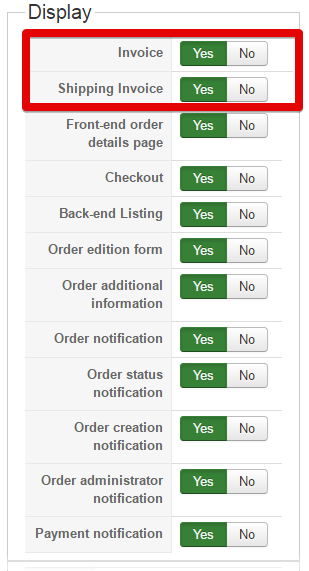
If you don't want to fill your invoice with your custom field just switch them off Invoice and Shipping Invoice.
OR if you need this (or some ot them) you can edit your invoice view, here in Components => HikaShop => Configuration, and always in Display dropdown select this time View.
In the view listing page, use filter dropdown to find more easily your invoice view, see screenshot example.
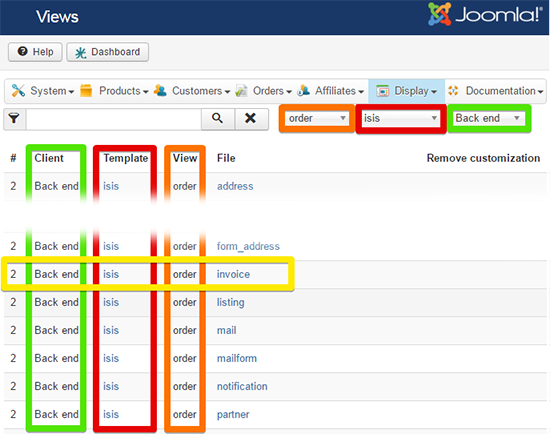
Note: In my screenshot I select Isis as my backend template, of course select yours to be sure to modify the good view.
Hope this will answer to your needs.
Regards,
This display issue is now corrected, you have to make two things :
- Update again, and so if an order haven't product WITH custom field like on your screenshot, won't be be displayed anymore.
- Manage your custom field option in Components => HikaShop => Configuration, and in Display dropdown and select Custom fields, and have a look on new options in Display part.
If you don't want to fill your invoice with your custom field just switch them off Invoice and Shipping Invoice.
OR if you need this (or some ot them) you can edit your invoice view, here in Components => HikaShop => Configuration, and always in Display dropdown select this time View.
In the view listing page, use filter dropdown to find more easily your invoice view, see screenshot example.
Note: In my screenshot I select Isis as my backend template, of course select yours to be sure to modify the good view.
Hope this will answer to your needs.
Regards,
Last edit: 10 years 5 months ago by Philip.
The following user(s) said Thank You: mterry2
Please Log in or Create an account to join the conversation.
10 years 5 months ago #237270
by mterry2
Replied by mterry2 on topic Invoice layout has changed
Great, that fixed it, thanks.
Please Log in or Create an account to join the conversation.
Time to create page: 0.171 seconds