
- Posts: 159
- Thank you received: 0
how to change cart styling when price is added
- Shafan Hameed
-
 Topic Author
- Offline
Less
More
10 years 4 months ago - 10 years 4 months ago #239334
by Shafan Hameed
how to change cart styling when price is added was created by Shafan Hameed
-- HikaShop version -- : 2.6.3
-- Joomla version -- : 3.5.1
-- PHP version -- : 7.0
-- Browser(s) name and version -- : chrome 49.0.2623.112
hi. i want to ask how to edit cart when price is added..
i have changed the empty cart styling and looks but when price is added they actualy styling is no more.. .. how to change it ?

this is when the cart it empty
Second thing is .. i want to completely remove the decimals from prices. how to do that ?

this is how it shows when price is added
-- Joomla version -- : 3.5.1
-- PHP version -- : 7.0
-- Browser(s) name and version -- : chrome 49.0.2623.112
hi. i want to ask how to edit cart when price is added..
i have changed the empty cart styling and looks but when price is added they actualy styling is no more.. .. how to change it ?
this is when the cart it empty
Second thing is .. i want to completely remove the decimals from prices. how to do that ?
this is how it shows when price is added
Last edit: 10 years 4 months ago by Shafan Hameed. Reason: forgot to mention about price desimal
Please Log in or Create an account to join the conversation.

10 years 4 months ago #239337
by Xavier
Replied by Xavier on topic how to change cart styling when price is added
Hi,
You have to edit the view "product / cart" and/or add css properties.
To remove the decimals from prices, you can change the currency settings in System > Currencies.
You have to edit the view "product / cart" and/or add css properties.
To remove the decimals from prices, you can change the currency settings in System > Currencies.
Please Log in or Create an account to join the conversation.
- Shafan Hameed
-
Topic Author
- Offline
Less
More
- Posts: 159
- Thank you received: 0
10 years 4 months ago #239425
by Shafan Hameed
Replied by Shafan Hameed on topic how to change cart styling when price is added
Hi Xavier,
I have already tried with changing the currency settings but its not working at all ..can you kindly tell me which option i have to change ?
There are my currency options
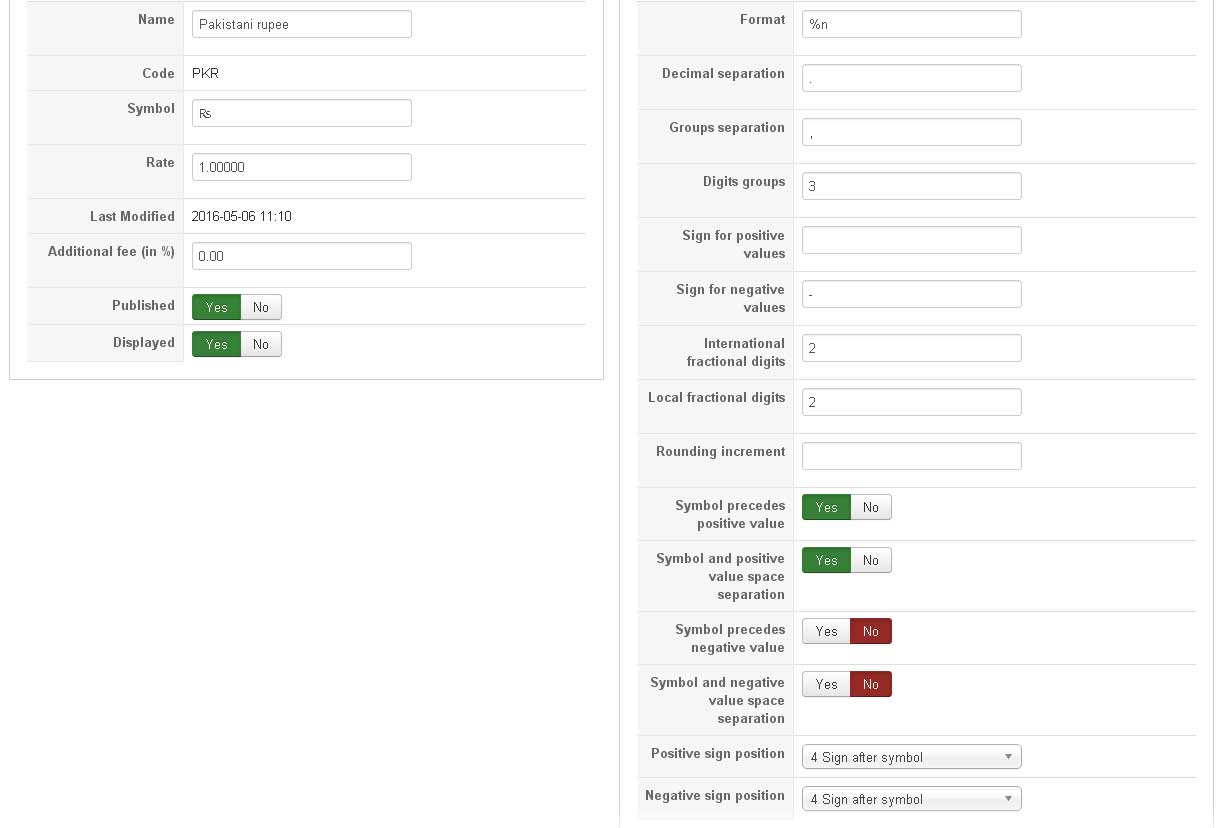
I have already tried with changing the currency settings but its not working at all ..can you kindly tell me which option i have to change ?
There are my currency options
Please Log in or Create an account to join the conversation.

10 years 4 months ago #239430
by nicolas
Replied by nicolas on topic how to change cart styling when price is added
Hi,
You need to change the "local fractional digits" and "international fractional digits" settings to 0.
You need to change the "local fractional digits" and "international fractional digits" settings to 0.
Please Log in or Create an account to join the conversation.
- Shafan Hameed
-
Topic Author
- Offline
Less
More
- Posts: 159
- Thank you received: 0
10 years 4 months ago #239512
by Shafan Hameed
Replied by Shafan Hameed on topic how to change cart styling when price is added
its Solved.. Thanks
1 more question..
i have set characteristics and applied them in a product.. but its now showing itself.. any solution how to make them display
also how to get social share in products page ?
1 more question..
i have set characteristics and applied them in a product.. but its now showing itself.. any solution how to make them display
also how to get social share in products page ?
Please Log in or Create an account to join the conversation.
10 years 4 months ago #239523
by nicolas
Replied by nicolas on topic how to change cart styling when price is added
Hi,
1. Make sure that you add variants to the product in the "variants" tab after adding the characteristics.
www.hikashop.com/support/support/documen...html#characteristics
2. Activate and configure the HikaShop social networks plugin via the Joomla plugins manager.
PS: please open new threads for new questions.
1. Make sure that you add variants to the product in the "variants" tab after adding the characteristics.
www.hikashop.com/support/support/documen...html#characteristics
2. Activate and configure the HikaShop social networks plugin via the Joomla plugins manager.
PS: please open new threads for new questions.
Please Log in or Create an account to join the conversation.
Time to create page: 0.196 seconds