

- Posts: 49
- Thank you received: 1
product detail: Item box bg color is not white ?
10 years 3 months ago #242491
by sindb
product detail: Item box bg color is not white ? was created by sindb
-- url of the page with the problem -- :
www.zebra-design.be/index.php/shop/produ...6-acapulco-ovaal-wit
-- HikaShop version -- : 2.6.3 of Hikashop Starter
-- Joomla version -- : 3.5.1
-- PHP version -- : 7.0
-- Browser(s) name and version -- : google Chrome 51.0.2704.84 m
Dear,
I have put in the backend the "Item box background color" = #ffffff
but the background color of the product detail isn't white ?
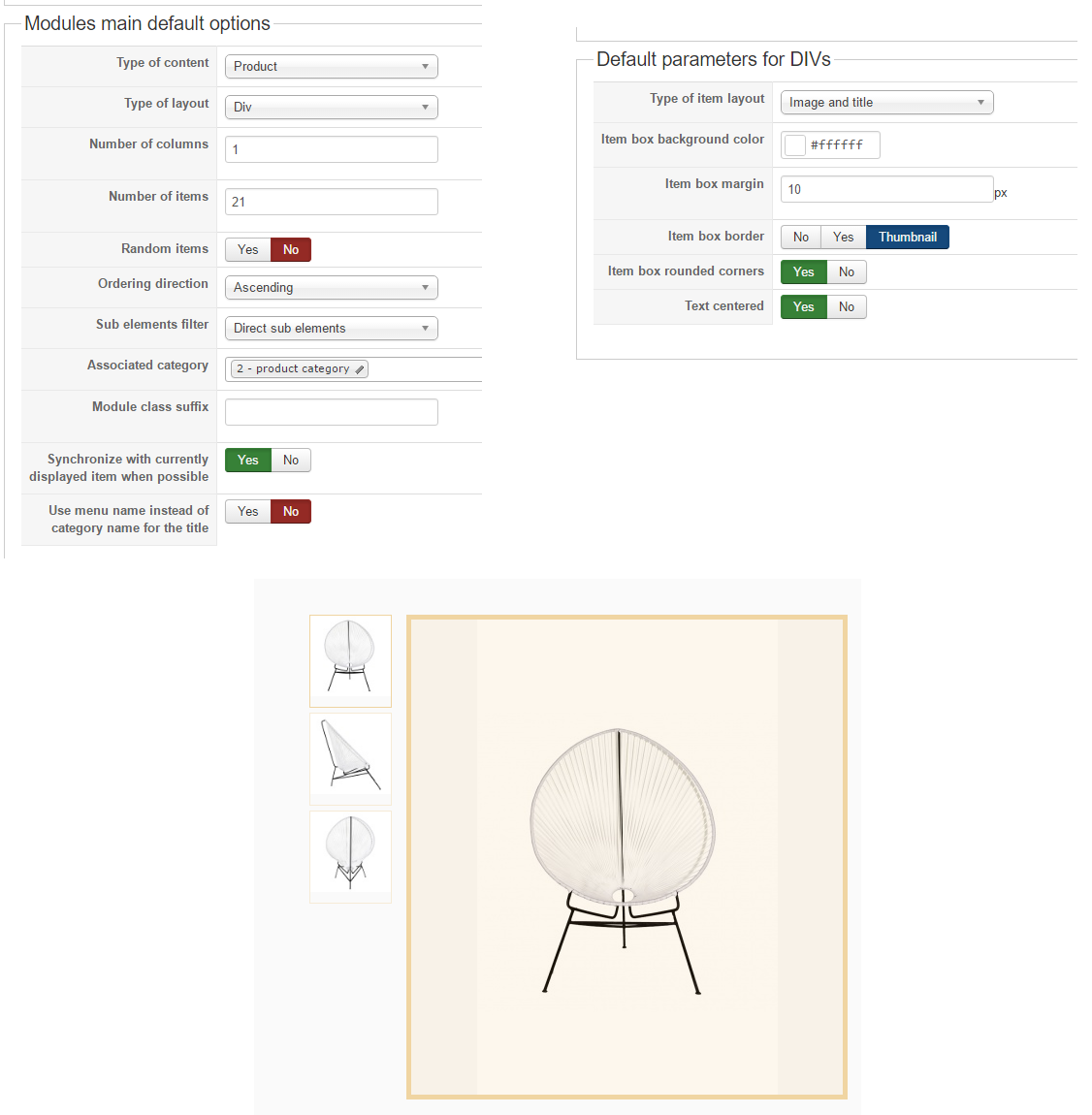
Please can someone tell me what I am doing wrong ?
TIA
Regards,
Thierry
-- HikaShop version -- : 2.6.3 of Hikashop Starter
-- Joomla version -- : 3.5.1
-- PHP version -- : 7.0
-- Browser(s) name and version -- : google Chrome 51.0.2704.84 m
Dear,
I have put in the backend the "Item box background color" = #ffffff
but the background color of the product detail isn't white ?
Please can someone tell me what I am doing wrong ?
TIA
Regards,
Thierry
Please Log in or Create an account to join the conversation.

10 years 3 months ago #242495
by lousyfool
Need help with customisations of layouts, style or other site development? PM me!
(Don't forget to turn on "E-mail notification of new messages" )
Replied by lousyfool on topic product detail: Item box bg color is not white ?
Hi,
The option you're referring to is not for the main image background on product detail pages. Instead it's for the "divs" in product (or category) listings, e.g. here: www.zebra-design.be/index.php/shop/category/44-stoelen
The CSS for your product pages is coming from your Joomla template, again.
The option you're referring to is not for the main image background on product detail pages. Instead it's for the "divs" in product (or category) listings, e.g. here: www.zebra-design.be/index.php/shop/category/44-stoelen
The CSS for your product pages is coming from your Joomla template, again.
Need help with customisations of layouts, style or other site development? PM me!
(Don't forget to turn on "E-mail notification of new messages" )
The following user(s) said Thank You: sindb
Please Log in or Create an account to join the conversation.
10 years 3 months ago - 10 years 3 months ago #242499
by sindb
Replied by sindb on topic product detail: Item box bg color is not white ?
So I have to ask the template provider which css file I can modify this, correct ?
because in zebra-design.be/templates/tz_interiart/css/themes/default/template.css
I don't find this
TIA
Regards,
Thierry
because in zebra-design.be/templates/tz_interiart/css/themes/default/template.css
I don't find this
TIA
Regards,
Thierry
Last edit: 10 years 3 months ago by sindb.
Please Log in or Create an account to join the conversation.
10 years 3 months ago - 10 years 3 months ago #242500
by lousyfool
Need help with customisations of layouts, style or other site development? PM me!
(Don't forget to turn on "E-mail notification of new messages" )
Replied by lousyfool on topic product detail: Item box bg color is not white ?
Your Joomla template is providing all of the CSS on your site - including the shop - and includes also numerous layout (= view) overrides, obviously. So, yes, for anything related to style and much related to layout of shop pages it's the template provider who is "in charge".
However, most templates are having a way to do CSS overrides in e.g. a custom.css file, or in an area in the template backend. You should ask your provider how such overrides can be done with your template, so you don't lose your changes once you update your template.
For the rest it's like with any other web content: use your browser console to inspect HTML and CSS, and to determine the CSS code you'll want.
However, most templates are having a way to do CSS overrides in e.g. a custom.css file, or in an area in the template backend. You should ask your provider how such overrides can be done with your template, so you don't lose your changes once you update your template.
For the rest it's like with any other web content: use your browser console to inspect HTML and CSS, and to determine the CSS code you'll want.
Need help with customisations of layouts, style or other site development? PM me!
(Don't forget to turn on "E-mail notification of new messages" )
Last edit: 10 years 3 months ago by lousyfool.
The following user(s) said Thank You: sindb
Please Log in or Create an account to join the conversation.

10 years 3 months ago - 10 years 3 months ago #242507
by Philip
Replied by Philip on topic product detail: Item box bg color is not white ?
Hello,
Even if you have right, this is most your template creator to do this, I can quickly save your time, look this screenshot
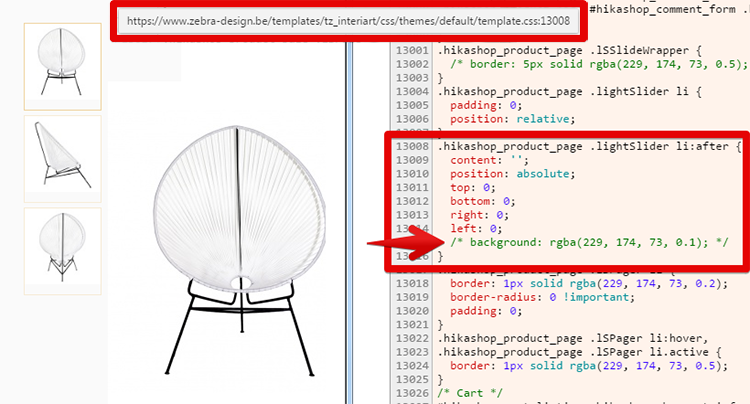
As you can see around line 13008, "switch off :
Hope this will help you
Regards
Even if you have right, this is most your template creator to do this, I can quickly save your time, look this screenshot
As you can see around line 13008, "switch off :
Code:
background: rgba(229, 174, 73, 0.1);
Hope this will help you
Regards
Last edit: 10 years 3 months ago by Philip.
The following user(s) said Thank You: sindb
Please Log in or Create an account to join the conversation.
10 years 3 months ago #242645
by sindb
Replied by sindb on topic product detail: Item box bg color is not white ?
dear,
see here my solution: CSS overrides in custom.css file:
.hikashop_product_page .lightSlider li::after{
z-index: -1;
background: #ffffff none repeat scroll 0 0;
}
.hikashop_product_page .hikashop_child_image{
z-index: 1;
}
.hikashop_product_page .hikashop_product_main_image_thumb .hikashop_product_main_image_subdiv::after{
background: rgba(0, 0, 0, 0) none repeat scroll 0 0;
}
.hikashop_product_page .hikashop_product_main_image_thumb .hikashop_product_main_image_subdiv{
background: #ffffff;
}
thank you
see here my solution: CSS overrides in custom.css file:
.hikashop_product_page .lightSlider li::after{
z-index: -1;
background: #ffffff none repeat scroll 0 0;
}
.hikashop_product_page .hikashop_child_image{
z-index: 1;
}
.hikashop_product_page .hikashop_product_main_image_thumb .hikashop_product_main_image_subdiv::after{
background: rgba(0, 0, 0, 0) none repeat scroll 0 0;
}
.hikashop_product_page .hikashop_product_main_image_thumb .hikashop_product_main_image_subdiv{
background: #ffffff;
}
thank you
Please Log in or Create an account to join the conversation.
Time to create page: 0.280 seconds