

- Posts: 49
- Thank you received: 1
colors images after upload aren't original colors
10 years 3 months ago #242790
by sindb
colors images after upload aren't original colors was created by sindb
-- url of the page with the problem -- :
www.zebra-design.be/index.php/shop/product/106-draagtas-rood
-- HikaShop version -- : 2.6.3 of Hikashop Starter
-- Joomla version -- : 3.5.1
-- PHP version -- : 7.0
-- Browser(s) name and version -- : google Chrome 51.0.2704.84 m
Dear,
the colors of images after upload in Hikashop are not the original colors sometimes ?
See some examples:
www.zebra-design.be/index.php/shop/product/106-draagtas-rood
www.zebra-design.be/index.php/shop/product/121-draagtas-roos (see upload 1)
www.zebra-design.be/index.php/shop/produ...hair-single-met-voet (see upload 2)
It is important that the original colors are shown.
How can I solve this please ?
TIA
Regards,
Thierry
-- HikaShop version -- : 2.6.3 of Hikashop Starter
-- Joomla version -- : 3.5.1
-- PHP version -- : 7.0
-- Browser(s) name and version -- : google Chrome 51.0.2704.84 m
Dear,
the colors of images after upload in Hikashop are not the original colors sometimes ?
See some examples:
www.zebra-design.be/index.php/shop/product/106-draagtas-rood
www.zebra-design.be/index.php/shop/product/121-draagtas-roos (see upload 1)
www.zebra-design.be/index.php/shop/produ...hair-single-met-voet (see upload 2)
It is important that the original colors are shown.
How can I solve this please ?
TIA
Regards,
Thierry
Please Log in or Create an account to join the conversation.

10 years 3 months ago #242867
by Philip
Replied by Philip on topic colors images after upload aren't original colors
Hello,
Can I see a back end product configuration and more especially the "IMAGES AND FILES" part.
Other point how do you add your product image because right now, I don't know where this trouble come from.
Awaiting news from you.
Regards
Can I see a back end product configuration and more especially the "IMAGES AND FILES" part.
Other point how do you add your product image because right now, I don't know where this trouble come from.
Awaiting news from you.
Regards
Please Log in or Create an account to join the conversation.
10 years 3 months ago - 10 years 3 months ago #242870
by sindb
Replied by sindb on topic colors images after upload aren't original colors
I send a mail to the support with login information 
I go to Hikashop / Categories
choose the correct category
e.g. Accessoires / Draagtassen / Plastiek
click on Products / Products
click on New
click on Upload image (green arrow)
you see while it's uploading the correct color and then it changes
see image
TIA
Regards,
Thierry
I go to Hikashop / Categories
choose the correct category
e.g. Accessoires / Draagtassen / Plastiek
click on Products / Products
click on New
click on Upload image (green arrow)
you see while it's uploading the correct color and then it changes
see image
TIA
Regards,
Thierry
Last edit: 10 years 3 months ago by sindb. Reason: explanation how upload image product
Please Log in or Create an account to join the conversation.
10 years 3 months ago #242871
by Philip
Replied by Philip on topic colors images after upload aren't original colors
Hello,
For this use our "Contact us" form to provide us backend access just add an url link to this topic.
Awaiting news from you.
Regards
For this use our "Contact us" form to provide us backend access just add an url link to this topic.
Awaiting news from you.
Regards
Please Log in or Create an account to join the conversation.
10 years 3 months ago #242967
by sindb
Replied by sindb on topic colors images after upload aren't original colors
Dear,
I've send this morning the needed info by the Contact us form.
Any news please ?
TIA
Regards,
Thierry
I've send this morning the needed info by the Contact us form.
Any news please ?
TIA
Regards,
Thierry
Please Log in or Create an account to join the conversation.

10 years 3 months ago #242948
by nicolas
Replied by nicolas on topic colors images after upload aren't original colors
Hi,
I think that your problem is this:
stackoverflow.com/questions/5773032/how-...upon-resizing-images
Your image is saved with a color profile different than sRGB.
And GD2, which is the PHP library to handle images transformations only supports sRGB.
It is recommended to only use sRGB images if you want to use them on the Internet.
So please check that and make sure that you use images with sRGB.
As written on the link above, the only solution to supporting images with other color profiles would be to use ImageMagick instead of GD2 to process the images, but only GD2 is installed by default with PHP so if we were to support ImageMagick library, it would work only for a handful of users of HikaShop. And even then, you would have issues with customers of yours using old browsers not supporting the color profiles you're using in your images. So it's best to stick with images in sRGB.
I think that your problem is this:
stackoverflow.com/questions/5773032/how-...upon-resizing-images
Your image is saved with a color profile different than sRGB.
And GD2, which is the PHP library to handle images transformations only supports sRGB.
It is recommended to only use sRGB images if you want to use them on the Internet.
So please check that and make sure that you use images with sRGB.
As written on the link above, the only solution to supporting images with other color profiles would be to use ImageMagick instead of GD2 to process the images, but only GD2 is installed by default with PHP so if we were to support ImageMagick library, it would work only for a handful of users of HikaShop. And even then, you would have issues with customers of yours using old browsers not supporting the color profiles you're using in your images. So it's best to stick with images in sRGB.
The following user(s) said Thank You: sindb
Please Log in or Create an account to join the conversation.
10 years 3 months ago #242984
by sindb
Replied by sindb on topic colors images after upload aren't original colors
Dear,
it is the first time I hear about sRGB images.
My images are all jpg.
Can I convert these jpg's to sRGB's ?
If so How ?
Thanks for your help.
Regards,
Thierry
it is the first time I hear about sRGB images.
My images are all jpg.
Can I convert these jpg's to sRGB's ?
If so How ?
Thanks for your help.
Regards,
Thierry
Please Log in or Create an account to join the conversation.
10 years 3 months ago #242986
by Philip
Replied by Philip on topic colors images after upload aren't original colors
Hello,
sRGB isn't the same thing from jpg.
jpg or png or else bmp are file format, sRGB or RGB or else are the way picture is encoded.
You have to have the good configuration in your program like photoshop by example) in order to save your picture in sRGB encoding.
Hope this will help you.
Regards.
sRGB isn't the same thing from jpg.
jpg or png or else bmp are file format, sRGB or RGB or else are the way picture is encoded.
You have to have the good configuration in your program like photoshop by example) in order to save your picture in sRGB encoding.
Hope this will help you.
Regards.
The following user(s) said Thank You: sindb
Please Log in or Create an account to join the conversation.
10 years 3 months ago #243188
by sindb
Replied by sindb on topic colors images after upload aren't original colors
Thank you
as you can see the image has the correct color now
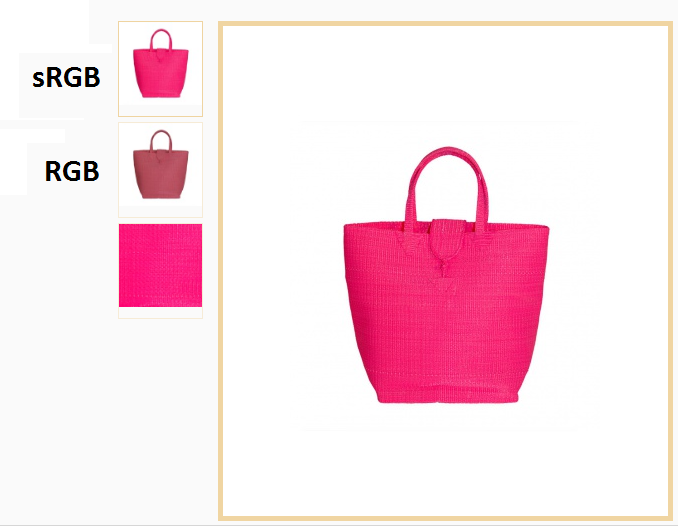
this ticket may be closed.
Friendly regards,
Thierry
as you can see the image has the correct color now
this ticket may be closed.
Friendly regards,
Thierry
The following user(s) said Thank You: Philip
Please Log in or Create an account to join the conversation.
Time to create page: 0.213 seconds