

- Posts: 106
- Thank you received: 0
button without text in cart page
10 years 3 months ago #244424
by french150
button without text in cart page was created by french150
-- HikaShop version -- : 2.6.3
-- Joomla version -- : 3.5.1
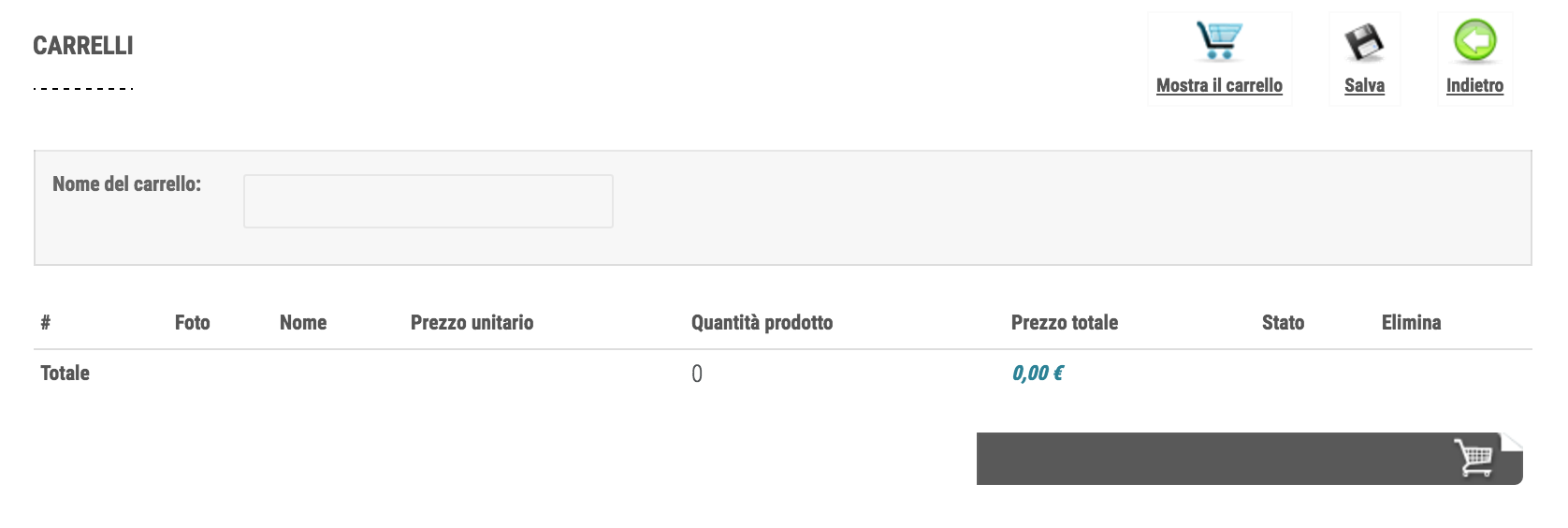
Hi. When i go to the cart page i see the button to proceed without any text.
Please see the attachment.
How to fix it?
-- Joomla version -- : 3.5.1
Hi. When i go to the cart page i see the button to proceed without any text.
Please see the attachment.
How to fix it?
Please Log in or Create an account to join the conversation.

10 years 3 months ago - 10 years 3 months ago #244426
by Philip
Replied by Philip on topic button without text in cart page
Hello,
This kind of issue can be leads by your template, but without Url link I can't be sure of it !
Try to switch to default template like Protostar to see if the text appears.
If not, you can use your navigator inspector tool to see Css code link to your finish button.
Or provide us a link.
Regards
This kind of issue can be leads by your template, but without Url link I can't be sure of it !
Try to switch to default template like Protostar to see if the text appears.
If not, you can use your navigator inspector tool to see Css code link to your finish button.
Or provide us a link.
Regards
Last edit: 10 years 3 months ago by Philip.
Please Log in or Create an account to join the conversation.
10 years 3 months ago #244490
by french150
Replied by french150 on topic button without text in cart page
I did inspection of this issue. I see that the image "add_to_cart.png" of style_picture_blue is without text. No any text there.
Please Log in or Create an account to join the conversation.

10 years 3 months ago #244502
by nicolas
Replied by nicolas on topic button without text in cart page
Hi,
It's normal that the image doesn't have any text. The text is added dynamically by the PHP since the same image is used for several different buttons in HikaShop.
As Philippe said, the problem is not with the image of the style, but with the CSS of the template.
We'll need a link to the page and a test user account to be able to see the issue to be able to tell you what CSS to add to fix the problem.
It's normal that the image doesn't have any text. The text is added dynamically by the PHP since the same image is used for several different buttons in HikaShop.
As Philippe said, the problem is not with the image of the style, but with the CSS of the template.
We'll need a link to the page and a test user account to be able to see the issue to be able to tell you what CSS to add to fix the problem.
Please Log in or Create an account to join the conversation.
10 years 3 months ago - 10 years 3 months ago #244594
by french150
Replied by french150 on topic button without text in cart page
Hi Nicolas. I sent you the data to check this issue by PM here.
Please let me know.
Best regards
Please let me know.
Best regards
Last edit: 10 years 3 months ago by french150.
Please Log in or Create an account to join the conversation.
10 years 3 months ago #244598
by nicolas
Replied by nicolas on topic button without text in cart page
Hi,
Remove that CSS:
from the file media/com_hikashop/css/style_pictureblue.css
and that shoudl solve the problem.
Remove that CSS:
Code:
a.hikashop_cart_button, a.hikashop_cart_button:hover {
border: none;
padding: 2px;
display: block;
white-space: normal;
}
and that shoudl solve the problem.
Please Log in or Create an account to join the conversation.
10 years 3 months ago #244623
by french150
Replied by french150 on topic button without text in cart page
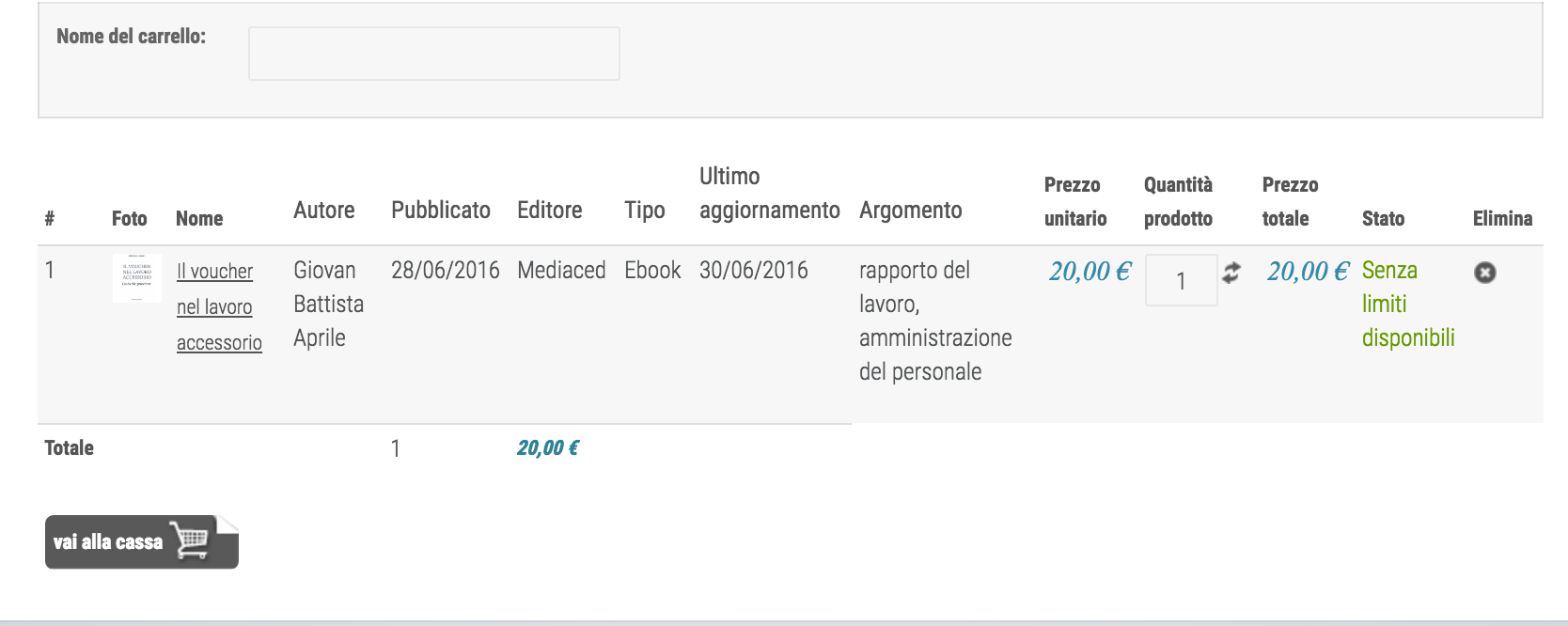
I did and now i see in this way, with small button. I think it's correct.
I hope that new upgrade won't override this change.
I hope that new upgrade won't override this change.
Please Log in or Create an account to join the conversation.
10 years 3 months ago #244630
by nicolas
Replied by nicolas on topic button without text in cart page
Hi,
It won't. Upgrades of HikaShop don't touch the styles.
It won't. Upgrades of HikaShop don't touch the styles.
Please Log in or Create an account to join the conversation.
Time to create page: 0.174 seconds