

- Posts: 49
- Thank you received: 1
Saved Cart unreadable wrong bg colors
10 years 3 months ago #244572
by sindb
Saved Cart unreadable wrong bg colors was created by sindb
-- url of the page with the problem -- :
zebra-design.be
-- HikaShop version -- : HikaShop Starter 2.6.3
-- Joomla version -- : 3.5.1
-- PHP version -- : 7.0
-- Browser(s) name and version -- : Google Chrome Version 51.0.2704.106 m
Dear,
when I add a product to my cart I get a popup window which is unreadable because of wrong background colors ?
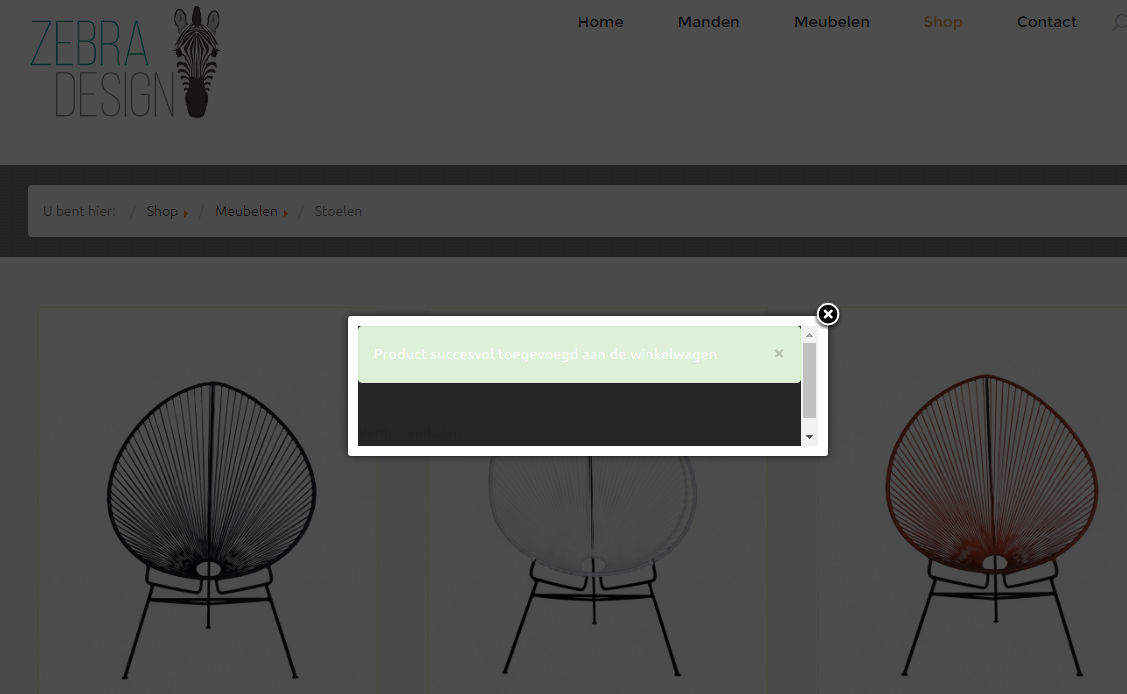
How or where can I fix this without creating somewhere else CSS problems please ?
TIA
Regards,
Thierry
-- HikaShop version -- : HikaShop Starter 2.6.3
-- Joomla version -- : 3.5.1
-- PHP version -- : 7.0
-- Browser(s) name and version -- : Google Chrome Version 51.0.2704.106 m
Dear,
when I add a product to my cart I get a popup window which is unreadable because of wrong background colors ?
How or where can I fix this without creating somewhere else CSS problems please ?
TIA
Regards,
Thierry
Please Log in or Create an account to join the conversation.

10 years 3 months ago #244596
by lousyfool
Need help with customisations of layouts, style or other site development? PM me!
(Don't forget to turn on "E-mail notification of new messages" )
Replied by lousyfool on topic Saved Cart unreadable wrong bg colors
Hi,
As in previous cases on your site, all styles are coming from your Joomla template, including the one in this popup.
So, as before, you should use the tools your template provides to change the CSS, or add it to a file for custom CSS, or whichever way your template provider is recommending.
As in previous cases on your site, all styles are coming from your Joomla template, including the one in this popup.
So, as before, you should use the tools your template provides to change the CSS, or add it to a file for custom CSS, or whichever way your template provider is recommending.
Need help with customisations of layouts, style or other site development? PM me!
(Don't forget to turn on "E-mail notification of new messages" )
The following user(s) said Thank You: sindb
Please Log in or Create an account to join the conversation.
10 years 3 months ago #244603
by sindb
Replied by sindb on topic Saved Cart unreadable wrong bg colors
How can I know when it is the CSS of the template or Hikashop ?
Sorry for this misunderstanding of me.
TIA
Sorry for this misunderstanding of me.
TIA
Please Log in or Create an account to join the conversation.
10 years 3 months ago #244605
by lousyfool
Need help with customisations of layouts, style or other site development? PM me!
(Don't forget to turn on "E-mail notification of new messages" )
Replied by lousyfool on topic Saved Cart unreadable wrong bg colors
Right-click on elements, then "inspect" them in your browser console where you can view HTML and the related CSS... as well, and that's the important part, the CSS files where it's coming from.
All modern browsers have this console built in, and e.g. Firefox could be extended with the glorious Firebug. See also documentation here, where it's referred to: www.hikashop.com/support/documentation/1...the-display.html#css
All of this is basic, essential web design stuff, not rocket science
In your site, there is no HikaShop CSS file in use. It's not even loaded in the <head>. Proof: check in the HikaShop backend -> System -> Configuration -> tab Display -> section CSS. What's the setting for the option "Front-end CSS File"? I bet it's "None".
That's generally ok in your case, because all CSS, means all styling of your shop, is coming from your template's files. Means that you should use your template's tools to change it to your needs. And - worst case - go back to your template provider if something is "wrong".
BTW, as with style, it's similar with layouts on your site: there are customized shop layouts that came with your template. Just FYI, you'll find those by following www.hikashop.com/support/documentation/1...-display.html#layout : in the list of views you'll find those which a a little trash bin on the right. Those are the views where overrides are in use - overrides made either by your template provider or by yourself.
Careful: Don't click the trash bins! It would delete those view overrides! So, nothing there without first backing them up!
All modern browsers have this console built in, and e.g. Firefox could be extended with the glorious Firebug. See also documentation here, where it's referred to: www.hikashop.com/support/documentation/1...the-display.html#css
All of this is basic, essential web design stuff, not rocket science
In your site, there is no HikaShop CSS file in use. It's not even loaded in the <head>. Proof: check in the HikaShop backend -> System -> Configuration -> tab Display -> section CSS. What's the setting for the option "Front-end CSS File"? I bet it's "None".
That's generally ok in your case, because all CSS, means all styling of your shop, is coming from your template's files. Means that you should use your template's tools to change it to your needs. And - worst case - go back to your template provider if something is "wrong".
BTW, as with style, it's similar with layouts on your site: there are customized shop layouts that came with your template. Just FYI, you'll find those by following www.hikashop.com/support/documentation/1...-display.html#layout : in the list of views you'll find those which a a little trash bin on the right. Those are the views where overrides are in use - overrides made either by your template provider or by yourself.
Careful: Don't click the trash bins! It would delete those view overrides! So, nothing there without first backing them up!
Need help with customisations of layouts, style or other site development? PM me!
(Don't forget to turn on "E-mail notification of new messages" )
The following user(s) said Thank You: sindb
Please Log in or Create an account to join the conversation.
Time to create page: 0.182 seconds